1
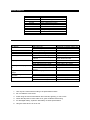
SCALE DISPLAY
Display
SCALE
OvER
AdErr
CALSP
----CLr
SHIFt
U 6.00
End
OFF
Explanation
Adjustment
Overload warning
Load cell damage
Enter adjustment function
Display when in adjustment functions
Clear
Conversion
Battery voltage
End
Scale off
SCALE TROUBLESHOOTING
Problem
No display
Display flickers
Cannot turn on or off
Tare does not function
Battery light is dim
Display is unstable
No weight but display is not
0
Big error or difference in
weight
Battery voltage cannot
increase
Short remote distance
Cause
Bad battery set
Loose battery
Low battery voltage
OFF/ON key is damaged
TARE key is damaged
Power adapter is damaged
Power adapter is incorrectly
inserted
Load is unstable
Load cell exceeds max load
Damp influence on the scale
Used immediately after opening
Scale stayed for long time on the
ground
Incorrect hanging of the scale
Possible Solution
Recharge or replace battery set
Fit in the battery into its slot
Turn off then on to refresh
Replace the key
Replace the key
Replace the power adapter
Re-insert power adapter and
check electrical outlet
Wait for the load to stabilize
Replace the load cell
Keep scale in dry places
Wait for 3 to 5 minutes
Hang the scale when keeping it
Bad battery set
Bad electric outlet
Display window is dirty
Remote control battery is bad
Replace the battery set
Repair the electrical outlet
Clean the display window
Replace remote control battery
Check that the hook can swing
IMPORTANT TIPS WHEN USING THE CRANE SCALE
1.
Use only the crane scale according to its prescribed functions.
2.
Do not rotate the crane scale.
3.
Avoid using the crane scale outdoor when thunder, lightning, or rain occurs.
4.
Check that all parts of crane scale are in good conditions before using.
5.
For damaged battery, replace it with battery of same specifications.
6.
Hang the scale when it is not in use.