1
C:\édéñÉtÉHÉãÉ_\ÅiäîÅjÉGÉXÉPÉCÉèÅ[Éh\SONY\VX9197\SourceÉfÅ[É^\4278307111\4278307111\4278307111HVLF58AMUC\01GBHVLF58AMUC\050C02.fm
Master: Right.L0
Basics
Program auto flash (The basics)
• If your camera has an AUTO mode or Scene Selection mode, they are dealt with
here as program auto.
1
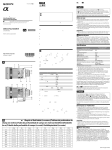
Select the P mode on the camera.
2
Press the MODE button to display [ AUTO] or [ ] on
the LCD panel.
Basics
• [ ] lights up when the camera is set to Fill-flash. [
when the camera is set to Auto flash.
AUTO] lights up
21
HVL-F43AM
4-278-307-11(1) GB