1
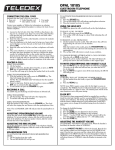
TELEDEX OPAL 1000/1001/1002/1003/1005/1010 DIAGRAM
MESSAGE WAITING LIGHT
RING VOLUME
Signals that a message is waiting for retrieval.
See your system administrator for instructions
on retrieving messages.
Adjusts the ringer volume
to Low or High setting.
HANDSET HOLDER
HANDSET JACK
Used to temporarily hold the handset,
without hanging up the telephone,
when telephone is wall mounted.
Modular jack for connecting handset to base.
DATA PORT
HEARING AID COMPATIBLE HANDSET
STORE KEY
(hidden)
Used in programming of number sequences.
See instructions for programming details.
AUTO DIAL KEYS 1-5 (model Opal 1010 only)
For easy, one-touch dialing of guest services or
PBX features. Programmed during installation.
DIAL KEYS (DTMF PAD)
(models Opal 1000/1003/1005/1010 only)
For dialing phone numbers, and entering
numbers to be stored in auto dial keys.
AUTO DIAL KEYS 6-10
(Quantity and location will vary based on specific model)
For easy, one-touch dialing of guest services or PBX
features. Programmed during installation.
FLASH KEY
(models Opal 1002/1003/1005/1010)
For programming of FLASH
duration.
REDIAL KEY
(models Opal 1002/1003/1005/1010)
To automatically redial
last number dialed
FOR CUSTOMER SERVICE CALL
Part Number 606-2660-00A
1-800-783-8353
HANDSET VOLUME KEY
Changes handset volume by
pressing repeatedly.
Teledex, LLC
6311 San Ignacio Avenue
San Jose, CA
95119
Telephone:
Fax:
email:
Internet:
(408) 363-3100
(408) 363-3136
[email protected]
www.teledex.com