1
Infrastructure and Mobility, Traffic Solutions
Sopers Lane, Poole, Dorset
BH17 7ER
UPS Solution General Handbook
Part no.
667/HB/47750/000
THIS DOCUMENT IS ELECTRONICALLY APPROVED
AND HELD IN THE STC DOCUMENT CONTROL TOOL
Company/Dept.
Name
Function
Signature
Prepared By
Siemens Traffic Solutions/Engineering
Ore Oluwatudimu / Ashley Thorpe
Product Development Engineer
Checked and Released
Siemens Traffic Solutions/ Engineering
Dave Martin
Hardware Engineering Manager
Date
COPYRIGHT STATEMENT
The information contained herein is the property of Siemens plc. and is supplied without liability for errors
or omissions. No part may be reproduced or used except as authorised by contract or other written
permission. The copyright and the foregoing restriction on reproduction and use extend to all media in
which the information may be embodied
Copyright Siemens plc 2014 All Rights Reserved
Version
Last Editor
Document
Name
Copyright
5
Page 1 of 71
Ashley Thorpe
UPS Solution General Handbook
Siemens plc 2014 All Rights Reserved
Status
Date
Doc. No.
Issued
05/11/14
667/HB/47750/000
Infrastructure and Mobility, Traffic Solutions
Sopers Lane, Poole, Dorset
BH17 7ER
Preface
SAFETY INFORMATION
Safety of Installation and Maintenance Personnel
In the interests of health and safety, when installing, using or servicing this
equipment the following instructions must be noted and adhered to:
(1) Only skilled or instructed personnel, with relevant technical knowledge
and experience, who are familiar with the safety procedures required
when dealing with modern electrical/electronic equipment, are to be
allowed to use and/or work on this equipment. All work shall be
performed in accordance with the Electricity at Work Regulations 1989.
(2) Such personnel must take heed of all relevant notes, cautions and
warnings in this Handbook and any other Document or Handbooks
associated with this equipment.
(3) The equipment must be correctly connected to the specified incoming
power supply.
(4) Mains voltages may be present within traffic system. Before any
maintenance work within the system is carried out, any mains supply to it
must be isolated or switched off.
(5) Mains voltages may still be present within traffic equipment even when
the site mains supply has been isolated or switched off. The UPS
Solution must be completely off to ensure no mains power is supplied to
connected traffic equipment.
(6) Only trained / competent persons should work on this equipment.
(7) Surfaces within the associated traffic equipment get hot, e.g. lamp, lens
and reflector. Therefore care should be taken when working in such
areas.
(8) Any power tools must be regularly inspected and tested.
(9) Any ladders used must be inspected before use to ensure they are
sound and not damaged.
(10) When using a ladder, before climbing it, ensure that it is erected properly
and is not liable to collapse or movement. If using a ladder near a
carriageway, ensure that the work area is properly signed and coned.
(11) Any personnel working on site must wear the appropriate protective
clothing with high visibility jackets and safety boots as a minimum.
Version
Last Editor
Document
Name
Copyright
5
Page 2 of 71
Ashley Thorpe
UPS Solution General Handbook
Siemens plc 2014 All Rights Reserved
Status
Date
Doc. No.
Issued
05/11/14
667/HB/47750/000
Infrastructure and Mobility, Traffic Solutions
Sopers Lane, Poole, Dorset
BH17 7ER
Safety of Road Users
It is important that all personnel are aware of the dangers to road users that
could arise during repair and maintenance of traffic control equipment.
Ensure that the junction area is coned and signed as necessary to warn
motorists and pedestrians of any dangers and to help protect the personnel
working on the site.
Precautions for Safe Battery Handling and Storage
Keep battery containers tightly closed when not in use.
If the battery case is broken, avoid contact with any internal components or
materials.
Do not handle near heat, sparks or open flames.
Protect battery containers from physical damage to avoid leaks or spills.
Place cardboard or other insulating material between layers of stacked
batteries to avoid damage and short circuits.
Do not allow conductive material to touch the battery terminals. A dangerous
short-circuit may occur and cause battery failure, fire, arcing, flash burns, etc.
Keep away from combustible materials, organic chemicals, reducing
substances, metals, strong oxidizers and water.
Batteries must be charged in a ventilated area. General ventilation is
acceptable.
Insulated tools must be used at all times and cases involving batteries.
For further information on proper battery handling see the Lead Crystal
Battery User Manual – 667/HB/47764/000.
Version
Last Editor
Document
Name
Copyright
5
Page 3 of 71
Ashley Thorpe
UPS Solution General Handbook
Siemens plc 2014 All Rights Reserved
Status
Date
Doc. No.
Issued
05/11/14
667/HB/47750/000
Infrastructure and Mobility, Traffic Solutions
Sopers Lane, Poole, Dorset
BH17 7ER
MAINTENANCE PROVISION (MP)
Product Reference
UPS Solution – 667/1/44750/ETC.
Installation and Commissioning
Methods of installation, configuration and commissioning are described in this
handbook. In addition, there are a series of documents which have more
specific detail but are supplied by the OEM (Original Equipment
Manufacturer). These documents are listed in section 1.2 below.
Spares and Maintenance
The UPS system elements are designed for ‘return to base’ repair with the
exception of battery replacement.
Modifications
There are no approved modifications for this product.
Warning
Use of components other than those indicated within this document or
modifications or enhancements that have not been authorised by Siemens
will invalidate Type Approval of this product.
Version
Last Editor
Document
Name
Copyright
5
Page 4 of 71
Ashley Thorpe
UPS Solution General Handbook
Siemens plc 2014 All Rights Reserved
Status
Date
Doc. No.
Issued
05/11/14
667/HB/47750/000
Infrastructure and Mobility, Traffic Solutions
Sopers Lane, Poole, Dorset
BH17 7ER
CONTENTS
1
Introduction ........................................................................................................................ 9
1.1
1.2
1.3
2
System Overview .............................................................................................................. 10
2.1
2.2
2.3
2.4
2.5
3
Scope ....................................................................................................................... 9
Related Documents .................................................................................................. 9
Definitions................................................................................................................. 9
Description.............................................................................................................. 10
Cabinet Variants ..................................................................................................... 10
Supported Loads .................................................................................................... 10
Generator Connectivity ........................................................................................... 11
Electrical Information .............................................................................................. 11
Modular Overview............................................................................................................. 12
3.1 UPS Cabinet Modules............................................................................................. 12
3.2 Battery Expansion Cabinet Modules........................................................................ 13
3.3 Modular Elements ................................................................................................... 14
3.3.1
Reinforced Cabinet Stool ................................................................................ 14
3.3.2
Vented Cabinet Outer Case ............................................................................ 14
3.3.3
Battery Housing Module ................................................................................. 14
3.3.4
UPS Housing Module ..................................................................................... 15
3.3.5
DC Housing Module ....................................................................................... 16
4
Hardware Overview .......................................................................................................... 17
4.1
4.2
4.3
5
Alpha FXM UPS unit ............................................................................................... 17
Universal Automatic Transfer Switch ....................................................................... 18
Lead Crystal Batteries............................................................................................. 19
Sizing the UPS Solution ................................................................................................... 20
5.1 Key Considerations ................................................................................................. 20
5.2 Sizing Example ....................................................................................................... 21
5.2.1
Which UPS Unit Should be Installed? ............................................................. 21
5.2.2
How Many Battery Packs are Required? ......................................................... 21
6
Internal Cabling Scheme .................................................................................................. 22
6.1
6.2
7
External Cabling Scheme ................................................................................................. 24
7.1
7.2
7.3
7.4
8
Mains Power Supply ............................................................................................... 24
UPS Fault / Alarm Relay Contacts........................................................................... 25
Ethernet Cable........................................................................................................ 25
Battery Expansion ................................................................................................... 25
Further UPS Connectivity ................................................................................................ 26
8.1
8.2
8.3
9
UPS Cabinet Internal Wiring ................................................................................... 22
Battery Expansion Cabinet Internal Wiring .............................................................. 23
Battery Temperature Sensor ................................................................................... 26
RS232 Interface ...................................................................................................... 26
LAN Interface.......................................................................................................... 26
Installation ........................................................................................................................ 27
9.1
9.2
9.3
9.4
Required Tools and Consumables .......................................................................... 27
Preparing and Installing the Reinforced Stool .......................................................... 28
Pulling and Gland Ducted Cables............................................................................ 29
Fitting the Vented Cabinet Outer Case and Sealing the Base .................................. 30
Version
Last Editor
Document
Name
Copyright
5
Page 5 of 71
Ashley Thorpe
UPS Solution General Handbook
Siemens plc 2014 All Rights Reserved
Status
Date
Doc. No.
Issued
05/11/14
667/HB/47750/000
Infrastructure and Mobility, Traffic Solutions
Sopers Lane, Poole, Dorset
BH17 7ER
9.5
9.6
9.7
9.8
9.9
9.10
9.11
9.12
Fitting and Connecting the Battery Housing Module ................................................ 31
Mounting and Connecting the UPS Housing Module ............................................... 33
Mounting and connecting the DC Housing Module .................................................. 34
Terminating External Cables into the UPS Connection Panel .................................. 35
Terminating External Cables into the DC Connection Panel .................................... 36
Terminating and Connecting the Ethernet Cable ................................................. 36
Fitting and Connecting the Batteries.................................................................... 37
Fitting the Battery Temperature Sensor ............................................................... 38
10 Isolation Switches ............................................................................................................ 39
10.1
10.2
10.3
Housing Module MCBs ....................................................................................... 39
Universal Automatic Transfer Switch (UATS) ...................................................... 39
FXM UPS Unit .................................................................................................... 40
11 Commissioning ................................................................................................................ 41
11.1
11.2
11.3
11.4
11.5
Electrical Safety Testing ..................................................................................... 41
Putting the UPS Solution in BYPASS .................................................................. 41
Powering and Commissioning the Controller ....................................................... 42
Starting Up the UPS Solution .............................................................................. 42
Testing the UPS Battery Support Function .......................................................... 42
12 UPS System Operation..................................................................................................... 43
12.1
Operating Modes ................................................................................................ 43
12.2
Fault Monitoring .................................................................................................. 43
12.2.1 Fault / Alarm Relay Contacts .......................................................................... 43
12.2.2 Fault Monitoring using Siemens RMS and UTMC Systems ............................. 45
12.3
Communicating with the UPS Solution ................................................................ 46
12.3.1 Three-Button Interface .................................................................................... 46
12.3.2 RS232 Interface ............................................................................................. 46
12.3.3 LAN Interface ................................................................................................. 48
12.4
Battery Charging................................................................................................. 50
12.5
Temperature De-Rating ...................................................................................... 51
12.5.1 Power output .................................................................................................. 51
12.5.2 Battery Charging ............................................................................................ 52
12.5.3 Battery Support Hold Up Times ...................................................................... 52
13 Maintenance ..................................................................................................................... 53
13.1
Periodic inspection.............................................................................................. 53
13.2
Maintenance Bypass Switching........................................................................... 54
13.3
Switching Off the UPS Solution ........................................................................... 55
13.4
First Line Maintenance........................................................................................ 56
13.4.1 Replacing the Alpha FXM UPS unit................................................................. 56
13.4.2 Replacing a Battery Pack................................................................................ 57
13.4.3 Replacing an Alpha UATS unit........................................................................ 59
13.5
Second Line Maintenance................................................................................... 59
14 Disposal ............................................................................................................................ 60
14.1
14.2
Under Maintenance Contract .............................................................................. 60
End of Life and Scrapping ................................................................................... 60
15 Part Numbers / Spares List .............................................................................................. 61
15.1
15.2
15.3
15.4
15.5
Version
Last Editor
Document
Name
Copyright
Hardware Spares ................................................................................................ 61
Housing Modules ................................................................................................ 61
Outer Case and Stool ......................................................................................... 61
Connection Panel and MCB Spares .................................................................... 61
Connection Accessories ..................................................................................... 61
5
Page 6 of 71
Ashley Thorpe
UPS Solution General Handbook
Siemens plc 2014 All Rights Reserved
Status
Date
Doc. No.
Issued
05/11/14
667/HB/47750/000
Infrastructure and Mobility, Traffic Solutions
Sopers Lane, Poole, Dorset
BH17 7ER
15.6
Generator Connect Feeder Pillar......................................................................... 61
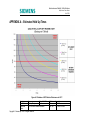
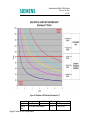
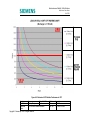
APPENDIX A – Estimated Hold Up Times .............................................................................. 62
APPENDIX B – FXM UPS Faults and Alarms .......................................................................... 65
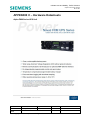
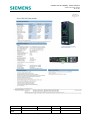
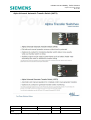
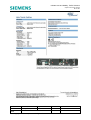
APPENDIX C – Hardware Datasheets ..................................................................................... 66
Alpha FXM Series UPS Unit............................................................................................. 66
Alpha Universal Automatic Transfer Switch (UATS).......................................................... 68
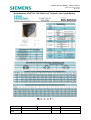
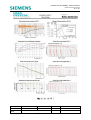
Betta Batteries 6CNFT-55 12V 55Ah Front Terminal Lead Crystal Battery ........................ 70
Figure 3-1: UPS Cabinet Modules ....................................................................................... 12
Figure 3-2: Battery Expansion Cabinet Modules (Cabinet removed)..................................... 13
Figure 3-3: Reinforced Stool – FRONT VIEW (CET plate attached) ..................................... 14
Figure 3-4: Battery Housing Module..................................................................................... 15
Figure 3-5: UPS Housing Module ........................................................................................ 15
Figure 3-6: DC Housing Module (shown fitted on top of a battery housing module) .............. 16
Figure 4-1: Alpha FXM Series UPS Unit .............................................................................. 17
Figure 4-2: Universal Automatic Transfer Switch.................................................................. 18
Figure 4-3: 6CNFT-55 Lead Crystal Battery with Key Electrical Information.......................... 19
Figure 5-1: Battery Hold up times at 20°C and 0°C .............................................................. 20
Figure 5-2: Sizing Example – Battery Pack Selection ........................................................... 21
Figure 6-1: UPS Cabinet Internal Wiring Diagram ................................................................ 22
Figure 6-2: Battery Expansion Cabinet Internal Wiring Diagram ........................................... 23
Figure 7-1: Mains Power Supply Chain ................................................................................ 24
Figure 9-1: Reinforced Stool and CET plate ......................................................................... 28
Figure 9-2: Stool Installation Diagram .................................................................................. 29
Figure 9-3: Reinforced Stool – LEFT HAND SIDE VIEW ...................................................... 30
Figure 9-4: Two Battery Housing Modules stacked on the Reinforced Stool (Cabinet removed)
........................................................................................................................................... 31
Figure 9-5: Battery Housing module mount .......................................................................... 32
Figure 9-6: Earth Connection between Battery Housing modules ......................................... 32
Figure 9-7: UPS Housing mounted on Battery Housing within Cabinet ................................. 33
Figure 9-8: Battery Cable Loom Connectors ........................................................................ 34
Figure 9-9: UPS Connection Panel ...................................................................................... 35
Figure 9-10: Battery Terminals Connected with the Terminal Linking Bar ............................. 37
Figure 9-11: Battery Temperature Sensor ............................................................................ 38
Figure 10-1: UATS Switches................................................................................................ 39
Figure 10-2: Alpha FXM UPS Circuit Breakers ..................................................................... 40
Figure 12-1: Fault Monitoring Connectivity Example ............................................................ 45
Figure 12-2: Alpha FXM Series UPS RS232 Interface Screenshot ....................................... 47
Figure 12-3: LAN Interface Screenshot – Relay Contact Configuration................................. 49
Figure 12-4: Battery Charging Cycle .................................................................................... 51
Figure 13-1: Battery Terminals Connected with the Terminal Linking Bar ............................. 58
Figure A-1: Estimates of UPS Solution Performance at +20°C ............................................. 62
Figure A-2: Estimates of UPS Solution Performance at 0°C ................................................. 63
Figure A-3: Estimates of UPS Solution Performance at -25°C .............................................. 64
Version
Last Editor
Document
Name
Copyright
5
Page 7 of 71
Ashley Thorpe
UPS Solution General Handbook
Siemens plc 2014 All Rights Reserved
Status
Date
Doc. No.
Issued
05/11/14
667/HB/47750/000
Infrastructure and Mobility, Traffic Solutions
Sopers Lane, Poole, Dorset
BH17 7ER
Table 2-1: UPS Load Suitability ........................................................................................... 10
Table 2-2: UPS Solution Electrical Information ..................................................................... 11
Table 3-1: UPS Cabinet Module Quantities .......................................................................... 12
Table 3-2: Battery Expansion Cabinet Module Quantities ..................................................... 13
Table 4-1: FXM Series UPS – Key Electrical Information ..................................................... 17
Table 4-2: UATS – Key Electrical Information ...................................................................... 18
Table 7-1: Alarm Contact Cable Specification ...................................................................... 25
Table 7-2: Ethernet Cable Specification ............................................................................... 25
Table 7-3: Battery Expansion Cable Specification ................................................................ 25
Table 9-1: Installation Steps for the UPS and Battery Expansion Cabinets ........................... 27
Table 9-2: RJ45 Interface Cable Connection........................................................................ 36
Table 12-1: Key UPS Solution Operating Modes.................................................................. 43
Table 12-2: Default Fault Contact Settings........................................................................... 44
Table 12-3: RMS Bit Labelling and Description .................................................................... 45
Table 12-4: RS232 Interface Connection Information ........................................................... 46
Table 12-5: LAN Interface Connection Information ............................................................... 48
Table 12-6: Maximum Output Power against Ambient Temperature ..................................... 51
Table B-1: FXM UPS Unit Fault and Alarms......................................................................... 65
CHANGE HISTORY
Version
1-4
5
Version
Last Editor
Document
Name
Copyright
Date
Jan
2014
Nov
2014
Author
Ore
Oluwatudimu
Ashley Thorpe
Change
Produce Document
Section 15 - added black outer case variant to parts list
5
Page 8 of 71
Ashley Thorpe
UPS Solution General Handbook
Siemens plc 2014 All Rights Reserved
Status
Date
Doc. No.
Issued
05/11/14
667/HB/47750/000
Infrastructure and Mobility, Traffic Solutions
Sopers Lane, Poole, Dorset
BH17 7ER
1 Introduction
1.1 Scope
This handbook provides a general description of the Siemens UPS Solution and its key
elements, outlining the detailed procedures for installation, commissioning and
maintenance.
1.2
Related Documents
Reference
667/HB/47760/000
667/HB/47761/000
667/HB/47764/000
667/US/47764/000
667/HE/45950/000
667/HE/46950/000
667/HB/45040/000
1.3
Title
Alpha FXM Series UPS Installation and Operation
Manual
Alpha Universal Automatic Transfer Switch
Installation Manual
Lead Crystal Battery User Manual
Lead Crystal Battery Material Safety Data Sheet
ST950 ELV Installation, Commissioning and
Maintenance Handbook
ST950 LV Installation, Commissioning and
Maintenance Handbook
Isolators and Feeder Pillars General Handbook
Author/Contact
Alpha Technologies
Europe Ltd.
Alpha Technologies
Europe Ltd.
Betta Batteries
Betta Batteries
Dave Martin
Dave Martin
Peter Lings
Definitions
Abbreviation
UPS
UATS
LC
VRLA
SOC
SNMP
LAN
MCB
LCD
GUI
OTU
OMU
OEM
Version
Last Editor
Document
Name
Copyright
Explanation
Uninterruptable Power Supply
Universal Automatic Transfer Switch
Lead Crystal (refers to battery technology)
Valve Regulated Lead Acid (refers to battery technology)
State of Charge
Simple Network Management Protocol
Local Area Network
Miniature Circuit Breaker
Liquid Crystal Display
Graphical User Interface
Outstation Transmission Unit
Outstation Monitoring Unit
Original Equipment Manufacturer
5
Page 9 of 71
Ashley Thorpe
UPS Solution General Handbook
Siemens plc 2014 All Rights Reserved
Status
Date
Doc. No.
Issued
05/11/14
667/HB/47750/000
Infrastructure and Mobility, Traffic Solutions
Sopers Lane, Poole, Dorset
BH17 7ER
2 System Overview
2.1 Description
The UPS Solution has been designed to provide seamless battery support to a Siemens
type traffic controller in the event of a loss of mains supply. The solution offers a lineinteractive uninterruptable power supply unit to constantly monitor the status of the mains
supply, maintaining a battery bank when power is present and switching to battery back
up when it is not. The switch from mains power to battery back up, and back again, is
almost instantaneous, ensuring that the traffic intersection controller sees no significant
break in power and remains operational.
The UPS Solution can be scaled to suit a range of power and battery hold up time
requirements. Hold up times can be extended further still with the connection of an
external generator as described in section 2.4.
2.2
Cabinet Variants
The UPS solution has been designed to be housed within a standard Siemens traffic
controller cabinet outer case to reduce its visual impact. When installed, the controller
and UPS solution cabinets appear identical. Two cabinet variants are available, as
described below.
UPS Cabinet -
Houses the UPS system equipment and up to two
48V 55Ah battery banks.
Battery Expansion Cabinet -
Houses up to three 48V 55Ah battery banks only.
The Battery Expansion cabinet can be installed
alongside the UPS cabinet, providing additional
battery support in cases when an extended period of
support time is required.
WARNING: No more than one Battery Expansion Cabinet can be connected to
any one UPS Cabinet.
2.3 Supported Loads
The UPS solution is ideally suited to support ELV/LV LED traffic controllers only. It
caters for intersection loads up to 2000W in two optimised steps via a choice of UPS unit:
UPS Unit
Alpha FXM1100
Alpha FXM2000
Max Power Output
1100W / VA
2000W / VA
Suitable for
Loads up to and including 1000W
Loads from 1000W to 2000W
Table 2-1: UPS Load Suitability
WARNING: Both units are subject to de-rating at high temperature. This must
be considered when specifying each solution. See sections 4.1 and 12.5.1 for
details. See section 5.2 for a solution sizing example.
Version
Last Editor
Document
Name
Copyright
5
Page 10 of 71
Ashley Thorpe
UPS Solution General Handbook
Siemens plc 2014 All Rights Reserved
Status
Date
Doc. No.
Issued
05/11/14
667/HB/47750/000
Infrastructure and Mobility, Traffic Solutions
Sopers Lane, Poole, Dorset
BH17 7ER
2.4
Generator Connectivity
The UPS solution offers the possibility of connecting up an external diesel generator
through a specially design support product, the Generator Connect Feeder Pillar. This
feeder pillar variant incorporates a lockable cable entry point, a 2P+E1 IP44 rated
appliance inlet connector and a 63A double-pole changeover switch for isolation and
source selection.
Detailed information on the Generator Connect Feeder Pillar is available in the Isolators
and Feeder Pillar General Handbook – 667/HB/45040/000. See section 7 for external
cabling scheme.
2.5
Electrical Information
Parameter
Input:
Voltage
Frequency
Current (at max battery
charging current)
Mains Input Circuit Breaker
Rating
Output:
Voltage
Frequency
Maximum Power2
Waveform
Switching Time
Voltage Distortion
Efficiency
Battery Charging:
Charge Current
Temperature Compensation
Battery Type
Environment:
Operating Temperature
Operating Altitude
Operating Humidity
Value
230Vac (150Vac – 328Vac without switching to battery support)
50Hz / 60Hz Auto-detect (±5%)
FXM1100: 8A at 230Vac
FXM2000: 15A at 230Vac
20A at 230Vac
230Vac
50Hz / 60Hz Auto-detect (±5%)
FXM1100: 1100 W/VA
FXM2000: 2000 W/VA
Pure Sine Wave
<5ms
<3% THD
Normal mode (LINE): >98%
Battery support mode (INVERTER): >82%
10A
-5mV/°C/Cell
12V 55Ah Valve Regulated Lead Crystal
-25°C to +74°C
12000ft
Up to 95%
Table 2-2: UPS Solution Electrical Information
1
Two Pole and Earth
Power output de-rates in high ambient temperatures. See sections 4.1 and 12.5 for details.
Issued
Version
5
Page 11 of 71
Status
Last Editor
Ashley Thorpe
Date
05/11/14
Document
UPS Solution General Handbook
Doc. No.
667/HB/47750/000
Name
Copyright Siemens plc 2014 All Rights Reserved
2
Infrastructure and Mobility, Traffic Solutions
Sopers Lane, Poole, Dorset
BH17 7ER
3 Modular Overview
This section details the five key building blocks of the UPS Solution; the stool, cabinet
outer case and three equipment housing modules.
3.1
UPS Cabinet Modules
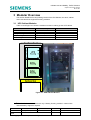
Table 3-1 and Figure 3-1 show the modules involved in making up the UPS cabinet.
UPS Solution Modules
Reinforced Stool
Vented Cabinet Outer Case
Battery Housing
UPS Housing
DC Housing
Quantity
1
1
2 (maximum)3
1
0
Refer to
Section 3.3.1
Section 3.3.2
Section 3.3.3
Section 3.3.4
N/A
Table 3-1: UPS Cabinet Module Quantities
Figure 3-1: UPS Cabinet Modules
3
The UPS Cabinet can be fitted with only 1 Battery Housing module in cases where
reduced battery support is required.
Version
Last Editor
Document
Name
Copyright
5
Page 12 of 71
Ashley Thorpe
UPS Solution General Handbook
Siemens plc 2014 All Rights Reserved
Status
Date
Doc. No.
Issued
05/11/14
667/HB/47750/000
Infrastructure and Mobility, Traffic Solutions
Sopers Lane, Poole, Dorset
BH17 7ER
3.2
Battery Expansion Cabinet Modules
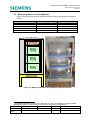
Table 3-2 and Figure 3-2 show the modules involved in making up the Battery Expansion
Cabinet.
UPS Solution Modules
Reinforced Stool
Vented Cabinet Outer Case
Battery Housing
UPS Housing
DC Housing
Quantity
1
1
4
3 (maximum)
0
1
Refer to
Section 3.3.1
Section 3.3.2
Section 3.3.3
N/A
Section 3.3.5
Table 3-2: Battery Expansion Cabinet Module Quantities
Figure 3-2: Battery Expansion Cabinet Modules (Cabinet removed)
4
The Battery Expansion Cabinet can be fitted with one, two or three Battery Housing modules
allowing each solution to be tailored to the customer performance requirements.
Issued
Version
5
Page 13 of 71
Status
Last Editor
Ashley Thorpe
Date
05/11/14
Document
UPS Solution General Handbook
Doc. No.
667/HB/47750/000
Name
Copyright Siemens plc 2014 All Rights Reserved
Infrastructure and Mobility, Traffic Solutions
Sopers Lane, Poole, Dorset
BH17 7ER
3.3
Modular Elements
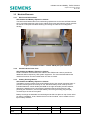
3.3.1 Reinforced Cabinet Stool
UPS Cabinet and Battery Expansion Cabinet
The Reinforced Cabinet Stool is a load bearing replacement to the normal ST950 cabinet
stool. It provides mounting points for the cabinet outer case and internal housing modules
as well as a CET plate for cables entering and exiting the cabinet via underground
ducting.
Figure 3-3: Reinforced Stool – FRONT VIEW (CET plate attached)
3.3.2 Vented Cabinet Outer Case
UPS Cabinet and Battery Expansion Cabinet
Plastic ventilation devices have been added to the ST950 outer case to provide the
additional airflow required by UPS system equipment. The vents are fitted behind the
cabinet’s front door and are invisible when the door is closed.
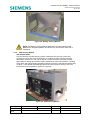
3.3.3
Battery Housing Module
UPS Cabinet and Battery Expansion Cabinet
The Battery Housing module is the main building block of the internal mounting frame. It
provides mounting and connectivity for one 48V 55Ah battery bank, made up of four
individual batteries. A 63A double-pole MCB on the right hand side provides isolation,
allowing the batteries to be removed and replaced whilst the UPS Solution is still
powering the intersection, and a simple battery connector gives easy plug-and-play
connectivity to the rest of the system.
Battery Housings are stackable and are designed to slide into place on top of each other
for ease of installation. A bar, fitted to the front of each module, can be raised to form a
lip for battery retention.
Version
Last Editor
Document
Name
Copyright
5
Page 14 of 71
Ashley Thorpe
UPS Solution General Handbook
Siemens plc 2014 All Rights Reserved
Status
Date
Doc. No.
Issued
05/11/14
667/HB/47750/000
Infrastructure and Mobility, Traffic Solutions
Sopers Lane, Poole, Dorset
BH17 7ER
Figure 3-4: Battery Housing Module
NOTE: The Battery Housing Module does not come with batteries fitted.
Batteries are shipped separately and should only be mounted at the end of
installation.
3.3.4 UPS Housing Module
UPS Cabinet ONLY
The UPS Housing contains the key system hardware and is the main control and
connectivity hub for the entire UPS solution. It contains the UPS unit and UATS (as
described in sections 4.1 and 4.2) as well as a UPS Connection Panel that provides
termination for internal and external cabling related to the entire UPS Solution, including
mains input and output, Battery Expansion Cabinet connection and fault-monitoring relay
contacts. A 20A double-pole MCB provides mains input isolation. Wiring of the UPS
Connection Panel is detailed in sections 6.1 and 9.8.
Figure 3-5: UPS Housing Module
Version
Last Editor
Document
Name
Copyright
5
Page 15 of 71
Ashley Thorpe
UPS Solution General Handbook
Siemens plc 2014 All Rights Reserved
Status
Date
Doc. No.
Issued
05/11/14
667/HB/47750/000
Infrastructure and Mobility, Traffic Solutions
Sopers Lane, Poole, Dorset
BH17 7ER
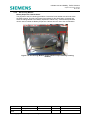
3.3.5 DC Housing Module
Battery Expansion Cabinet ONLY
The purpose of the DC Housing provides a Connection Panel similar to that found within
the UPS Housing. This DC Connection Panel allows for the termination of internal and
external cabling related to the Battery Expansion Cabinet only. A 63A double-pole MCB
can be used to isolate the Battery Expansion Cabinet from the rest of the UPS Solution.
Figure 3-6: DC Housing Module (shown fitted on top of a battery housing
module)
Version
Last Editor
Document
Name
Copyright
5
Page 16 of 71
Ashley Thorpe
UPS Solution General Handbook
Siemens plc 2014 All Rights Reserved
Status
Date
Doc. No.
Issued
05/11/14
667/HB/47750/000
Infrastructure and Mobility, Traffic Solutions
Sopers Lane, Poole, Dorset
BH17 7ER
4 Hardware Overview
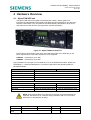
4.1
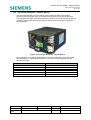
Alpha FXM UPS unit
The Alpha FXM series from Alpha Technologies are outdoor, military grade, lineinteractive Uninterruptable Power Supply units that have been selected for use within the
Siemens UPS solution. The unit offers an extended operating temperature range and is
well suited for use with ELV/LV LED type traffic controller equipment.
Figure 4-1: Alpha FXM Series UPS Unit
Each Siemens UPS solution uses one of two FXM series UPS units, depending on the
power requirements of the traffic intersection to be supported.
FXM1100 – Intersections up to 1kW
FXM2000 – Intersections up to 2kW
Key information for each type of unit is listed here. For more detailed information, please see
APPENDIX C – Hardware Datasheets or consult the FXM Series UPS Operating Manual –
667/HB/47760/000.
Parameter
Nominal Voltage
Nominal Frequency
Typical Efficiency
Typical Transfer time
Operating Temperature
Power output:
At -40° to +50° (Nominal)
At 65° (UK Worst case)
At 74° (Operating worst case)
De-rating
FXM1100
FXM2000
230VAC
50Hz / 60Hz
>98% (normal mode)
<5ms
-40°C to +74°C
1100W/VA
962.5W/VA
838.75W/VA
1.25% per degree above 55°C
20000W/VA
1700W/VA
1520W/VA
1.0% per degree above 50°C
Table 4-1: FXM Series UPS – Key Electrical Information
NOTE: Care must be taken when selecting a UPS unit if high temperatures are
expected. See section 5 for a solution sizing information and 12.5.1 for further
information on temperature de-rating.
Version
Last Editor
Document
Name
Copyright
5
Page 17 of 71
Ashley Thorpe
UPS Solution General Handbook
Siemens plc 2014 All Rights Reserved
Status
Date
Doc. No.
Issued
05/11/14
667/HB/47750/000
Infrastructure and Mobility, Traffic Solutions
Sopers Lane, Poole, Dorset
BH17 7ER
4.2
Universal Automatic Transfer Switch
The Universal Automatic Transfer Switch (UATS), also from Alpha Technologies,
provides a manual bypass switch for maintenance purposes. It has been designed to
work alongside the Alpha FXM UPS series and includes an automatic transfer facility that
constantly monitors the output of the UPS unit and will switch the system to bypass if a
fault is detected.
Figure 4-2: Universal Automatic Transfer Switch
Key information on the UATS is listed below. For further information on the unit, please
see APPENDIX C – Hardware Datasheets or consult the UATS Installation Manual –
667/HB/47761/000.
Parameter
Nominal Voltage
Nominal Frequency
Rated Input Current
Rated Output Current
Max. Output Power
Operating Temperature
Value
230Vac
50Hz / 60Hz
16A
16A
3600W/VA (at +40°C)
-40°C to +74°C
Table 4-2: UATS – Key Electrical Information
Version
Last Editor
Document
Name
Copyright
5
Page 18 of 71
Ashley Thorpe
UPS Solution General Handbook
Siemens plc 2014 All Rights Reserved
Status
Date
Doc. No.
Issued
05/11/14
667/HB/47750/000
Infrastructure and Mobility, Traffic Solutions
Sopers Lane, Poole, Dorset
BH17 7ER
4.3
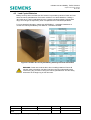
Lead Crystal Batteries
Battery back up within the Siemens UPS solution is provided by banks of 55Ah 12V front
terminal Lead Crystal batteries. Each bank consists of 4 of these batteries, creating a
48V 55Ah pack. Lead Crystal batteries have a greatly extended operating temperature
range and a longer life expectancy when compared to their Lead Acid equivalents.
For more detailed information, please see APPENDIX C – Hardware Datasheets or
consult the Lead Crystal Battery User Manual – 667/HB/47764/000.
Figure 4-3: 6CNFT-55 Lead Crystal Battery with Key Electrical Information
WARNING: Great care must be taken when handling batteries. Ensure all
relevant safety information has been has been read and understood before
commencing any process involving the Lead Crystal batteries. See the safety
information at the beginning of this document.
Version
Last Editor
Document
Name
Copyright
5
Page 19 of 71
Ashley Thorpe
UPS Solution General Handbook
Siemens plc 2014 All Rights Reserved
Status
Date
Doc. No.
Issued
05/11/14
667/HB/47750/000
Infrastructure and Mobility, Traffic Solutions
Sopers Lane, Poole, Dorset
BH17 7ER
5 Sizing the UPS Solution
5.1
Key Considerations
There are two key factors to consider when sizing a UPS Solution for any one traffic
intersection. These are the junction power requirements and the desired battery hold
up time.
A traffic intersection’s power requirements determine which of two Alpha FXM UPS units
is to be installed. The required battery support hold up time determines the number of
battery packs that will need to be installed within the UPS Solution. Extended hold up
periods will require the installation of a Battery Expansion Cabinet alongside the UPS
Cabinet.
Where cost or space is critical, a compromise between the junction power requirements
and required hold up time must be reached. Reducing the required hold up time
potentially decreases the number of battery packs to be installed. Reducing the junction
power requirements, and therefore the UPS system output, will allow each battery pack
to go further in terms of hold up time. Both options should be considered to meet
installation requirements.
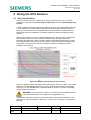
Figure 5-1: Battery Hold up times at 20°C and 0°C
Figure 5-1 displays a basic estimated battery hold up time chart for all options of the UPS
Solution at nominal ambient temperature of 20°C. Dashed lines indicate the estimated
hold up at 0°C. See APPENDIX A – Estimated Hold Up Times for a clearer view battery
hold up against temperature.
WARNING: The chart shown in Figure 5-1 is a performance estimate based on
manufacturer information to be used as a sizing guideline only.
Temperature extremes in both the hot and cold regions have detrimental effects on the
performance of the UPS Solution. See section 12.5 for more information on temperature
de-rating.
Version
Last Editor
Document
Name
Copyright
5
Page 20 of 71
Ashley Thorpe
UPS Solution General Handbook
Siemens plc 2014 All Rights Reserved
Status
Date
Doc. No.
Issued
05/11/14
667/HB/47750/000
Infrastructure and Mobility, Traffic Solutions
Sopers Lane, Poole, Dorset
BH17 7ER
5.2
Sizing Example
The following subsections give an example of sizing a UPS solution for a traffic
intersection in the UK with the following requirements.
Required Junction Power:
Desired Hold up Time:
900W
3.5 hours
WARNING: For the majority of UK installations, it is reasonable to assume a
worst case cabinet temperature range of 0°C to 65°C.The UPS Solution must
be derated to at least these values to help ensure correct operation.
5.2.1 Which UPS Unit Should be Installed?
Derating the UPS units’ power output to the reasonable UK worst case of 65°C gives the
following maximum output figures:
FXM1100 max. output at 65°C: 962.5W/VA
FXM2000 max. output at 65°C: 1700W/VA
A junction requiring 900W of power falls within the FXM1100 range.
5.2.2 How Many Battery Packs are Required?
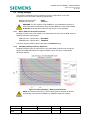
Derating the battery hold up performance to the reasonable UK worst case of 0°C, two
battery packs are not sufficient to support a 900W load for 3.5 hours. Three battery
packs are required.
Figure 5-2: Sizing Example – Battery Pack Selection
NOTE: Any solution requiring 3 or more battery packs to achieve its desired
hold up time will require the installation of a Battery Expansion Cabinet.
Version
Last Editor
Document
Name
Copyright
5
Page 21 of 71
Ashley Thorpe
UPS Solution General Handbook
Siemens plc 2014 All Rights Reserved
Status
Date
Doc. No.
Issued
05/11/14
667/HB/47750/000
Infrastructure and Mobility, Traffic Solutions
Sopers Lane, Poole, Dorset
BH17 7ER
6 Internal Cabling Scheme
The UPS Housing, DC Housing and Battery Housing modules all come fitted with prewired cable looms for ease of installation. The following subsections detail the internal
wiring interconnecting key system elements in both the UPS and Battery Expansion
cabinets.
6.1
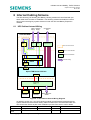
UPS Cabinet Internal Wiring
Mains Controller
Supply Supply
Controller I/O
Card
UPS HOUSING
Mains
IN
MCB
Mains
OUT
C1 – C6
Faults/Alarms
UPS Connection Panel
Switch or Circuit Breaker
DIN Rail Terminal Block
UPS / BYPASS
External Cabling
UPS
ON/OFF
Mains
I/P CB
UATS
Mains O/P
Fault Contacts
Alpha FXM Series UPS Unit
Battery CB
54VDC BUS
Battery + / -
MCB
MCB
BATTERY
HOUSING 1
BATTERY
HOUSING 2
Battery Expansion
Cabinet
Figure 6-1: UPS Cabinet Internal Wiring Diagram
As stated in section 3.3.4, the UPS Housing module comes fitted and prewired with key
system elements and all internal cabling. External cables are to be terminated within the
UPS Connection Panel as part of the Installation process. See section 9.8 for details.
Issued
Version
5
Page 22 of 71
Status
Last Editor
Ashley Thorpe
Date
05/11/14
Document
UPS Solution General Handbook
Doc. No.
667/HB/47750/000
Name
Copyright Siemens plc 2014 All Rights Reserved
Infrastructure and Mobility, Traffic Solutions
Sopers Lane, Poole, Dorset
BH17 7ER
Also shown within Figure 6-1 are the switches and circuit breakers used to isolate key
parts of the solution. See section 10 for further information.
WARNING: The FXM Series UPS unit offers further connectivity not shown in
Figure 6-1, some of which must be fitted for proper system operation. See
section 8 for details.
6.2
Battery Expansion Cabinet Internal Wiring
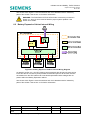
Figure 6-2: Battery Expansion Cabinet Internal Wiring Diagram
As stated in section 3.3.3, the DC Housing comes prewired with all interconnecting wiring
looms and the DC connection panel provides a termination point for all of these, as well
as isolation from the UPS cabinet via a 63A double-pole MCB. Mains voltages are not
present within the Battery Expansion cabinet.
Also shown within Figure 6-2 are the switches and circuit breakers used to isolate key
parts of the solution. See section 10 for further information.
Version
Last Editor
Document
Name
Copyright
5
Page 23 of 71
Ashley Thorpe
UPS Solution General Handbook
Siemens plc 2014 All Rights Reserved
Status
Date
Doc. No.
Issued
05/11/14
667/HB/47750/000
Infrastructure and Mobility, Traffic Solutions
Sopers Lane, Poole, Dorset
BH17 7ER
7 External Cabling Scheme
7.1
Mains Power Supply
All site installations should be designed in such a way that the controller cabinet, UPS
cabinet, Battery Expansion cabinet (if required) and feeder pillar (generator connect or
otherwise) are kept within the immediate vicinity of each other. Cable lengths between all
pillars and cabinets should be minimized wherever possible.
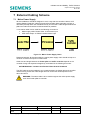
3 core mains cable is to be used for the following connections:
Mains supply within Feeder Pillar
UPS mains Input
UPS mains output
ST950 Controller Mains input
Figure 7-1: Mains Power Supply Chain
Distances between all elements within the mains power supply chain should be kept to a
minimum to reduce the impact of cable losses.
Cable size and length between the feeder pillar and traffic controller depend on the
controller fusing and expected voltage drop, as dictated in the following document:
667/HB/45040/000 – Isolators and Feeder Pillars General Handbook
The UPS cabinet can be installed in any location between the feeder pillar and controller
cabinet as long as the total cable length does not exceed the values specified in the
above document.
WARNING: The same cable is to be used throughout the mains power supply
chain from feeder pillar to controller.
Version
Last Editor
Document
Name
Copyright
5
Page 24 of 71
Ashley Thorpe
UPS Solution General Handbook
Siemens plc 2014 All Rights Reserved
Status
Date
Doc. No.
Issued
05/11/14
667/HB/47750/000
Infrastructure and Mobility, Traffic Solutions
Sopers Lane, Poole, Dorset
BH17 7ER
7.2
UPS Fault / Alarm Relay Contacts
A total of 18 relay contact termination points are made available via the UPS Connection
Panel (Normally Closed, Normally Open and Common for six relay outputs). These can
be cabled via ducting into the traffic controller for status and fault monitoring of the UPS
Solution. See sections 9.8 and 12.2.1 for details.
Cable selection for this interconnection is dependant on the number of cores required to
terminate all necessary contacts. Refer to Table 7-1 below.
Part Number
998/4/70468/004
Description
Armoured 1/1.13mm 8core PVC cable
998/4/70468/006
Armoured 1/1.13mm 12core PVC cable
998/4/70468/008
Armoured 1/1.13mm 16core PVC cable
998/4/70468/050
Armoured 1/1.13mm 20core PVC cable
Table 7-1: Alarm Contact Cable Specification
7.3
Ethernet Cable
When the FXM Series UPS unit’s LAN interface feature is to be used, CAT5e cable is to
be ducted into the controller cabinet and connected to an IP enable Ethernet connection.
Use the cable specified in Table 7-2 for this connection.
Part Number
Description
998/4/88384/000
Armoured CAT5E cable for duct installation
Table 7-2: Ethernet Cable Specification
See section 8.3 and 12.3.3 for LAN connection details.
7.4
Battery Expansion
Additional battery support from the Battery Expansion Cabinet is to be cabled into the
UPS Cabinet using the following armoured cable.
Part Number
998/4/88346/100
Description
2
Armoured 10mm 3core PVC Mains cable
Table 7-3: Battery Expansion Cable Specification
WARNING: This cable is to be clearly labelled to prevent confusion with Mains
supply chain cabling. Only two of the three cores available are to be used for
battery termination. The Green/Yellow core is to be used to link the main earth
studs of the UPS and Battery Expansion Cabinets.
See sections 9.8 and 9.9 for installation details.
Version
Last Editor
Document
Name
Copyright
5
Page 25 of 71
Ashley Thorpe
UPS Solution General Handbook
Siemens plc 2014 All Rights Reserved
Status
Date
Doc. No.
Issued
05/11/14
667/HB/47750/000
Infrastructure and Mobility, Traffic Solutions
Sopers Lane, Poole, Dorset
BH17 7ER
8 Further UPS Connectivity
8.1
Battery Temperature Sensor
Each Alpha FXM UPS unit is fitted with a sensor that is used to monitor battery
temperature. The sensor appears on a cable from the ‘Battery Temp’ port on the front of
the FXM Series UPS unit and, when correctly applied to the battery support bank,
enables temperature compensated battery charging.
WARNING: The Battery Temperature Sensor must be fitted for proper
operation of the UPS solution.
For details on the proper installation of the battery temperature sensor, see section 9.12.
See section 12.5.2 for more information on temperature compensated battery charging.
8.2 RS232 Interface
Alpha FXM UPS units are fitted with a female 9-way D-type connecter for RS232
connectivity to a computer or laptop. Status information and configuration settings are
made available via this interface and can be used to interrogate the UPS Solution when
on site. See section 12.3.2 for more information on the RS232 interface.
8.3 LAN Interface
Alpha FXM series UPS units provide internet and intranet connectivity via an
embedded SNMP (LAN) card and RJ45 connector. An IP based connection can be
utilized for remote system configuration using the UPS unit’s supporting software. See
section 9.10 and 12.3.3 for more information on the fitting and using the UPS Solution’s
LAN Interface.
NOTE: The SNMP (LAN) card is fitted to all Alpha FXM UPS units within
Siemens UPS Solutions as standard.
Version
Last Editor
Document
Name
Copyright
5
Page 26 of 71
Ashley Thorpe
UPS Solution General Handbook
Siemens plc 2014 All Rights Reserved
Status
Date
Doc. No.
Issued
05/11/14
667/HB/47750/000
Infrastructure and Mobility, Traffic Solutions
Sopers Lane, Poole, Dorset
BH17 7ER
9 Installation
WARNING: Ensure all power sources are switched off and safely isolated
before installation commences. All switches and MCBs should be in the OFF or
BYPASS position.
The UPS solution’s modular sections have been designed with ease of installation in
mind. Much of the solution comes prewired with simple plug and play interconnects
between modules. The table below lists the steps required for installation of both the UPS
cabinet and the Battery Expansion Cabinet.
Step No.
1
2
3
4
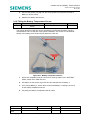
5
6
7
8
9
10
11
UPS Cabinet
Battery Expansion Cabinet
Prepare and install the Reinforced Stool
Pull and gland ducted cables
Fit the Vented Cabinet Outer Case and seal the base
Fit and connect the Battery Housing module(s)
Mount and connect the UPS
N/A
housing module
N/A
Mount and connect the DC
Housing module
Terminate External cables into
N/A
the UPS Connection panel
N/A
Terminate External Cables into
the DC Connection Panel
Terminate and connect the
N/A
Ethernet Cable
Fit and connect the batteries
Connect the Batt. Temp.
N/A
sensor
Refer to
Section 9.2
Section 9.3
Section 9.4
Section 9.5
Section 9.6
Section 9.7
Section 9.8
Section 9.9
Section 9.10
Section 9.11
Section 9.12
Table 9-1: Installation Steps for the UPS and Battery Expansion Cabinets
9.1
Required Tools and Consumables
14mm socket/spanner
10mm socket/spanner
10mm insulated spanner
5mm Alan key
Terminal Screwdriver
Cross-head screw driver
RJ45 Crimp Tool
Cable Ties
Gorilla Tape5
5
Or similarly industrial self-adhesive tape. Insulation or Electrical tape is not acceptable.
Issued
Version
5
Page 27 of 71
Status
Last Editor
Ashley Thorpe
Date
05/11/14
Document
UPS Solution General Handbook
Doc. No.
667/HB/47750/000
Name
Copyright Siemens plc 2014 All Rights Reserved
Infrastructure and Mobility, Traffic Solutions
Sopers Lane, Poole, Dorset
BH17 7ER
9.2
Preparing and Installing the Reinforced Stool
Step No.
1
UPS Cabinet
Battery Expansion Cabinet
Prepare and install the Reinforced Stool
Refer to
Section 9.2
WARNING: Prior to installation of the Reinforced Stool, instruct the Civils
Contractor as to the correct orientation of all cabinet stools, ensuring all
cabinets on site will face the right way.
The reinforced stool is based on a normal controller cabinet stool and the installation
process is much the same.
WARNING: Although similar, the normal ST800, ST900 or ST950 cabinet stool
must not be used when installing the UPS Solution as it is not capable of
supporting the total weight of all cabinet elements.
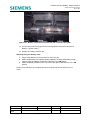
1. Prepare the Reinforced stool by fitting the CET plate to the upward fold in the top
of the stool using the two bolts and fixings provided.
Figure 9-1: Reinforced Stool and CET plate
2. Have the stool concreted into place in site in accordance with 667/HE/45950/000.
See Figure 9-2.
Version
Last Editor
Document
Name
Copyright
5
Page 28 of 71
Ashley Thorpe
UPS Solution General Handbook
Siemens plc 2014 All Rights Reserved
Status
Date
Doc. No.
Issued
05/11/14
667/HB/47750/000
Infrastructure and Mobility, Traffic Solutions
Sopers Lane, Poole, Dorset
BH17 7ER
Figure 9-2: Stool Installation Diagram
9.3
Pulling and Gland Ducted Cables
Step No.
2
UPS Cabinet
Battery Expansion Cabinet
Pull and gland ducted cables
Refer to
Section 9.3
NOTE: It is recommended that the Ethernet cable, if fitted, is pulled through all
conduits prior to attaching the RJ45 termination jack. This ensures the
termination is not compromised in any way during the pulling procedure. See
section 9.10 for termination details
NOTE: Sharp bends in all cables are to be avoided. A minimum bend radius of
4x the cable diameter should be observed where possible.
1. Pull all external cables through underground ducting and up into the cabinet via
the aperture in the left of the stool by the CET plate. See section 7 for details on
external cabling.
Version
Last Editor
Document
Name
Copyright
5
Page 29 of 71
Ashley Thorpe
UPS Solution General Handbook
Siemens plc 2014 All Rights Reserved
Status
Date
Doc. No.
Issued
05/11/14
667/HB/47750/000
Infrastructure and Mobility, Traffic Solutions
Sopers Lane, Poole, Dorset
BH17 7ER
CABLE ENTR
Y OPENING
Figure 9-3: Reinforced Stool – LEFT HAND SIDE VIEW
2. Working from back to front, gland these SWA cables to the CET plate, using the
holes and notches provided, in the following order:
o UPS Fault / Alarm relay contact cable (if required)
o Battery Expansion 54Vdc cable (if required)
o Controller 230Vac feed cable
o DNO 230Vac supply cable
o Ethernet cable (if required)
NOTE: Leave enough slack on all cables for termination at the top of the
cabinet. Cables should extend a minimum of 1500mm from the glanding point.
NOTE: When fitting the Battery Expansion Cable, terminate the Green/Yellow
core to the main earth stud on the CET plate.
9.4
Fitting the Vented Cabinet Outer Case and Sealing the Base
Step No.
3
UPS Cabinet
Battery Expansion Cabinet
Fit the Vented Cabinet Outer Case and seal the base
Refer to
Section 9.4
The Vented Cabinet Outer Case is simply a modified ST900 style controller cabinet and
is fitted to the stool in exactly the same way.
NOTE: The Vented Cabinet is packaged with the fixings necessary for fitting
the solutions housing modules (Battery, DC and UPS). Retain fixings until
reaching the appropriate installation step.
1. Fit the Vented cabinet outer case to the reinforced stool using the appropriate
M10 fixings as with the ST900 cabinet outer cases. Refer to 667/HE/45950/000.
2. The cabinet base should now be sealed. See 667/HE/45950/000 for details.
NOTE: Further installation from this point may involve work above un-cured
base seal. It is therefore recommended to mask the openings stool top with
cardboard or similar to prevent the loss of dropped fixings.
Version
Last Editor
Document
Name
Copyright
5
Page 30 of 71
Ashley Thorpe
UPS Solution General Handbook
Siemens plc 2014 All Rights Reserved
Status
Date
Doc. No.
Issued
05/11/14
667/HB/47750/000
Infrastructure and Mobility, Traffic Solutions
Sopers Lane, Poole, Dorset
BH17 7ER
9.5
Fitting and Connecting the Battery Housing Module
Step No.
4
UPS Cabinet
Battery Expansion Cabinet
Fit and connect the Battery Housing module(s)
Refer to
Section 9.5
The Battery Housing Module design allows them to be stacked unto each other. A
varying number of battery housing modules can be fitted depending on specific site
requirements.
WARNING: Batteries MUST NOT be fitted within the Battery Housing module
during installation.
Figure 9-4: Two Battery Housing Modules stacked on the Reinforced Stool
(Cabinet removed)
NOTE: Secure external cables from the CET plate to the cable
management holes in the left hand side of the Battery Housing modules as
each module is installed
Fitting the first Battery Housing Module:
1. Pass the first battery housing through the front door aperture of the cabinet outer
case and place unto the raised box section ‘top hats’ of the reinforced stool.
2. Align the countersunk holes in the bottom of the battery housing with the
threaded holes in the ‘top hats’, then secure into place using the Alan key and
fixings provided.
3. Pass the loose earth wire from the right side of the battery housing through the
opening in the housing bottom and secure to the marked earth stud on the box
section ‘top hat’ below.
Version
Last Editor
Document
Name
Copyright
5
Page 31 of 71
Ashley Thorpe
UPS Solution General Handbook
Siemens plc 2014 All Rights Reserved
Status
Date
Doc. No.
Issued
05/11/14
667/HB/47750/000
Infrastructure and Mobility, Traffic Solutions
Sopers Lane, Poole, Dorset
BH17 7ER
Fitting further Battery Housing Modules:
1. Pass the Battery Housing module through the front door aperture in the cabinet
outer case and place on top of the previously installed battery housing.
2. Using the back and side stops slide the Battery Housing into place, aligning the
countersunk holes on the bottom surface with the threaded holes in the top of the
Battery Housing module below. Secure using the fixings provided.
Figure 9-5: Battery Housing module mount
3. Pass the loose earth wire from the right side of the Battery Housing through the
opening in the housing bottom and secure to the marked earth stud on the
Battery Housing module below.
Figure 9-6: Earth Connection between Battery Housing modules
Version
Last Editor
Document
Name
Copyright
5
Page 32 of 71
Ashley Thorpe
UPS Solution General Handbook
Siemens plc 2014 All Rights Reserved
Status
Date
Doc. No.
Issued
05/11/14
667/HB/47750/000
Infrastructure and Mobility, Traffic Solutions
Sopers Lane, Poole, Dorset
BH17 7ER
9.6
Mounting and Connecting the UPS Housing Module
Step No.
5
UPS Cabinet
Mount and connect the UPS
housing module
Battery Expansion Cabinet
N/A
Refer to
Section 9.6
The UPS housing module contains the UPS Solution equipment and is pre-wired with
cable looms for connectivity with the Battery Housing Cable looms.
WARNING: The UPS Housing module weighs a total of 30.7kg. On a solo
install, disconnect and remove the FXM UPS unit. This can then be replaced
once the housing module is securely installed.
Figure 9-7: UPS Housing mounted on Battery Housing within Cabinet
1. Pass the UPS housing module through the front door aperture of the cabinet
outer case and place on top of the previously installed Battery Housing module.
2. Using the side stops, slide the UPS Housing module into place, aligning the
holes in the bottom flange with the threaded holes in the top of the Battery
Housing module below. Secure into place using the bolts provided.
3. Secure the loose earth cable to the marked earth stud on the side of the Battery
Housing module below.
4. Connect the loose battery connection cable looms to the red connector sockets
on the right side of each Battery Housing module, using the right hand opening in
the base of the Battery Housing module to reach the connector of the housing
below.
Version
Last Editor
Document
Name
Copyright
5
Page 33 of 71
Ashley Thorpe
UPS Solution General Handbook
Siemens plc 2014 All Rights Reserved
Status
Date
Doc. No.
Issued
05/11/14
667/HB/47750/000
Infrastructure and Mobility, Traffic Solutions
Sopers Lane, Poole, Dorset
BH17 7ER
Figure 9-8: Battery Cable Loom Connectors
NOTE: in cases where only one battery housing is installed within the UPS
cabinet, the longer of two battery cable looms can be removed and retained as
a maintenance spare.
9.7
Mounting and connecting the DC Housing Module
Step No.
6
UPS Cabinet
N/A
Battery Expansion Cabinet
Mount and connect the DC
Housing module
Refer to
Section 9.7
The DC housing provides a termination point for all batteries fitted within a Battery
Expansion Cabinet.
1. Pass the DC Housing module through the front door aperture of the cabinet outer
case and place on top of the previously installed Battery Housing module.
2. Using the side stops, slide the DC Housing module into place, aligning the holes
in the bottom flange with the threaded holes in the top of the Battery Housing
module below. Secure into place using the bolts provided.
3. Secure the loose earth cable to the marked earth stud on the side of the Battery
Housing module below.
NOTE: The DC Housing module is sometimes fitted to a Battery Housing
Module before shipping. If this is the case, check that the DC housing is secure
and that the earth cable is properly connected, then follow the normal Battery
Housing module installation steps (section 9.5) ensuring the DC Housing
module is placed at the top of the stack.
Version
Last Editor
Document
Name
Copyright
5
Page 34 of 71
Ashley Thorpe
UPS Solution General Handbook
Siemens plc 2014 All Rights Reserved
Status
Date
Doc. No.
Issued
05/11/14
667/HB/47750/000
Infrastructure and Mobility, Traffic Solutions
Sopers Lane, Poole, Dorset
BH17 7ER
4. Connect the loose battery connection cable looms to the red connector sockets
on the right side of each Battery Housing module, using the right hand opening in
the base of the Battery Housing module to reach the connector of the housing
below.
NOTE: in cases where less than three battery housing modules are installed
within the Battery Expansion Cabinet, unused battery cable looms can be
removed and retained as maintenance spares.
9.8
Terminating External Cables into the UPS Connection Panel
Step No.
7
UPS Cabinet
Terminate External cables into
the UPS Connection panel
Battery Expansion Cabinet
N/A
Refer to
Section 9.8
WARNING: Ensure all power sources are switched off and safely isolated
before installation commences. All switches and MCBs should be in the OFF or
BYPASS position.
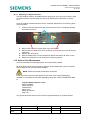
1. Remove the blanking plate from the top of the UPS housing revealing the UPS
Connection Panel.
2. The DIN rail mounted terminal blocks on the panel are clearly labelled. Cables
are to be terminated according to the following:
o ‘MAINS INPUT’ – Termination for a 3-core cable from the feeder pillar
supply.
o ‘OUTPUT’ – Termination for a 3-core cable to the traffic controller.
o ‘54VDC BUS’ – Termination for internal and Battery Expansion cabinet
battery cables. Clearly labelled ‘+’ and ‘-’.
o ‘C1’ to ‘C6’ – Termination for the UPS solution fault output contacts.
Clearly labelled ‘NO’, ‘C’ and ‘NC’ for Normally Open, Common and
Normally Closed respectively.
Figure 9-9: UPS Connection Panel
3. Replace the blanking plate.
See section 7 for further details on external cable specification details.
Version
Last Editor
Document
Name
Copyright
5
Page 35 of 71
Ashley Thorpe
UPS Solution General Handbook
Siemens plc 2014 All Rights Reserved
Status
Date
Doc. No.
Issued
05/11/14
667/HB/47750/000
Infrastructure and Mobility, Traffic Solutions
Sopers Lane, Poole, Dorset
BH17 7ER
9.9
Terminating External Cables into the DC Connection Panel
Step No.
8
UPS Cabinet
N/A
Battery Expansion Cabinet
Terminate External Cables into
the DC Connection Panel
Refer to
Section 9.9
WARNING: Ensure all power sources are switched off and safely isolated
before installation commences. All switches and MCBs should be in the OFF or
BYPASS position.
1. Remove the blanking plate of the DC Housing module to reveal the DC
Connection Panel.
2. The DIN rail terminal blocks are clearly labelled. Terminate the Battery cable
from the UPS cabinet to the TBs marked ‘UPS DC’.
3. Replace the blanking plate.
See section 7 for further details on external cable specification details.
9.10 Terminating and Connecting the Ethernet Cable
Step No.
9
UPS Cabinet
Terminate and connect the
Ethernet Cable
Battery Expansion Cabinet
N/A
Refer to
Section 9.10
If the FXM UPS unit’s LAN Interface feature is to be used, follow the instructions below to
properly terminate the Ethernet CAT5e cable.
1. Terminate the CAT5e cable into RJ45 jacks (531/4/03461/000) as a standard
straight-through Ethernet cable at both ends according the Table 9-2 below.
Pin
1
Colour
White – Orange stripe
2
Orange Solid
3
White – Green stripe
4
Blue solid
5
White – Blue stripe
6
Green solid
7
White – Brown stripe
8
Brown solid
Table 9-2: RJ45 Interface Cable Connection
2. Plug the RJ45 jack into the Ethernet socket marked ‘LAN’ on the FXM UPS unit.
See section 7.3 for cable specification details.
Version
Last Editor
Document
Name
Copyright
5
Page 36 of 71
Ashley Thorpe
UPS Solution General Handbook
Siemens plc 2014 All Rights Reserved
Status
Date
Doc. No.
Issued
05/11/14
667/HB/47750/000
Infrastructure and Mobility, Traffic Solutions
Sopers Lane, Poole, Dorset
BH17 7ER
9.11 Fitting and Connecting the Batteries
Step No.
10
UPS Cabinet
Battery Expansion Cabinet
Fit and connect the batteries
Refer to
Section 9.11
WARNING: All battery safety information must be read and understood before
installation of the batteries begins. Refer to the safety information at the
beginning of this document.
WARNING: Use the insulated spanner when adjusting battery terminal fixings.
Terminals should not be exposed for extended periods. Replace the terminal
covers whenever possible. This reduces the risk of an accidental short-circuit.
WARNING: Ensure all power sources are switched off and safely isolated
before fitting the batteries. All switches and MCBs should be in the OFF or
BYPASS position.
Each Battery Housing module takes four 12V LC batteries, forming a 48V battery pack.
These will be referred to as Battery 1, 2, 3 and 4 from left to right respectively. Repeat the
following steps for each Battery Housing module within UPS cabinet AND Battery
Expansion cabinet.
1. Lower the battery retention bar of the Battery Housing module. Slide Battery 1
into the housing.
2. Connect the negative ring tag from the housing’s MCB to the negative terminal
on Battery 1. (grey cable)
WARNING: All battery terminals are to be made hand tight. DO NOT
OVERTIGHTEN as battery terminals can easily be damaged.
3. Slide Battery 2 into the housing. Connect the positive of Battery 1 to the negative
of Battery 2 using the terminal linking bar provided.
NOTE: When fitting batteries in the Battery Housing module directly below the
UPS Housing module, the Battery Temperature sensor is to be fitted as this
stage. Refer to section 9.12 before completing the following instructions.
4. Repeat this last step with Batteries 3 and 4.
Figure 9-10: Battery Terminals Connected with the Terminal Linking Bar
Version
Last Editor
Document
Name
Copyright
5
Page 37 of 71
Ashley Thorpe
UPS Solution General Handbook
Siemens plc 2014 All Rights Reserved
Status
Date
Doc. No.
Issued
05/11/14
667/HB/47750/000
Infrastructure and Mobility, Traffic Solutions
Sopers Lane, Poole, Dorset
BH17 7ER
5. Connect the positive ring tag from the housing MCB to the positive terminal of
Battery 4. (brown cable)
6. Replace the battery retention bar.
9.12 Fitting the Battery Temperature Sensor
Step No.
11
UPS Cabinet
Connect the Batt. Temp.
sensor
Battery Expansion Cabinet
N/A
Refer to
Section 9.12
This sensor allows the FXM UPS unit to temperature compensate its battery charging
characteristics and is a vital part of the system installation. The sensor is to be fitted as
follows to the battery pack housed directly below the UPS unit.
Figure 9-11: Battery Temperature Sensor
1. Ensure the temperature sensor connector is securely fitted into the ‘BATTERY
TEMP’ socket of the FXM UPS unit.
2. Use tape to fix the sensor ring terminal to the exposed side of Battery 2.
3. On mounting Battery 3, ensure that it is flush with Battery 2 creating a secure fit
for the battery temperature sensor.
4. Tidy away the Battery Temperature Sensor cable.
Version
Last Editor
Document
Name
Copyright
5
Page 38 of 71
Ashley Thorpe
UPS Solution General Handbook
Siemens plc 2014 All Rights Reserved
Status
Date
Doc. No.
Issued
05/11/14
667/HB/47750/000
Infrastructure and Mobility, Traffic Solutions
Sopers Lane, Poole, Dorset
BH17 7ER
10 Isolation Switches
This section gives the names and locations of various switches and circuit breakers
throughout the UPS Solution that are used to isolate and switch on/off separate system
elements. These switches are used as during commissioning, start up and maintenance
of the UPS Solution and are referred to throughout the rest of this handbook by the
names listed here.
10.1 Housing Module MCBs
Mains Input MCB – UPS Connection Panel, UPS Housing, UPS cabinet
Battery Expansion MCB – DC Connection Panel, DC Housing, Battery Expansion
cabinet
Battery Housing Isolation MCB – Battery Housing(s), UPS and Battery Expansion
cabinets
10.2 Universal Automatic Transfer Switch (UATS)
The UATS is mounted within the UPS Housing module at the top of the UPS Cabinet.
Manual Bypass Switch (SW1)
UPS Supply Breaker (CB1)
Figure 10-1: UATS Switches
Version
Last Editor
Document
Name
Copyright
5
Page 39 of 71
Ashley Thorpe
UPS Solution General Handbook
Siemens plc 2014 All Rights Reserved
Status
Date
Doc. No.
Issued
05/11/14
667/HB/47750/000
Infrastructure and Mobility, Traffic Solutions
Sopers Lane, Poole, Dorset
BH17 7ER
10.3 FXM UPS Unit
The UPS Unit is mounted within the UPS Housing module at the top of the UPS Cabinet.
Battery Breaker
Input Circuit Breaker
Figure 10-2: Alpha FXM UPS Circuit Breakers
Version
Last Editor
Document
Name
Copyright
5
Page 40 of 71
Ashley Thorpe
UPS Solution General Handbook
Siemens plc 2014 All Rights Reserved
Status
Date
Doc. No.
Issued
05/11/14
667/HB/47750/000
Infrastructure and Mobility, Traffic Solutions
Sopers Lane, Poole, Dorset
BH17 7ER
11 Commissioning
The following subsections detail the procedure required to commission and start up the
UPS Solution. Refer to section 10 for details on isolation switch locations.
NOTE: In order to avoid unduly stressing the UPS Solution it is advisable to
follow the switch on procedure set out below.
WARNING: Ensure all power sources are switched off and safely isolated
before fitting the batteries. All switches and MCBs should be in the OFF or
BYPASS position.
11.1 Electrical Safety Testing
Upon completion of UPS Solution installation, the following Electrical Safety Tests are to
be carried out before the solution is powered or switched on.
Tests required are set out in the TS Traffic Installation Testing Document
(667/HE/20664/000):
2.1 Test Gear Requirement
2.2 Core to Core Testing – This applies to all cables between Feeder Pillar and
UPS Cabinet, UPS cabinet and Battery Expansion Cabinet, and UPS
Cabinet and Traffic Control Equipment.
2.3 Visual Inspection
2.4 Circuit Protective Conductor Test – This applies to all cables between Feeder
Pillar and UPS Cabinet, UPS cabinet and Battery Expansion
Cabinet, and UPS Cabinet Traffic Control Equipment.
2.5 Basic Polarity Test
2.6 Site Insulation Test
2.7 Polarity Test
2.8 Earth Loop Impedance Tests
11.2 Putting the UPS Solution in BYPASS
1. Make sure all switches listed in section 10 are in the OFF position and the
Manual Bypass Switch (SW1) on the UATS is in the BYPASS position.
2. Switch the Mains Input MCB on UPS Housing to ON.
The UPS Solution is now in BYPASS mode. When present, power from the site’s mains
supply feeder pillar passes directly to the traffic intersection controller without interacting
with the UPS unit.
NOTE: The UPS Solution is in BYPASS mode as long as long as the Mains
Input MCB in the UPS Connection Panel and the Manual Bypass Switch
(SW1) on the UATS are in the ON and BYPASS position respectively, no
matter the state of other isolation switches within the solution.
Version
Last Editor
Document
Name
Copyright
5
Page 41 of 71
Ashley Thorpe
UPS Solution General Handbook
Siemens plc 2014 All Rights Reserved
Status
Date
Doc. No.
Issued
05/11/14
667/HB/47750/000
Infrastructure and Mobility, Traffic Solutions
Sopers Lane, Poole, Dorset
BH17 7ER
11.3 Powering and Commissioning the Controller
1. Commission the traffic intersection controller in accordance with its related
Installation, Commissioning and Maintenance Handbook. See section 1.2.
2. Switch on mains power within the site’s supply feeder pillar at the appropriate
stage of controller commissioning.
The traffic intersection controller should now be fully operational.
11.4 Starting Up the UPS Solution
1. Switch all Battery Shelf Isolation Switches on the Battery Housing modules
within the UPS Cabinet and Battery Expansion Cabinet, if installed, to ON in turn.
2. If a Battery Expansion Cabinet is installed, switch the Battery Expansion MCB
in the cabinet’s DC Housing module to ON. The Battery Expansion Cabinet can
now be closed.
3. In the UPS Cabinet, switch the Battery Breaker on the UPS Unit to ON.
4. Ensure the UPS unit is now on and displays ‘STANDBY’.
5. Switch the UPS Supply Breaker (CB1) on the UATS to ON.
6. Switch the Input Circuit Breaker on the UPS Unit to ON.
7. Wait for the UPS Unit to display ‘LINE’.
8. Switch the Manual Bypass Switch (SW1) on the UATS to UPS.
The UPS Solution is now switched on and supporting the traffic Intersection. Mains power
from the site supply feeder pillar is now fed through the UPS unit before being passed on
to the controller.
11.5 Testing the UPS Battery Support Function
1. Switch the Mains Input MCB on the UPS Housing to OFF.
2. Ensure the UPS unit now displays ‘INVERTER’ and that traffic intersection is still
fully operational.
3. Switch the Mains Input MCB on the UPS Housing to ON.
4. Wait for the UPS unit to display ‘LINE’.
5. Ensure the traffic intersection is still fully operational.
Commissioning of the UPS Solution is now complete.
Version
Last Editor
Document
Name
Copyright
5
Page 42 of 71
Ashley Thorpe
UPS Solution General Handbook
Siemens plc 2014 All Rights Reserved
Status
Date
Doc. No.
Issued
05/11/14
667/HB/47750/000
Infrastructure and Mobility, Traffic Solutions
Sopers Lane, Poole, Dorset
BH17 7ER
12 UPS System Operation
12.1 Operating Modes
The UPS Solution has four main operating modes that are automatically selected by the
Alpha FXM UPS unit depending on the state of the mains power supply to the site and
battery pack SOC. These are listed and described in Table 12-1 below.
Operating Mode
‘LINE’
‘INVERTER’
‘RETRAN’
‘SHUTDOWN’
Description
The normal operating mode of the UPS Solution.
Mains power is available from the site supply feeder pillar and is being
passed through the UPS to the traffic controller load.
Batteries are being charged or maintained using the mains supply.
Mains power is unavailable from the site supply feeder pillar.
The UPS Solution is providing battery backup power from all connected
battery packs.
Mains power from the site supply feeder pillar has been restored.
The UPS Solution assesses and qualifies the available mains supply
before switching back to ‘LINE’ mode.
Mains power from the site supply feeder pillar is unavailable and the
batteries have been discharged to the UPS unit’s over discharge
threshold. The UPS Solution switches off. Power is no longer supplied to
the traffic controller load.
When mains power is restored at the site supply feeder pillar, the UPS
solution will automatically switch to ‘RETRAN’ mode.
Table 12-1: Key UPS Solution Operating Modes
NOTE: The current mode of operation is shown on the Alpha FXM UPS Unit’s
LCD Display. Press any of the three buttons directly below the unit’s display to
activate the backlight
For more information on all UPS unit modes please refer to 667/HB/47760/000.
12.2 Fault Monitoring
The UPS Solution offers extensive fault monitoring options as described in the following
subsections. More information on all available fault information is detailed in the Alpha
FXM UPS Operating Manual – 667/HB/47760/000.
12.2.1 Fault / Alarm Relay Contacts
The UPS Solution provides six relay outputs via the UPS Connection Panel that can be
cabled directly to the traffic controller cabinet for fault monitoring with Siemens UTMC or
RMS systems. See section 12.2.2 for details.
Each relay offers a Normally Closed (NC), Common (C) and Normally Open (NO)
contact, making a total of 18 possible termination points.
Table 12-2 lists and describes the default names and settings for these contacts.
Version
Last Editor
Document
Name
Copyright
5
Page 43 of 71
Ashley Thorpe
UPS Solution General Handbook
Siemens plc 2014 All Rights Reserved
Status
Date
Doc. No.
Issued
05/11/14
667/HB/47750/000
Infrastructure and Mobility, Traffic Solutions
Sopers Lane, Poole, Dorset
BH17 7ER
Default
Setting
N/A
Contact ID
Name
Voltage
Energised When:
C1
On Battery
Dry Contact
The UPS Solution is running on
battery backup power rather
than mains input
C2
Low
Battery 1
Dry Contact
C3
Low
Battery 2
Dry Contact
The battery voltage drops
below the a configurable
threshold
Matches C2
C4
Timer
Dry Contact
The UPS Solution has been
running on battery backup for a
user-defined length of time
C5
Alarm
Dry Contact
General Fault on UPS Unit6
N/A
C6
DO NOT USE
(See warning
below)
UPS On
48Vdc at
(500mA) from
battery packs
The UPS is providing a mains
output independent of the
power source
N/A
47Vdc
(40% SOC)
47Vdc
(40% SOC)
5 minutes
Table 12-2: Default Fault Contact Settings
WARNING: C6 is factory configured as a 48Vdc supply and is not to be used
with Siemens traffic equipment.
Details of all other fault and alarm flags are available within the Alpha FXM UPS
Operating Manual – 667/HB/47760/000.
All fault and alarm flags can be interrogated by any one of three UPS interfaces as
described in section 12.3.
6
All possible Alarm Contact triggers are listed in APPENDIX B – FXM UPS Faults and Alarms
Issued
Version
5
Page 44 of 71
Status
Last Editor
Ashley Thorpe
Date
05/11/14
Document
UPS Solution General Handbook
Doc. No.
667/HB/47750/000
Name
Copyright Siemens plc 2014 All Rights Reserved
Infrastructure and Mobility, Traffic Solutions
Sopers Lane, Poole, Dorset
BH17 7ER
12.2.2 Fault Monitoring using Siemens RMS and UTMC Systems
The UPS Solution’s fault / alarm relay contacts can be used to send indications back to
the central office Instation via an OTU or OMU7. The following are the recommended
naming conventions for bit and possible connection scenarios.
Bit
ONBAT (C1)
LOWB1 (C2)
HLD WARN (C4)
UPS ALRM (C5)
Description
On Battery support. UPS is in inverter mode. Site mains is off
Usually HLD WARN (C4) below is recommended for this
purpose.
Low Battery Warning 1 – Urgent indication that the UPS is
approaching its maximum support time and action should now
be taken to either provide additional support or take other
action (suitable site signing etc).
Hold Up Warning. Triggered from the Timer alarm (5
minutes), Urgent indication that the UPS is powering the load
(Avoids nuisance reports when short mains breaks occur).
UPS Alarm. Urgent – There is a fault with the UPS. Site visit
or remote investigation required.
Table 12-3: RMS Bit Labelling and Description
Example Scenario:
The LOWB1 (C2) contact can be used in two ways. The first is as an indication to the
controller that the UPS has been running on battery power for some time, allowing
special conditions or similar controller logic to perhaps dim lights or put the junction into a
flashing state to prolong support.
NOTE: Customers should decide on a site by site basis if the use of dimmed
signals during the day is acceptable.
The second would be to pass this back through an OTU or OMU to a central office
Instation to warn that the UPS has used more than half of its back up supply.
All contacts7 can either be passed through the controller (i.e. controller input to output to
OTU/OMU input to Instation) or may be connected directly to the OTU/OMU inputs for
forwarding to the central office Instation.
Review the controller and any OTU/OMU configurations supplied by the customer to
determine the connections that need to be made.
Figure 12-1: Fault Monitoring Connectivity Example
7
C6 is not to be used with Siemens traffic Equipment. See section 12.2.1
Issued
Version
5
Page 45 of 71
Status
Last Editor
Ashley Thorpe
Date
05/11/14
Document
UPS Solution General Handbook
Doc. No.
667/HB/47750/000
Name
Copyright Siemens plc 2014 All Rights Reserved
Infrastructure and Mobility, Traffic Solutions
Sopers Lane, Poole, Dorset
BH17 7ER
12.3 Communicating with the UPS Solution
12.3.1 Three-Button Interface
The Alpha FXM UPS unit includes a simple three-button button interface and LCD display
for basic system interrogation while present on site.
Using the three buttons, CANCEL, SCROLL and SELECT, it is possible to access the
following menus:
Control Menu -
Control, program and adjust a limited number of system
options including forcing the UPS unit into ‘INVERTER’
mode.
System Status Menu -
Measure various inputs, outputs and related system values
including the current battery voltage and estimated support
time available.
Alarm and Fault -
Disabled unless the UPS unit has a fault, these menus
display and fault or alarm flags that are currently active.
Event Status Menu -
Allows the user to scroll through the last 25 items listed in the
UPS units 100-event log.
For details on all the options available within these menus, please refer to the Alpha FXM
UPS Operating Manual – 667/HB/47760/000.
Access to many more system settings can only be achieved through the RS232 or LAN
interfaces as described in sections 12.3.2 and 12.3.3.
12.3.2 RS232 Interface
The Alpha FXM UPS unit’s RS232 interface can be accessed via the female 9-way Dtype connector on the unit itself. Table 12-4 below lists the necessary connection details.
Connection Parameters
Duplex Mode
Handshaking
Baud Rate
Data Format
Default Password
Required Setting
Half Duplex
Software Handshaking
2400 bps
8-bit Data, No Parity, 1 Stop Bit, No Flow Control
1111
Table 12-4: RS232 Interface Connection Information
The RS232 Interface’s main menu screen gives the user access to four main subsections
as well as displaying status and fault / alarm information in the following format.
Version
Last Editor
Document
Name
Copyright
5
Page 46 of 71
Ashley Thorpe
UPS Solution General Handbook
Siemens plc 2014 All Rights Reserved
Status
Date
Doc. No.
Issued
05/11/14
667/HB/47750/000
Infrastructure and Mobility, Traffic Solutions
Sopers Lane, Poole, Dorset
BH17 7ER
Figure 12-2: Alpha FXM Series UPS RS232 Interface Screenshot
Submenus 1, 2 and 4 are read-only and are used to view snapshots of input and output
measurements (the RS232 interface does not auto-refresh) and Factory configured unit
specification information.
The Maintenance submenu allows the user to adjust a limited number of UPS settings
including changing the connection password and switching systems timers on or off.
NOTE: The connection password applies to all UPS communication interfaces
described in section 12.3.
Special command prompts can be entered directly into the RS232 interface to configure
more specific UPS settings such as reprogramming and reconfiguring the six relay
contacts or viewing the 100-event log. Details of all available commands are available
within the Alpha FXM UPS Operating Manual – 667/HB/47760/000.
Version
Last Editor
Document
Name
Copyright
5
Page 47 of 71
Ashley Thorpe
UPS Solution General Handbook
Siemens plc 2014 All Rights Reserved
Status
Date
Doc. No.
Issued
05/11/14
667/HB/47750/000
Infrastructure and Mobility, Traffic Solutions
Sopers Lane, Poole, Dorset
BH17 7ER
12.3.3 LAN Interface
The UPS Solution’s LAN interface can be accessed via the Alpha FXM UPS unit’s
embedded SNMP (LAN) card using the RJ45 socket on the unit itself. If the solution’s
Ethernet Cable is fitted and a TCP/IP based network connection is available within the
traffic controller, the LAN interface can be accessed remotely from any other active
network device.
To connect to the LAN interface, type the Alpha FXM UPS unit’s IP address into a web
browser. Individual unit’s IP addresses can be configured to match networking required.
The default IP address and password for all UPS units are shown in Table 12-5.
Connection Parameters
IP Address
Password
Default Settings
192.168.0.90
1111
Table 12-5: LAN Interface Connection Information
NOTE: The connection password applies to all UPS communication interfaces
described in section 12.3.
Connecting to the LAN interface presents the user with a simple GUI that gives access to
the greatest number of system settings and configurations under the following top level
page menu.
UPS Specification
UPS Monitoring
UPS Maintenance
Event Manager
Upgrade Files
Configure Site Information
Communications
Keep Alive
The UPS Solution’s operating mode and fault / alarm flags are always displayed at the
top of each page for easy system monitoring.
Version
Last Editor
Document
Name
Copyright
5
Page 48 of 71
Ashley Thorpe
UPS Solution General Handbook
Siemens plc 2014 All Rights Reserved
Status
Date
Doc. No.
Issued
05/11/14
667/HB/47750/000
Infrastructure and Mobility, Traffic Solutions
Sopers Lane, Poole, Dorset
BH17 7ER
Figure 12-3: LAN Interface Screenshot – Relay Contact Configuration
NOTE: A similar, though slightly restricted GUI can be used with the UPS
Solution via the use of the Alpha UPS Monitor software package, available for
free download from the Alpha Technologies website8.
In depth information on the use of the Alpha UPS Monitor Software and the LAN interface
GUI is available within the Alpha FXM UPS Operating Manual – 667/HB/47760/000.
8
http://www.alpha.ca/web2/service-and-support/support/software-firmware-downloads
Issued
Version
5
Page 49 of 71
Status
Last Editor
Ashley Thorpe
Date
05/11/14
Document
UPS Solution General Handbook
Doc. No.
667/HB/47750/000
Name
Copyright Siemens plc 2014 All Rights Reserved
Infrastructure and Mobility, Traffic Solutions
Sopers Lane, Poole, Dorset
BH17 7ER
12.4 Battery Charging
The Alpha FXM UPS unit has four specific has four specific modes for battery charging
that are automatically cycled according to the battery pack voltage and State of Charge.
These are described below.
NOTE: All values given in the descriptions below apply to a UPS Solution
operating at an ambient temperature of 25°C. See section 12.5.2 for details on
temperature compensated battery charging.
Bulk Charging -
Used to recharge the batteries after discharge. The
charger within the FXM UPS unit operates in constant
current mode with an upper limit of 10Amps. The target
battery voltage is set to 54Vdc (2.25V per cell). The battery
voltage rises steadily as the batteries charge. As the battery
voltage approaches its target voltage value, the current
drawn starts to decrease. The charger voltage is then held at
54Vdc and the charger moves into Absorption mode.
Absorption -
Used to complete the final stage of battery recharge. The
charger is now in constant voltage mode and holds the
battery voltage at 54Vdc. The battery pack is allowed to draw
current based on its capacity and chemistry. The current
drawn continues to decreases as the battery charges.
Float -
Used to maintain fully charged batteries. As the battery
pack nears full charge, the current drawn drops to roughly
1A. The battery voltage is held at 54Vdc. If the current drawn
is roughly 1A or less for 10 to 20 minutes, the FXM UPS
Unit’s battery charger moves to the next state.
Charger Off -
Used to monitor the battery pack and check for any
faults. The battery charger switches itself off on leaving Float
mode. If the battery pack is bad or faulty, its voltage will drop
rapidly and the FXM UPS unit’s ‘Bad Battery’ alarm is
triggered. If the battery pack is in good condition, the battery
voltage will drop slowly. When the battery voltage drops to
52.6Vdc, the charger switches back on and enters Bulk
Charging mode.
Figure 12-4 displays the battery charging cycle in terms of voltage and charging current.
WARNING: Even with no battery packs connected, if mains power is available
a voltage of 32Vdc is normally present at the Alpha FXM UPS Unit’s battery
terminals. This is voltage is periodically raised to 56Vdc or above as the UPS
unit looks for a battery connection.
Version
Last Editor
Document
Name
Copyright
5
Page 50 of 71
Ashley Thorpe
UPS Solution General Handbook
Siemens plc 2014 All Rights Reserved
Status
Date
Doc. No.
Issued
05/11/14
667/HB/47750/000
Infrastructure and Mobility, Traffic Solutions
Sopers Lane, Poole, Dorset
BH17 7ER
Figure 12-4: Battery Charging Cycle
12.5 Temperature De-Rating
WARNING: For the majority of UK installations, it is reasonable to assume a
worst case cabinet temperature range of 0°C to 65°C.The UPS Solution must
be derated to at least these values to help ensure correct operation.
12.5.1 Power output
The Alpha FXM1100 and FXM2000 UPS units offer a maximum power output of 1100VA
and 2000VA respectively. See section 4.1. In high ambient temperatures, the maximum
power available decreases as the FXM UPS units reach the limits of their operating
range.
The FXM1100 UPS unit is de-rated by 1.25% for every degree above 55°C. The
FXM2000 UPS unit is de-rated by 1.0% for every degree above 50°C. Table 12-6 below
gives specific figures showing how this affects the maximum power output available.
Ambient
Temperature
-40°C
0°C
25°C
50°C
55°C
60°C
65°C (UK worst case)
70°C
74°C
FXM1100 Max. O/P
FXM2000 Max. O/P
1100 W/VA
1100 W/VA
1100 W/VA
1100 W/VA
1100 W/VA
1031.25 W/VA
962.5 W/VA
893.75 W/VA
838.75 W/VA
2000 W/VA
2000 W/VA
2000 W/VA
2000 W/VA
1900 W/VA
1800 W/VA
1700 W/VA
1600 W/VA
1520 W/VA
Table 12-6: Maximum Output Power against Ambient Temperature
Version
Last Editor
Document
Name
Copyright
5
Page 51 of 71
Ashley Thorpe
UPS Solution General Handbook
Siemens plc 2014 All Rights Reserved
Status
Date
Doc. No.
Issued
05/11/14
667/HB/47750/000
Infrastructure and Mobility, Traffic Solutions
Sopers Lane, Poole, Dorset
BH17 7ER
12.5.2 Battery Charging
The UPS Solution offers temperature compensated battery charging to help keep all
battery packs in optimum condition across its extended operating ambient temperature
range. The battery charging voltage is adjusted by -5.0mV/°C/cell.
12.5.3 Battery Support Hold Up Times
Ambient temperature plays a big part in determining how much a battery support hold up
time is available. As temperature decreases, the available capacity of each battery pack
is reduced as battery chemistry becomes increasingly inert. This becomes very apparent
and extremely low ambient temperatures.
APPENDIX A – Estimated Hold Up Times shows battery hold up runtime charts (such as
in section 5) adjusted for ambient cabinet temperatures of +20°C, 0°C and -25°C.
Version
Last Editor
Document
Name
Copyright
5
Page 52 of 71
Ashley Thorpe
UPS Solution General Handbook
Siemens plc 2014 All Rights Reserved
Status
Date
Doc. No.
Issued
05/11/14
667/HB/47750/000
Infrastructure and Mobility, Traffic Solutions
Sopers Lane, Poole, Dorset
BH17 7ER
13 Maintenance
This section gives a brief description of some key maintenance routines necessary for
upkeep of the UPS Solution. For detailed information see the UPS Method Statement
and hardware operating manuals listed in section 1.2.
WARNING: Ensure the safety information at the beginning of this document
before beginning any maintenance procedures
13.1 Periodic inspection
Note any faults or alarms flagged by the Alpha FXM UPS unit. Clear faults and alarms
wherever possible in accordance with UPS Operating Manual – 667/HB/47760/000.
Report ALL faults and alarms to Line Manager.
Switch off mains supply during at the beginning of normal junction periodic inspection.
Observe the battery voltage via the UPS 3-button interface. Wait for voltage to settle and
note. Also note time.
Carry out junction periodic inspection as normal. Refer to 667/HA/45950/000 for details.
Observe the battery voltage. Note alongside the time.
Restore the mains supply
Note down other key figures from the UPS unit including:
Number of mains failures
Cumulative inverter time
Cumulative kWh output
Estimated battery support
Version
Last Editor
Document
Name
Copyright
5
Page 53 of 71
Ashley Thorpe
UPS Solution General Handbook
Siemens plc 2014 All Rights Reserved
Status
Date
Doc. No.
Issued
05/11/14
667/HB/47750/000
Infrastructure and Mobility, Traffic Solutions
Sopers Lane, Poole, Dorset
BH17 7ER
Check the individual Battery Voltages:
For each Battery Shelf:
1. Switch the Breaker on the Battery Shelf (Battery Housing Assembly) to the OFF
position
2. On each Battery (four per shelf) measure the voltage between the Positive and
Negative Terminals (there is no need to remove the linking bars). Note these
voltages on the PI sheet.
3. Switch the Breaker on the Battery Shelf back to the ON position
When all shelves are complete, please check that all of the Battery Breakers are set back
to the ON Position
13.2 Maintenance Bypass Switching
The Maintenance Bypass feature allows maintenance personnel to connect the controller
load directly to the mains supply from the site feeder pillar via the Alpha UATS bypassing
the FXM UPS unit and its connected battery packs. See section 10 for isolation switch
information.
Flip SW1 on the UATS from ‘UPS’ to ‘BYPASS’ to instantly set the UPS Solution to
Bypass mode. The controller load will not experience a break in power.
WARNING: When set to Bypass in this fashion, mains powers is still being
used by the UPS unit to charge connected battery packs and all terminals
directly connected to the UPS unit are live. To isolate and switch off the UPS
unit, see section 13.3.
NOTE: Use of the BYPASS Switch may cause the attached control equipment
to restart, it should only be used when replacement of the FXM unit is required
(Please see Section 13.4.3).
See section 4.2 for more information on the UATS.
Version
Last Editor
Document
Name
Copyright
5
Page 54 of 71
Ashley Thorpe
UPS Solution General Handbook
Siemens plc 2014 All Rights Reserved
Status
Date
Doc. No.
Issued
05/11/14
667/HB/47750/000
Infrastructure and Mobility, Traffic Solutions
Sopers Lane, Poole, Dorset
BH17 7ER
13.3 Switching Off the UPS Solution
WARNING: This will stop all equipment connected to the UPS from being
supplied Mains power. Ensure all traffic control equipment is safely
switched off before switching off the UPS.
To switch off the UPS completely, follow these steps (see section 10 for isolation switch
information):
1. Switch the UATS to BYPASS
2. Switch all Breakers on the Battery Shelves (Battery Housing Assemblies) in both
cabinets (UPS and Battery Expansion Cabinets) to the OFF position
3. Switch the Battery Breaker on the Front left of the FXM UPS unit to the OFF
position
4. Switch the UPS Supply Breaker (CB1) on the front of the UATS to the OFF
position
5. Switch OFF the Input Circuit Breaker on the front right of the FXM unit
6. Unplug the 48V Battery Connector from the front (left) of the FXM unit to
disconnect the battery circuits completely.
7. Switch OFF the Main Breaker on the UPS Connection Panel (at the top of the
rack)
8. Open the Feeder Pillar and Isolate the UPS Cabinet
The UPS Solution will now be completely isolated from Mains and Batteries.
Version
Last Editor
Document
Name
Copyright
5
Page 55 of 71
Ashley Thorpe
UPS Solution General Handbook
Siemens plc 2014 All Rights Reserved
Status
Date
Doc. No.
Issued
05/11/14
667/HB/47750/000
Infrastructure and Mobility, Traffic Solutions
Sopers Lane, Poole, Dorset
BH17 7ER
13.4 First Line Maintenance
13.4.1 Replacing the Alpha FXM UPS unit
The following Steps can be carried out to replace a faulty Alpha FXM unit while still
supplying Mains Power to the Traffic Control Equipment. If it’s not necessary to keep the
Traffic Control Equipment Energised, please follow section 13.3 to fully isolate the UPS
Solution before following steps 7 onwards below. See section 10 for isolation switch
information.
THESE INSTRUCTIONS NEED TO BE FOLLOWED CAREFULLY, FAILURE
TO DO SO MAY RESULT IN ELECTRIC SHOCK.
1. Switch the UATS to BYPASS (the Junction will now only run from the Mains
Supply)
2. Switch all Breakers on the Battery Shelves (Battery Housing Assemblies) in both
cabinets (UPS and Battery Expansion Cabinets) to the OFF position
3. Switch the Battery Breaker on the Front left of the Alpha FXM UPS unit to the
OFF position
4. Switch the UPS Supply Breaker (CB1) on the front of the UATS to the OFF
position
5. Switch OFF the Input Circuit Breaker on the front right of the FXM unit
6. Unplug the 48V Battery Connector from the front (left) of the FXM unit to
disconnect the battery circuits completely.
7. Remove the covers from the Mains Input and output cables on the front right of
the FXM unit
8. Using a Multi Meter set to AC (check it’s working using the mains supply in
the UPS Connection Panel), check that both the input and output cable
looms are no longer energised.
9. Remove both Input and output cable looms labelling them so you know where
they came from. Use Insulation tape to cover the ends of the cables
10. Unplug the alarm cable looms C1 – C6 and the Battery Temperature Sensor
11. The FXM Unit can now be removed from the 19” Rack.
12. Install the Replacement FXM unit, Switching OFF the Input Circuit Breaker AND
the Battery Circuit Breaker.
13. Plug alarm cable looms C1 – C6 into the FXM unit
14. Reconnect the Input and Output Mains Looms onto the FXM Unit, Replace the
Covers.
15. Plug the Battery Temperature Sensor into the FXM unit
16. Plug The 48V Battery Connector into the FXM unit
17. Switch all Breakers on the Battery Shelves (Battery Housing Assemblies) in both
cabinets (UPS and Battery Expansion Cabinets) to the ON position
18. Switch ON the Input Circuit Breaker on the front right of the FXM unit
19. Switch ON the Battery Breaker on the front left of the FXM unit
20. Switch the UPS Supply Breaker (CB1) on the front of the UATS to the ON
position
21. Switch the UATS to UPS
22. Check the UPS goes into LINE mode and check the alarms.
Version
Last Editor
Document
Name
Copyright
5
Page 56 of 71
Ashley Thorpe
UPS Solution General Handbook
Siemens plc 2014 All Rights Reserved
Status
Date
Doc. No.
Issued
05/11/14
667/HB/47750/000
Infrastructure and Mobility, Traffic Solutions
Sopers Lane, Poole, Dorset
BH17 7ER
13.4.2 Replacing a Battery Pack
If a Battery in a Battery Pack (string) has been found to be faulty, all four batteries in that
pack will need to be replaced together. Follow the Instructions below to safely replace a
battery pack. See section 10 for isolation switch information.
WARNING: All battery safety information must be read and understood before
installation of the batteries begins. Refer to the safety information at the
beginning of this document.
WARNING: Use the insulated spanner when adjusting battery terminal fixings.
Terminals should not be exposed for extended periods. Replace the terminal
covers whenever possible. This reduces the risk of an accidental short-circuit.
WARNING: Batteries must NOT be shorted to earth at any time, Risk of
explosion and/or burning due to High Current. Do not attempt this process
without the correct 1000V Insulated Spanner.
Before Disconnecting the Battery Pack:
1. Switch all Breakers on the Battery Shelves (Battery Housing Assemblies) in both
cabinets (UPS and Battery Expansion Cabinets) to the OFF position
2. Switch the Battery Breaker on the Front left of the Alpha FXM UPS unit to the
OFF position
3. Unplug the 48V Battery Connector from the front (left) of the FXM unit to
disconnect the battery circuits completely.
Removing the Battery Pack:
1. Remove the Brown cable form the +ve (right hand side) of the Battery Pack,
insulate the ring crimp using electrical tape.
2. Remove all three linking bars from between the batteries in the pack.
3. Lower the battery retention bar of the Battery Housing module.
4. Remove the three batteries from right to left leaving the furthest left battery until
last
5. Remove the Grey –ve cable form the final battery
6. Remove the last Battery from the Battery Housing Assembly
Install the new batteries:
1. Slide Battery 1 into the housing.
2. Connect the negative ring tag from the housing’s MCB to the negative terminal
on Battery 1. (grey cable)
NOTE: All battery terminals are to be made hand tight. DO NOT
OVERTIGHTEN as battery terminals can be easily damaged.
3. Slide Battery 2 into the housing. Connect the positive of Battery 1 to the negative
of Battery 2 using the terminal linking bar provided.
NOTE: When fitting batteries in the Battery Housing module directly below the
UPS Housing module, the Battery Temperature sensor is to be fitted as this
stage. Refer to section 9.12 before completing the following instructions.
4. Repeat this last step with Batteries 3 and 4.
Version
Last Editor
Document
Name
Copyright
5
Page 57 of 71
Ashley Thorpe
UPS Solution General Handbook
Siemens plc 2014 All Rights Reserved
Status
Date
Doc. No.
Issued
05/11/14
667/HB/47750/000
Infrastructure and Mobility, Traffic Solutions
Sopers Lane, Poole, Dorset
BH17 7ER
Figure 13-1: Battery Terminals Connected with the Terminal Linking Bar
5. Connect the positive ring tag from the housing MCB to the positive terminal of
Battery 4. (brown cable)
6. Replace the battery retention bar.
After Replacing the Battery Pack:
1. Plug the 48V Battery Connector back into the FXM Unit
2. Switch all Breakers on the Battery Shelves (Battery Housing Assemblies) in both
cabinets (UPS and Battery Expansion Cabinets) to the ON position
3. Switch the Battery Breaker on the Front left of the Alpha FXM UPS unit to the ON
position
Finally check that there are no alarms active on the UPS and that the UPS is in Line
mode.
Version
Last Editor
Document
Name
Copyright
5
Page 58 of 71
Ashley Thorpe
UPS Solution General Handbook
Siemens plc 2014 All Rights Reserved
Status
Date
Doc. No.
Issued
05/11/14
667/HB/47750/000
Infrastructure and Mobility, Traffic Solutions
Sopers Lane, Poole, Dorset
BH17 7ER
13.4.3 Replacing an Alpha UATS unit
The UPS Cabinet needs to be Isolated before carrying out any work on the UATS or UPS
connection shelves. Please Isolate the cabinet by following the instructions in Section
13.3
Once the Cabinet is Isolated and the UPS is completely switched off, the following steps
can be followed:
1. Test the input and output terminals to ensure that the unit is completely isolated
from Mains and UPS
2. Remove the Covers from both sides of the UATS Shelf
3. Remove the four cable looms from the UATS, ensuring that you know where they
came from.
4. Replace the UATS Shelf
5. Wire the Cable looms into the replacement UATS and replace all of the covers.
6. Switch the UPS back on and check that it’s working properly.
13.5 Second Line Maintenance
It is recommended that undamaged parts are reused where possible.
All other parts must be sent for repair or disposal. Further details are held in the ‘Global
Service Support Plan (ref. 667/PA/47750/000).
NOTE: Observe Anti-static Precautions at all times.
Faulty parts being returned must always be sent back in the original packaging if
available or in an approved anti-static packaging, along with a fully completed fault label,
to;
Logistics Spares Returns Centre
Siemens Mobility,
Traffic Solutions,
Coalfield Way,
Ashby Park,
Ashby de la Zouch,
LE65 1JD
Any queries should be directed to the Service Logistics Manager on (01530) 258181.
Version
Last Editor
Document
Name
Copyright
5
Page 59 of 71
Ashley Thorpe
UPS Solution General Handbook
Siemens plc 2014 All Rights Reserved
Status
Date
Doc. No.
Issued
05/11/14
667/HB/47750/000
Infrastructure and Mobility, Traffic Solutions
Sopers Lane, Poole, Dorset
BH17 7ER
14 Disposal
14.1 Under Maintenance Contract
All items that have been replaced under a maintenance contract are sent back for
replacement. The items will either be sent to the OEM or Registered Distributor for
repair/replacement/disposal.
All Traffic Solutions, Siemens depots operates an Environmental Management System
(EMS).
In accordance with its Environmental Policy Siemens applies the Waste Hierarchy
when managing waste, segregating waste into a number of waste streams to optimise
the re-use/recycling carried out by the approved waste contractors that take the waste
away.
14.2 End of Life and Scrapping
End of life items and items involved in RTAs will normally be disposed of locally. In this
situation the local depot will dispose of all elements under the local EMS policy.
Version
Last Editor
Document
Name
Copyright
5
Page 60 of 71
Ashley Thorpe
UPS Solution General Handbook
Siemens plc 2014 All Rights Reserved
Status
Date
Doc. No.
Issued
05/11/14
667/HB/47750/000
Infrastructure and Mobility, Traffic Solutions
Sopers Lane, Poole, Dorset
BH17 7ER
15 Part Numbers / Spares List
15.1 Hardware Spares
Part Number
667/7/47760/110
667/7/47760/200
667/7/47761/000
667/6/47754/000
Description
Alpha FXM1100 UPS unit
Alpha FXM2000 UPS unit
Alpha UATS
Lead Crystal Battery 4 pack
15.2 Housing Modules
Part Number
667/6/47780/000
667/6/47781/110
667/6/47781/200
667/6/47782/000
Description
Battery Housing Assembly
1100VA UPS Housing Assembly
2000VA UPS Housing Assembly
DC Housing Assembly
15.3 Outer Case and Stool
Part Number
667/6/47784/000
667/6/47784/500
667/6/47785/000
667/6/47785/500
Description
Vented Cabinet Outer Case - Grey
Vented Cabinet Outer Case - Black
Reinforced Cabinet Stool - Grey
Reinforced Cabinet Stool - Black
15.4 Connection Panel and MCB Spares
Part Number
667/7/47762/000
667/7/47762/002
20A Mains MCB
63A Battery MCB
Description
667/7/47763/000
667/7/47763/100
667/7/47763/110
667/7/47763/200
667/7/47763/500
DIN Rail Terminal Block 2.5mm2 BEIGE
DIN Rail Terminal Block 6.0mm2 BEIGE
DIN Rail Terminal Block 6.0mm2 GREEN/YELLOW
DIN Rail Terminal Block 10.0mm2 BEIGE
DIN Rail End Bracket
15.5 Connection Accessories
Part Number
531/4/04012/000
Description
RJ45 Connector Jack
15.6 Generator Connect Feeder Pillar
Part Number
667/7/45043/000
667/7/45043/100
667/7/45043/200
Version
Last Editor
Document
Name
Copyright
Description
Generator Connect Feeder Pillar – GALVANIZED
Generator Connect Feeder Pillar – GREY
Generator Connect Feeder Pillar – BLACK
5
Page 61 of 71
Ashley Thorpe
UPS Solution General Handbook
Siemens plc 2014 All Rights Reserved
Status
Date
Doc. No.
Issued
05/11/14
667/HB/47750/000
Infrastructure and Mobility, Traffic Solutions
Sopers Lane, Poole, Dorset
BH17 7ER
APPENDIX A – Estimated Hold Up Times
Figure A-1: Estimates of UPS Solution Performance at +20°C
Copyright
Version
5
Page 62 of 71
Last Editor
Ashley Thorpe
Document
UPS Solution General Handbook
Name
Siemens plc 2014 All Rights Reserved
Status
Date
Doc. No.
Issued
05/11/14
667/HB/47750/000
Infrastructure and Mobility, Traffic Solutions
Sopers Lane, Poole, Dorset
BH17 7ER
Figure A-2: Estimates of UPS Solution Performance at 0°C
Copyright
Version
5
Page 63 of 71
Last Editor
Ashley Thorpe
Document
UPS Solution General Handbook
Name
Siemens plc 2014 All Rights Reserved
Status
Date
Doc. No.
Issued
05/11/14
667/HB/47750/000
Infrastructure and Mobility, Traffic Solutions
Sopers Lane, Poole, Dorset
BH17 7ER
Figure A-3: Estimates of UPS Solution Performance at -25°C
Copyright
Version
5
Page 64 of 71
Last Editor
Ashley Thorpe
Document
UPS Solution General Handbook
Name
Siemens plc 2014 All Rights Reserved
Status
Date
Doc. No.
Issued
05/11/14
667/HB/47750/000
Infrastructure and Mobility, Traffic Solutions
Sopers Lane, Poole, Dorset
BH17 7ER
APPENDIX B – FXM UPS Faults and Alarms
Table B-1 below lists all the faults and alarms associated with the Alpha FXM UPS unit.
The relay UPS unit’s ‘Alarm’ contact C5, by default, will trigger when any of the faults or
alarms listed in Table B-1 occur.
Any one of the faults listed will cause the FXM UPS unit to cease operation.
Alarms do not affect UPS operation but give warnings that a fault may be imminent.
Name
Faults:
Short_Circuit
Vout_Hi
Batt_Hi
Batt_Lo
Vout_Lo
Overload
Backfeed
Bad_Battery
Temp_Hi
Alarms:
Overload
Temp_Hi
Temp_Lo
User_Input
Line_Freq
No_Temp_Probe
Weak_Battery
Batt_Low
Batt_Brkr_Open
Self_Test
Fan_Fail
Wrong_Softwre
AC_Brkr_Open
Description
The load (controller) has a short
The output voltage is above unit specifications
Battery packs cannot be charged
Battery over-discharge threshold reached
The output voltage is below specification
The UPS unit is overloaded. Switch off excess loads
A relay inside the UPS unit has failed causing a backfeed risk
Battery pack voltage is extremely low
The UPS Unit is operating above its internal temperature range
The UPS unit is overloaded. Switch off excess loads
The ambient battery temperature is too high
The ambient battery temperature is too low
9
The user input contact “User Input: S2” is shorted
The line frequency is outside the UPS unit’s input specification
The Battery Temperature Sensor is disconnected or has failed10
Battery pack has failed the background scan in Line mode9
Battery pack voltage is low11
12
The UPS unit’s Battery Breaker is open
The UPS Unit is performing a self test
The UPS unit’s internal fan has failed
The Alpha UPS Monitor software package is invalid13
The UPS unit’s Input Circuit Breaker is open
Table B-1: FXM UPS Unit Fault and Alarms
9
Refer to 667/HB/47760/000
See sections 8.1 and 9.12 for details on the Battery Temperature Sensor
11
Default value of 47V relating to 40% SOC. Triggers C1. See section 12.2.1
12
See section 10.3
13
See section 12.3.3
Issued
Version
5
Page 65 of 71
Status
Last Editor
Ashley Thorpe
Date
05/11/14
Document
UPS Solution General Handbook
Doc. No.
667/HB/47750/000
Name
Copyright Siemens plc 2014 All Rights Reserved
10
Infrastructure and Mobility, Traffic Solutions
Sopers Lane, Poole, Dorset
BH17 7ER
APPENDIX C – Hardware Datasheets
Alpha FXM Series UPS Unit
Version
Last Editor
Document
Name
Copyright
5
Page 66 of 71
Ashley Thorpe
UPS Solution General Handbook
Siemens plc 2014 All Rights Reserved
Status
Date
Doc. No.
Issued
05/11/14
667/HB/47750/000
Infrastructure and Mobility, Traffic Solutions
Sopers Lane, Poole, Dorset
BH17 7ER
Version
Last Editor
Document
Name
Copyright
5
Page 67 of 71
Ashley Thorpe
UPS Solution General Handbook
Siemens plc 2014 All Rights Reserved
Status
Date
Doc. No.
Issued
05/11/14
667/HB/47750/000
Infrastructure and Mobility, Traffic Solutions
Sopers Lane, Poole, Dorset
BH17 7ER
Alpha Universal Automatic Transfer Switch (UATS)
Version
Last Editor
Document
Name
Copyright
5
Page 68 of 71
Ashley Thorpe
UPS Solution General Handbook
Siemens plc 2014 All Rights Reserved
Status
Date
Doc. No.
Issued
05/11/14
667/HB/47750/000
Infrastructure and Mobility, Traffic Solutions
Sopers Lane, Poole, Dorset
BH17 7ER
Version
Last Editor
Document
Name
Copyright
5
Page 69 of 71
Ashley Thorpe
UPS Solution General Handbook
Siemens plc 2014 All Rights Reserved
Status
Date
Doc. No.
Issued
05/11/14
667/HB/47750/000
Infrastructure and Mobility, Traffic Solutions
Sopers Lane, Poole, Dorset
BH17 7ER
Betta Batteries 6CNFT-55 12V 55Ah Front Terminal Lead Crystal Battery
Version
Last Editor
Document
Name
Copyright
5
Page 70 of 71
Ashley Thorpe
UPS Solution General Handbook
Siemens plc 2014 All Rights Reserved
Status
Date
Doc. No.
Issued
05/11/14
667/HB/47750/000
Infrastructure and Mobility, Traffic Solutions
Sopers Lane, Poole, Dorset
BH17 7ER
Version
Last Editor
Document
Name
Copyright
5
Page 71 of 71
Ashley Thorpe
UPS Solution General Handbook
Siemens plc 2014 All Rights Reserved
Status
Date
Doc. No.
Issued
05/11/14
667/HB/47750/000