1
VPort 3310 User’s Manual
System Configuration
System Configuration via FTP
FTP can be used to configure VPort 3310 Video Server much more quickly than configuring from
web browser, particularly when configuring multiple Video Servers. To configure a Video Server
via FTP, first download the parameter file, CONFIG.INI, customize each field, and then upload
the file to the Video Server to install the new settings. To log into the FTP daemon, enter “root” as
the user name, and use the same password used when connecting to the web server. The default
password of the FTP Server is the MAC address (no dashes, all upper case).
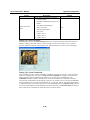
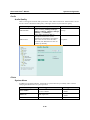
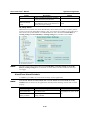
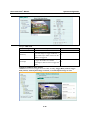
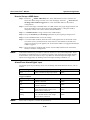
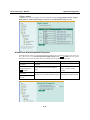
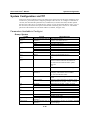
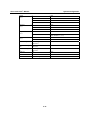
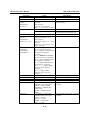
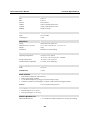
Parameters Available in Config.ini
Group: System
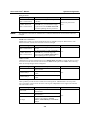
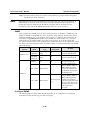
NAME
hostname
(r/w)
date
(r/w)
time
(r/w)
ntp
(r/w)
timezone
(r/w)
updateinterval
(r/w)
serialnumber
(r)
firmwareversion
(r)
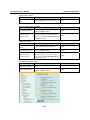
restore
(w)
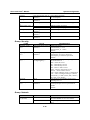
VALUE
<text string shorter than 40
characters>
<yyyy/mm/dd>
<keep>
<auto>
<hh:mm:ss>
<keep>
<auto>
<domain name or IP
address>
-12 to 12
0 to 2592000
<mac address>
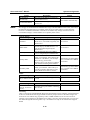
<text string shorter than 39 The version of firmware, including model,
characters>
company, and internal version number
Ex: VS7101-MOXA-0100x
0
Restore the system parameters to default
value.
Positive integer
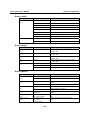
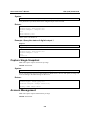
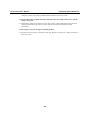
reset
(w)
do<1~2>
(w)
di<1~2>
(r)
overridedo<1~2>
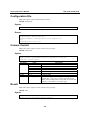
DESCRIPTION
host name of server
<VPort 3310 Video Server>
year, month, date separated by slashes
keep date unchanged
Use NTP to sync date/time automatically
hour, minutes, seconds separated by colons
keep date unchanged
Use NTP to sync date/time automatically
NTP server
<skip to invoke default server>
time zone, 8 means GMT +8:00
<8>
0 to Disable automatic time adjustment; a
nonzero number indicates the number of
seconds between NTP automatic update
intervals.
<0>
12 character mac address, without hyphens
Restore system parameters to default values
and restart the server after <value> seconds.
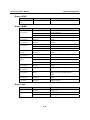
0 to 65535
-1
<state>
Restart the server after <value> seconds.
Do not restart the server.
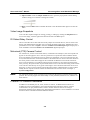
H: NC connected with COMMON
L: NO connected with COMMON
<state>
H: +13 to –30V
L: -30 to +3V
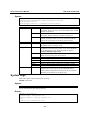
0
Enable setting relay
1
Disable setting relay
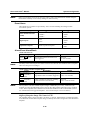
supportscriptversion <text string shorter than 10 The version of supported script/webpage
(r)
characters>
scriptversion
<text string shorter than 10 The maximum version of currently installed
characters >
script/webpage
4-38