1
25
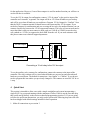
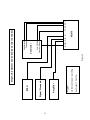
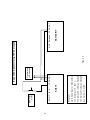
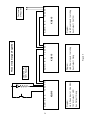
Connect pins 5 & 4 of the
XQ515 to pins 3 & 2 of the
SX1120RT inside the
equipment rack as per
Figure 4. Program the
XQ515 12V dc output to be
the first bank in the
XQ515uence. The
equipment rack will then
turn on first and off last.
(POWERED
BY
SX1120RT)
REMOTE
EQUIPMENT
RACK
PUSH
BUTTON
XQ515
SIGNAL
PROCESSING
EQUIPMENT
SX1120RT
AMPLIFIER
SX1120RT
AMPLIFIER
Figure 5
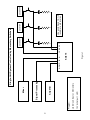
Connect pins 6 & 7 of the XQ515 to pins 1 & 2 of the first
SX1120RT as per Figure 3. Then connect pins 6 & 7 of the
first SX1120RT to pins 1 & 2 of the second SX1120RT.
Continue connecting as many SX1120RTs as needed.
There is no limit to the number of additional units that can
be connected in this way. Program the XQ515 Aux Output
to be the last bank in the XQ515uence. All the amplifiers
will then turn on last and off first.
SX1120RT
AMPLIFIER
Five Bank Expanded System Example