1
BCGMG - User Manual
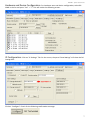
4 - Type the following parameters:
CardS1=X
CardS2=X
-> (where “X” is the value which should match the connected card reader code)
0-None
1-Mifare SRT Neokoros
2-RFID 125 Khz (any with protocol like Acura’s)
3-Bar Code + Code Reader
8-Mifare Duali DE-ABM6 ASCII
9-Acu Mifare AM-11
NOTE: To use a second card reader, the GIO configuration must be disabled.
6 - BMC Board/CLP Dexter μDX200/201 RS 485 Connection (Home Automation)
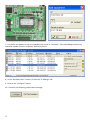
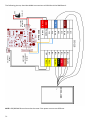
To connect a BMC board with a μDX200/201, follow the steps below:
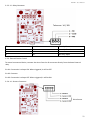
1 - Connect the CLP A pin to the pin 11 in the BMC Board;
2 - Connect the CLP B pin to the pin 12 in the BMC Board;
3 - Connect the CLP GND wire to the GND wire in the BMC Board;
4 - Using the NKHM software, open the “Settings” tab;
5 - Type the following parameters:
uDX.Clp0Enabled=(0=disabled, 1=enabled)
-> enables or disables the communication with CLP
uDX.Clp0Addr=(0, 1, 2, 3, ...)
-> correspondent value to the DNXET address in the CLP
uDX.Clp0ComType=(0=tcp/ip, 1=rs-232, 2=rs-485)
-> communication type (network, serial 232 or serial 485)
uDX.Clp0TcpMode=(0=client, 1=server)
-> tcp/ip mode (client or server)
uDX.Clp0Var=(1, 2, 3, ...)
-> number of variable to be accessed in CLP
uDX.Clp0BaudRate=(110, 300, 1200, 2400, 4800, 9600, 19200, 38400, 57600, 115200, 230400, 460800,
921600)
-> communication speed with the CLP
uDX.Clp0DataBits=(5, 6, 7, 8)
-> data bit communication with the CLP
uDX.Clp0StopBits=(0, 1)
-> stop bits to communication with the CLP
uDX.Clp0Parity=(0=par, 1=impar, 2=nenhum)
27