1
Real presentation power, anywhere you go
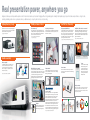
Being able to deliver a powerful presentation anywhere is vital for modern mobile business professionals. Weighing as little as 2.3kg and designed for reliability, Hitachi portable projectors pack the features and performance of larger models,
delivering outstanding results wherever your business takes you. Quick and easy to set up, they take the stress out of presenting.
Lightweight and easy to carry
Valuable performance features
Supplied with a soft carry case* these compact and light weight
models are not only easy to carry in the office, they are the ideal
presentation solution for visiting customers too.
Present without a PC*1
Large images in a limited space
Long lamp and Hybrid Filter life
Intelligent Eco Mode and 2000:1 contrast ratio*
Using a USB memory stick* or other suitable storage device, users
can display presentations or images through the projector without the
need of a computer. The thumbnail display ensures that menus are
easy to see, and there is also a slideshow function.
Hitachi projectors overcome the challenge of delivering presentations
in small rooms with limited space, as they can project a 60" (1.52m)
from less than 75" (1.9m) away.
A Hitachi Hybrid filter requires minimal maintenance and should
last as long as the projector lamp. And because replacement
lamps come with a new filter, you can simply replace both at the
same time making it unnecessary to clean the filter. Using the
new Eco Mode, lamp life is now up to 5000 hours* – enough for
years of bright effective mobile presentations.
When Intelligent Eco Mode is selected, the brightness of the lamp
automatically changes according to the level of the input signal.
The lamp becomes brighter when the input signal level is high and
darker when the level is low. In addition these projectors offer you a
higher contrast ratio of 2000:1.
2
*Softcase supplied with CPX11WN and CPWX12WN.
Low Total Cost of Ownership
*1 Available on the CP-X2521WN, CP-X3021WN, CPX11WN and CPWX12WN.
*2 Not compatible with all USB storage devices.
*Available on the CPX11WN, CPWX12WN, CP-X2521WN and CP-X3021WN.
*Up to 5000 hours on CP-X2521WN, CP-X3021WN, CPX11WN and CPWX12WN. Up to 4000 hours on CP-RX93.
Beginning of
slideshow
Unplayable slides
within slideshow
Lamp becomes less bright
Lamp becomes more bright
Versatile connectivity
End of slideshow
Wireless capability*
Eco Button
The USB wireless adaptor supports all IEEE802.11b/g/n
networks and enables the projector and computer to
communicate both directly or via a wireless network
infrastructure, letting you run presentations or lessons
wirelessly from your laptop.
*Available on the CP-X2521WN, CP-X3021WN, CPX11WN and CPWX12WN.
Without access point
communication
With access point
communication
Access point
Wireless Multi-user presentations*
Template function
Front air exhaust
The wireless presentation capabilities of these models combined
with the Live-viewer software allows up to four computer screens to
be displayed simultaneously. Individual usernames can be assigned
to connected computers making it easy to keep a track of
displayed presentations. This provides greater flexibility when
presenting and eliminates the clutter caused by cables.
This unique Hitachi feature allows you to project lines, grids and
maps onto a whiteboard, blackboard or flip chart, to make writing
and drawing and explaining easier.
Warm air is exhausted at the front of the projector, away from
your audience. The result is a quieter more comfortable meeting,
with less distraction.
You can switch to Eco Mode or Intelligent
Eco Mode quickly by pressing the Eco
Button. This puts the projector into the
most efficient mode (<0.4W in standby).
The Eco Button can also be customised
and you can assign certain functions to it
from the My Button menu.
Audio pass through
Audio pass through allows the user to listen to external speakers
via the projectors audio output whilst in standby mode, so you
experience audio without images. This feature preserves the lamp
life when you only need sound.
Crestron RoomView™*
HDMI input*
HDMI provides completely digital connections,
ensuring that lessons and presentations can
be delivered with the highest image quality.
RoomView™ software provides a custom configurable interface to
monitor, manage and control every device in every room remotely
from any computer. RoomView Connected™ Projector Support
Projectors with Crestron inside already connect directly to
RoomView Express software. Built-in network connectivity provides
instant status and remote technical support so your class or
meeting is never interrupted. Broadcast messaging ensures a safe
environment. Instructors can send an urgent memo to the main
office, and administrators can alert presenters in every room with
just one click. Schedule all the projectors throughout the facility to
turn off at the end of the day, saving energy and preserving lamps.
*Available on the CP-X2521WN, CP-X3021WN, CPX11WN and CPWX12WN.