1
4
SAFETY INSTRUCTIONS
Read these instructions.
Keep these instructions.
Heed all warnings.
Follow all instructions.
Indoor Installation
WARNING
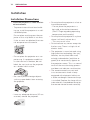
yyDo not place the projector in direct
sunlight or near heat sources such as
radiators, fires, stoves, etc.
- This may cause a fire.
yyDo not place flammable materials
such as aerosols near the projector.
- This may cause a fire.
yyDo not allow your children to cling to
or climb up to the projector.
- The projector may fall down and
cause personal injury or death.
Do
yy not place the projector directly on
a carpet, rug or place where ventilation is restricted such as a book shelf
or closet.
- This may cause the projector's internal temperature to rise and cause
a fire.
Do
yy not place the projector close to
sources of steam or oil such as a
humidifier or kitchen counter.
- This may cause a fire hazard or an
electric shock.
Do
yy not place the projector where it
might be exposed to excessive dust.
- This may cause a fire.
yyDo not use the projector in a damp
place such as a bathroom where it is
likely to get wet.
- This may cause a fire or an electric
shock.
yyDo not allow a tablecloth or curtain to
block the vents.
- This may cause the internal temperature of the projector to rise and
cause a fire.
yyThe distance between the projector
and the wall should be more than 30
cm for ventilation purposes.
- Otherwise, this may cause the internal temperature of the projector to
rise and cause a fire.
CAUTION
yyWhen installing the projector on a
table, be careful not to place it near
the edge.
- The projector may fall causing injury
to persons or damage to the projector. Make sure that you use a stand
suitable for the size of projector.
yyTurn off the projector, disconnect the
power supply and remove all connec
tions before moving the projector.
- A damaged cord may cause a fire
or an electric shock.
yyDo not install the projector on an
unstable or vibrating surface such as
a vibrating shelf or tilted surface.
- It may fall and cause injury.
yyBe careful not to tip the projector over
when connecting external devices to
the projector.
- This may cause injury to persons or
damage to the projector.