1
NT-SI-CN2I-OEM-ST-08-00236
Version: 3
Page: 3/102
Access to the IT system with digital certificates
under Microsoft Windows XP
PKI user manual
4.2.1
Preliminary measures .....................................................................................25
4.2.2
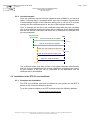
Overall schematic ...........................................................................................25
4.3
4.3.1
Download and installation...............................................................................26
4.3.2
Verification of the root certificate fingerprint ...................................................30
4.3.3
Contents of the RTE CA certificate.................................................................30
4.4
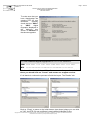
Generation of the key pair ..............................................................................33
4.4.2
Installation of the certificate ............................................................................34
4.4.3
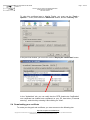
Contents and verification of your digital certificate .........................................35
Usage in your browser............................................................................................37
4.5.1
Authentication and encryption ........................................................................37
4.5.2
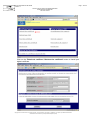
Example of accessing the "RTE Customer Services Portal" ..........................37
Mozilla Firefox ................................................................................................................39
5.1
Configuration for SSL/TS protocols ........................................................................39
5.2
Request for a digital certificate ...............................................................................39
5.2.1
Preliminary measures .....................................................................................39
5.2.2
Overall schematic ...........................................................................................40
5.3
Installation of the RTE CA root certificate...............................................................40
5.3.1
Download and installation...............................................................................40
5.3.2
Verification of the root certificate fingerprint ...................................................41
5.4
Downloading your certificate...................................................................................43
5.4.1
Generation of the key pair ..............................................................................45
5.4.2
Installation of the certificate ............................................................................45
5.4.3
Viewing and verification of your digital certificate ...........................................46
5.5
6.
Downloading your certificate...................................................................................31
4.4.1
4.5
5.
Installation of the RTE CA root certificate...............................................................26
Usage in your browser............................................................................................48
5.5.1
Authentication and encryption ........................................................................48
5.5.2
Example of accessing the "RTE Customer Services Portal" ..........................48
Certificates and email software ......................................................................................50
6.1
Outlook 2000/XP/2003............................................................................................50
6.1.1
Configuration ..................................................................................................50
6.1.2
User Guide......................................................................................................54
6.2
Outlook Express .....................................................................................................58
6.2.1
Configuration ..................................................................................................58
6.2.2
User Guide......................................................................................................61
6.3
Mozilla Thunderbird ................................................................................................63
6.3.1
Configuration ..................................................................................................63
6.3.2
User Guide......................................................................................................64
6.4
Lotus Notes.............................................................................................................66
Copyright RTE. This document is the property of RTE. All communication, reproduction or publication, even partial, is prohibited without written
authorisation from the Electricity Transport Network Operator (RTE)