1
Table of Contents
Table of Contents
Product Overview............................................................... 5
Package Contents.......................................................................... 5
System Requirements.................................................................. 5
Introduction.................................................................................... 6
Features............................................................................................. 7
Hardware Overview...................................................................... 8
Front View................................................................................. 8
Rear View.................................................................................. 9
Side View................................................................................... 9
Installation........................................................................10
Wireless Installation Considerations.....................................11
Zero Configuration Setup.........................................................12
Camera Setup Wizard.................................................................15
Windows Users.....................................................................15
Mac Users...............................................................................16
Manual Installation.....................................................................17
WPS - Push Button Setup..........................................................18
Mounting the Camera...............................................................19
mydlink............................................................................................20
Configuration....................................................................21
Accessing the Web Configuration Utility............................21
Live Video.......................................................................................22
Setup................................................................................................24
Wizard......................................................................................24
D-Link DCS-942L User Manual
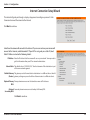
Internet Connection Setup Wizard.........................25
Motion Detection Setup Wizard..............................28
Network...................................................................................32
Wireless Setup.......................................................................34
Dynamic DNS .......................................................................35
Image Setup..........................................................................36
Audio and Video...................................................................37
Time and Date.......................................................................39
Video Clip...............................................................................40
Snapshot.................................................................................41
IP Filter.....................................................................................42
HTTPS Setup..........................................................................43
SD Recording.........................................................................44
Motion Detection................................................................45
Sound Detection..................................................................46
SD Management..................................................................47
Maintenance.................................................................................48
Admin......................................................................................48
System.....................................................................................49
Firmware Upgrade...............................................................50
Status...............................................................................................51
Device Info.............................................................................51
Log............................................................................................52
Wireless Security..............................................................53
3