1
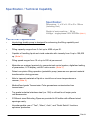
Control Panel Introduction
7
1
Filler Co., Ltd.
BAL-2001
Computerized Quantitative Filling Machine
POWER
2
6
MOTOR
F1
START
F2
STOP
13 14
8
9
10
11
12
4
3
5
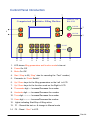
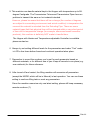
1. LCD shows filling parameters and function mode to be set
2. Power On /Off
3. Motor On /Off
4. Start / Stop to fill (“Stop” also for canceling the “Test” number)
5. Connector to “Pedal Switch”
6. Up / Down keys for the filling parameters on the Left in LCD
7. Up / Down keys for the function mode on the Right in LCD
8. Thousands digit --- Increase/Decrease the number
9. Hundreds digit ------Increase/Decrease the number
10. Tens digit ----------- Increase/Decrease the number
11. Ones digit ---------- Increase/Decrease the number
12. Lights indicating Start/Stop of filling action
13. F1 – Record the test no. & change to Manual mode
14. F2 – Reset “Sum” in LCD
Filler 08