1
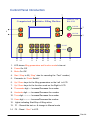
5. Sum: This number shows how many times the extrusion of material have
been performed by the machine. Therefore, in actual working, it represents
the bottles number already filled.
To re-zero, press F2 key.
We’ve added a small safety feature here: The machine will not operate while the cursor
(on the right hand side of LCD) is pointing the “Sum”. In another words, machine only
starts taking command ( Start or Stop) while the cursor is clearly pointing at “Test”,
“Manu” or “Auto”.
6. Test: This mode provide easy calibration for your first jar/ bottle.
Only the 2nd speed is set for speed adjustment in this “Test” function.
First, move the cursor pointing at “Test” in LCD, set approximate levels for
“Speed” (2nd speed) and “Suck Back”, leave Volume at “0000”. (Note:
Under “Manu” and “Auto” mode, machine will not operate when Volume
is left at “0000”).
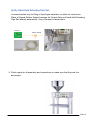
You can start extruding material into a jar/ bottle by pressing the “Start” button
or Pedal Switch.
This action can be stopped and still continue until the jar/ bottle is filled at
the level you desired. You can weight the filled bottle for precise quantity.
The total volume filled will be shown on the LCD as well.
Then, press F1 key to memorize this number. Then the functional cursor
is automatically moved to “Manu” mode. Now, the calibration is accomplished.
You may stay at this Manu mode to fill jars/bottles one at a time, or further
move the functional cursor “Auto” and start a continual operation.
Under both modes, following jars/ bottles will be filled with exactly equal volume.
Please Note: When the Speed has been significantly changed during operation,
the output Volume may be slightly shifted too. Re-calibration on volume may be
therefore needed.
Filler 19