1
U S E R
G U I D E
User Guide
Color Touch Screen
Color Screen
T A B L E
O F
C O N T E N T S
U S E R
G U I D E
INTRODUCTION
Table Of Contents
INTRODUCTION............................................... 4
PARTS DESCRIPTION
SAFETY WARNING & CAUTION..........................................
SAFETY GUIDELINES.........................................................
LIMITED 1 YEAR WARRANTY .............................................
WARRANTY INFORMATION................................................
PRODUCT REGISTRATION.................................................
4
5
6
7
8
PARTS DESCRIPTION................................... 12
PARTS INCLUDED.............................................................12
PARTS DESCRIPTION ......................................................13
INSTALLATION INSTRUCTIONS.......................................15
INSTALLATION.............................................. 16
INSTALLATION
Device Power Up ..............................................................21
CTS/CS Device Descriptions........................................... 22
CTS LAYOUT................................................................... 23
CS LAYOUT..................................................................... 23
OPERATING INSTRUCTIONS........................24
OPERATING INSTRUCTIONS
Navigating the Menu System.......................................... 24
Main Menu......................................................................... 24
View Camera...................................................................... 25
CS/CTS Alerts................................................................. 26
Show Alerts . .................................................................. 27
PROGRAMMING................................................................ 28
POWER LEVELS................................................................ 29
Custom Options.............................................................. 30
Diagnostics...................................................................... 32
INTERNET UPDATES
Trouble Codes................................................................ 33
Manual DPF Regeneration................................................ 35
Performance Tests.......................................................... 36
Injector Balance Rates................................................... 38
Options............................................................................. 40
APPENDIX
Alert Settings................................................................
Sound Duration..............................................................
Screen Layout................................................................
Display Background and MyStyle™...................................
Backlight Auto Dim..........................................................
Menu Time-out.................................................................
Tire Size........................................................................
Factory Reset.................................................................
2
40
42
42
43
44
45
45
47
U S E R
G U I D E
TABLE OF CONTENTS
Help Menu........................................................................ 49
49
50
51
52
Fusion Update Software................................................. 53
Possible Programming Errors....................55
Update Required............................................................. 55
Non-Stock condition....................................................... 55
PARTS DESCRIPTION
Product Info..................................................................
Vehicle Info...................................................................
Contact Info..................................................................
Tech Support Tools.........................................................
INTRODUCTION
Camera Delay . ............................................................... 48
Accessories..................................................56
Edge Accessories System (EAS)........................................ 56
APPENDIX...................................................... 61
Edge Backup Camera........................................................ 61
Edge Mounting Solutions................................................ 62
Trouble Shooting/Tips..................................................... 63
INTERNET UPDATES
Copyright© 2009 Ver 03
OPERATING INSTRUCTIONS
Commonly Used Acronyms...........................64
INSTALLATION
OEM EGT Locations......................................................... 57
APPENDIX
For additional questions not found in the user guide call:
Edge Products Technical Support
(888) 360-EDGE (3343)
8:00 am - 5:00 pm MST
To expedite your support call, please have your
Vehicle Information, Part Number, Serial Number,
and Date of Manufacture ready
prior to calling Technical Support.
The Edge Products information is found on the label
located on the bottom of the device.
3
I N T R O D U C T I O N
S A F E T Y
W A R N I N G
UU SS EE RR GG UU II DD EE
&
C A U T I O N
INTRODUCTION
SAFETY TERMS
Throughout this User Guide (hereafter noted as User Manual or Manual) you
will see important messages regarding your safety or the protection of your vehicle. These messages are designated by the words WARNING or CAUTION.
PARTS DESCRIPTION
WARNING indicates a condition that may cause serious injury or death
to you, your passengers or others nearby. Pay careful attention to these Warning
messages, and always comply with them. They could save a life.
CAUTION indicates a condition that could cause damage to your vehicle. It
is important to install and operate your EDGE product in conformance with instructions in this Manual. Caution messages alert you to particularly important
things to watch for to keep your vehicle operating the way you want it to.
INSTALLATION
The Edge product you have bought is a high-performance product. As such, it
does present some risks of which you should be fully aware. Do not use this
product until you have carefully read all the following safety information and
the Owner Agreement.
OPERATING INSTRUCTIONS
WARNING
Misapplication or misuse of this product could lead to a serious or fatal
accident. Comply with all safety information below, and in your vehicle
owner’s manual. Follow safety, installation and operating instructions in
this User Manual to assure proper use.
INTERNET UPDATES
NOTE: After the device has been installed, the flash screen and logo will
display followed by a warning and compliance directive. To indicate you accept
and acknowledge the warning and compliance, press the [ENTER] or [YES]
button.
APPENDIX
4
U S E R
I N T R O D U C T I O N
G U I D E L I N E S
INTRODUCTION
S A F E T Y
G U I D E
SAFETY GUIDELINES
2. Select a position on the windshield or dashboard to mount the device where it
will not impair your view. You must be able to see the road, traffic, and pedestrians without interference. Be sure your mounting location meets state and
local laws regarding placement of devices on the windshield or dashboard.
INSTALLATION
3. Do not operate the device while driving. Perform all adjustments or changes
while stopped. Changing a setting while under way can interfere with your attention to roadway conditions.
PARTS DESCRIPTION
1. Do not exceed legal speed limits on public roadways. Use any enhanced
speed capabilities of this product only in closed circuit, legally sanctioned racing environments expressly for this purpose. Loss of control from speeding
on a public road could seriously injure you, your passengers, or others on the
roadway.
5. Some modifications may affect other parts of your vehicle. For example, if
you remove/adjust the speed limiter in your vehicle, be sure your tires and other
components are rated for the increased speeds they will have to withstand. Not
doing so can lead to loss of vehicle control. Modify the speed limiter only for
use in closed circuit, legally sanctioned racing environments, not for use on
public roadways.
INTERNET UPDATES
6. Do not use the Performance Tests feature to break any traffic laws. Perform
these tests only where they are legal and safe.
OPERATING INSTRUCTIONS
4. “Stacking” performance-enhancing devices or other improper installation
could cause powertrain failure on the road. Other products may have features
incompatible with your Edge device. Follow all installation and operating instructions, and don’t stack products.
7. Some features may not function on all vehicle models. Check a newlyinstalled device for all features you intend to use. Do not rely on their working
without checking first.
APPENDIX
NOTE: Dispose of this product consistent with local codes. Return to your
electronics supplier for proper handling.
5
I N T R O D U C T I O N
L I M I T E D
1
Y E A R
UU SS EE RR GG UU II DD EE
W A R R A N T Y
INTRODUCTION
LIMITED 1 YEAR WARRANTY
PARTS DESCRIPTION
Edge Products, LLC, (hereafter “SELLER”) gives Limited Warranty as to
description, quality, merchantability, fitness for any product’s purpose, productiveness, or any other matter of SELLER’s product sold herewith. The SELLER
shall be in no way responsible for the product’s open use and service and the
BUYER hereby waives all rights other than those expressly written herein. This
Warranty shall not be extended or varied except by a written instrument signed
by SELLER and BUYER.
INSTALLATION
The Warranty is Limited to one (1) year from the date of sale and limited solely
to the parts contained within the product’s kit. All products that are in question
of Warranty must be returned shipping prepaid to the SELLER and must be accompanied by a dated proof of purchase receipt. All Warranty claims are subject
to approval by Edge Products Inc.
Under no circumstances shall the SELLER be liable for any labor charged or
travel time incurred in diagnosis for defects, removal, or reinstallation of this
product, or any other contingent expenses.
OPERATING INSTRUCTIONS
If the BUYER sends back a failed unit that is out of warranty and chooses to buy
a refurbished unit, the refurbished unit will only carry a 90 day warranty. If the
BUYER purchases a new unit at a predetermined discounted rate, it will have
the standard 1 year warranty.
Under no circumstances will the SELLER be liable for any damage or expenses
insured by reason of the use or sale of any such equipment.
INTERNET UPDATES
THE INSTALLATION OF THIS PRODUCT INDICATES THAT THE BUYER
HAS READ AND UNDERSTANDS THIS AGREEMENT AND ACCEPTS ITS
TERMS AND CONDITIONS.
IN THE EVENT THAT THE BUYER DOES NOT AGREE WITH THIS
AGREEMENT, THE BUYER MAY PROMPTLY RETURN THIS PRODUCT, IN A NEW AND UNUSED CONDITION, WITH A DATED PROOF OF
PURCHASE, TO THE PLACE OF PURCHASE WITHIN THIRTY (30) DAYS
FROM DATE OF PURCHASE FOR A FULL REFUND.
APPENDIX
NOTE: This warranty is void for any new products purchased through auction
websites. Warranty is valid only for new products purchased through Authorized
Dealers (proof of purchase required for all warranty claims).
6
U S E R
G U I D E
I N F O R M AT I O N
IMPORTANT INFORMATION ABOUT YOUR VEHICLE’S WARRANTY
CAUTION: Please keep in mind that towing in anything higher than the towing level and hard driving in race or extreme performance levels is not recommended.
NOTE: Even if you disconnect your unit, your dealer can detect the use of any
programmer—even if the unit has been removed.
APPENDIX
Thank you for purchasing the Edge CS and CTS products. The CS and CTS
products have been developed and produced from the highest quality materials available to ensure the best performance for years to come. If you have any
concerns or questions, please contact us.
INTERNET UPDATES
You have strong legal protection as a consumer in regard to your vehicle’s warranty. However, Edge strongly recommends you always disconnect and remove
your module/programmer and monitor when you take your vehicle to a dealer
for warranty work. In addition, leaving the product connected may affect dealer
diagnostic analysis and CAN tool functions. Edge makes every effort to produce
product that can be easily removed.
OPERATING INSTRUCTIONS
However, the reality is that many dealerships have been known to void warranties on vehicles that use aftermarket products as a matter of policy. This applies
in particular to those aftermarket products that produce horsepower, such as
performance enhancement “chips,” modified intake manifolds, or aftermarket
exhaust systems, regardless of product brand.
INSTALLATION
Consumers of aftermarket products are protected by the Federal MagnussonMoss Warranty Act. The Act states that if something breaks on your vehicle and
you take it in for warranty repair, the dealer must honor your warranty unless
whatever modifications you have added to your vehicle actually caused the problem in question.
PARTS DESCRIPTION
Many of our customers ask, “Will your product void my vehicle’s manufacturer’s warranty?” While the answer is straightforward from a legal standpoint,
it’s important to educate our customers (and all aftermarket consumers) on some
industry realities and offer some common sense precautions to minimize your
risk. Edge is committed to providing quality products that are safe to use. Our
products do not cause damage to a vehicle when used as intended.
INTRODUCTION
W A R R A N T Y
I N T R O D U C T I O N
7
I N T R O D U C T I O N
P R O D U C T
UU SS EE RR GG UU II DD EE
R E G I S T R AT I O N
INTRODUCTION
PLEASE take the time to register your product on line at edgeproducts.com.
Follow the instructions at link: http://www.edgeproducts.com/product_registration.php
BENEFITS OF PRODUCT REGISTRATION
PARTS DESCRIPTION
INSTALLATION
OPERATING INSTRUCTIONS
Your Safety - registering your product allows us to know exactly which product
you have and provide important product updates to you that improve the quality
and/or safety of the product
Enhanced Features - almost all Edge products are easily updated via the internet. We are constantly adding new features and improvementes to our product
that we know you will want to enjoy
Confirmation of Ownership - provides a record in case of product loss, theft,
or required warranty work. When you call us for support our team will already
have much of the information they need to help you
Improved Product Development - helps us better understand you (our customers) and design products that meet your needs
Special Offers - allows us to inform you about special offers on accessories and/
or new products that fit your vehicle and enhance your driving experience
Extended Warranty Plan Opportunity - within the first 90 days of ownership,
Edge offers the option to buy a 1-year warranty extension to all customers who
register their product!
CAUTION: RETURN YOUR VEHICLE TO STOCK BEFORE TAKING IT TO A
SERVICE CENTER.
INTERNET UPDATES
APPENDIX
If you take your vehicle to a service center they may, by your request or otherwise, update your vehicle’s calibrations. All Edge modules and programmers
are built to operate with OEM calibrations. If this happens and your vehicle
has not been returned to stock your device will no longer be capable of programming your vehicle. Therefore it is important that you return your vehicle to
stock before taking it in for service. Edge updates its active products (i.e. those
currently being manufactured) to work effectively with updated OEM calibrations. However, this process can takes some time as Edge is not always made
aware of calibration changes made by the OEM. In the case of discontinued
products, Edge cannot ensure that your unit will work effectively if you take
your vehicle to a dealership and you are given, by your request or otherwise, a
new calibration.
8
U S E R
G U I D E
I N T R O D U C T I O N
INTRODUCTION
Programming your vehicle may expose existing defects in your
vehicle’s PCM that could disable your vehicle. It is advised that
you do not program your vehicle in remote locations in case of
vehicle failure.
CAUTION: The Evolution employs carefully modified strategies that are designed to be utilized on unmodified (stock) vehicles only.
Edge Products will not be responsible for any damages caused by using the Evolution on a vehicle that has been modified from a stock configuration.
Failure to return to stock may result in PCM failure or engine damage.
OPERATING INSTRUCTIONS
If you have used another tuner/programmer on your vehicle, you will need
to program back to stock and remove the device before using the Edge Products
Device.
INSTALLATION
Using any of these modifications (either alone or in any combination) in
conjunction with the Evolution is NOT RECOMMENDED as it may cause an
excessively lean condition which could result in engine damage.
PARTS DESCRIPTION
Many aftermarket components such as cold air intake (CAI) kits, exhaust
systems, and throttle body spacers as well as forced induction systems (turbochargers, superchargers, nitrous oxide, etc) alter the calculated airflow characteristics of the engine. In addition, mechanical modifications to the engine such
as displacement changes, camshaft modification, and cylinder head modification
may alter calculated airflow characteristics.
INTERNET UPDATES
APPENDIX
9
I N T R O D U C T I O N
UU SS EE RR GG UU II DD EE
INTRODUCING THE CS AND CTS MODELS
INTRODUCTION
From the pioneers in display-based technology and engine performance management, comes the CS (Color Screen) and CTS (Color Touch Screen) for popular
domestic late model trucks and SUVs. Edge has reinvented four of its most popular
lines – the Insight*, Mileage Max*, Evolution, and Juice/Attitude– with an all-new
look and cool new features.
*Coming soon - Check
PARTS DESCRIPTION
THE BREAKDOWN
www.edgeproducts.com for information
Four product lines, two screen options. It’s just that simple. Edge has taken its
best-known products – the Insight, Mileage Max, Evolution, and Juice/Attitude –
and given them a fresh look, improved features and benefits, and pricing that will
make the competition obsolete. Consumers can pick the product that suits their
needs and then choose the screen option that best fits them.
INSTALLATION
THE CS (COLOR SCREEN)
OPERATING INSTRUCTIONS
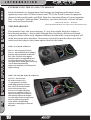
The CS – an acronym for Color
Screen – has a familiar feel of Edge’s
popular legacy Attitude and Evolution. This new full-color digital
display features a ruggedized case,
user-friendly buttons, an easy-tonavigate menu, and a light sensitivity
sensor that automatically
adjusts the brightness for improved
night viewing.
THE CTS (COLOR TOUCH SCREEN)
INTERNET UPDATES
APPENDIX
The CTS – an acronym
for Color Touch Screen
– is the pinnacle of what
made Edge popular: Innovation. The CTS model features
a full-color, button-free,
touch-screen digital display;
an easy-to-navigate menu; a
light sensitivity sensor that automatically adjusts the brightness for improved viewing; and a
video-in jack that supports
most off-the-shelf backup
cameras or DVD players with an
RCA jack.
10
U S E R
G U I D E
I N T R O D U C T I O N
INTRODUCTION
MOUNTING OPTIONS & ACCESSORIES
PARTS DESCRIPTION
Both CS and CTS devices come with a standard
windshield mount from Arkon Resources Inc.,
the leader in device-mounting solutions. The
CS and CTS devices have a standard two-tab
system built in so they can accept an array of
different Arkon mounts. Additionally, the CS
unit will fit into any of Edge’s popular custom
dash pods or pillar mounts. The CS and CTS
will accept various sensors (e.g., EGT sensor,
wide band O2 sensor, etc.), so customers can
customize their devices with accessories
to fit their needs.
INSTALLATION
*NOTE: The CTS can also be used
with Edge’s custom dash pods by
using an adapter kit.
OPERATING INSTRUCTIONS
INTERNET UPDATES
APPENDIX
11
P A R T S
D E S C R I P T I O N
P A R T S
INTRODUCTION
PARTS DESCRIPTION
1.
2.
3.
4.
5.
6.
7.
INSTALLATION
1
OPERATING INSTRUCTIONS
INTERNET UPDATES
APPENDIX
12
U S E R
G U I D E
I N C L U D E D
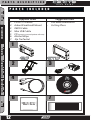
Supplied Items
CS or CTS Device
•
Arkon Windshield Mount
•
OBDII Cable
Mini USB Cable
CD (contains manual/update software)
Alcohol Wipe
Zip Tie Packet
Suggested Tools
Flat head screwdriver
Cutting Pliers
2
3
4
5
6
7
U S E R
P A R T S
G U I D E
P A R T S
D E S C R I P T I O N
D E S C R I P T I O N
INTRODUCTION
The Parts Description section of this manual describes each of the parts
included in your CS/CTS kit both physically as well as functionally.
CTS Device
PARTS DESCRIPTION
The CTS device provides you with an interface to change
the performance programming on your vehicle as well
as gives you a multi-color touch screen display which
allows you to monitor multiple vehicle parameters in real
time. It is equipped with a large touch screen, a USB port
(for PC communication and electronic updates), a 16-pin
connector (for main vehicle communication), a video-in
jack, and a six-pin accessories connector which allows
you to further extend the capabilities of the device (see
the accessories page in the back of the manual).
CS Device
INSTALLATION
The CS device provides you with an interface to change
the performance programming on your vehicle as well as
gives you a multi-color screen display which allows you
to monitor multiple vehicle parameters in real time. It is
equipped with a full color screen, a Menu button, Up and
Down Arrow button, an Enter button, USB port (for PC
communication and electronic updates), a 16-pin connector (for main vehicle communication), and a six-pin
accessory connector.
OPERATING INSTRUCTIONS
CS/CTS Windshield Mount
The windshield mount supplied with your CS/CTS kit is
designed to give you flexibility in mounting your device
anywhere you’d like on your windshield. It is equipped
with a locking suction cup, a vertically adjustable arm,
and a 180 pivot head which allows you to fine tune the
viewing angle to your preference.
INTERNET UPDATES
CS/CTS OBDII Connector
APPENDIX
The OBDII connector/cable has two plugs, a smaller male
16-pin plug that connects to the back of your device, and
a larger rectangle style 16-pin male connector which
connects to the OBDII port located under the driver’s side
dashboard. The purpose of this connector is to provide
a communication link between your vehicle and your
device as well as provide a power and ground source.
13
P A R T S
D E S C R I P T I O N
INTRODUCTION
PARTS DESCRIPTION
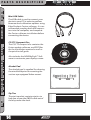
Mini USB Cable
The USB cable is used to connect your
device to your PC in order to perform
firmware and calibration updates using
Edge Products Fusion software. It is recommended you plug both USB connectors into the computer, and complete
the Fusion software installation before
connecting the device.
INSTALLATION
CS/CTS Compact Disc
The CS/CTS compact disc contains the
Fusion update software, and PDF files
for the Installation manual as well as
the quick install guide.
Also includes the NEW MyStyle™ Software to customize your display screen.
OPERATING INSTRUCTIONS
Alcohol Pad
The alcohol pad is supplied for cleaning
the windshield prior to mounting the
suction cup equipped Arkon mount.
INTERNET UPDATES
APPENDIX
Zip Ties
The zip tie packet contains zip ties to
help you secure the OBDII cable out of
the way under the dash.
14
U S E R
G U I D E
U S E R
I N S T A L L A T I O N
G U I D E
I N S TA L L AT I O N
I N S T R U C T I O N S
The OBDII port is a 16-pin connector like the illustration below.
INTRODUCTION
Step 1: Locating the OBDII Port
PARTS DESCRIPTION
OBDII PORT
INTERNET UPDATES
APPENDIX
15
OPERATING INSTRUCTIONS
OBDII LOCATIONS
*07 + Ford Superduty
OBDII ports are located on the
left side of the wheel instead of the
right
* 94-97 Ford Powerstrokes are located on the passenger side below and
to the left of the glove box.
INSTALLATION
The OBDII port is located under
the dash below the steering
wheel. The OBDII
port is placed in
different locations
under the dash for
different applications; refer to the
OBDII port location
drawing (left) to
help you locate your
OBDII port.
I N S T A L L A T I O N
U S E R
G U I D E
INTRODUCTION
Step 2: Connecting/Routing the OBDII Cable
PARTS DESCRIPTION
Remove the panel on the
side of the dashboard to
provide access to route
the OBDII cable from the
OBDII port up to the top
of the dash.
*On some vehicles you may
also need to remove the panel
directly under the steering
wheel
INSTALLATION
OPERATING INSTRUCTIONS
INTERNET UPDATES
Once you’ve removed
the necessary panels,
connect the OBDII
cable to the OBDII
port, and route the
cable under the dash,
out the side panel, up between the door seal trim
and the edge of the dash.
Tuck the cable back as far
as you can as you route it
up to the dash.
APPENDIX
16
*Note: Leave
6-10 inches of
cable exposed on top
of the dash so you have
room to position the
control unit.
U S E R
G U I D E
I N S T A L L A T I O N
*Select a location that will
not impair your ability to view
the road/traffic/pedestrians
while you drive.
PARTS DESCRIPTION
Position the device
and the mount on the
windshield in the desired
location.
Pay attention to
where the suction
cup will mount on the
windshield.
INTRODUCTION
Step 3: Position the Control Unit
INSTALLATION
OPERATING INSTRUCTIONS
INTERNET UPDATES
Once you’ve identified
the suction cup position on the windshield,
use the supplied alcohol wipe to thoroughly
clean the area. After
you’ve wiped the area
clean, let it dry for 2-3
minutes.
APPENDIX
17
I N S T A L L A T I O N
U S E R
G U I D E
INTRODUCTION
Step 4: Connect the Mount and OBDII Cable
PARTS DESCRIPTION
Before you attach the suction cup portion of the
mount to the window
attach it to the device.
Insert the tabs on the
mount into the slots on
the back of the device and
slide up (CTS) or to the
side (CS) until it stops.
INSTALLATION
*The mounting tabs are a tight
fit by design in order to maintain a solid connection. You
may add a small amount of lithium
lube to aid in insertion.
OPERATING INSTRUCTIONS
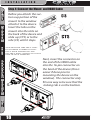
Next, insert the connector on
the end of the OBDII cable
into the 16-pin connector on
the back of the device (this is
easier if done prior to
mounting the device on the
window). The connector only
fits one way so be sure that the
locking tab is on the bottom.
INTERNET UPDATES
APPENDIX
18
U S E R
I N S T A L L A T I O N
G U I D E
UNLOCKED
Once the alcohol has dried you’re
ready to attach the mount to
the windshield.
INTRODUCTION
Step 5: Position and Lock the Unit on the
Windshield
PARTS DESCRIPTION
You’ll notice that the
mount has a locking tab.
This tab creates the suction
that will lock the mount to
the windshield. Make sure
the lock is in the “Unlocked”
position. Position the mount
where you’ve cleaned the
windshield, press firmly,
and push the tab to the
“Locked” position.
OPERATING INSTRUCTIONS
Once you’ve locked the mount to the
windshield, use the adjustment knobs to
fine tune the viewing angle and height of
the CTS/CS device.
INSTALLATION
LOCKED
VERTICAL ADJ. KNOB
INTERNET UPDATES
This knob will allow you
to adjust the viewing
angle and height of the
control unit up or down.
VARIABLE ANGLE ADJ KNOB
APPENDIX
This knob will allow you to
adjust the viewing angle of the
control unit in both horizontal
and vertical fashions. Use it to
fine tune your viewing angle.
19
I N S T A L L A T I O N
U S E R
G U I D E
INTRODUCTION
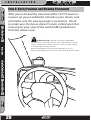
Step 6: Verify Position and Viewing Placement
PARTS DESCRIPTION
After you’ve locked the mount and the CS/CTS device is
in place on your windshield, sit back in your drivers seat
and make sure the viewing angle is as desired. Check
to make sure the device doesn’t create a blind spot that
may impair your view of the road/traffic/pedestrians
from the drivers seat.
INSTALLATION
WARNING: Some states prohibit
mounting devices that may obstruct your
view. Please check local and state laws
to ensure compliance.
For alternate mounting options visit
www.edgeproducts.com or www.arkon.com
OPERATING INSTRUCTIONS
INTERNET UPDATES
APPENDIX
20
U S E R
G U I D E
I N S T A L L A T I O N
INTRODUCTION
Step 7: Remove Cable Slack/Replace Panels
PARTS DESCRIPTION
After positioning
the device and the
mount, remove any
slack in the OBDII
cable and coil it behind the side panel
you removed earlier.
Use the supplied zip
ties to secure the
coiled cable from
moving, falling down
under the dash, or interfering with pedal operation. Replace all panels
removed during installation.
INSTALLATION
OPERATING INSTRUCTIONS
21
APPENDIX
The CS/CTS device will not power up until the vehicle is started. If
you wish to power the device prior to starting the vehicle, turn the
key to the run position and press the menu button (CS) or touch the
screen (CTS).
INTERNET UPDATES
Device Power Up
I N S T A L L A T I O N
C T S / C S
U S E R
D e v i c e
INTRODUCTION
2
4
3
G U I D E
D e s c r i p t i o n s
5
6
7
3
PARTS DESCRIPTION
1
INSTALLATION
OPERATING INSTRUCTIONS
8
1
2
9
3
4
10
5
INTERNET UPDATES
APPENDIX
8
22
9
6
7
U S E R
G U I D E
I N S T A L L A T I O N
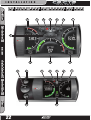
CTS L AY O U T
3.
5.
6.
1. Up/Down Arrow Button - On the JUICE ATTITUDE these buttons are used to toggle the
2.
3.
5. Power Level Indicator - The power level indicator represents the current power level. 0
represents stock.
6. Backdown Indicator -
(Juice/Attitude only) The backdown indicator light will illuminate
(yellow) when the Juice module is decreasing power added by the device while exceeding a
backdown limit. The light will contain one of the following characters; E = EGT, S = Transmission
Slip, C = Cold Engine.
Right Gauge - The right gauge is one of two analog style gauges.
the gauge parameters. In the menus it allows you to select the highlighted option.
9. Center Gauge - The center gauge is a bar style gauge.
23
APPENDIX
7.
8. Enter Button - The enter button when pressed from the main screen will allow you to change
INTERNET UPDATES
4.
power level up/down. On the EVOLUTION, INSIGHT and MILEAGE MAX these buttons may be
used for future feature enhancements. In the menus these buttons are used to select the menu
items and increase or decrease values.
Menu Button - The menu button gives you access to the main menu.
Left Gauge - The left gauge is one of two analog style gauges. The displayed parameter for
all gauges can be changed by pressing the enter button, choosing the desired gauge, and selecting a different parameter from the drop down list.
Alert Indicator - The alert indicator light will illuminate (red) when an alert limit is exceeded. When this light contains an “R,” it indicates that your Diesel Particulate Filter (DPF) equipped
vehicle is performing a regeneration cycle.
OPERATING INSTRUCTIONS
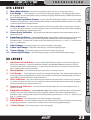
CS L AY O U T
INSTALLATION
7.
8.
9.
10.
PARTS DESCRIPTION
4.
for all gauges can be changed by simply touching the gauge and choosing a different parameter
from the drop down list.
Power level up/down Arrows - On the JUICE ATTITUDE these buttons are used to toggle
the power level up/down. On the EVOLUTION, INSIGHT and MILEAGE MAX these buttons may be
used for future feature enhancements.
Alert Indicator - The alert indicator light will illuminate (red) when an alert limit is exceeded. When this light contains an “R,” it indicates that your Diesel Particulate Filter (DPF) equipped
vehicle is performing a regeneration cycle.
Power Level Indicator - The power level indicator represents the current power level. 0
represents stock.
Backdown Indicator - (Juice/Attitude only) The backdown indicator light will illuminate
(yellow) when the Juice module is decreasing power added by the device while exceeding a
backdown limit. The light will contain one of the following characters; E = EGT, S = Transmission
Slip, C = Cold Engine.
Right Gauge - The right gauge is one of three analog style gauges.
Lower Left Gauge - The Lower Left Gauge is one of two digital gauges.
Center Gauge - The Center gauge is one of three analog style gauges.
Lower Right Gauge - The Lower Right Gauge is the scecond of two digital gauges.
INTRODUCTION
1. Main Menu button - The main menu button gives you access to the main menu.
2. Left Gauge - The left gauge is one of three analog style gauges. The displayed parameter
OPERATING INSTRUCTIONS
N a v i g a t i n g
t h e
U S E R
M e n u
G U I D E
S y s t e m
INTRODUCTION
Main Menu
PARTS DESCRIPTION
INSTALLATION
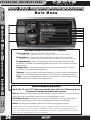
The main menu consists of 6 options:
•
View camera - shows camera the camera image.
•
Show alerts - shows the current, active alerts and their current set values.
NOTE: only present when a camera is installed on a CTS.
NOTE: This menu only appears when there is an alert active.
OPERATING INSTRUCTIONS
•
Programming - allows you to program the vehicle to one of the pre-tuned
•
Diagnostics - gives you the ability to scan and clear trouble codes, as well as
•
•
power levels included with the Mileage Max or Evolution. This is not present on the
Juice-Attitude.
data stream certain key vehicle functions.
Options - gives you access to the Alert Settings, the Screen Layout, and the Brightness menus. All of these menus will allow you to change their related parameters.
Help - is used to display product and vehicle information, as well as Edge Products
contact information, and technical support tools.
INTERNET UPDATES
Menu Navigation Buttons
Both the CS and CTS devices provide you with the following three
buttons for navigating the menu system:
Menu: The Menu button allows you to enter the main menu (CS only). Once you are in the
APPENDIX
main menu you’ll use the Menu button to return to the previous screen.
UP/Down Arrow: The Up/Down Arrow button will allow you to toggle up or down
through the menu options, you’ll notice it highlights each option as you toggle.
Enter: Pressing the enter Button will select the currently highlighted option.
24
Note: With the CTS device you can simply touch the option you’d
like to select on the menu screen. As a touch screen device it
will automatically select the option you’ve touched and advance
you to the selected option screen.
U S E R
G U I D E
OPERATING INSTRUCTIONS
INTRODUCTION
WARNING: YOU SHOULD NOT OPERATE THIS
DEVICE WHILE DRIVING. PERFORM ALL
ADJUSTMENTS OR CHANGES WHILE STOPPED.
PARTS DESCRIPTION
The menu items and operating instructions contained in the
following several pages are meant to cover a wide variety of
vehicles, as such some of the options/features covered in the
operating instructions may not apply to your vehicle. Your CS/
CTS will display only the options/features that your vehicle’s
computer system is capable of executing.
View Camera
If you have a back up camera or other RCA device connected to the
CTS, the view camera menu item will be active. It will not be active
if you don’t have a device connected.
WARNING: Do not rely solely on the camera image for backing
up. It is possible for the camera image to freeze. Always use your mirrors, and look behind you before backing up. Objects in the view may be
closer than they appear. If you are using a camera not manufactured by
Edge Products, the image may be reversed.
INTERNET UPDATES
If the CTS can detect gear position, when the gear selector is placed
in reverse the CTS screen will automatically show the camera image.
OPERATING INSTRUCTIONS
The view camera menu item will display the back up camera or
other RCA jack device you have connected when you select the
menu item. Once you’ve selected View Camera, simply touch the
screen to return to the Main Menu.
INSTALLATION
(CTS-Only)
APPENDIX
25
OPERATING INSTRUCTIONS
C S / C T S
U S E R
G U I D E
A l e r t s
INTRODUCTION
The CS/CTS device is equipped with an alert system that notifies the
user when vehicle parameters are outside a user-defined value.
PARTS DESCRIPTION
INSTALLATION
OPERATING INSTRUCTIONS
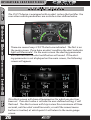
There are several ways CS/CTS alerts are indicated. The first is on
the main screen. If you have an alert condition the alert indicator
light will illuminate. On the main screen the alerting parameter
will flash red and the alert notification will sound. If the alerting parameter is not displayed on the main screen, the following
screen will appear.
INTERNET UPDATES
APPENDIX
This Alerts screen will show all parameters for which an alert has
been set. If an alert value is outside the user-defined setting, it will
flash red. The Alerts screen will stay in view for a minimum of three
seconds, until no alert condition exists, or until the screen/menu
button is touched, at which point it will return to the main gauge
screen.
26
U S E R
G U I D E
OPERATING INSTRUCTIONS
Show Alerts
INTRODUCTION
PARTS DESCRIPTION
INSTALLATION
If you have exited the Alerts screen (shown on the previous
page) you can return to the screen by entering the main
menu and selecting the Show Alerts menu.
OPERATING INSTRUCTIONS
The Show Alerts Menu item is a dynamic menu item,
meaning it only appears under certain conditions. If you
aren’t currently meeting/exceeding an alert then the Show
Alerts menu item will not be displayed in the Main Menu.
INTERNET UPDATES
APPENDIX
27
OPERATING INSTRUCTIONS
U S E R
G U I D E
PROGRAMMING
INTRODUCTION
PARTS DESCRIPTION
INSTALLATION
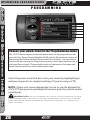
Choose your power level in the Programming menu:
OPERATING INSTRUCTIONS
The CS/CTS device comes ready with power levels to be programmed into
your vehicle’s Power Control Module (PCM) (see the Power Levels section of
the manual for further detailed Power Level descriptions). You can choose
these levels by entering the Programming menu, and choosing from one of
the listed Power Levels. The available levels will depend on the make and
model of your vehicle as well as the product type.
INTERNET UPDATES
Select the power level that best suits your needs by highlighting it
and pressing enter (or simply touching it if you’re using a CTS).
NOTE: Please visit www.edgeproducts.com to see the detailed list
of CS/CTS dyno proven power/performance gains by vehicle make/
model/year.
APPENDIX
WARNING: Do not combine, or “stack” chips (modules) to gain
more horsepower. The chips could be incompatible and result in powertrain failure or create dangerous conditions leading to a serious or
fatal accident.
28
U S E R
G U I D E
OPERATING INSTRUCTIONS
POWER LEVELS
INTRODUCTION
PARTS DESCRIPTION
Trans Only- The Trans Only level only makes changes to the transmission.
It will provide firmer transmission shifts which help increase transmission life.
specifically tuned for optimum fuel economy, we recommend using this level for
daily driving.
Towing - The towing level is designed for towing, Tuning strategies are optimized to provide power where it is needed most in order to move a load.
INTERNET UPDATES
Economy - The economy level is the lowest power setting. It has been
OPERATING INSTRUCTIONS
WARNING: Performance and Extreme levels are not intended
for, and should not be used for towing. Do not exceed your vehicle’s
max GVWR as outlined in the vehicle’s owner’s manual. Doing so may
result in loss of vehicle control and cause bodily injury.
INSTALLATION
The CS/CTS Evolution typically has 4 levels, and each is tuned specifically for different driving situations. The level names are reflective of what the driving level should be used for. As a general rule
of thumb the Economy level has the lowest power output, and the
Extreme level has the highest power output. The Performance, and
Extreme levels should be used only when you desire a high power
output from the vehicle.
Performance - The Performance level is a high power level. The fuel
Extreme - This is the highest setting for the Evolution. The fuel injection
and timing strategies are aggressively tuned to extract high performance from
your vehicle without sacrificing drivability or durability.
29
APPENDIX
injection and timing strategies are tuned semi aggressively to extract substantial
power gains from the vehicle without sacrificing drivability or durability.
OPERATING INSTRUCTIONS
U S E R
G U I D E
Cust o m O p t i o n s
INTRODUCTION
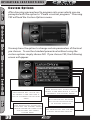
After choosing a power level to program into your vehicle you are
prompted with the option to “Create a custom program.” Choosing
YES will load the Custom Options menu.
PARTS DESCRIPTION
INSTALLATION
You may have the option to change certain parameters of the level
you choose. To use the standard power level without using the
custom options simply choose NO. If you choose YES, the following
screen will appear.
OPERATING INSTRUCTIONS
INTERNET UPDATES
Gear Ratio
Tire Size
This Option will allow you
to select a new tire size if
you’ve changed the factory
tires
APPENDIX
Speed Limiter
30
This Option will allow you
to adjust the factory speed
limiter higher or lower than
the factory set speed
limiter MPH
This Option will allow you to
select a new gear ratio if you’ve
changed the factory gears
Reset Values
This Option will restore
all of the settings back
to factory defaults
Use current settings
This Option will use the previously selected options
U S E R
G U I D E
OPERATING INSTRUCTIONS
PARTS DESCRIPTION
WARNING: If you drive on public roads after removal or
adjustment of the speed limiter, you must still obey all driving laws,
including adhering to posted speed limits. To drive at racing speeds
on public roads seriously endangers you, your passengers, and others
nearby. Driving at high speeds with inadequate tires or other components can lead to serious or fatal injury.
INTRODUCTION
Your Evolution programmer has the ability to remove/adjust your
vehicle’s factory speed limiter. Removal/adjustment of the factory
speed limiter is intended for use at a closed circuit, legally sanctioned racing environment. Even if racing in a legally sanctioned
racing environment, it is your responsibility to ensure your tires and
other vehicle components are rated to travel at increased speeds
with the speed limiter removed/adjusted.
CAUTION:
During programming, the CS/CTS device will go through a series of
screens telling you the actions it is completing.
INTERNET UPDATES
2
OPERATING INSTRUCTIONS
The first screen you’ll see will show Creating files, the second screen
will show Unlocking Module, the third screen Writing files, and
the fourth screen Programming complete. This process can take
several minutes depending on your vehicle year/make/model.
3
1
INSTALLATION
Removing/adjusting the speed limiter for purposes inconsistent with the product’s intended function violates the product’s
intended use and will invalidate the product’s warranty. Edge Products
is not responsible for, or liable for the consequences of improper product use.
4
31
APPENDIX
After the CS/CTS device has successfully programmed your vehicle,
the programmed level number will appear on the main screen in the
level indicator box.
OPERATING INSTRUCTIONS
U S E R
G U I D E
Diagnostics
INTRODUCTION
PARTS DESCRIPTION
INSTALLATION
OPERATING INSTRUCTIONS
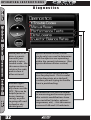
When your PCM
detects a problem with your
vehicle it sets a
trouble code. Use
this menu item to
retrieve the code,
and to clear it
after retrieval.
INTERNET UPDATES
APPENDIX
Manual regeneration manually clears out the
DPF. This can be
helpful prior to
heavy towing,
racing, or prior
to going off road
in dead or dry
shrubs/grass.
32
Injector Balance Rates (Diesel
trucks only) are used to determine
if all the injectors are operating
within the correct tolerances. (See
Injector Balance Rates section)
Records contain certain parameters for play back. This is useful
on the drag strip, at a sled pull,
or when you are trying to trouble
shoot a problem/bug.
Performance tests can be helpful
for measuring performance gains
after vehicle modifications have
been installed (intake, exhaust
programers, etc) - Use this menu
to access 0-60 and 1/4 mile tests
U S E R
G U I D E
OPERATING INSTRUCTIONS
Troub l e C o d e s
PARTS DESCRIPTION
Retrieving Codes
If you want to retrieve and view the DTCs on your vehicle, select the
Trouble Codes from the Diagnostics menu. Make sure the Key is in
the on position. Select Trouble Codes from the Diagnostics menu
and Read DTCs from the following menu.
INTRODUCTION
The diagnostics scanner included with the CS and CTS devices is a
powerful tool that allows you to view and clear Diagnostic Trouble
Codes (DTCs) on your vehicle. DTCs are the messages your vehicle’s
computer stores when it detects a problem with your vehicle. The
“Check Engine” light on your dash is activated by the presence of
most DTCs (some DTCs may not set a check engine light).
INSTALLATION
OPERATING INSTRUCTIONS
INTERNET UPDATES
Clearing Codes
After you’ve retrieved the trouble codes and recorded them,
you can clear the trouble codes by selecting Clear DTCs from
the menu. This will erase any of the codes currently set. If the
codes come back we recommend you see a qualified mechanic
who can accurately diagnose/repair the problem.
APPENDIX
33
OPERATING INSTRUCTIONS
U S E R
G U I D E
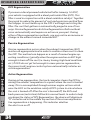
DPF Regeneration
INTRODUCTION
PARTS DESCRIPTION
If you own a diesel powered vehicle built after January 1st 2007,
your vehicle is equipped with a diesel particulate filter (DPF). This
filter is used in conjunction with a diesel oxidation catalyst. Together
they work to reduce the amount of soot and emissions emitted from
the tailpipe. As soot builds up in the DPF it will begin restricting the
filter. The soot that gathers is automatically purged in one of two
ways: Passive Regeneration & Active Regeneration. Both methods
occur automatically and require no action on your part. During
either of these regeneration methods, you may notice an increase or
change in the exhaust noise & increased EGT.
Passive Regeneration
INSTALLATION
OPERATING INSTRUCTIONS
Passive regeneration occurs when the exhaust temperature (EGT)
reaches an appropriate level in order to oxidize or burn soot to clean
the DPF. This method can happen as a result of normal engine operating conditions, typically when the engine reaches an EGT high
enough to burn off the soot (i.e. heavy towing, high load conditions
etc.) If EGTs do not get hot enough to cause passive regeneration,
then your truck’s engine-control system automatically initiates an
active regeneration.
Active Regeneration
INTERNET UPDATES
APPENDIX
During active regeneration, the truck computer cleans the DPF by
raising the exhaust temperature to a point where the soot is burned
away. This is accomplished through various engine actions which
raise the EGTs in the oxidation catalyst/DPF system to a level where
the soot is burned off. After the soot is burned off, the EGTs and
back-pressure (restriction) fall back to normal levels. In order to help
you know the status of DPF Regeneration, the device will display an
“R” circled in red in the middle top section of the screen anytime active regeneration is happening. This indicates whether
the alert is on or off.
34
U S E R
G U I D E
OPERATING INSTRUCTIONS
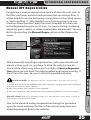
Manu a l D P F R e g e n e r a t i o n
PARTS DESCRIPTION
INSTALLATION
Select this menu
option to initiate
a Manual Regen
sequence.
INTRODUCTION
Completing a manual regeneration cycle will clear the soot mass in
the filter, and lower exhaust back pressure/free up exhaust flow. It
will be helpful to do this before any competition such as drag racing
or tractor pulling. It’s also helpful to use if you’re going to be in a
situation where you don’t want the truck computer to initiate the
Active Regeneration cycle on it’s own, (i.e. heavy towing, or driving
where dry grass, shrubs, or other combustibles are present). You can
do this by selecting the Manual Regen option on the Diagnostics
menu.
3. Do not connect any shop exhaust hoses or vents to the tail pipe.
INTERNET UPDATES
WARNING: To prevent injury or property damage do the following:
1. Park the vehicle outdoors and keep people, other vehicles, and combustible material away from it.
2. Do not leave the vehicle unattended.
OPERATING INSTRUCTIONS
When manually initiating a regeneration cycle some vehicles will
require a drive cycle (i.e. you have to drive the vehicle some distance) while others may allow you to initiate a Service Regeneration where you can leave the vehicle parked and engine running. If
the latter is the case, be sure to follow the guidelines below:
CAUTION: Exhaust temperatures may be greater than 300 C (572 F)
during service regeneration.
APPENDIX
Due to the elevated ending temperatures during this procedure
open the hood and keep the front of the vehicle away from anything impeding air flow to the radiator.
35
OPERATING INSTRUCTIONS
U S E R
G U I D E
Per formance Tests
INTRODUCTION
PARTS DESCRIPTION
INSTALLATION
WARNING: Do not use the Performance Tests feature to break
any traffic laws. Perform these tests only where they are legal and
safe.
OPERATING INSTRUCTIONS
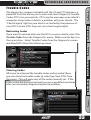
The CTS and CS devices allow you to test the performance of your
vehicle by timing 0-60 and quarter mile runs.
The results recorded by the Performance Test features will likely
differ from what you’ll see on a drag-strip or other racing venues. Incorrect speedometer calibration, data sample rate, and tire slippage
can cause miscalculations in the displayed results.
INTERNET UPDATES
Select the 0-60 menu item and the following screen will appear
APPENDIX
36
U S E R
OPERATING INSTRUCTIONS
G U I D E
INTRODUCTION
After bringing the vehicle to a stop, follow the directions noted on
the screen.
0-60 Test
1/4 Mile Test
The quarter mile test will simulate a drag strip light tree, and start timing the run
once the green light is lit.
OPERATING INSTRUCTIONS
Speed Distance Time
INTERNET UPDATES
APPENDIX
When you’ve finished the quarter
mile run the device will display the
ending mph, the distance
traveled in ft., and the
elapsed time it took to
reach 1/4 mile. In addition
it will graph your MPH vs
Speed so you can better
analyze the run.
Distance Time
INSTALLATION
Speed
The Quarter mile test will prompt
you with a drag strip style light tree.
If you watch the circles on
the left they will light up
yellow, then green. If you
go before green appears
then a red light will light
up in the bottom showing
that you started too early.
If you don’t start early then
you will see a green light
remain in the bottom circle.
PARTS DESCRIPTION
The 0-60 test will require you to come to a stop and will start timing the run as
soon as you start accelerating
Light Tree
37
OPERATING INSTRUCTIONS
U S E R
G U I D E
Inje c t o r B a l an c e R a t e s
INTRODUCTION
NOTE: Only available on certain models.
If you experience a misfire, knock, excessive smoke, or rough running
condition with no electrical DTCs, the Injector Balance Rate option
can help identify faulty injectors.
PARTS DESCRIPTION
INSTALLATION
The balance rates are the fuel adjustments for each individual cylinder based on the variations in engine crankshaft speed. The balance
rates will change depending on if the transmission is in Neutral or
Drive. Monitor and record all cylinder balance rates in drive and
neutral. Injectors that read a higher numerical value than +/- 4.0
( e.g. +/- 5,6,7 etc.) in park/neutral and +/-6.0 in drive may identify
faulty injectors.
OPERATING INSTRUCTIONS
If the balance rates show a possible faulty injector, we recommend
you consult a professional diesel mechanic who can verify this test
and also perform a Cylinder Power Balance test to diagnose faulty
injectors.
After Selecting Injector Balance Rates from the Diagnostics screen,
you’ll be prompted by the following screen
INTERNET UPDATES
APPENDIX
38
U S E R
G U I D E
OPERATING INSTRUCTIONS
INTRODUCTION
After selecting yes, you’ll see a screen with 8 parameter data display
boxes. Each box represents an Injector. This screen is where you’ll
want to compare the injector balance rates in both Park and Drive.
PARTS DESCRIPTION
INSTALLATION
OPERATING INSTRUCTIONS
INTERNET UPDATES
In Park the values should not have a numerical value
higher than + or - 4.0, in Drive they should not be higher
than + or - 6.0
39
APPENDIX
Note: The above injector balance screen shot represents a truck with
injector balance rates that are acceptable. The sample was taken in
park. You can see that there are no numbers higher than +4.0 or -4.0 on
the screen, so it’s safe to assume the injectors are working properly.
OPERATING INSTRUCTIONS
U S E R
G U I D E
Options
INTRODUCTION
PARTS DESCRIPTION
INSTALLATION
The Options menu contains menu items that will let you customize
the device settings to your liking, as well as change the alert default
settings to best fit your needs.
Aler t S e t t i n gs
OPERATING INSTRUCTIONS
INTERNET UPDATES
APPENDIX
The Alert Settings screen allows you to turn the alerts on/off both
collectively and individually, and also lets you set the alert values for
each of the parameters.
40
U S E R
G U I D E
OPERATING INSTRUCTIONS
INTRODUCTION
To turn alerts on, select the top screen option Alerts are Off and
press enter. You’ll see the option change from Off to On or vice
versa.
PARTS DESCRIPTION
To individually disable/enable an alert, or to change the alert value,
simply scroll to the parameter you’d like to change, select the parameter and the following screen will appear
INSTALLATION
OPERATING INSTRUCTIONS
On the screen you have the option to turn the parameter off/on,
turn the sound off/on and change the set point data.
If you turn just the sound off, you’ll still receive a visual alert when
the set-point is reached.
41
APPENDIX
You can change the set point to better fit your driving style or individual needs, the default settings are Edge Products recommended
alert settings.
INTERNET UPDATES
Turning the Alert off will completely disable the alert visually as well
as audibly.
OPERATING INSTRUCTIONS
U S E R
G U I D E
Soun d D u r a t i o n
INTRODUCTION
You can adjust the duration of the alert sound by using this menu
option. Simply press the up/down arrow until you have the desired
sound length in seconds.
PARTS DESCRIPTION
INSTALLATION
Scre e n L a y o u t
OPERATING INSTRUCTIONS
The screen Layout menu allows you to choose from five different
screen layout options. The Analog Gauge Screen is set as the
default. Once you’ve selected the gauge screen you want to use you
can customize which parameters are displayed by simply touching the parameter value on the main screen (CTS) or pressing enter
while on the main screen (CS) and choosing the PID you’d like to
display from the drop down list.
INTERNET UPDATES
APPENDIX
42
U S E R
G U I D E
OPERATING INSTRUCTIONS
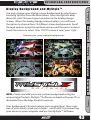
Displa y B a c k gr o u n d a n d M y S t y l e ™
PARTS DESCRIPTION
Following are some example backgrounds:
INTRODUCTION
You may change your display screen background by selecting or
touching Options from the Main Menu. From the Options drop
down list, select Screen Layout and choose the Analog Gauge
Screen. When the Analog Gauge screen displays, you will have
the option to choose from 10 different screen backgrounds. Scroll
through options using the up/down arrows and then press enter or
touch the screen to select. Your CS/CTS screen is now ‘your’ style.
INSTALLATION
OPERATING INSTRUCTIONS
INTERNET UPDATES
Your background is limited only by your imagination! Have a picture of your family, truck, pet or logo? ...easily add it by connecting
your device to your computer and use the MyStyle™ Software.
43
APPENDIX
NEW: Create and add your own custom background using the
unique Edge Products MyStyle™ Software included with your CD or
download from the Edge Products website.
OPERATING INSTRUCTIONS
U S E R
G U I D E
Back l i gh t A u t o D i m
INTRODUCTION
PARTS DESCRIPTION
INSTALLATION
The CS and CTS devices both have ambient light sensors. As it get’s
darker outside the device will automatically dim the screen for
easier viewing. The Auto Dim feature allows you to set how far it will
dim the screen.
OPERATING INSTRUCTIONS
NOTE: It’s best to make this adjustment at night so you can verify the
screen brightness is to your liking. You’ll need to return to the main
display screen after setting the Autodim percent in order to see the
changes.
INTERNET UPDATES
APPENDIX
44
U S E R
G U I D E
OPERATING INSTRUCTIONS
Menu T i m e - o u t
INTRODUCTION
PARTS DESCRIPTION
INTERNET UPDATES
Tire S i z e
OPERATING INSTRUCTIONS
note: This function only applies to menu screens. If you are viewing a
parameter adjustment screen like the one pictured above, the device will
not time out. If you do not exit these screens, the device will not poweroff and may discharge the vehicle’s battery.
INSTALLATION
The CS and CTS devices have a built in time-out feature. The purpose of this time-out is to prevent the unit from staying powered up
for excess amounts of time. If you leave the device in a menu option
and then exit the vehicle, the device will stay powered up for 300
seconds by default, after which it will return to the main menu and
then power off. If left in a menu while the truck is running or the key
is on it will return to the main menu after 300 seconds.
You can adjust the wait time to be longer or shorter by simply using
the arrows to take the time up/down.
NOTE: only available on certain models.
APPENDIX
The CS/CTS Evolutions will allow you to re-calibrate the speedometer for non-stock tire size. To do so select Tire Size in the Options
Menu.
Once you’ve selected the Tire Size menu, you’ll see the following
options:
English = 35/12.50/16 where 35 is the height, 12.50 the width, and 16 the wheel size
P-Metric = 275/75/16 where 275 is width, 75 is aspect ratio, and 16 is diameter
Circumference = The outer circumference of the tire on your vehicle
Height = The Height of the tire on your vehicle
45
OPERATING INSTRUCTIONS
U S E R
G U I D E
INTRODUCTION
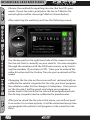
Choose the method for inputting tire size that best fits your
needs. If your tire size is printed on the tire in P-Metric the
easiest option will be choosing P-Metric (shown below).
After selecting the method, you’ll see the following screen
PARTS DESCRIPTION
INSTALLATION
OPERATING INSTRUCTIONS
Use the key pad on the right hand side of the screen to enter
the tire size that is currently on your vehicle. You can navigate
through the numbers with the UP/Down arrows, or by touching the numbers (if you have a CTS). Once you’ve entered the
value hit enter and the Custom Tire size you’ve entered will be
saved.
INTERNET UPDATES
Changing the tire size on the screen will not automatically recalibrate the vehicle computer for tire size, you must program
the vehicle in order for the changes to take place. Once you’ve
set the tire size it will be saved, and when you program a
power level to the truck the tire size will be programmed into
the factory computer and re-calibrate the speedometer.
APPENDIX
After you’ve saved the tire size in this menu, you will not need
to re-enter it in custom options, it will be saved and every time
you program the vehicle it will program in the saved tire size
data.
46
U S E R
G U I D E
OPERATING INSTRUCTIONS
Facto r y R e s e t
INTRODUCTION
PARTS DESCRIPTION
INSTALLATION
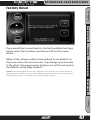
If you would like to revert back to the factory default settings,
simply select Factory Reset and choose YES on the screen
above.
OPERATING INSTRUCTIONS
Many of the settings will be returned back to the defaults as
they were when the unit was new. Any changes you’ve made
to the alerts, the gauge screen displays, etc will be returned to
the defaults set by Edge Products.
NOTE: Factory Reset will not return the vehicle to stock from a
programmed Power Level. See Programming Power Levels section
for instructions to return to stock power level.
INTERNET UPDATES
APPENDIX
47
OPERATING INSTRUCTIONS
U S E R
G U I D E
Cam e r a D e l a y
INTRODUCTION
(CTS ONLY)
PARTS DESCRIPTION
INSTALLATION
The Camera Delay menu item is always displayed. If you don’t
have a camera or other RCA device connected, this menu option will not affect device functionality in any way.
OPERATING INSTRUCTIONS
INTERNET UPDATES
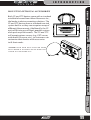
The CTS is designed to automatically engage the back-up
camera when the vehicle gear selector is in Reverse (may not
function on all vehicle models). The camera delay will allow you to customize the delay time for the device to switch
from the main viewing screen to camera view. If this is set
too short then you’ll see the device blink as you move the
gear selector past Reverse. If it’s set too long the screen may
not appear before you start backing up. Some vehicles will
communicate gear position faster than others, so this menu
option allows you to customize the delay to your liking.
APPENDIX
48
U S E R
G U I D E
OPERATING INSTRUCTIONS
Help Menu
INTRODUCTION
PARTS DESCRIPTION
INSTALLATION
The Help menu contains useful information about your device, and
the vehicle it is being used on. It also contains Edge Products Contact Information, and Technical Support tools.
OPERATING INSTRUCTIONS
Produ c t I n f o
INTERNET UPDATES
APPENDIX
The Product Info screen contains three important items.
Device Firmware Version
Device Calibration Version
Device Serial Number
The Firmware is the software that runs the device functions, I.E.
menu systems, programming routines etc.
49
OPERATING INSTRUCTIONS
U S E R
G U I D E
INTRODUCTION
The Calibration is the data that the device programs into your vehicle in order to achieve better performance/mileage.
PARTS DESCRIPTION
From time to time Edge Products will release updates with improved
functionality for both Firmware and Calibrations. Each of these
updates are labeled with a number, the number shown in this menu
represents the version that is currently on your device.
The Serial Number is a number assigned to your particular device.
This number is used to identify your device in the software update
process and to Edge Technical Support.
Vehi c l e I n f o
INSTALLATION
OPERATING INSTRUCTIONS
INTERNET UPDATES
APPENDIX
Vehicle Info contains important information about your vehicle.
This information will help Edge Products Technical Support by letting them know all of the specifics of your vehicle, and the programming that is currently loaded on your vehicle’s PCM (vehicle information may differ from above screen).
50
U S E R
G U I D E
OPERATING INSTRUCTIONS
Conta c t I n f o
INTRODUCTION
PARTS DESCRIPTION
OPERATING INSTRUCTIONS
This information will be useful if you need to contact Edge Products
for warranty claims, sales information, upgrade information or any
other technical questions/inquiries.
INSTALLATION
The Contact Information menu contains the Edge Products web site
URL, the company address, the Technical Support email address,
and the Technical Support phone number.
INTERNET UPDATES
APPENDIX
51
OPERATING INSTRUCTIONS
U S E R
G U I D E
Tech S u p p o r t T o o l s
INTRODUCTION
PARTS DESCRIPTION
INSTALLATION
OPERATING INSTRUCTIONS
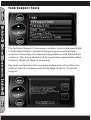
The Technical Support Tools menu contains tools made specifically
to help Edge Products Technical Support representatives help
customers when they are experiencing problems with their vehicle
or device. This menu should only be used when requested by Edge
Products Technical Support personnel.
The tools contained in this menu are locked and will not function
without specific numbers provided by Edge Products Technical
Support.
INTERNET UPDATES
APPENDIX
52
U S E R
G U I D E
I N T E R N E T
U P D A T E S
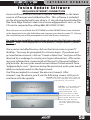
Fusion Update Software
PARTS DESCRIPTION
Note: Be sure to install both the SOFTWARE and the DRIVERS that come included
in the download or on the disk before you connect your device to your PC. During
the installation you will be prompted to install the drivers, choose yes.
INTRODUCTION
REQUIRES INTERNET CONNECTION
Fusion Software allows the user to update their device to the latest
version of firmware and calibration files. This software is included
on the disc provided with your device. It can also be downloaded for
free from Edge Products web site at www.edgeproducts.com , or the
CD can be requested by calling 888-360-EDGE (3343).
For step by step installation instructions please copy this link into your web
browser http://www.edgeproducts.com/product_images/product_updatefile-11.pdf
APPENDIX
53
INTERNET UPDATES
NOTE: If the USB connector you received
has 2 plugs, it is
recommended that
you plug both USB
connectors into the
computer before connecting the device
to the other end to
ensure proper operation.
OPERATING INSTRUCTIONS
the device to Fusion.
INSTALLATION
Once you’ve installed Fusion, click on the Fusion icon on your PC
desktop. You may be prompted for a Fusion login. If you have not
yet created an account, click on “Create a New User” and you will be
directed to a webpage to create your login information. After entering your information, a password will be sent to the email address
you provide. Be sure your email account doesn’t block emails from
“edgeproducts.com”. Upon receiving the password, enter your email
address and password on the login screen.
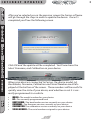
You’ll be prompted to connect the device to launch. After
connect¬ing the device, you’ll see the following screen, click yes to
NOTE: Be sure to return your vecontinue with the update.
hicle to stock before connecting
I N T E R N E T
U P D A T E S
U S E R
G U I D E
INTRODUCTION
After you’ve selected yes on the previous screen the Fusion software
will go through the steps in order to update the device. Once it’s
completed you’ll see the following screen
PARTS DESCRIPTION
INSTALLATION
OPERATING INSTRUCTIONS
Click OK and the update will be completed. You’ll now have the
latest Firmware, and Calibration on your device.
INTERNET UPDATES
When your device is connected to Fusion, the device model, Lvl,
Bootloader, Firmware, Calibration and Serial Number are all displayed at the bottom of the screen. These numbers will be useful to
quickly view the state of your device, and whether or not it is currently programmed to a vehicle.
APPENDIX
•
•
•
•
•
•
MODEL : The model number for your device
LVL : The currently programmed level
BOOTLOADER : The bootloader version currently on your device
FIRMWARE : The firmware version currently on your device
CALIBRATION: The calibration version currently on your device
SERIAL NUMBER : The serial number assigned to your device
I
I N T E R N E T
U P D A T E S
U S E R
G U I D E
I N T E R N E T
U S E R
U P D A T E S
G U I D E
Updat e R e q u i r e d
Fusion is designed to help the development team at Edge Products
support new vehicle calibrations.
55
55
APPENDIX
If you don’t have the competitive product that programmed your
truck, connect the device to Fusion where you’ll be prompted to
download the correct stock files. Once downloaded, simply connect
the device to your vehicle, and the device will program the verified
stock files to your vehicle.
INTERNET UPDATES
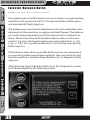
“ Non-stock condition detected. This is most likely because your vehicle has
been programmed with a competitive product. It is recommended that you
return your vehicle to a stock condition with the product that changed it.
Alternatively, you can plug your device into the internet update system and it
will load the necessary files onto your device to return your vehicle to stock.”
OPERATING INSTRUCTIONS
During programming, the device will read the stock file on your
vehicle and compare it to a corresponding stock file that has been
verified by Edge Products. If there is a mismatch the device will alert
you, and display this message:
INSTALLATION
Non-S t o c k c o n di t i o n
PARTS DESCRIPTION
When you connect your device to the vehicle, the first step it takes
is identifying your vehicle’s stock file. If the stock file isn’t currently
supported the device will display a screen alerting you that the stock
file is not yet supported, and prompt you to press a button/touch the
screen in order to read and save the stock file. Once the device has
saved the stock calibration, it will prompt you to connect the device
to Fusion. Fusion will ask you if you want to upload your vehicle’s
stock files to our server. Choosing yes will upload the files to the
server, and alert the development team. This will help the development team at Edge Products provide support for your vehicle’s
calibration as quickly as possible.
INTRODUCTION
Possible Programming Errors
A P P E N D I X
U S E R
G U I D E
INTRODUCTION
Accessories
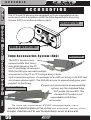
The CTS and CS devices are equipped with an expandable accessories port which interfaces with the Edge Expandable Accessory
System (EAS), as well as a video-in jack.
ACCESSORY PORT
PARTS DESCRIPTION
INSTALLATION
VIDEO-IN JACK (CTS ONLY)
Edge A c c e s s o r i e s S y s t e m ( EA S ) EAS EGT Probe
OPERATING INSTRUCTIONS
INTERNET UPDATES
APPENDIX
The EAS is an accessory
network cable that transmits data between the CS
or CTS and Edge Accessories.
With the EAS you can add multiple
accessories to the CS or CTS using a daisy-chainstyle connection system. An example of an EAS accessory is an EGT sensor (shown above right). The EAS allows you to expand and grow your
product in the future.
If you’re not interested in an expandable
Standard EGT Probe
system, use the standard Edge
EGT probe (shown left). The
standard EGT probe is not
expandable with future
accessories.
To view or purchase EDGE accessories visit
WWW.EDGEPRODUCTS.COM or contact your local
EDGE PRODUCTS AUTHORIZED MVP DEALER
56
U S E R
G U I D E
A P P E N D I X
INTRODUCTION
OEM EGT Locations
NOTE: this section refers to diesel vehicles
The 2007.5 and newer light-duty diesel pickups are equipped with
OEM Exhaust Gas Temperature (EGT) sensors, all of which can be
monitored with the CS and CTS Devices.
in your engine manifold is to apply grease in the tip of the drill bit and
threads of your tap tool when drilling/tapping the hole in your manifold.
Reduce pressure on the drill when the drill breaks through the manifold wall to reduce risk of pushing metal chips into the manifold.
57
APPENDIX
The 2008 and newer Ford Powerstroke 6.4L is factory-equipped with
an EGT sensor in the pipe prior to the high pressure turbo. This EGT
sensor accurately represents EGT temperatures in the combustion
chamber.
INTERNET UPDATES
CAUTION: One effective way to avoid metal fragment contamination
OPERATING INSTRUCTIONS
WARNING: When installing the EGT Thermocouple, wear eye
protection and protective clothing to protect from getting metal chips in
your eyes. Also, since exhaust manifolds can be very hot, allow the engine to cool before drilling. When working under the vehicle, make sure
the park brake is set. If the vehicle must be raised, carefully follow the
stand and vehicle safety guidelines for placement and use of jacks and
stands.
INSTALLATION
Edge Products was the first company to integrate gauge screens
with their power modules giving customers the ability to monitor
EGTs and other vehicle parameters in real-time. Since the introduction of the Attitude monitor Edge Products has always recommended that the EGT probe be placed in the exhaust manifold, in a
pre-turbo location simply because the manifold location gives the
best representation of combustion chamber temperatures. Other
locations downstream in the exhaust system do not accurately represent combustion chamber temperatures.
PARTS DESCRIPTION
Before a customer uses the vehicle’s OEM sensors for reading exhaust gas temperature, it’s extremely important that he/she become educated about EGT sensor placement, and understand what
exactly to look for when using an EGT sensor on a diesel-powered
vehicle.
A P P E N D I X
U S E R
G U I D E
INTRODUCTION
PARTS DESCRIPTION
The 2007.5 and newer GM Duramax, and Dodge Ram 6.7 Cummins
do not have EGT sensors placed pre-turbo where the optimum readings can be achieved. When items such as turbos, catalysts, NOX
filters, and particulate traps are introduced, temperatures can vary
in large margins due to the thermal energy stored/transferred by
these devices. This creates an environment that doesn’t represent
combustion-chamber temperatures as effectively as a manifold/
pre-turbo placed sensor.
Edge Products recommends using a pre-turbo EGT sensor if you use
the CS/CTS for any kind of competition, or heavy hauling. If your
vehicle is not equipped with a pre-turbo EGT sensor, Edge recommends you purchase an Edge Products sensor and install it in a
pre-turbo location.
INSTALLATION
OPERATING INSTRUCTIONS
As noted in the accessories section, you can purchase an Edge
Products EGT sensor to be coupled with the Edge Accessories System
(EAS) or you can purchase a standalone Edge EGT sensor. Either of
these Items can be purchased at www.edgeproducts.com or at
your local Edge Products Authorized MVP Dealer.
If you are unsure whether or not your vehicle is equipped with a preturbo EGT sensor please see the diagram on the following page.
If you are unsure how hot is acceptable on your EGT’s we recommend you do the following:
INTERNET UPDATES
1 - Display EGTs on your main display screen
2- Observe what the EGTs are in your vehicle while it is at a stock
power level and accelerating at a heavy load, i.e. pulling a heavy
trailer up a long hill.
APPENDIX
3- Add 100 degrees F to the highest stock reading you’ve seen and
use that number as your ma x safe EGT.
4 - Record these readings for later reference.
58
U S E R
G U I D E
A P P E N D I X
The exhaust systems are outlined in order to illustrate where the EGT
sensors are placed, and what items exist that may alter temperature
as seen at the exhaust manifold.
OPERATING INSTRUCTIONS
INTERNET UPDATES
The Ford 6.4 Powerstroke has an EGT probe placed in the passenger side up pipe prior to the turbo. This is an excellent location
for an EGT sensor. The readings you’ll see here better represent the
temperatures in the combustion chamber than the temperatures
you would see down stream.
INSTALLATION
The GM LMM Duramax is not equipped with a pre-turbo EGT
probe. It is however equipped with two EGT probes downstream
from the turbo. Both of these probe’s readings are available for display on the CS and CTS. However they are not an accurate representation of combustion chamber temperatures.
PARTS DESCRIPTION
The Dodge 6.7 Cummins is not equipped with a pre-turbo EGT
probe. It is however equipped with three EGT probes downstream
from the turbo. All of these probe’s readings are available for display
on the CS and CTS. However they are not an accurate representation of combustion chamber temperatures.
INTRODUCTION
The Illustrations on the right represent the 2007.5-2009 light-duty
diesel pickups.
APPENDIX
59
A P P E N D I X
U S E R
G U I D E
INTRODUCTION
Modern Light-Duty diesel truck exhaust
illustrations
PARTS DESCRIPTION
Dodge 6.7
Cummins
Exhaust Manifold
Post-DPF
EGT
Pre-DPF/Post-Cat
EGT
Diesel
Particulate
filter
Muffler
Pre-Cat
EGT
NOX Filter
Diesel Oxidation
Catalyst
INSTALLATION
GM LMM
Duramax
OPERATING INSTRUCTIONS
Post-DPF
EGT
Muffler
Pre-DPF/Post-Cat
EGT
Diesel
Particulate
filter
Diesel Oxidation
Catalyst
INTERNET UPDATES
Ford 6.4
Powerstroke
Muffler
Pre-Turbo
EGT
Diesel
Particulate
filter
APPENDIX
Post-DPF
EGT
60
Diesel Oxidation
Catalyst
Pre-DPF/Post-Cat
EGT
Pre-Cat
EGT
Exhaust Manifold
A P P E N D I X
U S E R
G U I D E
A P P E N D I X
Edge B a c k u p Ca m e r a PARTS DESCRIPTION
INSTALLATION
OPERATING INSTRUCTIONS
INTERNET UPDATES
APPENDIX
To view or purchase the
EDGE Back-up Camera visit
WWW.EDGEPRODUCTS.COM or contact your
local EDGE PRODUCTS AUTHORIZED MVP
DEALER
INTRODUCTION
Finish your CTS off with the Edge Products Backup Camera. The
Edge Products Backup Camera provides a high-quality color image
with “Night Vision” infrared LEDs allowing users to see objects in
total darkness, up to a range of approximately 30 feet. The camera comes with a built-in, theft-resistant mount that installs easily
using the license plate mounting screws/bolts. The custom Edgedesigned, theft-resistant mount is sturdy and stylish. The quickrelease mount features a simple lock-and-key mechanism. The
camera is also equipped with a magnetic back allowing users to
mount the camera in different locations. The adjustable mounting
bracket allows the user to adjust the viewing angle up and down to
reach the desired viewing angle.
The CTS will work with most
off-the-shelf back-up
cameras that use an
RCA style video
connector. In
addition to using the CTS as a
back-up camera
display device, you
can also use it as a
display for a DVD player,
or other devices equipped
with RCA video-out.
61
A P P E N D I X
U S E R
G U I D E
Edge M o u n t i n g S o l u t i o n s INTRODUCTION
PARTS DESCRIPTION
INSTALLATION
Edge Products offers the best custom mounting options on the
market. Edge Products dash mounts offer a unique solution for CS
or CTS owners that are looking to add a
factory-finish look to their truck. The pods are durable, made
from high-quality plastic, and manufactured for a perfect fit and finish.
They are angled for easy viewing, can be painted to match
vehicle interior color (if
needed), and are easy
to install. The CS and
CTS devices will fit in
all Edge Products
pods. The CTS
will require an
adaptor.
OPERATING INSTRUCTIONS
INTERNET UPDATES
To view or
purchase the
EDGE mounting pod
designed for your specific
vehicle, visit WWW.EDGEPRODUCTS.COM or
contact your local EDGE PRODUCTS
AUTHORIZED MVP DEALER
APPENDIX
62
U S E R
A P P E N D I X
G U I D E
Troub l e S h o o t i n g /T i p s
that could disable your vehicle. It is advised that you do not program your vehicle
in remote locations in case of failure.
INTRODUCTION
Tip: Programming your vehicle may expose existing defects in your vehicle’s PCM
Tip: Keep in mind that the CTS/CS is a high performance product and that not all
Tip: Vehicle manufacturers do not recommend vehicle programming in extreme
Tip: If problems persist, contact Edge Technical Support. Please have the product
Serial Number and Vehicle Information prior to callingTechnical Support. This will
help ensure quick and accurate support.
The drivers were not successfully
installed by the automatic installer
Camera picture is frozen
Error 16 when programming
Screen beeps quickly
Bad connections
There was a communication error
Possible device malfunction
Edge EGTs are not displaying
Connector on the back of the device
is not fully seated
63
APPENDIX
Fusion drivers will not install
correctly
SOLUTION
Once the device cools down the
screen will turn itself on
Touch the screen or start the vehicle,
if this does not turn the screen on
then you will need to call technical
support
Select “Return to stock” from the
programming menu and try to start
the vehicle again. If the problem
continues contact technical support
Manually install the drivers, Edge
technical support can provide you
with instruction on how to do this
Cycle the key off and on.
Try to program the level again
Update the device using the fusion
software
Make sure the cable connection is not
upside down, and push the cable until
it is fully seated
INTERNET UPDATES
Vehicle does not start after
programming
POSSIBLE CAUSE
The unit is too hot from being in the
direct sunlight
The unit will not wake up with the
key in the “on” position until the
screen is touched or any button is
pressed
The calibration may have not written
correctly
OPERATING INSTRUCTIONS
TROUBLE SHOOTING GUIDE
SYMPTOM
Screen beeps for two seconds (long
beep)
No display when the key is in “on”
position
INSTALLATION
temperature. Please see the service manual of your vehicle to ensure that programming is being done in accordance to the original equipment manufacturers
specifications.
PARTS DESCRIPTION
vehicles deliver the exact same power output when programmed with the CTS/CS.
It is recommended that you select a program that will best fit your needs. Whether
towing, or traveling long distances at high speeds, choose your power level wisely
and keep in mind the condition and tolerances of your vehicle when selecting a
suitable power level.
A P P E N D I X
U S E R
G U I D E
Commonly Used Acronyms
INTRODUCTION
PARTS DESCRIPTION
INSTALLATION
OPERATING INSTRUCTIONS
INTERNET UPDATES
APPENDIX
ACT = Air Charge Temp
ACV = Air Control Sensor
AOD = Automatic Overdrive Transmission
APP = Accelerator Petal Position
AXOD = Automatic Overdrive Transmission
BAT = Battery Voltage
BCM = Body Control Module
BOO = Brake On/Off Switch
BP = Barometric Pressure Sensor
CCD = Computer Controlled Dwell
CCO = Converter Clutch Override
CDR = Crankcase Depression Regulator
CEL = Check Engine Light
CFI = Central Fuel Injection
CHT = Cylinder Head Temperature
CID = Cylinder Identification Sensor
CKP = Crank Position Sensor
CMP = Cam Position Sensor
CPS = Crankshaft Position Sensor
CS = Color Screen
CTS= Color Touch Screen
DPF = Diesel Particulate Filter
DTC = Diagnostic Trouble Codes
ECA = Electronic Control Assembly
ECM = Electronic Control Module
ECT = Engine Coolant Temp
EDF = Electric Drive Fan Relay
EDIS = Electronic Distributor
EGO = Exhaust Gas Oxygen Sensor
EGR = Exhaust Gas Recirculation
EGRC = EGR Control Solenoid
EOT = Engine Oil Temperature
EVP = EGR Position Sensor
EVR = EGR Valve Regulator
FDM = Fuel Delivery Module
FPM = Fuel Pump Monitor
FRP = Fuel Rail Pressure
HEGO = Heated Exhaust Gas Sensor
IAT = Intake Air Temperature
ICM = Integrated Controller Module
IDM = Ignition Driver Module
ISC = Idle Speed Control
ITS = Idle Tracking Switch
IVS = Idle Validation Switch (Diesel)
KAM = Keep Alive Memory
KOEO = Key On Engine Off
64
KOER = Key On Engine Running
KS = Knock Sensor
LOAD = Engine Load
LOS = Limited Operation Strategy
LPD = Line Pressure Desired
LUS = Lock-up Solenoid
MAF = Mass Airflow
MAFV = Mass Airflow Sensor Voltage
MAP = Manifold Absolute Pressure
MAT = Manifold Air Temp
MCU = Microprocessor Control Unit
MIL = Malfunction Indicator Light
MPH = Miles Per Hour
OHC = Over Head Camshaft
OSS = Output Shaft Speed
PCM = Powertrain Control Module
PFE = Pressure Feedback EGR Sensor
PIP = Profile Ignition Pickup
PSPS = Power Steering Pressure Switch
RPM = Revolutions Per Minute
SES = Service Engine Soon
SIL = Shift Indicator Light
SPARK = Spark Advance/Retard
SPOUT = Spark Output Signal (from
ECA)
STAR = Self Test Automatic Readout
TAPS = Throttle Angle Position Sensor
TCM = Transmission Control Module
TFI = Thick Film Ignition System
TFT = Transmission Fluid Temperature
TGS = Top Gear Switch
THS = Transmission Temperature Switch
TPS = Throttle Position Sensor
TQC = Torque Control
TSS = Turbine Shaft Speed
TTS = Transmission Temperature Switch
VAF = Vane Air Flow Sensor
VAT = Vane Air Temperature
VCT = Variable Cam Timing
VSS = Vehicle Speed Sensor
WAC = WOT A/C Cut-off Switch
WOT = Wide Open Throttle