1
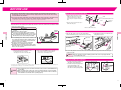
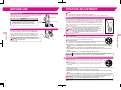
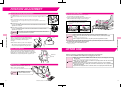
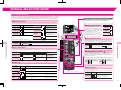
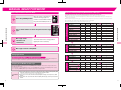
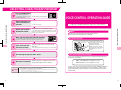
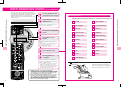
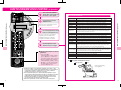
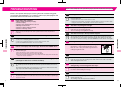
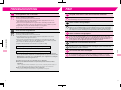
MANUAL SELECTION MODE How To Operate Manual Selection Mode Guide To Combining & Adjusting Manual Selection Massages This guide shows how you can combine massage from the 4 basic menus shown below. Press the [POWER] button. ● A circle in the adjustment column means that particular adjustment can be made in the course of the massage. ● When a massage that does not allow width adjustment is combined with a Roller or Back Vibration Massage, the width adjustment function does not activate. ● When Shoulder Kneading or Roller Massage is selected, the Automatic Shiatsu Point Locator function is activated as in the Healthcare Programs. ● Only 2D Roller can be applied along to Manual Shiatsu for both Full and Partial. ● Shoulder Kneading cannot be conducted along with Roller Massage. 3 4 Massage action continues for 15 minutes. (Select one from the following 10 types.) 1. Basic Massage Actions The rollers return to the storage position (upper part of the seat back). Massage has been completed. Width (3 levels) Up/Down Voice Intensity on back (No level) Voice Forward/Backward Speed Kneading 6 levels Human Hands Tapping 1 4 levels Tapping 2 Kneading & Tapping 4 levels Rhythm Shiatsu 1 Rhythm Shiatsu 2 Technique Shiatsu 1 Technique Shiatsu 2 Shoulder Kneading Forward/Backward Speed 2D Full Spinal 3D Full Spinal 2D Partial Spinal 3D Partial Spinal Forward/Backward Speed Back Vibration Leg Vibration Forward/Backward Speed Width Up/Down Voice Intensity (3 levels) + 2. Roller 2 Press either button to select the preferred massage type. (Choose one from the following 4 types.) MANUAL SELECTION MODE Action MANUAL SELECTION MODE 1 Open the remote control panel to select the massage type. If no selection is made within 5 minutes, the power automatically shuts off. Action Width (3 levels) Up/Down Voice Intensity on back (No level) Voice If you press Healthcare Program button during the Manual Selection Mode, the rollers once return to Storage Position before starting the Healthcare Program with the Automatic Shiatsu Point Locator Function. Stopping In The Middle Of a Massage To stop in the middle of a massage, press the [POWER] button to bring the rollers back to Storage Position. Then, the massage action stops. In an emergency or if some malfunction occurs, use the [STOP] button to stop the chair immediately. After a safety check, press the [POWER] button again to bring the rollers back to Storage Position. Action Width (3 levels) Up/Down Voice Intensity (2 levels) + 4. Air Massage Manual Selection Mode → Healthcare Program 3. Vibration + Changing Selection Action Arm Voice Seat Calf Foot Voice ● If you feel the massage is too intense, lower the intensity according to this Operating Manual. If this solution does not work, stop using and contact the vendor. → May result in injury if constantly used on a high stimulation level. Caution 19 ● If your legs or feet come out of the footrest during the massage, do not try to force them back in. ● If your arms come out of the lower arm units during the massage, do not try to force them back in. 20