1
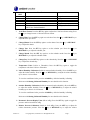
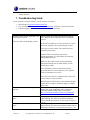
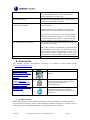
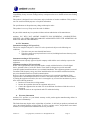
barometric pressure up or down. Reference Section 4.2.1 Setting Barometric Pressure for
more details on this function.
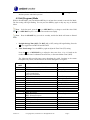
14. Pressure Threshold Setting (default level 2). Press the SET key again to adjust the
pressure threshold setting. Press the + key or MIN/MAX key to adjust the pressure
threshold up or down. Reference Section 4.5.5 for more details on this function.
15. Storm Threshold Setting (default level 4). Press the SET key again to adjust the storm
threshold setting. Press the + key or MIN/MAX key to adjust the storm threshold up or
down. Reference Section 4.5.4 for more details on this function.
4.2.1 Setting Barometric Pressure
Note: This is a continuation of the previous section. To enter this mode, you must start at the
beginning of this section.
The display console displays two different pressures: absolute (measured) and relative (corrected to
sea-level).
To compare pressure conditions from one location to another, meteorologists correct pressure to
sea-level conditions. Because the air pressure decreases as you rise in altitude, the sea-level corrected
pressure (the pressure your location would be at if located at sea-level) is generally higher than your
measured pressure.
Thus, your absolute pressure may read 28.62 inHg (969 mb) at an altitude of 1000 feet (305 m), but
the relative pressure is 30.00 inHg (1016 mb).
The standard sea-level pressure is 29.92 in Hg (1013 mb). This is the average sea-level pressure
around the world. Relative pressure measurements greater than 29.92 inHg (1013 mb) are
considered high pressure and relative pressure measurements less than 29.92 inHg are considered low
pressure.
To determine the relative pressure for your location, locate an official reporting station near you (the
internet is the best source for real time barometer conditions, such as Weather.com or
Wunderground.com), and set your weather station to match the official reporting station.
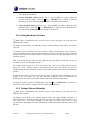
To change the relative pressure in the SET mode, press the + key or MIN/MAX key to increase or
decrease the relative pressure setting to match the official reporting station.
4.2.2 Setting Calibrated Humidity
Note: This is a continuation of the previous section. To enter this mode, you must start at the
beginning of this section.
The display console allows you to calibrate both the indoor and outdoor humidity. Humidity is a
difficult parameter to measure accurately and drifts over time. The calibration feature allows you to
zero out this error. To calibrate humidity, you will need an accurate source, such as a sling
psychrometer or Humidipaks One Step Calibration kit, available from Ambient Weather, which uses a
salt bath.
Version 1.8
©Copyright 2011, Ambient LLC. All Rights Reserved.
Page 8