1
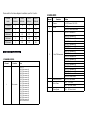
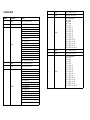
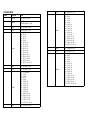
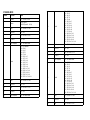
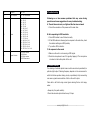
4.Troubleshooting 24 Tilt fine 4 000 - 255 25 Pan Tilt speed4 000 – 255 Fast to slow 26 Color4 000 008 025 042 058 075 091 108 124 141 157 174 190 207 223 – – – – – – – – – – – – – – – 007 024 041 057 074 090 107 123 140 156 173 189 206 222 239 Blackout R G B W R+G R+B R+W G+B G+W B+W R+G+B R+G+W R+B+W G+B+W 240 – 255 R + G + B + W 27 Special Function 000-199 No function 200-209 Reset 210-239 No function 240-255 Stand-alone Following are a few common problems that may occur during operation and some suggestions for easy troubleshooting: A. The unit does not work, no light and the fan does not work 1. Check the connection of the power and the main fuse. B. Not responding to DMX controller 1. Check DMX cables to see if linked correctly. 2. If the DMX address is showing but no response to the controller, check the address settings and DMX polarity. 3. Try another DMX controller. C. No response to the sound 1. Make sure the unit is not receiving a DMX signal. 2. Check the microphone to see if it is good by tapping it. The microphone is located on the bottom plate of the unit. 5. Fixture Cleaning The cleaning of external optical lenses must be carried out periodically to optimize light output. Cleaning frequency depends on the environment in which the fixture operates: damp, smoky or particularly dirty surrounding can cause a greater accumulation of dirt on the unit’s optics. Clean with a soft cloth using normal glass cleaning fluid or mild soapy water. Always dry the parts carefully. Clean the external optics at least every 20 days. ---------------------www.prolight.co.uk----------------------------------