1
NOTE: Some PBX's require a PAUSE after the first digit to access an
outside line. The REDIAL function will automatically incorporate a
PAUSE if the dialed number is 7 digits or more. The inserted Pause
will be of the same duration as set in the pause timing.
USING THE DATA PORT
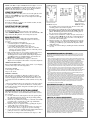
Removable mounting bracket,
turned 180 degrees (for Wall
Mount installation)
The DATA PORT is a modular jack, located on the right side of the
telephone, labeled DATA. You can connect a facsimile, modem,
answering machine and other devices to the telephone line through
the DATA port.
To use the DATA PORT:
Insert the modular line cord from your facsimile machine, modem,
etc., into the jack labeled DATA.
Back View — mounting
bracket is shown in the
Desk Mount Configuration
ADJUSTING THE RING VOLUME
The Diamond has two ring volume settings.
To change the ring volume:
Locate the adjustment control on the back of the telephone
labeled RINGER LOW/HI. Slide the switch to the desired LOW or HI
ring volume. The Ring Volume can be changed at any time.
7)
8)
RMA PROCEDURES
The following procedure should be followed with all Teledex
telephone products prior to sending the telephone to the factory
for repair.
1) Please perform the tests listed below:
a. Test the telephone on a different telephone jack.
b. Test telephone with a different line cord.
c. Test with a different handset cord (coiled cord).
d. For two line products, please ensure that one of the line
buttons is pressed (if both line buttons are in the UP position,
the telephone will not operate).
2) If the steps listed above do not provide a remedy for the suspect
telephone, please place a tag on the individual telephone
describing the defect. Next, call the Teledex Repair Department
at 1 (800) 875-8539 for an RMA number. You must have an
RMA number to return products to Teledex.
3) Kindly note: An RMA number is unique to each return
shipment. Do not duplicate this number on any future shipments.
SHIPPING INSTRUCTIONS:
Please print the RMA number clearly on the outside of your shipping
carton(s). Please ship to the following address:
Teledex LLC / RMA#___________
6311 San Ignacio Avenue
San Jose, CA 95119
FREIGHT CHARGES:
The Customer is responsible for shipping products for repair to
Teledex. After repair, Teledex will return telephone products to the
Customer freight prepaid in the same manner in which is was sent
(i.e. Freight sent to Teledex UPS Blue, will be returned via 2 day shipping).
**Please note: When telephones are returned for repair due to misuse
(i.e. liquid spills, abuse, or Customer modification - warranty label
broken), the Customer will be charged the standard repair fee, regardless of warranty status.
CONVERTING FROM DESK TO WALL MOUNT
The Diamond telephone can be changed for wall mount applications. The conversion is easiest when the handset and line cords are
not connected.
1) Located on the front of the telephone above the speaker grill is
the wall/desk mount clip. Remove this clip by firmly pushing
upward (towards the hookswitch).
2) Rotate the clip a half turn (180 degrees) so that the side with the
protruding edge is towards the top. This edge will hold the
handset. (Closest to the hookswitch.)
3) Return the clip to its original location by pushing the clip dow
wards, until it stops (snaps into place).
4) Turn the Diamond over so that the back side is up, facing you
(A non abrasive surface is suggested to prevent scratching).
5) Locate and remove the mounting bracket, firmly push back and
pull up to remove two of the four retaining tabs.
6) Rotate the mounting bracket a half turn (180 degrees) so that
9)
10)
Back View — Mounting
bracket shown is in the
Wall Mount Configuration
the mounting eyelet is facing in the same direction as the other
mounting eyelet located on the telephone.
Insert the top two retaining tabs of the mounting brackets into
the mounting bracket slots (located near the middle of the telephone). Then firmly push down to insert the retaining tabs on
the opposite side of the mounting bracket.
Connect a short modular line cord into the jack on the back of
the phone (labeled TO TEL). Route the line cord through the line
cord channel. Connect the other end of line cord to the phone
jack on the wall mounting plate.
Turn the telephone over, and slide the Diamond down onto the
wall plate mounting posts. Both eyelets should line up with the
mounting posts (When properly installed the telephone will be
stable and secure).
Complete the wall mounting by installing the handset and hand
set cord.
REQUIREMENTS OF PART 68 - FCC RULES
This device has been granted a registration number by the Federal Communications Commission,
under Part 68 rules and regulations for direct connection to the telephone lines. In order to comply
with these FCC rules, the following instructions must be carefully read and applicable portions followed completely:
1. Direct connection to the telephone lines may be made only through the standard modular cord furnished, to the utility installed jack. No connection may be made to party or coin phone lines. On the
bottom of the phone is a label that contains among other information, the FCC Registration
Number and the Ringer Equivalence number (REN) for this equipment. If requested this information must be provided to the telephone company. The USOC Jack for this equipment is RJ11C.
2. The telephone company, under certain circumstances, may temporarily discontinue and make
changes in facilities and services which may affect the operation of the users' equipment: however,
the user shall be given adequate notice in writing to allow the user to maintain uninterrupted service.
3. In certain circumstances, it may be necessary for the telephone company to request information
from you concerning the equipment which you have connected to your telephone line. Upon
request of the telephone company, provide the FCC registration number and the ringer equivalence
number of the equipment which is connected to your line; this information will be found on the
device.
4.If any of your telephone equipment is not operating properly, you should immediately remove it
from the telephone line. It may cause harm to the telephone network.
5. If the telephone company notes a problem, they may temporarily discontinue service. When practical, they will notify you in advance of disconnection. If advance notice is not feasible, the telephone
company must; promptly notify you of such temporary discontinuance; afford the opportunity to correct the condition; inform you of your rights to bring a complaint to the FCC under their rules.
6. Repairs to the device may be made only by the manufacturer or an authorized service agency.
This applies at any time during and after warranty. If unauthorized repair is performed, registration,
connection to the telephone lines and remainder of warranty period all become null and void.
7. This equipment is hearing aid compatible.
REQUIREMENTS OF PART 15 - FCC RULES
NOTE: This equipment has been tested and found to comply with the limits for a Class B digital
device, pursuant to Part 15 of the FCC Rules. These limits are designed to provide reasonable protection against harmful interference in a residential installation. This equipment generates, uses, and
can radiate radio frequency energy and, if not installed and used in accordance with the instruction,
may cause harmful interference to radio communications. However, there is not a guarantee that
interference will not occur in a particular installation. If this equipment does cause harmful interference to radio or television reception, which can be determined by turning the equipment off and on,
the user is encouraged to try to correct the interference by one or more of the following measures: Move the telephone away from the receiver. -Consult the dealer or an experienced radio/TV technician for help. Any changes made by the user not approved by the manufacturer can void the user's
authority to operate the telephone.
INDUSTRY OF CANADA REQUIREMENTS
Notice: The Industry Canada label identifies certified equipment. This certification means that the
equipment meets certain telecommunications network protective operational and safety requirements
as prescribed in the appropriate Terminal Equipment Technical Requirements documents. The
department does not guarantee the equipment will operate to the users satisfaction. Before installing
this equipment, users should ensure that it is permissible to be connected to the facilities of the local
telecommunications company. The equipment must also be installed using an acceptable method of
connection. The customer should be aware that compliance with the above conditions may not prevent degradation of service in some situations. Repairs to certified equipment should be coordinated
by a representative designated by the supplier. Any repairs or alterations made by the user to this
equipment, or equipment malfunctions, may give the telecommunications company cause to request
the user to disconnect the equipment. Users should ensure for their own protection that the electrical
ground connections of the power utility, telephone lines, and internal metallic water pipe systems, if
present, are connected together. This precaustion may be particularly important in rural areas.
Caution: Users should not attempt to make such connections themselves, but should contact the
appropriate electric inspection authority or electrician, as appropriate.