1
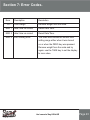
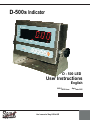
Section 2: Key descriptions.
Power On/Off the indicator
ZERO
1: when self checking, press zero key to enter parameter setting.
2: set the zero point for all-subsequent weighing.
3: move the cursor to change the digit when setting parameter or other functions.
TARE
1: when self checking, press TARE key to enter Fast calibretion.
2: Tare the scale. store the current weight in memory as a tare value,
Subtract the Tare value from the weight and shows the net weight.
entering a value using the key pad will store that value as the tare value.
3: Cycle through the functions or increase the active digit when setting value for
parameters or other functions.
MODE
1: Enter / Cancel the counting mode from weighing mode when “F3 key” = 1.
2: Accumulate and print when “F3 key” = 2.
3: “Hold” function keep and cancel when “F3 key” = 3.
4: Enter pre tare value when “F3 key” = 4.
5: Parameter setting for the animal weighing when “F3 key” = 5.
6: Cancel or quit from the operations.
FUNC
1: Select or enter the function and save the setting values of parameters.
2: View unit weight, counts and total weight when counting mode when (F3 KEY=1).
3: View Nos of accumulated weight and total weight when (F3 KEY=2).
4: Enter / Cancel animal weighing function when (F3 KEY=5).
UNIT
1: When self checking, press unit key to see unit conversion coefficient.
2: Unit conversion when weighing.
Sang
R
Weighing Solution
User’s manual of Sang D-500s LED
Page 8