1
E-STOP SYSTEMS
QUICK START GUIDE
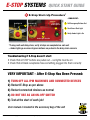
5 E-Stop Start-Up Procedure*
–SINGLE UNIT–
Red Light On
1
Red Light On
Push Start –
Green Light On
1
Pull Emergency Buttons Out
2
2
Push Green Start Light
3
Verify Amber Light is On
3
Amber Light Turns On
*If using multi-unit daisy chain, verify all steps are completed on each unit
– Amber lights go on when all green buttons are pushed in the daisy chain scenario
Troubleshooting if E-Stop doesn’t start:
• Check that all STOP buttons are pulled out – red lights must be on
• Check that all black receptacles have something plugged into them correctly
VERY IMPORTANT - After E-Stop Has Been Pressed:
1) TURN OFF ALL IPM MACHINES AND CONNECTED DEVICES
2) Restart E-Stop as per above
3) Restart connected devices as normal
4) DO NOT USE AS AN ON-OFF SWITCH
5) Test at the start of each job!
User manual is located in the accessory bag of the unit
CONFIDENTIAL
Copyright © 2012 In-Place Machining Company
Version: 1.2
08/27/2012