1
J74 StepLocker – Page 6
The “Lock”
The Lock is the heart of StepLocker. It defines the state StepLocker is into and which functions will be
performed, such as modulating, learning or bypassing.
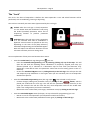
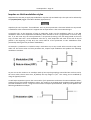
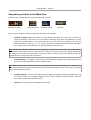
The Lock has essentially two main states (represented by the Lock sign):
•
Locked: when the Lock sign is closed, StepLocker
is in the locked state and modulation is ON, using
the locked (recorded) parameter values and its
sequencing features to perform parameter
modulation.
•
Unlocked: When the Lock sign is open, StepLocker
is in the unlocked state and its modulation is
bypassed. Two sub-states are possible in this case,
depending on the state of the [Step Selectors]:
Unlocked & Programming and Unlocked & Bypass.
Next will explain the difference between the two
sub-states and how you move among them.
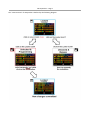
Here an explanation of how you move between these states:
•
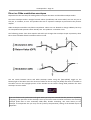
From the Locked state (lock sign being closed ) you can:
◦ Enter the Unlocked & Programming state by selecting (clicking on) any of the steps. This will
open the lock with the following effects: Modulation is temporary stopped; Each step you
selected (clicked on) is selected as a destination step for new locks (and becomes red);
StepLocker is now able to learn new parameter values from Live for locking (more on this in a
few lines).
◦ Go into the Unlocked & Bypass state by clicking directly on the lock sign. This will open the lock
and temporary stop modulation. In the bypass state you can essentially use Live as StepLocker
would not be present.
•
From the Unlocked & Programming state (lock sign open
, step selected in red) you can:
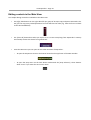
◦ Commit changes (adding new parameter locks) by clicking on the
button, which is
placed just underneath the Lock sign. This will save the parameter values (lock them) to the
steps you selected. This will also close the lock, move StepLocker back into the Locked state
(with a new configuration) and restart modulation.
◦ Move back to the Locked state (no changes, modulation active) by clicking on the lock sign.
•
From the Unlocked & Bypass state (lock open, no step selected for programming) you can:
◦ Remain in Live for usual operation (as if StepLocker would not be there)
◦ Move back to the Locked state (modulation active again) by clicking on the lock sign.