1
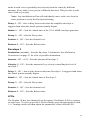
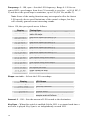
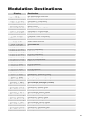
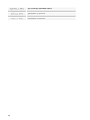
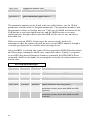
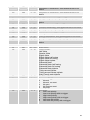
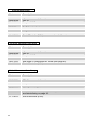
Destination: see table – See Modulation Destinations on page 27 for a list of
possible destinations.
Modulators
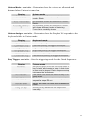
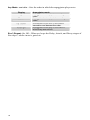
The Modulators section lets you configure the modulation routing and amount
for the Prophet '08’s four general-purpose modulation slots as well as for MIDI
controllers (Mod Wheel, Key Pressure, Breath Control, Velocity, and Foot
Controller).
Since each Prophet '08 mod source has a single destination, the four general
purpose Mods provide a way to send a mod source (such as a sequence or LFO)
to additional destinations, with a different amount. There are also additional
mod sources available here, such as Noise, allowing a wide variety of
possibilities.
To configure a general-purpose modulation slot, press the appropriate switch, 1–
4, and use the SOURCE, DESTINATION and AMOUNT knobs to set the modulation
as desired.
To configure modulation for a controller, press the MISC switch, select the
desired controller with the SOURCE knob, then use the DESTINATION and
AMOUNT knobs to set its modulation.
The Breath and Foot Controller parameters can be controlled by the Pedal/CV
input on the rear panel. This gives you the ability to route them to different
parameters on each Program for more flexible control. These are set in the
Global section.
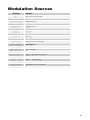
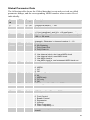
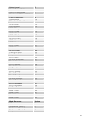
Source: see table – Selects a modulation source. See Modulation Sources on
page 29 for possible sources.
Amount: -127…+127 – Sets the amount of modulation.
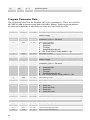
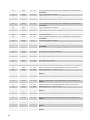
Destination: see table – Selects a modulation destination. See the Modulation
Destination table on page 4 for a list of possible destinations.
Note: The Modulators can not be edited when the EDIT SEQUENCER
switch is on.
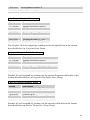
Misc Parameters
The Miscellaneous Parameters module lets you configure a variety of
parameters not found elsewhere. The parameter list is printed on the panel for
easy reference. Use the SELECT knob to choose the desired parameter, and the
VALUE knob, PARAM 2 knob, or the +/YES or -/NO switches to adjust the
value.
15