1
Start Your Installation
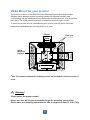
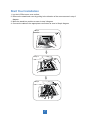
1. Lay the LCD flat on an even surface.
2. Remove the stand back cover by pulling in the direction of the arrow as seen in step 2
diagram.
3. Move the stand into position as seen in step 3 diagram.
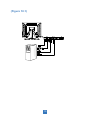
4. Connect the cables to the appropriate connectors as seen in Step 4 diagram.
Step 2
Step 3
K
Step 4
K
Power
USB
7
Audio
VGA