1
Maintenance and Troubleshooting
5.2
Troubleshooting Tips
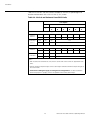
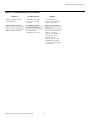
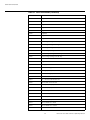
Table 5-1 provides some general guidelines for troubleshooting problems you may
encounter with the CL-810. If the suggested solutions fail to resolve the problem or if you
encounter an issue not described here, please contact Runco Technical Support.
Table 5-1. Troubleshooting Chart
Symptom
Possible Cause(s)
Solution
• The CL-810 is not plugged
in or the AC outlet is not
active.
• The main power switch (at
the rear of the projector) is
off.
• Lamp cover is not securely
attached.
• Ensure that the CL-810 is
plugged in and that the AC
outlet is active.
• Turn on the power switch.
The projector does not turn
back on after it was powered
off.
• The projector will not turn
on for two minutes after
power-off, to protect the
lamp.
• Wait until the CL-810
completes its cool-down
(POWER LED lights solid
orange).
The remote control does not
work correctly.
• The batteries have run out.
• Replace the batteries.
The projector is on and OSD
menus appear, but there is no
video image on-screen.
• Incorrect source selection.
• Source component is not
turned on.
• Source component is
connected incorrectly or
not at all.
• Select the correct source.
• Turn on the source.
A projected image from a
DVD is split or otherwise
scrambled.
• DVD player is connected
to the Component input
and set to progressive
scan mode.
• Turn off progressive scan
on the DVD player.
Image is blurred.
• The lens is not correctly
focused.
• Adjust the focus with the
remote control.
Image is too bright and/or
lacks definition in the bright
areas of the image.
• Contrast is set too high.
• Lower the contrast setting.
Image appears “washed out”
and/or dark areas appear too
bright.
• Brightness is set too high.
• Lower the brightness
setting.
Colors in the image are
swapped; for example, reds
appear blue or vice versa.
• The Red/Pr, Green/Y or
Blue/Pb outputs from the
source are connected to
the wrong inputs on the
CL-810.
• Ensure that the source
outputs are connected to
the correct CL-810 input.
PR
EL
IM
IN
A
R
Y
The projector does not turn
on.
50
• Securely attach the lamp
cover.
• Check cable connection
from source component to
projector.
Runco CL-810 Series Owner’s Operating Manual