1
사용설명서
USER'S MANUAL
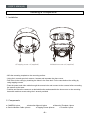
OSD Control Button
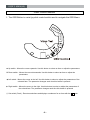
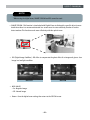
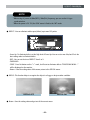
1. The OSD Button is a mini-joy stick control switch used to navigate the OSD Menu.
HE
AT
E
R
HEATER
T
ON
W
DO
FT
LE
I
VO R L
LU ED
M
E
VI
DE
O
N
FR
UP
SE
TU
P
TEMP.
SENSOR
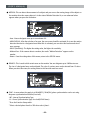
▲ Up switch : Moves the cursor upwards. Use this button to select an item or adjust the parameters.
▼ Down switch : Moves the cursor downwards. Use this button to select an item or adjust the
parameters.
◀ Left switch : Moves the cursor to the left. Use this button to select or adjust the parameters of the
selected item. The parameter changes each time this button is pressed.
▶ Right switch : Moves the cursor to the right. Use this button to select or adjust the parameters of
the selectd item. The parameter changes each time this button is pressed.
◎ Set switch (Push) : Executes selections and displays a submenu for an item with the
8
-8-
mark.