1
Fly Safe
DJI encourages you to enjoy flying your Phantom 3 Professional in a safe, responsible, and smart way. To do this, it is important to
understand some basic flight guidelines, both for your protection and for the safety of those around you.
1. Fly in Open Areas: Always fly in locations that are free and clear of buildings, trees, power lines, and other obstacles. Do not fly above
or near people or animals.
2. Maintain Control at All Times: Even when using DJI autopilot functions such as Auto-Takeoff, Auto-Landing, and Auto-Return to
Home, always keep your hands on the Remote Controller and maintain control of your aircraft when it is in flight.
3. Maintain Line of Sight: Keep your aircraft in sight at all times, and avoid flying behind buildings or other obstacles that may block your view.
4. Monitor Your Altitude: For the safety of full-sized aircraft and other air traffic, always fly at altitudes less than 400 feet (120 meters)
above ground level, or in line with your local laws and regulations.
Visit http://flysafe.dji.com/no-fly for more information on critical safety features such as
No-Fly Zones.
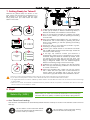
● Calibrating the Compass:
Make sure to calibrate the compass at every new flight location. The compass is very sensitive to electromagnetic interference, which
can cause abnormal compass data, leading to poor flight performance or even failure. Regular calibration is required for optimal
performance.
1. DO NOT calibrate your compass where there is a chance of strong magnetic interference, such as magnetite, parking structures, and
steel reinforcements underground.
2. DO NOT carry ferromagnetic materials with you during calibration such as keys or cellular phones.
3. DO NOT calibrate beside massive metal objects.
4. If the Aircraft Status Indicators are showing solid red, then try to calibrate again. If they are blinking red and yellow alternately after
placing the aircraft on the ground, the compass has detected magnetic interference. Change your location.
● Environmental Considerations:
1. Do not fly in severe weather conditions. This includes high winds (speeds of 22 mph or 10 m/s or more), snow, rain, and fog.
2. Only fly in open areas. Tall buildings and steel structures may affect the accuracy of the on-board compass and GPS signal.
3. Avoid obstacles, crowds, high-voltage power lines, trees, and bodies of water.
4. Minimize electromagnetic interference by avoiding areas with high levels of electromagnetism, including mobile phone base stations,
radio transmission towers, or Wi-Fi hotspots.
5. Aircraft and battery performance are subject to environmental factors such as air density and temperature. Be very careful when
flying 19,600 feet (6 km) or more above sea level, as battery and aircraft performance may not be at peak efficiency.
6. The Phantom 3 Professional cannot operate in P Mode or use GPS at polar latitudes. Only ATTI Mode and the Vision Positioning
system will be operational.
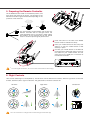
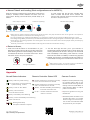
● P Mode:
In this mode, the Phantom 3 Professional can use GPS and the Vision
Positioning system, allowing it to hover accurately in position indoors
and out. When GPS is available, a Home Point will be locked so that the
Phantom 3 Professional can Return to Home if the Remote Controller
signal is lost.
GPS Positioning
To enable P Mode, toggle the Flight Mode Switch
to the P position.
There are three states in P mode:
P-GPS: GPS works best when outdoors and in a wide open area. Your
Phantom 3 Professional uses GPS to hover in place when there is a
strong GPS signal.
P-OPTI: If GPS is not available, the aircraft can use the Vision Positioning
system to hover accurately.
P-ATTI: Neither GPS nor the Vision Positioning system are available.
The aircraft will only use its barometer for altitude and other on-board
sensors for attitude stabilization.
Note that the Vision Positioning system may not work properly when
the Phantom 3 Professional is flying over water, over surfaces without
a clear pattern, or in a low-light environment.
Return to home
●
9 feet 10 inches
Vision Positioning
Altitude
1 foot
● Return to Home:
When there is a strong GPS signal, the aircraft will be able to
record a Home Point and return to that Home Point when
required. The Home Point location is recorded when the GPS
signal icon in the DJI Pilot app is either yellow or green.
The aircraft will return to the Home Point automatically in the
following scenarios (all require a strong GPS signal):
Smart RTH: When the RTH button on the Remote Controller
or in the DJI Pilot app is pressed.
Low-Battery RTH: A notification will appear in the DJI Pilot
app requesting the pilot to take action when the battery level
falls under a certain level.
Failsafe RTH: When the Remote Controller’s signal is lost.
While returning to the Home Point, the aircraft’s altitude can be adjusted to avoid obstacles. Tall buildings may affect the Remote
Controller’s signal. The Failsafe Return to Home procedure will be triggered if the signal is lost. Be sure to fly higher than any nearby
buildings to avoid crashing.