1
3
Controls
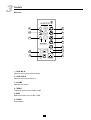
7 – CLIP
Clip indicator. The Led must light up only occasionally. Otherwise adjust the levels accordingly.
8 – Power Cord
Socket for the power cord. Check that it is plugged properly before turning the unit on. A fuse is located in the
compartment above the socket. If the unit does not light, check the fuse and replace it, if necessary, by a fuse of
same characteristics.
9 – MIC IN
Balanced XLR and ¼’’ phone Jack microphone inputs.
10 – LINE IN
Balanced XLR and RCA inputs for line level equipment or CD /MP3 player.
11 – OUTPUT
Balanced XLR and ¼’’ phone Jack main outputs. Allows cascading of several ACTIVE 12 or connect the mixed
signal to a separate recording or amplification system.
12 – Voltage selector
The device is supplied to work with the voltage of the electrical network in Europe. In case of use in other
countries, a 115V voltage can be selected.
13 – POWER
Power on/off switch. Set the overall volume (3) to zero before operating this button.
4
Installation Tips
1.
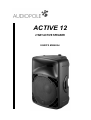
The ACTIVE 12 must be placed in such a way that there is no obstacle to the projection of sound. It is
preferable to use a speaker stand in order to elevate the speaker to enable him to better dispersion.
2.
Do not hang ACTIVE 12 by the handles, there is a danger of falling. For a wall mounting application, use a
bracket suitable and compatible with the weight and size of the enclosure (K & M 241 type).
3.
Use good quality wiring to avoid a degradation of the signal.
4.
Do not point the microphone in the direction of the speaker, there is a risk of feedback which can damage
transducers and affect hearing.
6