1
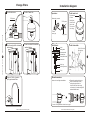
Change membrane
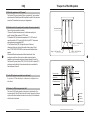
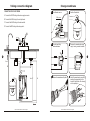
Tubing connection diagram
CONNECTING THE COLOR TUBING
1 Turn off water source.
A. Connect the WHITE tubing to the water supply connector.
2 Switch off water tank.
To RO system
B. Connect the BLUE tubing to the sink top faucet.
C. Connect the BLACK tubing to the drain saddle.
D. Connect the RED tubing to the storage tank.
4 Remove the membrane housing
cap by turning counterclockwise.
3 Turn the Jaco fitting
counterclockwise.
05
10
Jaco
Faucet
B
D Tank
Drain
C
Input water
Santevia Alkaline Reverse Osmosis System
A
6 Install the membrane by carefully
pushing the spigot end into the
socket at the far end of the housing
until completely in.
5 Remove the membrane with pliers.
O
PR
RE
IN
G
WA
TE
R
S
SY
TE
M
Santevia Alkaline Reverse Osmosis System