1
Memory Module Replacement Guide
Preface
This guide contains information on how to replace a memory module for
TOSHIBA personal computers.
When the Diagnostic Tool indicates that a memory module should be
replaced, first check the model of your computer, and then follow the
instructions in this guide for replacing it.
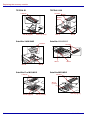
This guide covers the following models:
■ TECRA S1
■ Satellite 1110/1115
■ TECRA 9100
■ Satellite Pro M10
■ TECRA M1
■ Satellite Pro M15
■ TECRA M2
■ Satellite M30/M35
■ Satellite 2400
■ Portégé R100
■ Satellite 2405
■ Portégé M200/M205
Conventions
This manual uses the following formats to describe, identify, and highlight
terms and operating procedures.
Abbreviations
On first appearance, and whenever necessary for clarity, abbreviations are
enclosed in parentheses following their definition. For example: Read Only
Memory (ROM). Acronyms are also defined in the Glossary.
Messages
Messages are used in this manual to bring important information to your
attention. Each type of message is identified as shown below.
Pay attention! A caution informs you that improper use of equipment or
failure to follow instructions may cause data loss or damage your
equipment.
Please read. A note is a hint or advice that helps you make best use of
your equipment.
User’s Manual
iii