1
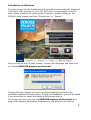
manually copied into the Adobe® Photoshop plug-in folder. Select the plugin entry folder in the CD start menu to open it.
Installation on Mac
Load your CD into your CD/DVD drive and open the installation menu
through the desktop. Drag the DENOISE projects professional file into
the program link. To use the Adobe® Photoshop plug-ins, open the Adobe®
Photoshop plug-ins folder and copy the appropriate plug-ins into your
Photoshop plug-ins folder. You can now use DENOISE projects
professional to edit your photos!
Registration
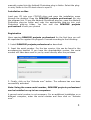
Upon opening DENOISE projects professional for the first time you will
be requested to register the program. Proceed according to the following:
1. Install DENOISE projects professional as described.
2. Input the serial number. For the box version, this can be found in the
accompanying booklet. If you have the downloadable version, the serial
number will have been sent to you by email directly after the purchase.
3. Finally, click on the “Activate now” button. The software has now been
successfully activated.
Note: Using the same serial number, DENOISE projects professional
can be installed on up to two computers.
A second serial number is not necessary. For an additional installation on a
different computer, enter the serial number and then click on “Activate
now”.
3