1
Robocall API User Guide
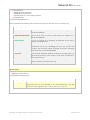
<campaignData>
<name>Christmas</name>
<method>mp3</method>
<mp3Url>http://url .tune.mp3</mp3Url>
</campaignData>
</robocallDatafeedRequest>
Note: The difference between this and the next request is that there IS an <mp3Url> tag.
Request tags explained
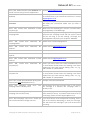
<username>
This will be sent to you by email when you register as a
Grapevine Affiliate.
<authenticationCode>
This will be sent to you by email when you register as a
Grapevine Affiliate.
<requestType>
If you are setting up a campaign, the default for this tag is
always ‘campaignSetup’.
<name>
You can set up a campaign yourself, as in this example, or
Grapevine can set up a campaign for you. You will use the
<name> tag to identify which campaign (and which message)
should be sent to selected MSISDNs
<method>
The method identifies whether an MP3 file is being used or a
Grapevine recording. If the former, a URL must be entered in
the <mp3Url> tag.
<mp3Url>
If you have entered ‘mp3’ in the <method> tag, you must
enter the URL for this file in this tag.
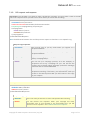
MP3 response
<robocallDatefeedResponse>
<status>success</status>
</robocallDatefeedResponse>
Response tags explained
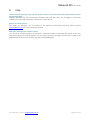
<status>
You will receive this response when your message has been
successfully sent. If your message is not successfully sent, you will
receive an error response. See 7.3 Data feed error response.
Copyright © 2010 Grapevine Interactive (Pty) Ltd
Page 6 of 11