1
Operating Instructions MA 51
4 Pure tone audiometry
4.1 Air Conduction (AC) Testing
In the hearing threshold test, the hearing threshold of the patient is
measured in comparison with the normal hearing threshold for air
conduction. The test is started on the ear with better hearing.
The patient should sit at a distance of at least 1 m from the device.
Eliminate any obstructions which will
interfere with the placement of the earphone
cushions on the ear (i.e. hair, eyeglasses).
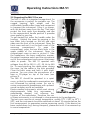
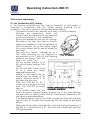
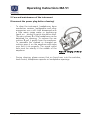
Ensure the headphones are put on correctly.
Red side on the right, blue side on the left.
Adjust the headband of the headphones so
that the receivers are at the correct height
(the sound output grid  exactly facing the
ear canal).
Start with the “better” indicated ear at 1
kHz. (After switching on, the frequency is Picture 10 Headphone
automatically set to 1 kHz.) In the following
example we assume that the
right is the “better” ear.
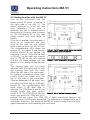
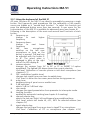
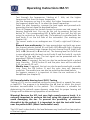
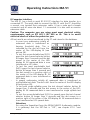
Set the receiver selector Ê to
AC and the signal selector Ó to
TONE.
Set the left level control knob
Ú↕ to a value just below
expected hearing loss.
Explain to the patient that he
should press the button of the
patient response switch if he
just hears the test tone.
Press the STIM bar Ù↔ for a
certain time to present the test
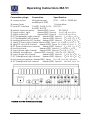
tone. The STIM LED Û should Picture 11 MA 51 controls and display for
airconduction threshold test
light on.
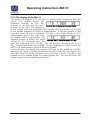
If the patient hears the test
tone, the patient response display Î lights red. In this case decrease
the level with the level control knob Ú. Proceed with presenting the
test signal as described before.
If the patient doesńt hear the test tone, increase the level with the level
control knob Ú. Proceed with presenting the test signal as described
before.
When you find a stable threshold value, note the level and frequency. If
the MA 51 is connected to a PC, the value was stored with your last
STIM presentation.
Geba_MA51_Fe_11a.doc
12
851 407/2 10/11