1
Musical Note Mode.
The Musical Note Mode works by comparing the VCO
frequency to a table of stored values corresponding to
Western musical notes. In this mode, the display will
show the numerical frequency reading, but once a
specific frequency is reached that is equivalent to a
known note value, the display will show the name of
the note. For example, if the VCO is tuned for 53Hz it
will display '53', but if the pitch were to reach 55Hz
the display will show 'A1' which is the musical note A
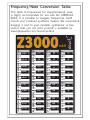
of octave 1. A Note-to-Frequency chart is available
online and at the end of this guide.
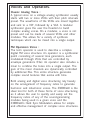
Sharp notes are represented by a dot between the
note and octave number.
Dot Indicates Sharp Note
C.2 d.2
=%)
F.2 G.2 A.2
C2 d2 E2 F2 G2 A2 b2