1
Get
Started
All you need to know to get going.
Welcome!
Thanks for choosing Sprint. This booklet introduces you to the
basics of getting started with Sprint Prepaid and your Samsung
Galaxy Core Prime™.
For ongoing support and resources, visit sprint.com/prepaidsupport.
There, you’ll find guides, tutorials, and more to help you get the most
out of your phone.
Note: Available applications and services are subject to change at any time.
2
Using This Guide
Using This Guide
This Get Started guide is designed to help you set up and use your
new Galaxy Core Prime. It’s divided into four sections to help you find
the information you need quickly and easily.
Get Ready − page 5 − Find out what
you need to do before you use your
phone the first time, including charge
battery and activating Sprint Prepaid
service on your phone.
Use Your Phone − page 11 − Take
advantage of your phone’s features
and Sprint services, from the basics
(Making Calls) to the more advanced
(using Google Play™, Wi-Fi®, and more).
Android™ Basics − page 8 − Learn some
basics about how to move around on
your phone, use the home screen, and
enter text. If you’re familiar with Android
phones, you can probably skip these
pages (although a refresher course never
hurt anyone).
Tools & Resources − page 22 −
Find useful tips for your phone and
discover resources and other helpful
Sprint information. For additional
information including the full User
Guide, videos, tutorials, and
community forums, visit
sprint.com/prepaidsupport.
3
Your Samsung Galaxy Core Prime
Proximity
Sensor
LED
Indicator
Earpiece
Front
Camera
Microphone
Camera
Flash
Power/Lock
Key
Headset Jack
Speaker
Volume
Buttons
Touchscreen
Recent
Apps Key
Microphone
4
Back Key
Home Key
USB Charger/
Accessory Port
Register Your Phone on Sprint Prepaid
Install the Battery
1. From your computer’s browser, visit
sprint.com/prepaidactivate.
2.Choose an activation option and click
Next, and then enter your ZIP code and
click Next.
3.When prompted, enter the serial number
(MEID) printed on the label on your
phone’s packaging.
4.Follow the instructions to select a plan and
payment method.
•If you’re swapping phones or bringing
your number over from a different carrier,
follow the prompts to sign in or provide
additional information.
1. Use the slot above the power button to
remove the battery cover.
2.Align the battery’s contacts with those
inside the battery compartment and gently
press down until the battery is seated.
3.Replace the back cover.
Charge the Battery
1. Insert the USB cable into the
charger/accessory port.
2.Insert the other end of the cable into the
charging head, and then plug the charging
head into a standard AC power outlet.
Note: Connecting the charger improperly
may cause serious damage to the device.
Any damage caused by misuse is not
covered by the warranty.
visit sprint.com/prepaidsupport for guides, tutorials and more
5
Get Ready
Get Your Phone Ready
Activate Your Phone
Set Up Your Phone
Activate Your Phone
Once activated, your phone guides you
through various setup options, including
setting up your Google™ Account.*
•Press and hold the Power/Lock Key
to turn on your new phone.
•Your phone is designed to activate
automatically. You will see a
Hands-Free-Activation screen
during the Setup Wizard. Follow the
onscreen instructions to continue.
If your phone is still not activated, visit
sprint.com/prepaidsupport for assistance. If
you do not have access to the Internet, call
Sprint Customer Service at 1-855-639-4644
from another phone.
6
Complete the Setup Screens
Note: At some point during setup, you
will see a prompt to install Sprint Default
Configuration. Follow the prompts to install
the package and then continue with the
setup screens.
1. When you see the Welcome screen,
select a language and tap Next to begin.
2.You’ll see a Wi-Fi setup screen. Follow the
prompts to set your Wi-Fi options.
3.Follow the prompts on the next few
screens to get your phone set up.
•Got Google? - Create or sign in to a
Google Account, and set preferences
including Google Location options.
•Samsung account - Create or sign in
to your Samsung user account.
4.Enter a name for your device and then
tap Finish.
*You do not need to sign up for a Google Account to
use your phone; however, to download content from
the Google Play™ Store app, you must link your
phone to a Google Account.
Basic Phone Functions
Turn the Phone On or Off
•Press and hold the Power/Lock Key
Get Ready
Set Up Your Phone
.
Turn the Screen On and Off
•To turn the display screen on or off, press
the Power/Lock Key
. Swipe the
screen to unlock it.
visit sprint.com/prepaidsupport for guides, tutorials and more
7
Your Home Screen
Viewing Your Home Screen
Your phone’s Home screen extends
horizontally up to five full screens.
•To display the main (center) Home screen,
from any screen.
press
•To view extended screens, swipe the
screen left or right.
Customize Your Home Screen
•To add app shortcuts, tap Apps ,
touch and hold an icon, and drag it
to the home screen.
•To change wallpaper or add widgets, touch
and hold an empty area on a home screen
and tap Wallpapers or Widgets.
8
Notifications Panel
You can expand the notification area to see
more about your notifications.
1. Drag the notifications panel down.
2.Tap a notification to open its app.
Status Bar
The status bar at the top of the Home
screen lets you quickly see both your phone
status (connections, signal strength, battery,
GPS) and any current notifications.
The bottom front of your phone contains
three keys: Recent Apps, Home, and Back.
Above this row is a row of app icons that are
available from every Home screen.
Open Apps
•If an app is on one of your Home screens,
just tap it to open it.
•If an app is not available from your Home
screen, tap Apps , and then tap the app
icon. You may have to scroll right or left to
find your app.
Android Basics
Keys and App Icons
Phone Camera Messages Internet Apps
Recent
Apps Key
Home Key
Back Key
visit sprint.com/prepaidsupport for guides, tutorials and more
9
Typing on Your Phone
Samsung Keyboard
Your Keyboard Settings
Select a field that requires text or numbers
to display the Samsung keyboard.
You can customize your onscreen keyboard
settings to suit your needs:
Note: To switch between input methods,
drag the notifications bar down, tap Choose
input method, and then tap an input
method.
•Tap
or
to change entry type.
•If predictive text is on, words will appear
above the keyboard as you type. Tap a
word to enter it and move on to the next
word.
•If Keyboard swipe is on, you can enter
words by sliding your finger continuously
over the keyboard.
10
•Tap Apps
> Settings
> Language and
input (under System), and tap the Settings
icon
next to a keyboard or input
method.
Google Voice Typing
Use your voice to enter text instead of typing.
1. From any screen where you can enter text,
tap the input field to reveal the keyboard.
2.Tap and speak clearly.
Voicemail
Make a Phone Call
Set Up Your Voicemail
1. If the screen is locked, swipe the screen to
unlock it.
2.From home, tap Phone .
3.Tap the digits of the number you want to
call on the phone keypad. (The number will
appear just above the keypad as you enter
it. Tap
to delete one or more digits.)
4.Tap
.
All unanswered calls are automatically
transferred to your voicemail, even if your
phone is in use or turned off. You should set
up your voicemail and personal greeting as
soon as your phone is activated:
Answer an Incoming Call
•Drag
to the right on the screen.
Send a Call Directly to Voicemail
•Drag
to the left.
Mute the Ringer on a Call
•Press the volume button on the left side
of the phone to mute the ringer.
1. From home, tap Apps
> Voicemail
2.Follow the voice prompts to create
your password and record your name
and greeting.
Sprint strongly recommends setting a
voicemail password.
.
Retrieve Your Voicemail
1. From home, tap Apps
> Voicemail
2.Tap a message to listen to it.
visit sprint.com/prepaidsupport for guides, tutorials and more
.
11
Use Your Phone
Calls
Contacts
Your phone’s Contacts app lets you access and manage contacts from a variety of sources,
including Google and Corporate email accounts, contacts synced from your computer, and
contacts you’ve entered manually.
Save a Phone Number
Add a New Entry to Contacts
1. From home, tap Phone .
2.Enter a phone number using the
onscreen keypad.
3.Tap > Add to Contacts > Create contact.
4.Select an account for the contact, such as
Google or Microsoft Exchange ActiveSync.
Select Device to save the contact to your
phone only.
5.Tap Name and enter a name for the
new entry.
6.Tap Mobile (default) to select a label such
as Mobile, Home, etc.
7.Add any other information you want to
save to the contact and then tap Save.
1. From home, tap Apps
> Contacts .
2.Tap .
3.Tap any field and enter the name, phone
number, and other contact details.
4.Add more data fields or a picture if
desired, and tap Save.
12
Find a Contact
1. From home, tap Apps
> Contacts ,
and then tap Search.
2.Enter the first letter or letters of an entry.
3.Tap the contact to display its information.
Messages
1. From home, tap Messages .
2.Tap .
3.Enter a phone number, email address, or
contact name in the Enter recipient field.
(If available, tap a name from the list to
finish the entry.)
4.Tap Enter message and then type
your message.
•If you want to add an attachment to
your message, such as a picture or
video, tap .
•Tap a media type (such as Image, Video,
Audio, etc.) and then tap an available
album and item.
5.When you’re ready to send, tap
.
Access Messages
1. From home, tap Messages .
2.From the Messages screen, tap the
message you want to view.
–or–
1. Open the Notifications panel.
2.Tap the message you want to view.
Text and MMS messages are collected in
ongoing “conversations,” so when you view a
message, you can scroll through the entire
history of your messages with that person.
visit sprint.com/prepaidsupport for guides, tutorials and more
13
Use Your Phone
Send a Text or Multimedia
(MMS) Message
Email
Your phone’s Email applications let you access and manage multiple email accounts
simultaneously in one convenient location.
Set Up a Gmail™ Account
Set Up a Standard Email Account
1. From home, tap Apps
> Gmail .
2.Follow the instructions to set up or sign in
to a Gmail account.
1. From home, tap Apps
> Email .
2.If another email account is already set up,
tap > Manage accounts > .
3.Enter the Email address and Password for
the email account.
4.Tap Next and follow the onscreen
instructions.
–or–
Tap Manual setup, select an account type
(POP3 or IMAP), and follow the instructions
to configure your account.
14
Set Up a Microsoft® Exchange
ActiveSync® Account
Note: Contact your company’s
Exchange Server administrator
for required sign-in information.
1. From home, tap Apps
> Email .
2.If another email account is already set up,
tap > Manage accounts > .
3.Enter your Email address and Password
information and then tap Manual setup.
4.Tap Microsoft Exchange ActiveSync.
5.When prompted to provide additional
detailed information, scroll down the
screen and tap Next.
6.Enter a Domain\user name, Password,
and Exchange server information.
7.Follow the prompts to set additional
options and permissions. Tap Next
to continue.
8.Identify your new account with a unique
name, enter the outgoing name, and then
tap Done.
visit sprint.com/prepaidsupport for guides, tutorials and more
15
Use Your Phone
Email
Email
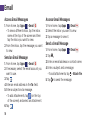
Access Email Messages
Access Gmail Messages
1. From home, tap Apps
> Email .
•To view a different inbox, tap the inbox
name at the top of the screen and then
tap the inbox you want to view.
2.From the inbox, tap the message you want
to view.
1. From home, tap Apps
> Gmail .
2.Select the inbox you want to view.
3.Tap a message to view it.
Send an Email Message
1. From home, tap Apps
> Email .
2.If necessary, select the email account you
want to use.
3.Tap .
4.Enter an email address in the To: field.
5.Enter a subject and a message.
•To add attachments, tap
(on the top
of the screen) and select an attachment.
6.Tap
.
16
Send a Gmail Message
1. From home, tap Apps
> Gmail .
2.Tap
.
3.Enter an email address or contact name.
4.Enter a subject and a message.
•To add attachments, tap > Attach file.
5.Tap
to send the message.
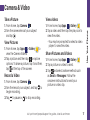
Take a Picture
View videos
1. From home, tap Camera
.
2.Aim the camera lens at your subject
and tap .
1. From home, tap Apps
> Gallery
.
2.Tap a video and then tap the play icon to
view the video.
•You may be prompted to select a video
player to view the video.
View Pictures
1. From home, tap Apps
> Gallery
to
view the Camera folders.
2.Tap a picture and then tap
to explore
options. To share a picture, tap it and then,
tap
at the top of the screen.
Record a Video
1. From home, tap Camera
.
2.Aim the lens at your subject, and tap
to
begin recording.
3.Tap
to pause or
to stop recording.
Use Your Phone
Camera & Video
Share Pictures and Videos
1. From home, tap Apps
> Gallery
.
2.Tap a picture or video to send.
3.Tap
and select a share method such
as Email or Messages. Follow the
onscreen instructions to send your
picture or video clip.
visit sprint.com/prepaidsupport for guides, tutorials and more
17
Web
Wi-Fi
Go Online
Connect to a Wi-Fi Network
1. From home, tap Internet
. The first time,
you may be prompted to enter your
wireless phone number.
2.From any web page:
•Tap for more options.
•To scroll, slide your finger up or down
the page.
•To zoom in or out, pinch the screen.
When you’re in range of an available Wi-Fi
network, use your phone’s Wi-Fi feature to
access the Internet and other data services.
Note: Additional browser options, such as
Google Chrome™, may also be available on
your phone.
18
Note: You may already have signed in to
Wi-Fi during the phone’s setup process.
1. From home, tap Apps
> Settings
>
Wi-Fi.
2.Tap the icon next to Wi-Fi and slide to the
“ON” position.
3.Tap and then tap Scan to display a list of
available networks.
4.Tap a Wi-Fi network to connect. If
necessary, enter the security key
(password) and tap Connect.
Google Play and Google Mobile Services
Download Apps and Games
1. From home, tap Apps
> Play Store
.
2.The first time you visit the Google Play
Store app, tap OK to accept the Terms of
Service.
3.Browse through featured apps and games,
at the top of the app to start
or tap
a search.
4.Tap an item to read a description
and reviews.
5.Tap INSTALL (for free apps) or the
price (for paid apps) and follow the
onscreen prompts.
Note: You must have a Google Account set
up on your phone to purchase and download
apps from Google Play.
Google Mobile™ Services
•Gmail – The Google mail service. Your
Gmail account lets you access many
Google-related services as well as
Google Play.
•Google Hangouts™ – Google’s instant
messaging service. From home, tap
Apps
> Hangouts
to begin using
the service.
•Google Maps™ – The Google location
program. From home, tap Apps
>
Maps
to begin using this service.
•YouTube™ – View and share videos. From
home, tap Apps
> YouTube
to
browse through and view available videos.
Sign in with your Google Account to upload
your own videos.
visit sprint.com/prepaidsupport for guides, tutorials and more
19
Use Your Phone
Google Play is the place to go to find
new apps, games, movies, and more
for your phone.
Bluetooth®
Pair and Connect With a
Bluetooth-Capable Device
1. From home, tap Apps
> Settings
>
Bluetooth, and then slide the icon to the
“ON” position.
2.Tap the check box next to your
phone’s name to make it discoverable
by other devices.
3.Tap Scan. (You’ll see a list of in-range
Bluetooth devices.)
4.Tap a device from the list to initiate pairing.
5.Enter the passkey or PIN code, or verify the
shared key, and tap OK.
6.The external device will then have to also
accept the connection and enter your
phone’s PIN code.
7.Once you’re paired with a device, your
connection should launch.
shows your
current connection status.
20
Share Contacts, Files, or Pictures
Using Bluetooth
1. Open the application containing the file
you want to share (for example, from home,
tap Apps
> Contacts ).
2.Locate the file or entry you want to share.
•You can send pictures and videos directly
from the camera or from Gallery, Calendar
events, Contacts (as vCards), music tracks,
and voice recordings. Not all devices will
be able to receive all file types.
3.Depending on the application, tap
>
Share name card > Bluetooth.
4.Tap the name of the device to which you’re
sending the file.
Facebook, Twitter & More
Set Up Social Networking Accounts
Use Social Networking Accounts
Before using your social networking
accounts, you may need to download them
from the Google Play Store app.
1. From home, tap Apps
> Facebook
(or Twitter, Instagram, etc.).
2.Follow the onscreen instructions to sign
into your account, for example, by
entering a user name and password.
3.Update your status, post pictures, follow
your favorite tweets, and more, all on your
Galaxy Core Prime.
1. From home, tap Apps
> Play Store
.
2.Browse or search for the app you want to
download, for example Facebook®, Twitter®,
or Instagram .
3.Tap the app and then tap Install. Follow the
prompts to download and install the app.
®
Tip: You can add Home screen widgets for
many social networking apps. Touch and
hold an empty space, tap Widgets and then
drag the widget to the empty space.
visit sprint.com/prepaidsupport for guides, tutorials and more
21
Use Your Phone
You can set up and access all your favorite social media apps on the go.
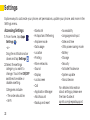
Settings
Explore ways to customize your phone, set permissions, update your phone, and more in the
Settings menu.
Accessing Settings
1. From home, tap Apps
>
Settings .
–or–
Drag the notifications bar
down and tap Settings .
2.Select the settings
category you want to
change. Touch the ON/OFF
switches to enable or
disable a setting.
Categories include:
•The order should be:
•Wi-Fi
22
•Bluetooth
•Hotspot and Tethering
•Airplane mode
•Data usage
•Location
•Printing
•More networks
•Sound
•Display
•Lock screen
•Call
•Application Manager
•Add Account
•Backup and reset
•Accessibility
•Language and input
•Date and time
•Ultra power saving mode
•Battery
•Storage
•Security
•Activate this device
•System update
•About device
For detailed information
about settings, please see
the User Guide at
sprint.com/prepaidsupport.
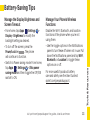
Battery-Saving Tips
Manage the Display Brightness and
Screen Timeout
Manage Your Phone’s Wireless
Functions
•From home, tap Apps
> Settings
>
Display > Brightness to modify the
backlight setting as desired.
•To turn off the screen, press the
. The phone
Power/Lock key
will continue to function.
•Switch to Power saving mode. From home,
tap Apps
> Settings
> Ultra power
saving mode and then toggle the OFF/ON
switch to ON.
Disable the Wi-Fi, Bluetooth, and location
functions of the phone when you’re not
using them.
•Use the toggle options in the Notifications
panel to turn these off when not in use. Pull
down the Notifications panel and tap Wi-Fi,
Bluetooth, or Location to toggle these
options on or off.
visit sprint.com/prepaidsupport for guides, tutorials and more
Tools & Resources
For more useful tips about battery
care and safety, see the User Guide at
sprint.com/prepaidsupport.
23
Manage Your Account
Refill
Online: sprint.com/prepaidmysprint
Refill Your Account
•View cash balance and/or payment date
•Check minute usage (if not on an
unlimited voice plan)
•Add a credit/debit card to set up
AutoPay or make one-time payments
•See or modify your price plan
•Change your Account PIN
Visit sprint.com/prepaidrefill to refill your
cash balance by making a one-time payment
with a credit or debit card.
From a Phone
•Sprint Customer Service:
Dial 1-855-639-4644
24
Resources
Sprint Zone
•This Get Started Guide to get you up
and running.
•Online Support – For ongoing help
over the life of your phone, visit
sprint.com/prepaidsupport to find
videos, tutorials, troubleshooting tips,
and the complete User Guide for your
Galaxy Core Prime.
•Community – Visit community.sprint.com
to join the discussion about all things
Sprint. Here people help each other make
the most of their wireless services with tips,
forums, blogs, and the latest news.
Enhance your Sprint experience. The free
Sprint Zone application makes it a snap to
manage your account, get tips and tricks
for your phone, find recommended apps,
and more.
•From home, tap Apps
> Sprint Zone
to access account services, Sprint news,
phone information, suggested applications,
troubleshooting, and more.
visit sprint.com/prepaidsupport for guides, tutorials and more
Tools & Resources
Resources For Your Phone
25
Sustainability
At Sprint, environmental responsibility is
more than talk. We’re continuously working
to reduce our carbon footprint and
decrease our use of natural resources.
So where is my User Guide?
We took the full printed user guide out of
the box and put it, along with expanded
support resources, online for you. Less
paper, more and better information.
Just visit sprint.com/prepaidsupport from
any computer to access your complete user
guide and the rest of our support materials.
26
What else has Sprint been doing?
Plenty. To find out just what we’ve been
up to, visit sprint.com/green for
more information.
Survey
Galaxy Core Prime
We are interested in your initial
impressions of this new Sprint phone.
By registering your Galaxy Core Prime
phone at samsung.com, you are
entitled to:
Thank you for choosing Sprint.
•Premium service through your choice of
live chat, email and/or phone
•Access to specialized call center staff
•Extended call center hours
•Galaxy Core Prime product user manual
As an owner, you can write a product
review, shop for accessories and receive
exclusive Samsung offers.
visit sprint.com/prepaidsupport for guides, tutorials and more
Tools & Resources
Within two weeks of your phone purchase,
please go to the website
http://labs.sprint.com/sprintphonesurvey to
complete a brief survey. Your feedback will
help us provide the wireless features and
services you want most.
27
The services described in this guide may require a subscription to a service plan and/or may incur additional
charges. Not all services will work on all phones. See sprint.com/prepaidcoverage for more details.
Portions of this guide are reproductions of work created and shared by Google and used according to terms
described in the Creative Commons 3.0 Attribution License.
Important Privacy Message. This phone is capable of determining its/your geographical location. To set
> Settings
>
controls for access and use of your location information by others, from home, tap Apps
Location, tap the OFF/ON icon so it’s in the ON position, and then tap Mode. Select your location options from
the list and follow any applicable prompts. These settings for the use of location information can be turned on
and off. For some applications and services you select, a phone must be turned on and set to allow collection
of location information in order to function.
Please be advised that if you use a third party application, the application may collect your personal
information or require Sprint to disclose your customer information, including location information (when
applicable), to the application provider or some other third party. Sprint’s policies do not apply to these third
party applications. Please carefully review the application’s terms of use and/or the application provider’s
policies for more information about how the application will collect, access, use or disclose your information
before using a third-party application. Terms of use and other policies usually are available on the application
provider’s website.
©2015 Sprint. Sprint and the logo are trademarks of Sprint. Samsung, Galaxy, and Core Prime are all
trademarks of Samsung Electronics Co., Ltd. Gmail, Google+, Hangouts, Google Maps, YouTube, Android,
Google, Photos, Google Maps, Google Mobile Services, and Google Play are trademarks of Google, Inc. Other
marks are property of their respective owners. Screen images simulated. Appearance of device may vary.