1
User Manual - Rev H
California Instruments
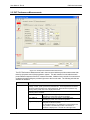
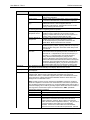
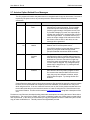
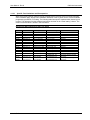
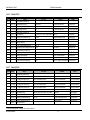
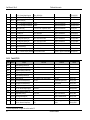
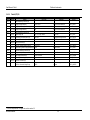
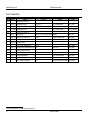
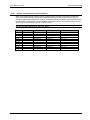
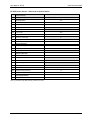
2.7 Avionics Option Related Error Messages
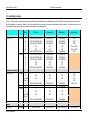
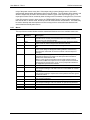
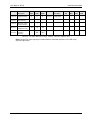
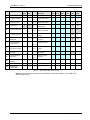
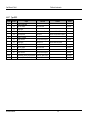
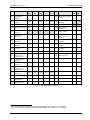
The Gui program will monitor the power source on a regular basis for any run time errors. If an error is
reported by the power source, any test step execution will be aborted. Possible errors and error
sources are:
No
Description
Potential cause
2
Current Limit
Fault
EUT may require more current than the
programmed current limit setting. This is possible
on constant power loads during reduced voltage
(low line) type test steps. If the power source is set
to Constant Voltage (CV) mode, the output will trip
off when the current limit is exceeded and a Current
Limit fault is generated. In Constant Current (CC)
mode, the output voltage will be reduced to reduce
the current to the set limit. In this case, no error
message will be generated.
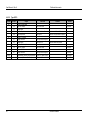
113
Undefined
Header
Generally caused by a communication problem
between the PC and the power source.
If the RS232 interface is used and these problems
persist, try using the GPIB interface instead.
(Requires National Instruments GPIB controller).
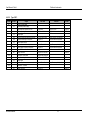
15
Slew
exceeds
dwell
The power source transient system was
programmed to slew to a voltage and/or frequency
value that would take longer to accomplish than the
slew time set. This error can result in single step
mode if the steps are executed out of order or one
or more steps are skipped. The voltage/frequency
values may no longer line up. Try running the test
from the first step.
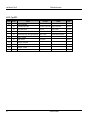
16
Illegal during
transient
A transient step is still in progress. Try using the
Abort button to abort any test in progress. If other
Gui screens other than the Main GUI screen are
open, they may have initiated a transient, which
conflicts with the option. Try closing all other Gui
windows.
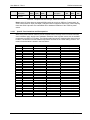
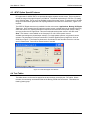
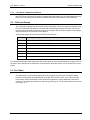
Great efforts have been made to check all test sequence files provided as part of the avionics options.
However, due to the breadth and complexity of the test databases, an occasional error may occur
while using these files. If an error cannot be resolved, turn on the Gui bus monitor window and rerun
the test that yields the error and save the bus trace to a text file using the File, Save All menu in the
bus monitor window. This file can be emailed to [email protected] along with a description of the
error.
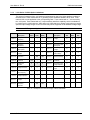
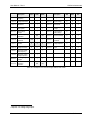
Furthermore, test files were developed making reasonable assumptions concerning the intent of the avionics
test directives. The user is free to modify, edit, revise or otherwise update any of these tests to match his/her
own requirements. In this case, we recommend you copy the supplied test revision subdirectory and use this
copy to make modifications to. This will preserve the original data provided.
Avionics Software
21