1
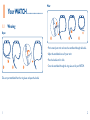
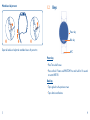
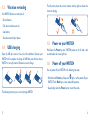
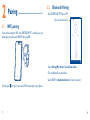
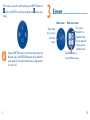
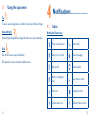
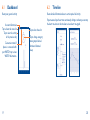
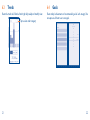
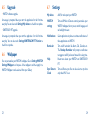
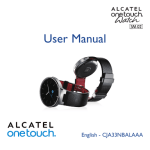
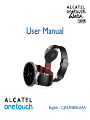
User Manual English - CJA33NBALAAA Note: This manual is not for sale. ONETOUCH FIT ONETOUCH FIT helps you to pair WATCH with your phone, review the activity dashboard, set goals, etc. (Page XX) You can download this APP in the following ways: • Android phone: -Search for "ONETOUCH FIT" in Google play store. -Scan the following QR code: Introduction����������������������������� WATCH Wear, Feel, Tap and experience it. • If you raise your hand with the screen facing towards you while you are in a standing/sitting position, the screen will light up and the current time will display. • Tracks your daily movements and monitors your sleep. • Control Music player and Camera without taking out your phone. • Measures your heart rate while exercising or resting. • iPhone: App store (TBD) Supported phone list(1): • ALCATEL ONETOUCH website (TBD) • LG G3 • Saumsung S5 • HTC one Max • HTC one M8 • Moto-G • OPPO FIND7 • HUAWEI P7 • POP S7 • HERO2 • HERO2C Bluetooth • POP M5 WATCH pairs with phone devices supporting Bluetooth 4.0 LE. • PIXI 8 Supported phones/systems • PIXI 7 WATCH is compatible with: • POP 10 • Android 4.3 and above • POP D5 • iOS7, iPhone 4s and above (1) More phones will be supported in the future. Table of contents 1 Your WATCH����������������������������������������������������������������������������1 2Pairing����������������������������������������������������������������������������������������7 3Screen��������������������������������������������������������������������������������������10 4Notifications����������������������������������������������������������������������������12 5Applications�����������������������������������������������������������������������������14 6 ONETOUCH FIT�������������������������������������������������������������������18 Safety and use�����������������������������������������������������������������������������������25 General information������������������������������������������������������������������������37 Warranty�������������������������������������������������������������������������������������������42 Troubleshooting�������������������������������������������������������������������������������44 This product meets applicable national SAR limits of 2.0W/kg. The specific maximum SAR values can be found on page XX of this user guide. www.sar-tick.com When carrying the product or using it while worn on your body, either use an approved accessory such as a holster or otherwise maintain a distance of XX mm from the body to ensure compliance with RF exposure requirements. Note that the product may be transmitting even if you are not making a phone call. 1 Your WATCH������������������� 1.1 Wear Wearing Open • Put it around your wrist and cross the watchband through the buckle. • Adjust the watchband size to fit your wrist. • Press the buckle until it clicks. • Cross the watchband through the ring sleeve to fix your WATCH. Take out your watchband from the ring sleeve and open the buckle. 1 2 1.2 Watchband adjustment Keys Power key Back key Open the buckle and adjust the watchband size to fit your wrist. NFC Power key • Press: Turn on/off screen. • Press and hold: Power on/off WATCH. Press and hold for 10 seconds to restart WATCH. Back key • Tap to go back to the previous screen. • Tap to dismiss notifications. 3 4 1.3 Vibration reminding Your WATCH vibrates to remind you of: The left picture shows the correct insertion and the right one shows the incorrect charging. • All notifications • Call, alarm, calendar, event, etc. • Low battery • Disconnection with your phone 1.4 USB charging Open the USB port cover at the end of the watchband. Connect your WATCH with a computer to charge via USB. Make sure that the chip on WATCH is correctly inserted. Otherwise, it won't charge. 1.5 Power on your WATCH Hold down the Power key until WATCH powers on. It will take a few seconds before the screen lights up. 1.6 Power off your WATCH You can power off your WATCH in the following two ways: • Hold down the Power key. Swipe icon right or left to power off your WATCH. Touch Back key to cancel power-off operation. • Keep holding down the Power key for around 8 seconds. The following instructs you to correctly charge WATCH. 5 6 2 Pairing������������������������������� 2.1 2.2 Bluetooth Pairing • Start ONETOUCH FIT. Tap icon . Tap it to show menu list. NFC pairing If your phone supports NFC and ONETOUCH FIT is installed, you can quickly pair your phone with WATCH by using NFC. • Select Settings\My devices, Tap Add new device. • Turn on Bluetooth on your phone. • Select WATCH in Available devices list, tap it to connect. Find the logo 7 and put it close to the NFC antenna part in your phone. 8 • The first time, you need to confirm pairing on your WATCH. Swipe icon left on your WATCH to confirm pairing. Swipe icon right to reject pairing. 3 Screen������������������������������� Tap on watch face to access main menu screen. Keep your WATCH screen on if your phone cannot detect any Bluetooth device. Your WATCH's Bluetooth will be disabled for power saving if it has not paired with any device a long time after its screen is off. 9 Home screen Main menu screen The screen is provided in an extended format. You can swipe left/ right to view the extended screen. Tap the Back key to access the Home screen. 10 3.1 Using the tap screen Tap To access, select an application or confirm an action, tap it with your finger. Swipe left/right 4 Notifications��������������������� 4.1 Icons Notification/Status icons Swipe left/right the applications, images, life modes etc. at your convenience. Phone is disconnected Missed call(s) Battery is low (in red) Unread message(s) Battery is full Unread email(s) Battery is charging (in blue) Sleep tracker is active Mute is on Stopwatch is active Airplane mode is on Workout tracker is active Slide Slide up the screen to open notifications. Slide down the screen to close the notification area. 11 12 4.2 Notifications(1) When there are notifications, touch and drag up to open the Notification panel and read the detailed information(2). Incoming call Message(3) Calendar reminder Alarm Heart rate alert(4) Informs you when the phone gets an incoming call. You can reject or mute the incoming call from WATCH. Shows you the content of an incoming message. Notification can be dismissed from WATCH. Reminds you about upcoming events. Notification can be dismissed. When your alarm goes off, you can dismiss or snooze the alarm that you set on the phone. If your heart rate is outside the normal range, it will alert you. Notification or alert can be dismissed. (1) Make sure WATCH is connected with your phone. (2) WATCH will gently vibrate when there is an incoming notification. (3)Supports SMS and SNS. (4) TCL Communication Ltd. shall not be liable in the event of inaccuracy of your heart rate or failure to provide the heart rate. 13 5 Applications���������������������� Weather(1) forecasts the weather for the next 12 hours and for the next 5 days. Current time is shown in the bottom left of the screen. Current temperature is displayed in the middle of the screen. You can Swipe right to see the weather forecast for the next day. Life records all of your activities; you can view detailed data through different modes like Steps, Calories, Distance, Sleep, etc. Heart rate measures your heart rate. Tap the heart-shaped icon to measure in several seconds. Note that your WATCH must have proper contact with your wrist to ensure data correctness. To make sure your heart rate test is accurate, WATCH should be fastened and worn on your wrist. Otherwise, the test result can be abnormal. (1) The weather information is provided by AccuWeather. For details about the APP, go to www.AccuWeather.com. 14 Workout tracks your workout activities. You can specify some periods of your workout by lap and swipe the screen to view detailed information for each lap. Stopwatch measures the amount of elapsed time Music(1) can play(previous/next)/stop songs on our phone. You can also adjust sound volume by making circles on the screen with your finger. Compass obtains geographic and altitude information. The altitude information will be more accurate if you are outdoor or in an open space. Conversely, the altitude may have deviation if the weather or atmospheric pressure sharply changes, or you are in a closed space such as an air-conditioned room or a cabin. (1) Make sure WATCH is connected with your phone. 15 Camera(1)(2) controls the Camera in your phone to take a picture.Tap once on your WATCH to turn on Camera on your phone and tap to take the picture. Images will be saved in the Gallery of your phone. Watch face personalises your watch face. You can swipe left/ right to select a watch face type. Search phone helps you to find your phone. Tap it and then your phone sounds if WATCH is connected to your phone. Mute turns on silent mode. You can tap this icon to turn mute on/off. When Mute is on, notifications can still be received but you won't be reminded by vibration. (1) Make sure WATCH is connected with your phone. (2) Make sure your phone is unlocked. 16 Airplane mode disconnects WATCH from your phone. You can tap this icon to turn airplane mode on/off. Brightness personalises brightness of your WATCH. You can tap this icon to adjust brightness. Theme personalises theme of your WATCH. You can tap this icon to select a theme. 6 ONETOUCH FIT�������� ONETOUCH FIT helps you to pair WATCH with your phone, review the activity dashboard, set goals, etc. You need to log in and fill your information the first time. You can set your account by: • Creating an account on ONETOUCH FIT login page directly. • Using other social APP accounts (such as Google accounts) to log in. Your account can be used on ALCATEL ONETOUCH FIT website (TBD). 17 18 6.1 Dashboard 6.2 Shows your general activity. Account information Tap to show the menu list Tap to view the activity of the previous day Connection status. If phone is connected with your WATCH, tap to view WATCH information. 19 Timeline Shows detailed information about a certain period of activity. If you measured your heart rate continuously during a workout, you can tap the heart rate item on the timeline to view heart rate graph. Tap to show share list Tap to change category among steps/calories/ durations/distances/ sleep 20 6.3 Trends 6.4 Shows the trends of all kinds of activity by daily, weekly and monthly view. Tap to select other category. 21 Goals Shows today’s achievement and recommended goal of each category. You can open one of them to set a new goal. 22 6.5 Upgrade 6.7 Settings • WATCH software upgrade My device Add, Pair and unpair your WATCH. A message is prompted when you start the application for the first time everyday. You can also touch Settings\My devices to check for an update. WATCH settings Turn on/off Music & Camera control, personalise your WATCH wallpaper, factory reset, switch language and set backlight timeout. Notifications Select applications in phone to activate notifications of these applications on WATCH. Reminder Turn on/off reminders like Alarm, Call, Calendar, etc. The Standup Reminder will prompt a notification to suggest a walk If you haven't moved for a long time. Know more about your WATCH and ONETOUCH FIT. Turn on/off auto sync. You can also select to sync data only when Wi-Fi is on. • ONETOUCH FIT upgrade A message is prompted when you start the application for the first time everyday. You can also touch Settings\ONETOUCH FIT Version to check for an update. 6.6 Wallpaper You can personalize your WATCH’s wallpaper. Go to Settings\WATCH Settings\Wallpaper and tap one of the wallpapers and then apply it to WATCH. Wallpaper can be selected from your Gallery. 23 Help Sync Data to Cloud 24 Safety and use We recommend that you read this chapter carefully before using your device.The manufacturer disclaims any liability for damage, which may result as a consequence of improper use or use contrary to the instructions contained herein. • TRAFFIC SAFETY: Given that studies show that using a device while driving a vehicle constitutes a real risk, even when the hands-free kit is used (car kit, headset...), drivers are requested to refrain from using their device when the vehicle is not parked. When driving, do not use your device and headphone to listen to music. Using a headphone can be dangerous and forbidden in some areas. When switched on, your device emits electromagnetic waves that can interfere with the vehicle’s electronic systems such as ABS anti-lock brakes or airbags. To ensure that there is no problem: - do not place your device on top of the dashboard or within an airbag deployment area, - check with your car dealer or the car manufacturer to make sure that the dashboard is adequately shielded from RF energy. 25 • CONDITIONS OF USE: You are advised to switch off the device from time to time to optimise its performance. Switch the device off before boarding an aircraft. Switch the device off when you are in health care facilities, except in designated areas. As with many other types of equipment now in regular use, mobile devices can interfere with other electrical or electronic devices, or equipment using radio frequency. Switch the device off when you are near gas or flammable liquids. Strictly obey all signs and instructions posted in a fuel depot, petrol station, or chemical plant, or in any potentially explosive atmosphere. When the device is switched on, it should be kept at least 15 cm from any medical device such as a pacemaker, a hearing aid or insulin pump, etc. In particular when using the device, you should hold it against the ear on the opposite side to the device, if any. Do not let children use the device and/or play with the device and accessories without supervision. Please note that your device is a unibody device, the battery is not removable. Do not attempt to disassemble your device. If you disassemble your device the warranty will not apply. Also disassembling the device may damage the battery, and may cause leakage of substances that could create an allergic reaction. Always handle your device with care and keep it in a clean and dust-free place. 26 Do not allow your device to be exposed to adverse weather or environmental conditions (moisture, humidity, rain, infiltration of liquids, dust, sea air, etc). The manufacturer’s recommended operating temperature range is -10°C to +55°C. At over 55°C the legibility of the device’s display may be impaired, though this is temporary and not serious. Do not open, dismantle or attempt to repair your device yourself. Do not drop, throw or bend your device. Do not use the device if the glass made screen, is damaged, cracked or broken to avoid any injury. Do not paint it. Use only batteries, battery chargers, and accessories which are recommended by TCL Communication Ltd. and its affiliates and are compatible with your device model. TCL Communication Ltd. and its affiliates disclaim any liability for damage caused by the use of other chargers or batteries. Do not place WATCH on or in heating devices, such as microwave ovens, stoves, or radiators. Pay attention to any warnings. Never allow children to play with WATCH. Small components may present a choking hazard to children. Do not attempt to open or disassemble WATCH. Under inappropriate operation, the product and battery can be damaged and be hazardous to the human body and the environment. Do not expose WATCH to extreme temperatures. The recommended temperature ranges from -20°C to 60°C. Do not place WATCH close to fire. Do not dispose of WATCH in a fire. This may cause the device to explode. Your WATCH is an IP67 device. Therefore, You don't have to take off WATCH when you wash your hands or face, but remember to dry your WATCH if any water gets on it while it is raining, you are cleaning etc. You are not recommended to swim or take showers with your WATCH. Prevent the USB connector from contacting water to avoid rust. Do not crush, drop, or puncture your WATCH. Do not store NFC tag with magnetic devices to keep good performance. Do not clean WATCH with corrosive cleaning products. Do not place WATCH in dishwashers, washing machines or dryers. 27 28 Some people may suffer epileptic seizures or blackouts when exposed to flashing lights, or when playing video games. These seizures or blackouts may occur even if a person never had a previous seizure or blackout. If you have experienced seizures or blackouts, or if you have a family history of such occurrences, please consult your doctor before playing video games on your device or enabling a flashing-lights feature on your device. When you play games on your device, you may experience occasional discomfort in your hands, arms, shoulders, neck, or other parts of your body. Follow the instructions to avoid problems such as tendinitis, carpal tunnel syndrome, or other musculoskeletal disorders. Parents should monitor their children’s use of video games or other features that incorporate flashing lights on the devices. All persons should discontinue use and consult a doctor if any of the following symptoms occur: convulsion, eye or muscle twitching, loss of awareness, involuntary movements, or disorientation. To limit the likelihood of such symptoms, please take the following safety precautions: TCL Communication Ltd. avoids using known allergens in our products. From time to time, trace amounts of an allergen may be added during manufacture of a device or device component that could cause discomfort for some individuals. This approach is common for many types of products. We recommend that you monitor any products that may be in prolonged contact with your skin, and remove them if you experience skin irritation. - Do not play or use a flashing-lights feature if you are tired or need sleep. • HEART RATE ALERT - Take a minimum of a 15-minute break hourly. TCL Communication Ltd. shall not be liable in the event of inaccuracy of your heart rate or failure to provide the heart rate. - Play in a room in which all lights are on. • ALLERGENS: - Play at the farthest distance possible from the screen. • PRIVACY: - If your hands, wrists, or arms become tired or sore while playing, stop and rest for several hours before playing again. Please note that you must respect the laws and regulations in force in your jurisdiction or other jurisdiction(s) where you will use your device regarding taking photographs and recording sounds with your device. Pursuant to such laws and regulations, it may be strictly forbidden to take photographs and/or to record the voices of other people or any of their personal attributes, and duplicate or distribute them, as this may be - If you continue to have sore hands, wrists, or arms during or after playing, stop the game and see a doctor. 29 30 considered to be an invasion of privacy. It is the user's sole responsibility to ensure that prior authorisation be obtained, if necessary, in order to record private or confidential conversations or take a photograph of another person; the manufacturer, the seller or vendor of your device (including the operator) disclaim any liability which may result from the improper use of the device. • DATA PRIVACY Please note by using WATCH some of your personal data may be shared with the main device (smartphone). It is under your own responsibility to protect your own personal data, not to share with it with any unauthorized devices or third party devices connected to yours. For products with Wi-Fi features, only connect to trusted Wi-Fi networks. Also when using your product as a hotspot (where available), use network security. These precautions will help prevent unauthorized access to your device. Your product can store personal information in various locations including a SIM card, memory card, and built-in memory. Be sure to remove or clear all personal information before you recycle, return, or give away your product. Choose your apps and updates carefully, and install from trusted sources only. Some apps can impact your product’s performance and/or have access to private information including account details, call data, location details and network resources. 31 Note that any data shared with TCL Communication Ltd. is stored in accordance with applicable data protection legislation. For these purposes TCL Communication Ltd. implements and maintains appropriate technical and organizational measures to protect all personal data, for example against unauthorized or unlawful processing and accidental loss or destruction of or damage to such personal data whereby the measures shall provide a level of security that is appropriate having regard to (i) the technical possibilities available, (ii) the costs for implementing the measures, (iii) the risks involved with the processing of the personal data, and (iv) the sensitivity of the personal data processed. You can access, review and edit your personal information at any time by logging into your user account, visiting your user profile or by contacting us directly. Should you require us to edit or delete your personal data, we may ask you to provide us with evidence of your identity before we can act on your request. 32 • BATTERY: Please note your device is a unibody device, the battery is not removable. Observe the following precautions: - Do not attempt to open the back cover, - Do not attempt to eject, replace and open battery, - Do not punctuate the back cover of your device, - Do not burn or dispose of your device in household rubbish or store it at temperature above 60°C. Device and battery as a unibody device must be disposed of in accordance with locally applicable environmental regulations. This symbol on your device, the battery and the accessories means that these products must be taken to collection points at the end of their life: - Municipal waste disposal centres with specific bins for these items of equipment - Collection bins at points of sale. They will then be recycled, preventing substances being disposed of in the environment, so that their components can be reused. In European Union countries: These collection points are accessible free of charge. All products with this sign must be brought to these collection points. 33 In non European Union jurisdictions: Items of equipment with this symbol are not to be thrown into ordinary bins if your jurisdiction or your region has suitable recycling and collection facilities; instead they are to be taken to collection points for them to be recycled. CAUTION: RISK OF EXPLOSION IF BATTERY IS REPLACED BY AN INCORRECT TYPE. DISPOSE OF USED BATTERIES ACCORDING TO THE INSTRUCTIONS. • CHARGERS Mains powered chargers will operate within the temperature range of: 0°C to 40°C. The chargers designed for your device meet with the standard for safety of information technology equipment and office equipment use. They are also compliant to the ecodesign directive 2009/125/EC. Due to different applicable electrical specifications, a charger you purchased in one jurisdiction may not work in another jurisdiction. They should be used for this purpose only. • RADIO WAVES: THIS DEVICE MEETS INTERNATIONAL GUIDELINES FOR EXPOSURE TO RADIO WAVES 34 Your mobile device is a radio transmitter and receiver. It is designed not to exceed the limits for exposure to radio waves (radio frequency electromagnetic fields) recommended by international guidelines. The guidelines were developed by an independent scientific organization (ICNIRP) and include a substantial safety margin designed to assure the safety of all persons, regardless of age and health. The radio wave exposure guidelines use a unit of measurement known as the Specific Absorption Rate, or SAR. The SAR limit for mobile devices is 2 W/kg. Tests for SAR are conducted using standard operating positions with the device transmitting at its highest certified power level in all tested frequency bands. The highest SAR values under the ICNIRP guidelines for this device model are: Maximum SAR for this model and conditions under which it was recorded. Body-worn SAR XX Body-worn SAR testing has been carried out at a separation distance of XX mm. To meet RF exposure guidelines during body-worn operation, the device should be positioned at least this distance away from the body. If you are not using an approved accessory ensure that whatever product is used is free of any metal and that it positions the device the indicated distance away from the body. Organizations such as the World Health Organization and the US Food and Drug Administration have stated that if people are concerned and want to reduce their exposure they could use a hands-free device to keep the device away from the head and body during phone calls, or reduce the amount of time spent on the device. For more information you can go to www.alcatelonetouch.com Additional information about electromagnetic fields and public health are available on the following site: http://www.who.int/peh-emf. XX W/kg During use, the actual SAR values for this device are usually well below the values stated above. This is because, for purposes of system efficiency and to minimize interference on the network, the operating power of your mobile device is automatically decreased when full power is not needed for the call. The lower the power output of the device, the lower its SAR value. 35 36 General information • Internet address: http://www.alcatelonetouch.com • Address: Room 1910-12A, Tower 3, China HK City, 33 Canton Road, Tsimshatsui, Kowloon, Hong Kong • LICENCES The Bluetooth word mark and logos are owned by the Bluetooth SIG, Inc. and any use of such marks by TCL Communication Ltd. and its affiliates is under license. Other trademarks and trade names are those of their respective owners. WATCH Bluetooth Declaration ID B XX This equipment is in compliance with the essential requirements and other relevant provisions of Directive 1999/5/EC. The entire copy of the Declaration of Conformity for your telephone can be obtained through our website: www.alcatelonetouch.com. 37 38 • Regulatory information Disclaimer The following approvals and notices apply in specific regions as noted. TCL Communication Ltd. WILL NOT BE LIABLE FOR ANY DAMAGES OF ANY KIND ARISING OUT OF OR RELATING TO THE USE OR THE INABILITY TO USE THE SOFTWARE OR ANY THIRD PARTY APPLICATION, ITS CONTENT OR FUNCTIONALITY, INCLUDING BUT NOT LIMITED TO DAMAGES CAUSED BY OR RELATED TO ERRORS, OMISSIONS, INTERRUPTIONS, DEFECTS,DELAY IN OPERATION OR TRANSMISSION, COMPUTER VIRUS, FAILURE TO CONNECT, NETWORK CHARGES, IN-APP PURCHASES, AND ALL OTHER DIRECT, INDIRECT, SPECIAL, INCIDENTAL, EXEMPLARY, OR CONSEQUENTIAL DAMAGES EVEN IF TCT Mobile Limited HAS BEEN ADVISED OF THE POSSIBILITY OF SUCH DAMAGES. SOME JURISDICTIONS DO NOT ALLOW THE EXCLUSION OR LIMITATION OF INCIDENTAL OR CONSEQUENTIAL DAMAGES, SO THE ABOVE EXCLUSIONS OR LIMITATIONS MAY NOT APPLY TO YOU. NOTWITHSTANDING THE FOREGOING, TCT Mobile Limited TOTAL LIABILITY TO YOU FOR ALL LOSSES, DAMAGES, CAUSES OF ACTION, INCLUDING BUT NOT LIMITED TO THOSE BASED ON CONTRACT, TORT, OR OTHERWISE, ARISING OUT OF YOUR USE OF THE SOFTWARE OR THIRD PARTY APPLICATIONS ON THIS MOBILE DEVICE, OR ANY OTHER PROVISION OF THIS EULA, SHALL NOT EXCEED THE AMOUNT PURCHASER PAID SPECIFICALLY FOR THE WAVE OR ANY SUCH THIRD PARTY APPLICATION THAT WAS INCLUDED WITH THIS 39 40 MOBILE DEVICE. THE FOREGOING LIMITATIONS, EXCLUSIONS, AND DISCLAIMERS SHALL APPLY TO THE MAXIMUM EXTENT PERMITTED BY APPLICABLE LAW, EVEN IF ANY REMEDY FAILS ITS ESSENTIAL PURPOSE. Childcare Warranty We aim at “creating value for consumers”. In order to better protect consumers’ rights, please read through the following points in case of controversy: These products are not toys and may be hazardous to small children. Parents shall be responsible and monitor their children’s use of video games or other features that incorporate flashing lights on the phones. WATCH is warranted against any defect or malfunctioning which may occur in conditions of normal use during the warranty period of twelve (12) months from the date of purchase as shown on your original invoice. (The warranty period may vary depending on your country.) Recycling Within the warranty span, damages and defects deemed by authorized technical personnel as incurred from normal uses, are subject to free repair service provided by the company and the company is allowed to charge or refuse to repair under the following. A. Damage caused by accident or abuse. B. C onducting or allowing unauthorized personnel to conduct tests, repair, or disassembly of the product. C. D amages caused by usage of or connection to non-official accessories. Please don’t dispose of products or electrical accessories (such as chargers, headsets, or batteries) with your household waste. Warning: Never dispose of batteries, either separately or within a mobile device, in a fire because they may explode. These items should be disposed of in accordance with the national collection and recycling schemes operated by your local or regional authority. Or, you may return unwanted ALCATEL ONETOUCH products and electrical accessories to any ALCATEL ONETOUCH Approved Service Center in your region. For details on approved national recycling schemes and ALCATEL ONETOUCH recycling activities, go to: http://www.alcatelonetouch.com. Packaging and product guides should only be disposed of in accordance with national collection and recycling requirements. Please contact your regional authorities for more details. 41 42 Battery This Limited Warranty covers batteries only if battery capacity falls below 80% of rated capacity or the battery leaks, and this Limited Warranty does not cover any battery if: (i) The battery has been charged by a battery charger not specified or approved by TCL Communication Ltd. for charging the battery; (ii) Any of the seals on the battery are broken or show evidence of tampering; or (iii) The battery has been used in equipment other than the watch for which it is specified. Software • Software Embodied in Physical Media. No warranty is made that the software will meet your requirements or will work in combination with any hardware or software applications provided by third parties, that the operation of the software products will be uninterrupted or error free, or that all defects in the software products will be corrected. • Software NOT Embodied in Physical Media. Software that is not embodied in physical media (e.g. software that is downloaded from the Internet), is provided “as is” and without warranty. 43 Troubleshooting Please refer to the instructions below before contacting our aftersales service: Your WATCH cannot be detected. • Press the Power key to light up the screen. Your WATCH can be detected for only 3 minutes after the screen is off. • Turn on Bluetooth if it is disabled. • Enable the Bluetooth service to search for devices. Your WATCH fails to pair with your phone or the pairing is slow. • Press the Power key to light up the screen. Your WATCH can be detected for only 3 minutes after the screen is off. • Make sure the communication between your WATCH and phone is normal. Your WATCH often disconnects from your phone. • The background ONETOUCH FIT Service is killed. Restart the APP. • Make sure the communication between your WATCH and phone is normal. 44 When there are other devices connected to your phone: • It is normal if the rate of transferring files using Bluetooth decreases. • It is normal if the Wi-Fi speed slows down. Note that the Wi-Fi speed will be severely affected for some phones with defects. Vibration does not work. • Charge and confirm that the battery works. • Make sure the connection between your WATCH and phone is not interrupted. How many BT 4.0 Low Energy (BLE) devices can be connected to the phone at most? WATCH vibrates unexpectedly. • Check whether you have a notification. • Make sure your WATCH is not far away from your phone. 5 BLE devices can be connected to the phone at the same time. After ONETOUCH FIT is installed and WATCH is connected to your phone, the battery consumption speed of your phone increases. This is normal and the consumption includes: • Connection keeping between your WATCH and phone • File transfer between your WATCH and phone • Disconnection, device scanning, and re-connection Your WATCH fails to be charged. • Make sure the USB connector of your WATCH is correctly inserted into the computer. (The chip on the USB connector must contact that of the computer.) • Make sure your WATCH is tightly inserted into the USB port. 45 Your WATCH does not respond. Press and hold the Power key for 10 seconds to restart WATCH. This is only for emergency. Factory reset If the instructions above fail to solve the problem, try to reset your WATCH. In ONETOUCH FIT, tap , then touch Settings\WATCH Settings\ Factory reset to reset your WATCH. 46 ALCATEL is a trademark of ALCATEL-Lucent and is used under license by TCL Communication Ltd. © Copyright 2015 TCL Communication Ltd. All rights reserved TCL Communication Ltd. reserves the right to alter material or technical specification without prior notice. 47