1
01ED-S317-27/Vol1/E 03.9.2 0:19 PM ページ 9
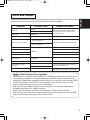
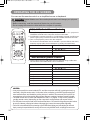
Ports and Cables
Function
Projector Port
RGB IN 1
RGB input
RGB IN 2
RGB output
RGB OUT
USB mouse control
USB
ENGLISH
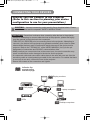
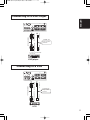
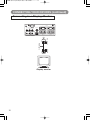
Refer to the table below to find out which projector port and cable to use for connecting a
given device. Use this table for determining which cables to prepare.
Connection Cables
Accessory RGB cable or optional RGB
cable with D-sub 15-pin shrink jack and
inch thread screws
Accessory USB cable
AUDIO IN 1
・Linked to RGB IN 1
Audio input from computer
Optional audio cable with stereo mini jack
AUDIO IN 2
・Linked to RGB IN 2
PS/2 mouse control
Optional PS/2 mouse cable
ADB mouse control
Optional ADB mouse cable
CONTROL
Serial mouse control
Optional serial mouse cable
RS-232C communication
Optional RS-232C cable
S-video input
S-VIDEO IN
Optional S-video cable with mini DIN 4-pin
jack
Video input
VIDEO IN
Accessory audio/video cable
Audio input from video
equipment
AUDIO IN L
AUDIO IN R
Accessory audio/video cable or optional
audio cable with RCA jack
Audio output
AUDIO OUT
Optional audio cable with stereo mini jack
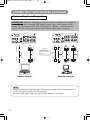
NOTE About Plug-and-Play Capability
• This projector is compatible with VESA DDC 1/2B. Plug-and-Play can be achieved by
connecting this projector to computers that are VESA DDC (display data channel)
compatible. Please take advantage of this function by connecting the accessory RGB
cable to the RGB IN 1 port (DDC 1/2B compatible). Plug-and-Play may not work
properly if any other type of connection is attempted.
• Plug-and-Play is a system composed of the computer, its operating system and
peripheral equipment (i.e. display devices).
• Please use the standard drivers as this projector is a Plug-and-Play monitor.
• Plug-and-Play may not function properly with some type of computers. Use the RGB
IN 2 port if Plug-and-Play does not function correctly.
9