1
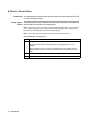
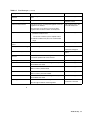
Table 8-1
Error Messages (continued)
Message
Description
Recommended Action
FATAL – Sample block sensor
failure
Fatal error.
Turn off system.
Fatal – Stack Overflow
A warning or error message that displays which task
stack overflowed.
Call Technical Support.
Call Technical Support.
The warning message is issued when the stack has
reached within 10% of overflowing.
Field is full
You tried to enter more data in a field than the field size
allows.
Reenter data within the
specifications of the field.
Heated cover sensor failure
The heated cover sensor failed.
Call Technical Support.
Infinity hold not allowed in
cycle
A method can have an infinity hold segment as the last
segment in the method.
Use finite values for cycle
segments within the
method.
This message occurs when you tried to enter an infinity
time in a CYCLE segment.
Invalid password/pin#
You entered an incorrect PIN#.
Enter the correct PIN#.
LCD screen timed-out
System error.
Call a Technical Support.
Display screen and firmware have a faulty connection.
List of user names is full
The maximum number of users has been entered into
the system.
Delete unused user names.
Maximum of 6 segments
allowed
You tried to insert more than six temperature control
parameters into a hold or cycle.
Do not assign more than six
hold or cycle parameters to
a method.
Method battery RAM initialized
Stored methods have been reset due to hardware or
software failure.
Not all methods may be lost.
Check method directory.
Call Technical Support.
Method requires at least one
segment
You deleted all temperature control parameters in a
method.
Review and correct the
method to include the
temperature parameter(s).
A method must have at least one time and temperature
parameter.
No seconds in time field
You did not include seconds in the time field.
Include seconds when
entering the time.
Not enough method memory
left
This error occurs:
♦ Determine how much
storage memory is
available on the
instrument or PC card.
♦ When you attempt to exceed the limit of 137
methods.
♦ When you attempt to store or create a new method
which is larger than the available storage space.
♦ Delete or store rarely
used methods
elsewhere.
Not implemented yet
The feature is not implemented in the current firmware
version.
Upgrade firmware when the
new version is available
from Applied Biosystems.
PC card and Flash do not
verify
The PC (upgrade) card and instrument memory do not
match.
Call Technical Support.
Firmware upgrade unsuccessful.
PC card does not contain valid
data
8-4 Troubleshooting
The PC card being used to upgrade the instrument
does not contain a valid program.
Call Technical Support.