1
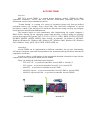
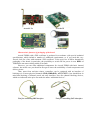
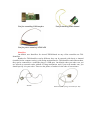
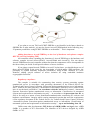
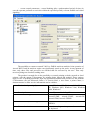
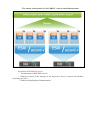
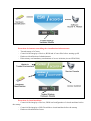
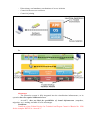
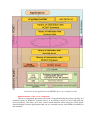
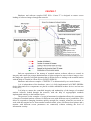
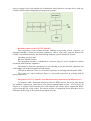
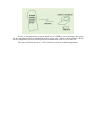
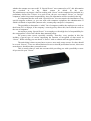
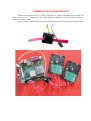
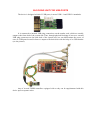
THE FOLLOWING PRODUCT LINES DEVELOPED BY «OKB SAPR» ARE REPRESENTED IN THIS CATALOGUE – DST PUA line of ACCORD™ family Accord-TSHM (Trusted Startup Hardware Module) - a trusted startup hardware module designed for use on IBM-compatible personal computers and LAN workstations in order to protect computer equipment and information resources from unauthorized access; Hardware and software complex Accord-Win32 consisting of Accord-TSHM and special software implementing the rules of control of access to information, is designed to isolate users’ access to workstations, terminals and terminal servers; Hardware and software complex Accord-Win64 consisting of Accord-TSHM and special software implementing the rules of control of access to information, is designed to isolate users’ access to workstations, terminals and terminal servers running under 64-bit OS Windows; Hardware and software complex Accord-X consisting of Accord-TSHM and special software implementing the rules of control of access to information, is designed to isolate users’ access to workstations running under Linux; Accord-V. is a hardware and software complex designed to protect VmWare virtualization infrastructure; Accord-U is a hardware and software complex that combines the functions TSHM and those of cryptographic data protection. – PCDST (Personal cryptographic data security tools) line of SHIPKA™ family SHIPKA-1.6 KC3 - PCDST SHIPKA, basic edition, certified by FSS for class KC3, a medium size case; SHIPKA-1.6 KC2 - PCDST SHIPKA, basic edition, with higher speed of cryptographic computations, a small case; SHIPKA-2.0 - a modification of PCDST SHIPKA with high performance and (on request) with a high-volume encrypted disc, a small case; SHIPKA-lite is one of the cheapest devices in the line, on the basis of which PCDST SHIPKA can be built. It is designed for use as an identifier in DST PUA and OS, and as a carrier of keys and certificates of CDSS software. It includes a removable hardware key container and a reader; SHIPKA-lite Slim is one of the cheapest devices in the line, on the basis of which PCDST SHIPKA can be built. It is designed for use as an identifier in DST PUA and OS, and as a carrier of keys and certificates of CDST software. A small case is available; SHIPKA-T (Terminal) is the software designed to provide opportunities to work with cryptographic resources of PCDST SHIPKA in the terminal access mode; Center-T - a hardware and software complex DST PUA designed to provide secure startup of software images of terminal stations through the network. It is built entirely on SHIPKA-2.0, from which all of the components of the complex are loaded (three components). Cases are small. – Subsystems for automation of work with DST Accord and SHIPKA Subsystem of distributed audit and management of Accord-RAU is software for automation of data security management in automated systems; Privacy - a hardware and software complex for cryptographic protection of data stored on the hard disk and transmitted through the network using PCDST SHIPKA . SRCC (a system of remote centralized control) - a centralized control system of DST PUA of Accord family. It consists of a server and a client part (centralized control server and centralized control client). – Tools for providing trusted communication sessions “MARSH!” - a hardware and software complex designed for ensuring secure work of remote users of untrusted computers with the servers of a trusted distributed information system (DIS) through information transmission networks within a trusted communication session (TCS). – SECRET line Personal secret - a hardware and software complex for secure use of personal USB-carriers or service USB-carriers on autonomous workstations, which exists on the basis of simple cryptographic service carriers; Business Secret – a hardware and software complex for secure use of service USB-carriers in an organization, the computers of which are networked. It exists on the basis of simple cryptographic service carriers; Special Secret – a hardware and software complex for secure use of service USBcarriers on autonomous workstations or stations in the network having a hardware system for logging all attempts to connect the carrier. It is developed on the basis of cryptographic service carriers. Upon request it can be produced without a support of disk encryption. – Commutator of SATA-devices – USB-port blocking device ACCORD-TSHM Overview DST PUA Accord-TSHM is a trusted startup hardware module (TSHM) for IBMcompatible computers - servers and local network workstations, protecting devices and information resources from unauthorized access. “Trusted Startup” is a startup of a variety of operating systems only from pre-defined permanent carriers (for example, from a hard disk) after successful completion of special procedures: a check of the integrity of PC hardware and software (using a step-by-step integrity check) and user identification/authentication. The complex begins to work immediately after implementing the regular computer’s BIOS (before starting up the operating system) and provides a trusted startup of operating systems that support file systems FAT 12, FAT 16, FAT 32, NTFS, HPFS, EXT2FS, EXT3FS, FreeBSD, Sol86FS, QNXFS, MINIX. These include, in particular, OS families of MS DOS, Windows (Windows 9x, Windows ME, Windows NT, Windows 2000, Windows XP, Windows 2003, Windows Vista), QNX, OS/2, UNIX, LINUX, BSD, etc. Controllers Accord-TSHM can be implemented on different controllers, but its basic functionality will always remain the same and correspondent to the statements and specifications indicated in compliance certificates. In order to choose a right option, at first you should determine what kind of open slot the computer has, where you plan to install Accord-TSHM. These can include the following bussed interface: PCI or PCI-X – so you need controllers Accord-5MX or Accord-5.5 PCI-express – so you need controllers Accord-5.5.e or Accord-GX Mini PCI – so you need a controller Accord 5.5MP Mini PCI-express – so you need controllers Accord-5.5ME or Accord-GXM Mini PCI-express half card – so you need a controller Accord-GXMH Accord-5MX Accord-5.5 Accord-5.5.e Accord-GX Accord-GXM Accord-GXMH Characteristic features of packaging of the board Accord-TSHM with a FSS certificate is produced in accordance with special technical specifications, which include a number of additional requirements, so if you need this very Accord, look for a line with comment “FSS certificate” in the price list. It differs through the packaging of the board, in particular, the possibility to switch off the power in case BIOS of TSHM does not start working within N seconds. However, you can order additional components for Accord-TSHM with basic internal software, but in this case you should at first get to know the availability of such components and delivery terms. Thus, apart from real-time timers, controllers can be equipped with an interface of blocking two or more physical channels (FDD, HDD(IDE), ATX, EATX). One should bear in mind that blocking of channels needs not only interfaces, but also channel blocking devices, which are indicated in the price list under the name “additional devices”. Tool for controlling IDE interface Tool for controlling SATA interface Tool for controlling USB interface Tool for blocking FDD channel Tool for power control of ATX/EATX Identifiers On default, user identifiers for Accord-TSHM based on any of the controllers are TMidentifiers. Readers for TM-identifiers can be different: they can be external (with laces) or internal (installed in the computer casing), with fixing mechanisms for TM-identifiers and without them, they can be connected to a controller plug or a USB-port. On default, when you order a set you are offered an external reader without a fixing mechanism, and if you need another one, you should specify it in your order. These are the photos of readers for the sake of convenience. DS-03E DS-03TE (with a fixing mechanism for TM) DS-USB For COM-port DS-03 (internal) If you plan to use not TM, but PCDST SHIPKA as an identifier in the future (based on SHIPKA-lite or other models), you need to choose Accord-TSHM marked in the following way: “Expansion possibilities: using PCDST SHIPKA as an identifier” . This is important! Adding functions to Accord-TSHM up to the level of hardware and software complex DPT PUA Accord (including TSE) All controllers allow expanding the functions of Accord-TSHM up to the hardware and software complex Accord (Accord-Win32, Accord-Win64 and Accord-X). You can choose Accord-TSHM based on any controller without fear that the components will be incompatible in the future when you decide to add special software of access isolation. If you plan to expand Accord-TSHM to Accord-U in the future, you should choose one of those Accord-TSHMs in the price list, the description of which states: “FSS certificate, the possibility to expand functions. Expansion possibilities: using PCDST SHIPKA as a user identifier, adding special software of access isolation for using embedded hardware cryptographic functions”. Regulatory compliance The complex is suitable for constructing data security systems protecting against unauthorized access in accordance with governing documents of the Federal Service for Technical and Export Control of Russia “Protection against unauthorized access to information. Part 1. Software for data protection. Classification in accordance with the level of control of the lack of non-declared possibilities”- in accordance with the 3rd level of control, “Automated Systems. Protection against unauthorized access to information. Classification of automated systems and requirements to information security” – in accordance with protection class 1D, as well as for using as a means of user identification/authentication, monitoring PC software and hardware environments’ integrity while creating automated systems that meet the requirements of the regulatory document of the Federal Service for Technical and Export Control of Russia “Automated systems. Protection against unauthorized access to information. Classification of automated systems and requirements to information security” – up to and including class 1B. Unlike some other developments, PCI devices of «OKB SAPR» are legal, since «OKB SAPR» is a member of PCI Association. The identifier of PCI devices designed by «OKB SAPR» is 1795. Certificates: The certificate of compliance with the Federal Security Service requirements to hardware and software modules for trusted startup of computers for Accord-TSHM (version 3.2 based on controller Accord-5.5) № SF/127-1602. The certificate of the Federal Technical Commission № 246/7 for complex DST PUA “Accord-TSHM”. The resolution of the Ministry of Defense of the Russian Federation № 61 dated 04.10.2010 about the compliance of the hardware and software complex DST PUA “AccordTSHM” with the requirements to information security. HARDWARE AND SOFTWARE COMPLEX ACCORD-WIN32 (TSE) AND HARDWARE AND SOFTWARE COMPLEX ACCORD-WIN64 (TSE) Hardware and software complexes of data security tools (HSC DST) Accord-Win32 and Accord-Win64 are designed to isolate users’ access to workstations, terminals and terminal servers. The complex operates under all kinds of Microsoft NT + operating systems, on terminal servers built on the basis of Windows 2000 Advanced Server and on the basis of servers belonging to Windows 2003 and 2008 family (32-bit for Accord-Wint32 and 64-bit for AccordWin64), software Citrix Metaframe XP, Presentation Server 4.5, XenApp5.0, XenApp 6 running on these operating systems. Possibilities: 1) Protection against unauthorized access to a personal computer; 2) User identification/authentication before the startup of the operating system with subsequent sending of the results of such successful identification/authentication to the operating system; 3) Hardware check of the integrity of system files and critical registry keys; 4) Trusted OS startup; 5) Check of the integrity of programmes and data and their protection against unauthorized modifications; 6) Creation of individual isolated working software environment for each user; 7) Prohibition of launching unauthorized programmes; 8) Isolation of access of users to data stores and programmes with the help of discretionary access isolation; 9) Isolation of access of users and processes to data stores with the help of mandatory access isolation; 10) Automatic keeping of the protocol of registered events in nonvolatile memory of the hardware part of the complex; 11) Strengthened authentication of terminal stations with the help of controllers Accord or PCDST SHIPKA; 12) Identification/authentication of users connecting to the terminal server (using TMidentifier or PCDST SHIPKA); 13) Optional automatic identification of users authenticated by protecting mechanisms of a TSHM controller in Windows NT + system and in the terminal server (in this approach, avoiding re-identification of users, you can ensure that the operating system will be loaded under the name of the same user that has been authenticated in the TSHM controller, and the same user will be connected to the terminal server); 14) Control of terminal sessions; 15) Control of printing on printers connected to both, terminal servers and user terminals, which allows to control printer output and mark the documents being printed (a security label, a user name, a printer name, a document name or other service information can be a marker); 16) Control of access to USB devices. Main specifications: Its own access isolation system (mandatory and discretionary isolation methods) - actions permitted by application software but prohibited by Accord will be denied to the user. The possibility to use an already established connection (on RDP and ICA protocols) between the server and the terminal, without a need to establish a new one. During the entire user session a detailed event log is kept, which records all user activities in the terminal server. The complex software allows the data security administrator to describe any consistent security policy based on the most complete set of attributes: File operations R permission to open files for reading only W permission to open files for writing C permission to create files on the disk D permission to delete files N permission to rename files V file visibility O emulation of the permission to write information in an open file Catalogue operations M creation of directories on the disk E deletion of directorieson the disk G permission to move to this directory n renaming of subdirectories S inheritance of rights to all embedded subdirectories 1 inheritance of rights for the 1st level of nesting 0 a prohibition to inherit rights to all embedded subdirectories Other X permission to launch programmes Registration r registration in a log of reading operations in case of accessing the object w registration in a log of writinf operations in case of accessing the object and parameters: – the list of files, the integrity of which should be controlled by the system and control options; – startup of the start task (for functionally closed systems); – presence or absence of supervisor’s privilege; – detailed character of the access log; – assigning/changing the password for authentication; – time limits - time on weekdays (discreteness of 30 minutes) when it is allowed to start work for a given subject; – screen control parameters - screen blanking after a predetermined period of time (in case the operator performs no activities within the specified period), relevant audible and visual signaling. The possibility to connect external Vba32 or DrWeb antivirus modules. Joint operation of Accord-Win32 and an antivirus engine can significantly speed up the work. At any moment of time, only those files and processes are checked that are accessed by the user. Thus only necessary things are checked, nothing more. The product’s strength lies in the possibility to control printing on both, network or local printers, with the output of documents for printing being logged and marked. These settings apply in case of printing documents from any application software that provides for the printout of documents (not just Microsoft Office). A security label, a user name, a printer name, a document name or other service information can be a marker. Work under Operating Systems Windows NT, Windows 2000, Windows XP, Windows 2003, Windows Vista, Windows 2008, Windows 7 Security class Controllers being used Up to and including 1B Accord-5МХ, Accord-5.5, Accord- 5.5e, Accord-5.5МР, Accord-5.5ME, Accord-GX, Accord-GXM, Accord- GXMH Identification (identifier type) Touch memory DS-199x, PCDST SHIPKA According to the password entered from the keyboard User authentication Certificates: Certificate of the Federal Service for Technical and Export Control of Russia No. 2398 for the complex DST PUA “Accord-Win32”. Certificate of the Federal Service for Technical and Export Control of Russia No. 2400 for the complex DST PUA “Accord-Win64” HARDWARE AND SOFTWARE COMPLEX DST PUA ACCORD-X Hardware and software complex of data security tools (HSC DST) Accord-X is designed to isolate access of users to workstations running under OS of Linux family. Possibilities: 1) Protection against unauthorized access to a personal computer (including the possibility to limit the number of permitted hours of work for every user); 2) User identification/authentication before the startup of the operating system with subsequent sending of the results of such successful identification/authentication to the operating system; 3) Hardware check of the integrity of system files; 4) Trusted OS startup; 5) Static and dynamic control of data integrity, their protection against unauthorized modifications; 6) Isolation of access of users and processes to data stores (objects) with the help of discretionary access isolation; 7) Isolation of access of users and processes to data stores (objects) with the help of mandatory access isolation; 8) Isolation of access of users to certain processes; 9) Control over access to peripheral devices; 10) Creating an individual isolated working software environment for each user; 11) Automatic keeping of an event log; 12) Control of printing on local and network printers, keeping of a log of data output being printed (a security label, a user name, a printer name, a document name or other service information can be a marker); Main specifications: Its own access isolation system (mandatory and discretionary isolation methods) - actions permitted by application software but prohibited by Accord will be denied to the user. During the entire user session a detailed event log is kept, which records all user activities (you can adjust the level of details being logged). Software of the complex allows the data security administrator to describe any consistent security policy on the basis of the fullest set of attributes: Discretionary access isolation rules for objects permission to open the object for reading only R permission to open the object for writing W permission to open the object for implementing X O changing the attribute R by attributes RW at the stage of object opening (emulation of the permission to write information in an open file) permission to create the object C permission to delete the object D permission to rename the object N permission to create a hard link for the object L permission to create a symlink for the object or container 1 Discretionary access isolation rules for containers creation of catalogues М deletion of catalogues Е permission to move to this catalogue G renaming of subcatalogues n inheritance of rights to all embedded subcatalogues S inheritance of rights for the 1st level of nesting 1 a prohibition to inherit rights to all embedded subcatalogues 0 and parameters: – The list of objects and the rights to access them by a particular subject; – The list of objects and the rights to access them by a group of subjects; – The list of objects, the integrity of which should be controlled by the system (static and/or dynamic control of integrity), for a particular subject; – The list of objects, the integrity of which should be controlled by the system (static and/or dynamic control of integrity), for a group of subjects; – The list of system capabilities of the subject; – The list of system settings; – The level of details being logged; – Assigning/changing the password for authentication; – Assigning/changing the identifier (TM, PCDST SHIPKA ) – Time limits - time on weekdays (discreteness of 30 minutes) when it is allowed to start work for a given subject; The strength of the complex lies in the availability of the printing control module, which allows to mark data you output for printing on network and local printers, with all the user’s activities being logged. The printing control module Accord-X works when you print documents from any application software that provides the possibility to print out a document/file/data (not just OpenOffice and other word processors). The control over printing is carried out at the level of the Linux printing subsystem, so the data being printed out from the console are also marked in accordance with the settings of the printing control subsystem of Accord-X. A security label, a user name, a printer name, a document name or other service information can serve as a marker (stamp). Work under Operating Systems All OS of Linux family Security class Controllers being used Up to and including 1B Accord-5МХ, Accord-5.5, Accord- 5.5e, Accord5.5МР, Accord-5.5ME, Accord-GX, Accord-GXM, Accord- GXMH Identification (identifier type) Touch memory DS-199x, PCDST SHIPKA User authentication According to the password entered from the keyboard ACCORD-V. Hardware and software complex ACCORD-V. is designed to protect virtualization infrastructure VMware vSphere 4.1, VMware vSphere 5. Accord-V. provides protection for all components of the virtualization environment: ESX-servers and virtual machines themselves, vCenter control servers and additional servers with VMware services (e.g. VMware Consolidated Backup). What’s the problem? – The start the virtual infrastructure is “stretched” and consists of stages, separated by different elements of the infrastructure. – To ensure the protection, all the stages of the system startup should be controlled within the virtual machine. – There is a need for a solution that will allow the resident component to have access to a new controlled environment while being outside of that environment. Major idea: Continuous control of correctness of the start based on the algorithm of a step-by-step integrity check, the essence of which is as follows: to control data on the i-th logical level of their representation for reading, the use of procedures of i-1st level is needed, the integrity of which was preliminary checked. Composition of Accord-V.: Hardware and software complex DST PUA Accord-V. consists of the following components: – “Accord-V. for vCenter”; – “Accord-V. for ESX-server”; – “Accord-V. for client workstations”. The software part of the complex consists of the following components: – “Subsystems for control of virtual machines integrity” (the module for checking the integrity of OS of virtual machines); – “Subsystems of access isolation in a virtual infrastructure” (the functions of access isolation in a virtualization infrastructure); – “Subsystems for control and monitoring the integrity check modules and identification/authentication check modules” (a control module that allows to manage the modules for checking integrity, identification/authentication, and analyze their logs); – Module of identification/authentication for the management console of ESX-server; – “Subsystems of protection in OS of virtual machines” (a complex protecting data from unauthorized access in OS of virtual machines), additional software libraries and service programmes (installation, testing, archiving utilities, etc.). The scheme of integration of «ACCORD-V.» into a virtual infrastructure Protection of ЕSХ/ЕSХ1 servers – Trusted startup of ЕSХ/ЕSХ servers; – Hardware control of the integrity of the hypervisor, Service Console and modules protecting Accord-V.; – Hardware identification of administrators. Protection of elements controlling the virtualization infrastructure: – Trusted startup of vCenter – Control of the integrity of devices, BIOS and vCenter files before starting up OS – Hardware identification of administrators – Discretionary and mandatory mechanisms of access isolation (Accord-Win32/64) Protection of virtual machines: – Control of the integrity of devices, BIOS and configuration of virtual machines before the startup – Control of the integrity of OS files within a virtual machine before the startup – Hardware identification of users – Discretionary and mandatory mechanisms of access isolation – Control of the access to resources – Control of printing So: Advantages – The protection system is fully integrated into the virtualization infrastructure, so its operation does not require additional servers. – Accord-V. does not limit the possibilities of virtual infrastructure (snapshots, migration, etc.), making available all of its advantages. Certificate: Certificate of the Federal Service for Technical and Export Control of Russia No. 2598 for the complex DST PUA “Accord-V.” ACCORD-U Accord-U is a hardware and software complex, which combines the functions of TSHM and the ones of cryptographic data protection. It is built on controllers Accord-5.5, which include a hardware cryptographic subsystem, and it consists of controllers equipped with a USB-host (Accord-5.5 or Accord-5.5.e), a periphery (user identifiers (PCDST SHIPKA in the basic version), readers (USB in the basic version), EATX-breaker) and special software “Accord-U” on a CD. Special software “Accord-U” represents libraries and user utilities for customizing and applying the cryptographic part of the complex. Possibilities: Complex Accord-U ensures a trusted startup of the operating system and allows to protect files using encryption mechanisms and digital signatures. The cryptographic functionality of Accord-U includes encryption, digital signatures, hash function, key generation, as well as long-term storage of keys and certificates. Nowadays Accord-U operates only with Russian encryption and signing algorithms. Main specifications: The implementation of cryptographic operations is hardware-based in relation to the PC; the key information never leaves the device in an open form. Keys are generated in Accord with the help of a physical random number generator and are securely stored in its memory. Programme interfaces CryptoAPI and PKCS#11 are implemented in Accord-U, through which third-party applications using these interfaces can run on the device. Accord-U is fully compatible with PCDST SHIPKA: devices can exchange keys and perform all the counter operations (one can decrypt the material encrypted through SHIPKA with the help of Accord-U, and vice versa; one can check signatures developed by Accord-U with the help of SHIPKA, and vice versa). Given this fact, it may be reasonable to construct systems that combine these two types of devices. This will allow developing a solution, which will be flexible enough in terms of cost and friendliness. User programmes for Accord-U are identical to software programmes from SHIPKA, so the application of the cryptographic possibilities of the complex will not cause difficulties for those who have experience of working with SHIPKA. Certificates: The certificate of compliance of Accord-U with the requirements of the Federal Security Service of Russia to CDSS of KC3 class. The certificate of compliance of Accord-U with the requirements of the Federal Security Service of Russia to CDSS of KB2 class. PCDST SHIPKA Work with SHIPKA’s own programmes After the installation of software and the customization of SHIPKA, the following independent functions become available: 1) Encryption and signing of files; 2) Generation and viewing of certificates; 3) Secure login to the OS; 4) Authorization assistant. The purpose of the programme “Encryption and signing of files” can be understood from its name. It is important that the keys are generated with the help of a physical random number generator, stored in the secure memory of the device and never get into the computer’s core memory, since cryptographic operations are also performed within the device. Public keys and encryption keys can be exported for sharing with subscribers, it is a simple procedure described in the User Manual. Symmetric keys are exported in a secure form (encrypted). The programme “Generation of certificates” will help you to issue a self-signed certificate or create a request for a certificate to the verification center. The structure of the certificate meets the X.509 standard. “Customization of a secure login to the OS” can replace the login to Windows through your login and password to a login through SHIPKA and its PIN-code. In this case the protection is strengthened not only through the “second factor” (connection of the device), but also through the fact that the user is authenticated not in the operating system, but in SHIPKA’s processor, which cannot be modified. In this case one SHIPKA can be used to login to all the computers where the user is registered. “Authorization assistant” is a programme which records the data input in authorization forms and offers to fill them automatically (SHIPKA will not confuse the passwords for different services, and, what is more important, these data are stored in its memory securely). Work with standard applications SHIPKA can be used for cryptographic protection of e-mails - in programmes Outlook, OutlookExpress and The BAT! (using both PKCS #11 and CSP) – you just need only customize these programmes for work with SHIPKA as described in the User Manual. One can obtain public key certificates in the verification center in a regular way using PCDST SHIPKA - the only nuance is that you need to indicate a crypto provider for SHIPKA in the list of crypto providers in the form of the verification center. SHIPKA can be used for secure login to the Windows domain, as well as in a number of data security systems, focused on the use of SHIPKA or involving the work with smart cards. Own software shell Finally, the last thing to mention is Privacy software shell for working in OpenPGP ideology specifically designed for PCDST SHIPKA. It is not included in the standard software of PCDST SHIPKA, being a separate product. Privacy can help you to manage keys, encrypt files and folders, create secure virtual disks and secure e-mail or ICQ messages with the help a digital signature or encryption. For this purpose you do not need to change the settings of mail or ICQ programmes, all the necessary settings are set directly in the interface of Privacy. SHIPKA –Т SHIPKA-T (Terminal) is the software designed to provide the possibility to work with cryptographic resources of PCDST SHIPKA in the terminal access mode. One software set is purchased for each terminal server, and it does not include PCDST SHIPKAs themselves: their number should be determined by the number of the intended users. The price of SHIPKA-T includes the cost of a one-year license. The license cost for subsequent years is calculated by the number of SHIPKA-Ts used in the terminal mode of SHIPKA and should be paid separately. To use SHIPKA in the terminal access mode you only need to install the software of SHIPKA-T in the manner described in the document called “PCDST SHIPKA . Installation and customization in terminal access systems”. In this case the user should act in the same way as if he works with SHIPKA locally. The following is the basic information about the features of working with a CDSS in the terminal access mode, as well as the features of implementing SHIPKA-T. When penetrating into the terminal access system (TAS) of a cryptographic data security system (CDSS) the following problems may arise: 1) A CDSS cannot provide for the work in the terminal access mode at all, because it does not support the procedures of remote cryptographic transformations. 2) If user keys are stored in the terminal server (TS), they are not, strictly speaking, user keys, and the signature made with them does not confirm the authorship of the user. 3) If the keys are on the side of the terminal client (TC), and the digital signature is developed on the side of the terminal server, but not on the side of the user being on the TC, then the private keys of key pairs are transferred through the network within a terminal session. Such a signature also cannot fully guarantee the authorship. 4) In a significant number of cases, even in case of a digital signature being developed directly on the client, the transition of information data sets through the network is required in a terminal mode. While transmitting the data processed on the side of the terminal server, for example, after having computed the hash function on the basis of these data, a user who is on the side of the TC cannot be sure they are correct (they could be modified before the transmission through the network before the computation of the hash function, or the hash function could be calculated not on the basis of the transmitted data, the transmitted correct hash could be substituted on its way back). 5) Even if all the computations are done on the side of the TC, during the computation the private key of the key pair can be loaded into the main memory of the TC or it can remain on the TC for a long-term storage. Given that the terminal clients are generally protected not so carefully as terminal servers, the private key can be illegally copied and used for personal gain. This means that a cryptographic data security system should meet the following requirements when working in a terminal access mode: 1) A CDSS should support the work in the terminal mode (Requirement 1). 2) The private key of the key pair of the digital signature should be located on the TC (Requirement 2). 3) Information data sets should be created on the TC (Requirement 3). 4) The development of a signature and encryption should be performed on the TC (Requirement 4). 5) Unauthorized use of the private key of the key pair within the period of its use or storage on the TC should be excluded (Requirement 5). PCDST SHIPKA supports remote cryptographic transformations, so a system built on its basis satisfies requirement No. 1. All the work with the private key of the key pair is performed within SHIPKA, which is connected to the terminal client, and requirements No. 2 and 3 are met. SHIPKA implements all Russian cryptographic algorithms on the hardware basis and ensures secure storage of private keys of key pairs in the memory of the device. That means that all cryptographic operations are performed in a trusted environment, and the private key of the key pair never leaves the device and never gets into the main memory of the terminal client, which allows to satisfy requirements No. 4 and 5. The clients run under the following operating systems can serve as terminal clients used in a terminal access system with the described system (for which the terminal software for PCDST is implemented): – Win32 (Windows 98, Windows 2000, Windows XP); – WinCE; – Linux. The support of various terminal operating system allows to use thin clients of different manufacturers and models, which gives some freedom to the customer who wants to deploy the solution (these can be clients like Wyse, KAMI, Depo and many others). Terminal servers can run under both, Windows and Citrix. Functionality of PCDST SHIPKA (terminal application) The correct application of SHIPKA for cryptographic protection of electronic messages and documents using terminal access technologies is possible for the following reasons: – Key information associated with the user and the software performing cryptographic transformations, is concentrated within a single device, is available for execution only to authorized users, and is technologically protected from unauthorized reading and modification; – Own resources (a possibility to obtain a random sequence on the hardware basis, the possibility to store own private and public keys, the possibility to store a public key of the terminal server, as well as the possibility to compute and verify a signature) for ensuring protection of virtual channels built within the protocols RDP or ICA; – Support of standard interfaces (crypto provider and PKCS#11), which allows to save a software user interacting with internal PCDST software from studying the features of implementing such interaction procedures. Performance of cryptographic operations All cryptographic transformations are performed directly within the device. The code implementing cryptographic algorithms is technologically protected from unauthorized changes. The keys needed to perform cryptographic computations are also stored in the device, where they are generated with the help of a hardware random number generator. The keys are securely stored in the file system of SHIPKA, so any unauthorized access to the keys through extracting and direct reading of chips used to store files, is excluded. Another feature of key files is access control: despite the fact that such key files are file system objects, one cannot work with them as with usual files. Firmware of SHIPKA is designed in such a way that one can work with key files only from the cryptographic transformation functions and that’s it. In their turn, the functions of cryptographic transformations obtain access to the key files only after the user is authenticated and confirms that he has the right of access to key data stored in SHIPKA through his PIN-code. Thus, in case of applying SHIPKA for cryptographic transformations in the terminal mode: – The key never leaves the device; – The data needed to compute the hash function value pass through the device; – The computation of the electronic digital signature and the encryption takes place within the device; – The key never appears in the computer's memory; – Unauthorized access to the key is technically possible neither when it is generated, nor when the device is working, nor when it is stored in the device. The model of data transmission through virtual channels The use of standard software of PCDST SHIPKA in a terminal session yields the following results: the user runs the programme on the terminal server, the programme via CryptoAPI (CSP) or PKCS#11 interface refers to the library of interaction with the firmware of PCDST, which, in its turn, refers to a device driver in order to exchange data with the device. But the device is connected not to the server, but to the terminal. This means that the operating system should redirect the references from the terminal session to the device installed on the terminal. The software SHIPKA-T is designed for this very purpose. This software can be divided into three main groups of functions: – The functions of working with the device as with an object of the operating system; – The functions of notification (notices of installation and removal of the device); – The functions of exchange of commands and data with the device. These three groups of functions are implemented for the terminal server and the terminal client. This means that the software SHIPKA-T includes two sets of software: to install on the TS (SHIPKA-TS) and on the TC (SHIPKA-TC). Moreover, the server component does not depend on the operating system of terminal clients, since virtual channels ensure a unified interface of interaction with the TC. Interaction of the application with SHIPKA device in a terminal session Implementation of the server component The server component determines the mode of operation during the startup (locally, in a terminal session of Windows Terminal Server, in a terminal session of Citrix) and loads the necessary library. The latter, in its turn, creates virtual channels, which will serve all the future data interchange between applications that run in a terminal session, and SHIPKAs installed in the terminals. Implementation of the client component Client component for Win32 The client component for Win32 (Windows 98, Windows 2000, Windows XP) provides the processing of the commands of data interchange with the devices. At the moment of creation of a terminal session the libraries are initialized and the virtual channels with the terminal server are created. After that the libraries process the requests from the server component and transmit them through the library of interaction with PCDST firmware in the terminal to the device or report the facts of installation/removal of PCDST from the terminal. Client component for WinCE Windows CE (WinCE) is a variant of the Microsoft Windows operating system for handheld computers, mobile phones and embedded systems. Architecture x86, MIPS, ARM and processors Hitachi SuperH are supported. Windows CE is optimized for the devices that have a minimal memory size. One of the features of the operating system Windows CE lies in the fact that in most cases the operating system being started up in a particular device cannot be added additional functions. Thus, the functioning of the client component needs the inclusion of RDP or Citrix ICA client, as well as the required libraries, at the stage of preparation of an image of the operating system. In other aspects the client component for Windows CE is fully identical to the client component for Win32 in terms of its composition and dependencies. Client component for “Kami-terminal” “Kami-terminal” is a distribution package of Linux OS designed specifically for its use on terminal clients. This distribution package of OS Linux is described just as an example and is not the only one possible for the application of SHIPKA in the terminal mode. The startup of “Kami-terminal” is performed in four stages: – The startup of the basic image of the file system (FS). The basic part starts from the preliminary prepared carrier and consists of the Linux kernel and the image of the file system with the minimum set of files needed to install a network connection to the startup server. – Authentication and the startup of a user profile. The user is offered to connect a PCDST and enter a PIN-code. Upon the successful completion of the authentication process the user profile is read from the device, on the basis of which the settings and the software package file is loaded from the startup server. – Loading, testing and installing of software packages required to start a session with the TS. Software packages, specified in the settings file of the user profile on the server, are loaded from the startup server via the NFS protocol. For each loaded package the hash is computed, the value of which is compared to the corresponding value recorded in the user profile on the device. Upon the successful completion of testing the contents of the package are installed in the FS of “Kami-terminal”. – Start of a terminal session. On the basis of the contents of the settings file, a connection with the TS is set, and virtual channels are created. CENTER-T Hardware and software complex DST PUA “Center-T” is designed to ensure secure loading of software images through the network. Such an organization of the startup of terminal stations software allows to control its integrity and ensure the prompt administration of rights assigned to users in these images, since the images are signed by a digital signature that is checked prior to loading to the terminal station with the help of a hardware client device (PCDST SHIPKA). Hardware and software complex “CENTER-T” is characterized by two main features: 1) it is independent of the hardware, since it is fully implemented in PCDST SHIPKA (both, client and server components are placed on disks embedded in these devices and can run on any PC); 2) it helps to ensure the controlled integrity and authenticity of the images of terminal stations software loaded through the network, with the help of cryptographic methods implemented entirely on the hardware basis. The presence in the complex of a special automated workstation allows the construction of images of terminal stations software for different users with different sets of possibilities. This allows to respond to changing situations quickly enough (for example, when the user needs to work with the terminal server from another terminal station, where a different local printer and a monitor with different screen parameters are connected) without reducing the level of information security. The complex offers the possibility to separate the administrative authorities of an administrator and a data security administrator, which enhances its protective properties. Hardware and software complex DST PUA “Center-T” consists of three components: – Automated workstation “Center” (AWS “Center”); – Storage and network loading server (SNLS); – Client PCDST SHIPKA for terminal stations, being the parts of the terminal access system (user SHIPKA). 1. AWS “Center” 1) Hardware requirements. The software is loaded to any designated PC from SHIPKA of the AWS “Center” administrator (based on the PCDST SHIPKA-2.0 KS2 and software), it runs in the main memory of the PC, but does not remain in the PC after disconnecting SHIPKA of the AWS “Center” administrator. 2) Functionality. The construction of images of terminal stations (TS), the development of an authentication code to control their authenticity and integrity, the work with key pairs designed to control the authenticity and integrity of the images of terminal stations software, the initialization and the update of SHIPKAs of the storage and network loading server, as well as of user SHIPKAs. 3) Security. After disconnecting PCDST SHIPKA, the PC on the integration of the images of terminal stations software is performed, retains neither the “Center” software, nor the integrated software images - everything is stored only in SHIPKA of the administrator of AWS “Center”. The integrity and authenticity of the images is controlled through authentication codes (AC). 4) Placement requirements. It is enough to install one AWS “Center” for each terminal server farm, but there can be more such workstations, if the organization has a significant number of terminal clients, and it is difficult for one administrator to construct the images of terminal stations software. 2. The server for storage and network loading of terminal stations software 1) Hardware requirements. The software is loaded to any designated PC from SHIPKA of the Server for storage and network loading (based on the PCDST SHIPKA-2.0 KC2 and software), it runs in the main memory of the PC, but does not remain in the PC after disconnecting SHIPKA of the Server for storage and network loading. 2) Functionality. Creation of users, assigning of SHIPKAs for them, comparison of users of the images of terminal stations software with these SHIPKAs. 3) Security. The Sever for storage and network loading is loaded only from SHIPKA of the Sever for storage and network loading. The PC, in which the software of the Sever for storage and network loading is implemented, retains neither the software, nor the images loaded from the Sever for storage and network loading. The Sever for storage and network loading logs the work of users from the moment the terminal station is switched on to the moment a session with the terminal server is started, and from the moment the session ends to the moment the terminal station is switched off, as well as it logs all the actions of the administrator and the data security administrator of the Sever for storage and network loading. 4) Placement requirements. The Server for storage and network loading should be installed within the general protected circuit with terminal clients that are loaded from it. 3. Terminal Stations 1) Hardware requirements. The startup software of terminal stations is loaded from client SHIPKAs (based on SHIPKA-2.0 KC2 with a client license for “Center-T”), so any computer equipment supporting loading from USB-devices can be a terminal client. 2) Functionality. The startup image starts from the user SHIPKA disk, refers to the Server for storage and network loading, receives the image compared with this user SHIPKA, checks authentication codes, and if authentication codes are correct, allows the implementation of terminal stations software. This image of terminal stations software supports the work with hardware and software complex DST PUA Accord-Win32 or Accord-Win64 TSE and server software for PCDST SHIPKA, ensuring the correct operation of PCDST SHIPKA in the terminal mode and all of its internal possibilities. 3) Security. Hardware-based identification/authentication of the user, verification of the integrity and authenticity of loaded images through checking authentication codes. 4) Placement requirements. A user SHIPKA should be given to each user who has access to the terminal server. PRIVACY PRIVACY is a hardware and software complex, in which PCDST SHIPKA forms the hardware part, and a set of following modules forms the software part: – For work with keys; – For encryption of files and folders; – For protection (through encryption and digital signing) of e-mail; – For protection (through encryption and digital signing) of instant messages (ICQ, etc., hereinafter referred to as “ICQ”); – Protected virtual disks. The software part of the complex is an interface for use of the functions of SHIPKA, that means that all cryptographic transformations and the work with keys are performed exclusively by the processor of SHIPKA, but not in the operating system of the PC, in which PRIVACY is installed. Work with keys With the help of PRIVACY one can generate keys and key pairs using PCDST SHIPKA, work with symmetric keys already created in PCDST SHIPKA, import and export keys, sign imported public keys, as well as delete keys and key pairs. The interface provides for indications, according to which one can easily see the difference between keys meeting Federal Standards (GOST) and RSA keys (key with red and blue heads, respectively), imported public keys and key pairs (one and two keys respectively), signature keys and symmetric encryption keys (one or a couple of keys <from a bunch > and a <Gold> symmetric key). E-mails and ICQ messages are protected using asymmetric cryptography, and files and folders on the hard disk, as well as virtual disks are protected using symmetric cryptography. The exchange of public keys between users is performed trough transition of a public key certificate via e-mail or in any other way. PRIVACY supports two types of certificates: the internal format and X.509 format. The internal format of the public key certificate is designed only for PRIVACY users and contains the information required to check the authenticity of the public key. The support of X.509 format allows to exchange encrypted messages with the users of other software products, based on the use of asymmetric cryptography with certificates of this kind, which is standard for most applications. Protection of communication performed via e-mail or ICQ To allow the users of e-mail and ICQ to transmit information in a secure form inaccessible for other persons, there are services for protection of electronic communication. One of the services controls the transmission of data via e-mail, and the second one analyzes the traffic from the clients of programmes designed for instant messaging. PRIVACY can be used with any mail clients that support protocols MIME, S/MIME, PGP/MIME, as well as with the clients for instant messaging through OSCAR protocol. A PRIVACY user only needs to customize his account in the PRIVACY interface, set the rules that will govern the processing of outgoing messages, and include the protection function into the PRIVACY menu. After that PRIVACY will serve as a Proxy-server processing all incoming and outgoing messages. The messages are processed only if SHIPKA is connected to the computer and if the PINcode is entered correctly. In the absence of any connected SHIPKA neither incoming, nor outgoing messages will be processed by PRIVACY. The entire customization process is performed only in the PRIVACY window, no change in the settings of the mail client or ICQ client are required. With the help of the rules or policies of message processing defined in the PRIVACY settings, one can control the filter parameters and the degree of protection of each outgoing message. All the rules of processing of outgoing messages are stored inside PCDST SHIPKA and start to be applied automatically after switching on the protection function. This approach allows to transfer all your settings together with the device and apply them in different systems, in which the same accounts or ICQ UIN are used. File protection PRIVACY allows to store files and folders on the hard drive in an encrypted form. To encrypt a file, one needs to select a symmetric key, which should be generated in PCDST SHIPKA with the help of PRIVACY or another application in advance, and specify the files or the folders to be encrypted. In the process of decryption of the file a key is selected automatically without any intervention of the user. In order to transmit the encrypted file or provide a possibility for someone else to read it, you can choose the encryption with the key of the recipient. In this case it is necessary to specify the key of the recipient and your own key of the pair, the public key of which is kept by the recipient. Virtual disks PRIVACY allows the user to work with virtual disks, and the user can choose the size, the file system, and the indication of the virtual disk. If SHIPKA is not connected to the computer (or connected, but the option <connect virtual disk> is not set in the PRIVACY interface), virtual disks will not be displayed in the list of disks. ACCORD-DAM The subsystem of distributed audit and management “Accord-DAM” is the software for automation of data security management in the hardware. It unites an automated workstation of the data security administrator (AWS DSA) and user terminals equipped with data security tools of Accord family. Subsystem “Accord-DAM” is based on complex “Accord AcXNet”, which ensures secure data transmission through the network, and special software of AWS DSA. Attention: the presence on AWS DSA and workstations of complexes “Accord-TSHM” and software – for workstations and servers – “Accord-Win32/Win64” – is a technical requirement for application of subsystem “Accord-DAM”, and these components are not included into the delivery of this product! Possibilities: Operative supervision of the user’s work, which allows: – To receive information about who works at the station, about the OS version, under which they work, about the list of tasks that are performed at the station at the current time; – To view all the events of the access isolation subsystem from all stations in a single window; – If a detailed analysis of work of a station is needed – to receive all incoming events to a separate window; – To choose to view only the stations or only the events that are currently of particular interest; – To quickly change the level of details of the log at the workstations; – To view the screen of the chosen workstation; – To view the disks of the workstations (up to the file level). Operative management of the user’s work, which allows: – To send messages to the user; – To exchange files with the user; – To switch on a Screensaver for the user, which can be unlocked only with a TMidentifier of the data security administrator; – To manage the mouse and the keyboard of the workstations; – To overload the workstations. Remote administration Centralized collection of logs of DST PUA Accord, which allows: – To receive logs of the access isolation subsystem from the workstations; – To receive logs of TSHM controllers from the workstations; – To clear the logs; – The data security administrator can configure the parameters of collecting logs from selected workstations; – Systematically according to appropriate catalogues, with the division according to collection dates. Work with the list of registered workstations means the following: – Editing the list of stations at the AWS; – Sending the updated list to the workstations. Working with user databases and configuration files at workstations, which includes the following: – Obtaining configuration files from the selected station; – Editing and replacing configuration files of the selected station; – Editing the database of users of workstations at the AWS: removing station users or changing the configuration of their powers; adding new station users and imposing new powers to them; synchronization of user databases at workstations (including those located in controllers) immediately after changing the base or while starting up the workstation. “MARSH!” Construction In terms of construction, “Marsh!” is designed as a USB-device and looks just like a regular “flash drive”. However, “Marsh” resembles a flash drive only in terms of appearance. In fact, it is an active microprocessor, with a multistage cryptographic subsystem, verified secure Linux operating system, a browser, a special memory management subsystem, etc. “Marsh!” as a trusted startup hardware module The main objective of “Marsh!” is to create a trusted environment for cryptography. For this purpose, a special section of memory of “Marsh!” contains all the necessary software. The most important feature is the possibility to sign documents in XML format provided by “Marsh!”. “Marsh” is prepared for use as a startup device. At the beginning of a trusted communication session the user is loaded from “Marsh!”, thus ensuring a trusted environment. After that the browser and all associated software, required for its work, start. A secure exchange of information is ensured in the browser in a trusted session, which meets all the requirements of Federal law of Russian Federation no. 63-FZ. After loading the operating system on the client computer and launching the browser, a trusted session with the server (VPN-gateway) of the central information system is provided, i.e. a secure connection based on cryptographic algorithms (private keys and certificates are stored in the protected memory of “Marsh!”). “Marsh!” as a memory with hardware access control In terms of access control, “Marsh!” represents a memory divided into several sections. As a rule, these are at least one section Read Only (RO), at least one section ReadWriteHidden (RWH), as well as sections AddOnly (AO) and sections with shared access RW. Division into sections is carried out while it is produced, and it cannot be changed by the user. Usually the RO section hosts the operating system and other software, which remains unchanged for quite a long time, updates and additions of functional software are hosted in one of RWH sections, key VPN information is hosted in another one, and the AO section is used to keep hardware logs of security events. Hardware resources of trusted communication session tool (TCST) “Marsh!” In terms of its hardware resources TCST “Marsh!” represents a control microcontroller, a memory of the microcontroller’s software startup, a random number generator from physical noise sources and a memory with controlled access. This device performs memory control, generation and control of random sequences, and resident cryptography used to manage software updates. Hardware resources of “Marsh!” are not used for dataflow cryptography, but are used only for storage of the code and the key information, which allows to use this device with any certified CDSS without changing key management systems. Resident software tools of TCST “Marsh!” The composition of the resident software includes an operating system, a browser, an integration module, a library of electronic signatures, VPN, a crypto core, supports libraries for reliable work with the memory, the Mass Storage transport system and the file system. Operating system: Linux. Browser: Mozilla Firefox. The integration module is embedded as a browser plug-in, and is intended to initiate operations with electronic signatures. The library of electronic signatures is a tool allowing to use the electronic signatures not of bit strings, but of the documents in XML format. VPN can be different. There is a successful experience in working with all spread VPNs. The crypto core can be different. There is a successful experience in working with all spread crypto cores. Integration of TCST “Marsh!” into functional subsystems based on WEB-services To integrate with a functional subsystem built on WEB-services the server side should just establish a physical or virtual server of a trusted communication session – a TCS server. Its purpose is to support VPN from the side of the channel (the client) and to support the WEBservice from the side of the center. The current practice of integration shows that there are no difficulties at this stage is the system is developed correctly. In case of integration with a system based not on a WEB-service technology, the system can be supplemented with a standard Integration Agent (IA), which is mass-produced. In this case the integration represents a description and customization of the services in the IA. The cost of technical means of a TCS is much lower than in traditional approaches. SECRETS It is not a secret that data are valuable not only for their lawful owner. So the owner’s desire to keep them in secret is very understandable. Until now, keeping the data in secret made it impossible to operatively work with them, because you cannot carry such data on a flash drive, for example. But the times have changed. We offer a product line under a common mark “Secret” designed specially for secure work with data on USB-carriers. “Secret” is a special data carrier. If you use a “Secret” you can be sure that the data you store in your “Secret” will be available only on your predefined computers. In this case other data carriers cannot be used on your computers, and you cannot copy the data to a carrier which you have brought. A part of this solution, which is common for the entire line of “Secrets”, is the installation of special internal software and the programmes installed on the user computer. These programmes allow you to open the secret (a secure part of the device memory) on a number of computers limited and pre-determined by the owner. Such a restriction is very important because there is no sense in trying to steal the “Secret”. What is the sense in stealing if you can open it only on the computer of the lawful owner? However, limiting the number of computers where this or that “Secret” can be opened is of great importance not only for the direct user, but also for the owner of the information system, since this will not only protect work secrets from loss caused by negligence or theft, but also allow to develop a policy so that an unreliable employee will not be able to open the work secret on his/her home computer or a computer of his /her new employer. Secrets are different, that is why nowadays our range includes three different complexes. The common thing is that the user data, the confidentiality of which he wants to keep, are stored in a closed part of the device memory, and one can open that “Secret” only on the computers predetermined by the owner such data. Personal Secret “Personal Secret” is the cheapest device in the line designed to protect user personal data stored in his/her “Secret”, including in case of a loss of this carrier. As a rule, they are used on one or more home computers. Business Secret “Business Secret” is a corporate solution that includes, in addition to the required number of “Secrets”, authentication and registration servers equipped with data security tools that provide a level of protection, proportional to the network scale. This solution is ideal for networks with up to 1000 users per one authentication server. Special Secret It is designed for employees charged with the work with data, the confidentiality of which is vital, but which should be stored in the service carrier and transferred by the employee between different computers as part of his service duties (not only between those fixed by the system administrator in the list of permitted workstations). The major difference of a “Special Secret” from a “Personal Secret” and a “Business Secret” is that its hardware log records all attempts of work on different PCs, regardless of whether the attempt was successful. If “Special Secret” was connected to a PC, this information was recorded in its log, which cannot be edited by the user. The administrator can impose a ban on working with “Secret” on the computers not included in a preliminary defined list. If there is no such a ban, the user can connect “Secret” to “foreign” computers, under his personal responsibility, since this information will be recorded in the log. It is important that the work with “Special Secret” does not require the installation of any special computer software, so you can work with computer equipment, the administration of which is difficult or impossible (internet cafes, counterparty enterprise’s computers). The possibility to determine a “white” list of computers enables the employees to work on their home PCs or laptops, if the company’s security policy allows this, but to ban the work on the rest of computers. An employee using “Special Secret” is an employee with a high level of responsibility for the consequences of his work with the data entrusted to him. We protect some secrets especially carefully. Therefore, every product in this line includes a special type of carriers supporting the function of encryption of data stored in “Secret”. While ordering you can choose a “Secret” with or without such encryption function. The main thing is that everyone has a secret or, more truly, many secrets. So, there should be several “Secrets”. If we care about Business Secrets or cherish professional secrets, it does not mean that we should not have personal secrets. This is exactly what we took into account while providing you with a possibility to store all you need in your “Secret”. COMMUTATOR OF SATA-DEVICES The device supports SATA (1.5 Gb/s) and SATA-2 (3Gb/s) standards. As an option, the device can serve as a commutator for SATA-devices (connection of one of the two SATAdevices to a SATA-host). Any of Accord-TSHM controllers can be equipped with this device upon a separate order. BLOCKING UNIT FOR USB-PORTS The device is designed to block 2 USB-ports, it meets USB 1.1 and USB 2.0 standards. It is connected to internal USB plug connections on the mother card, which are usually output to the front desk of the system unit. Thus, through physical blocking of access to external USB plug connectors on the back desk of the system unit, one can differentiate the access of users to USB-ports located in front or output to the back desk with the help of an USB bracket (see the picture). Any of Accord-TSHM controllers equipped with a relay can be supplemented with this device upon a separate order.