1
Implementation of the client component
Client component for Win32
The client component for Win32 (Windows 98, Windows 2000, Windows XP) provides
the processing of the commands of data interchange with the devices. At the moment of creation
of a terminal session the libraries are initialized and the virtual channels with the terminal server
are created. After that the libraries process the requests from the server component and transmit
them through the library of interaction with PCDST firmware in the terminal to the device or
report the facts of installation/removal of PCDST from the terminal.
Client component for WinCE
Windows CE (WinCE) is a variant of the Microsoft Windows operating system for
handheld computers, mobile phones and embedded systems. Architecture x86, MIPS, ARM and
processors Hitachi SuperH are supported. Windows CE is optimized for the devices that have a
minimal memory size.
One of the features of the operating system Windows CE lies in the fact that in most cases
the operating system being started up in a particular device cannot be added additional functions.
Thus, the functioning of the client component needs the inclusion of RDP or Citrix ICA client, as
well as the required libraries, at the stage of preparation of an image of the operating system.
In other aspects the client component for Windows CE is fully identical to the client
component for Win32 in terms of its composition and dependencies.
Client component for “Kami-terminal”
“Kami-terminal” is a distribution package of Linux OS designed specifically for its use on
terminal clients. This distribution package of OS Linux is described just as an example and is not
the only one possible for the application of SHIPKA in the terminal mode.
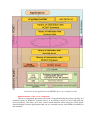
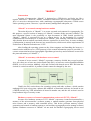
The startup of “Kami-terminal” is performed in four stages:
– The startup of the basic image of the file system (FS). The basic part starts from the
preliminary prepared carrier and consists of the Linux kernel and the image of the file system
with the minimum set of files needed to install a network connection to the startup server.
– Authentication and the startup of a user profile. The user is offered to connect a
PCDST and enter a PIN-code. Upon the successful completion of the authentication process the
user profile is read from the device, on the basis of which the settings and the software package
file is loaded from the startup server.
– Loading, testing and installing of software packages required to start a session with
the TS. Software packages, specified in the settings file of the user profile on the server, are
loaded from the startup server via the NFS protocol. For each loaded package the hash is
computed, the value of which is compared to the corresponding value recorded in the user profile
on the device. Upon the successful completion of testing the contents of the package are installed
in the FS of “Kami-terminal”.
– Start of a terminal session. On the basis of the contents of the settings file, a
connection with the TS is set, and virtual channels are created.