1
wePresent WiPG-1000
WiPG-1000 User’s Manual
(Model Name: WiPG-1000)
Version:)6.0
Date:)January)11,)2013)
For more information
www.wePresentWiFi.com
US, Canada, South America:
+1 214 935 2416
Europe, UK, Middle East:
+31 (0)10 2293495
South Africa:
+27 (0) 21 871 1545
Asia Pacific:
+886 2 2227 0099
© WP Technologies, Inc. 2015
WP1000-Manual
Table of Contents
Table of Contents
2
1.
Overview ............................................................................................................... 4
2.
Package Contents .............................................................................................. 5
3.
USB Token Contents .......................................................................................... 5
4.
Physical Details ................................................................................................... 5
5.
What You Might Need ...................................................................................... 7
6.
Quick Installation ............................................................................................... 7
7.
WiPG-1000 Receiver Device ........................................................................... 9
8.
DoWiFi for Windows........................................................................................10
8.1
Install the application .....................................................................................10
8.2
Start the application .......................................................................................11
8.3
Quick Connect...................................................................................................11
8.4
Connect to WiFi Network ..............................................................................12
8.5
Connect to Receiver Device .........................................................................12
8.6
Login .....................................................................................................................12
8.7
Main User Interface .........................................................................................13
8.8
Screen Projection .............................................................................................13
8.9
Audio Projection ..............................................................................................14
8.10
Menu ....................................................................................................................14
8.10.1
Show Receiver Information ..........................................................................15
8.10.2
Web Admin.........................................................................................................15
8.10.3
Search Receiver Device ..................................................................................16
8.10.4
Launch SidePad -> SidePad Receiver........................................................16
8.10.5
Enable BrowserSlides .....................................................................................17
8.10.6
Select Projection Desktop (Win XP/Vista/7) ...........................................17
8.10.7
Projection Quality ............................................................................................18
8.10.8
Projection Mode ...............................................................................................18
8.10.9
Projection Aspect Ratio .................................................................................19
8.10.10
Enable USB IWB Bridge ..................................................................................19
8.10.11
Advanced Screen Capture ............................................................................20
8.10.12
Send Audio to Display ....................................................................................21
8.10.13
Auto Power Manager ......................................................................................21
8.10.14
Auto WiFi Connect ...........................................................................................22
8.10.15
Make wePresent WiPG-1000 Token ...........................................................22
8.10.16
Copy Application to desktop .......................................................................23
8.10.17
About....................................................................................................................24
8.10.18
Exit .........................................................................................................................24
9.
DoWiFi for Mac ..................................................................................................25
Table of Contents
3
9.1
Install the application .....................................................................................25
9.2
Start the application .......................................................................................25
9.3
Quick Connect...................................................................................................25
9.4
Connect to WiFi Network ..............................................................................26
9.5
Connect to Receiver Device .........................................................................26
9.6
Login .....................................................................................................................27
9.7
Main User Interface .........................................................................................27
9.8
Screen Projection .............................................................................................27
9.9
Audio Projection ..............................................................................................28
9.10
Menu ....................................................................................................................28
9.10.1
Show Receiver Information ..........................................................................29
9.10.2
Web Admin.........................................................................................................29
9.10.3
Search Receiver Device ..................................................................................30
9.10.4
Launch SidePad -> SidePad Receiver........................................................30
9.10.5
Enable BrowserSlides .....................................................................................31
9.10.6
Projection Quality ............................................................................................31
9.10.7
Projection Mode ...............................................................................................32
9.10.8
Projection Aspect Ratio .................................................................................32
9.10.9
Send Audio to Display ....................................................................................33
9.10.10
Auto WiFi Connect ...........................................................................................33
9.10.11
About....................................................................................................................33
9.10.12
Exit .........................................................................................................................33
10.
Web Management ...........................................................................................34
10.1
Home Page .........................................................................................................34
10.2
Download ...........................................................................................................34
10.3
Conference Control .........................................................................................35
10.4
BrowserSlides ....................................................................................................36
10.5
Admin...................................................................................................................36
10.5.1
System Status ....................................................................................................37
10.5.2
Device Setup......................................................................................................37
10.5.3
Network Setup ..................................................................................................38
10.5.4
OSD Setup ..........................................................................................................40
10.5.5
Change Passwords...........................................................................................41
10.5.6
Reset to Default ................................................................................................42
10.5.7
Firmware Upgrade ...........................................................................................43
10.5.8
BrowserSlides Setup ......................................................................................44
10.5.9
Reboot System ..................................................................................................45
10.5.10
Logout..................................................................................................................45
11.
Appendix ............................................................................................................46
11.1
Wall-mount Instructions................................................................................46
WiPG-1000 User Manual
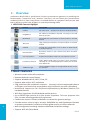
1. Overview
wePresent WiPG-1000 is professional wireless presentation gateway. By enabling the
Revolutionary “interactive” and “wireless” functions, you can throw your presentations
wirelessly from a PC, Mac, iPad, iPhone, or Android devices to a projector! And use your pad,
tab or phone to control your PC/Mac, or view the presenting slides!
• WiPG-1000 Features Highlight:
Icon
Feature
Description
DoWiFi
No more wires … Display-over-WiFi for Windows & Mac
Plug&Show
No software installation required. Just plug in the USB
drive to your PC.
MobiShow
Interactive PPT presentation via iPhone/iPad or Android
devices
WiFi-Doc
High quality presentation via iPhone/iPad or Android
devices
SidePad
Control the presentation on PC or Mac via iPhone/iPad
or Android devices
BrowserSlides
Broadcast slides to your devices with WiFi and web
browser
4-to-1 projection
Project four PC/Mac screens to one projector at once.
Conference Control
Open WiPG's web page to control screen projection
centrally. Or use mouse/keyboard to select a PC to show
from WiPG's UI.
SNMP Manager
Use the SNMP manager to manage WiPG devices across
the network.
•Basic Features
▪
▪
▪
▪
▪
▪
▪
▪
▪
▪
4
▪
▪
Wireless screen and audio projection
Remote desktop control feature
Support Windows Win 8, Win7, Vista, XP
Support Mac version 10.5 and above
Plug and Show! No installation required … just plug in the accompanied token to
a USB port, and hassle free presentation can be started in seconds. (Windows)
MobiShow Supportive for iOS/Android/Blackberry/Windows Mobile 5/6
handheld devices
WiFi-Doc Supportive for iOS/Android mobile devices
Up to 30FPS high speed 4-to-1 Split Screen Projection. Turn one projector into
four, increase meeting productivity right away.
Conference control! Allows moderators to streamline grand meetings.
Provide session security login, wireless WEP/WPA key and Gatekeeper function
to protect presentation contents and keep good security to office networks.
Web management including software download and device settings
Support WiFi AP-Client Mode
→Back
WiPG-1000 User Manual
2. Package Contents
•
•
•
•
•
•
wePresent WiPG-1000 Box
wePresent WiPG-1000 USB Token
Power Adapter (DC +5V, 2.5A)
2 WiFi Antenna
Quick Installation Guide
Warranty Card
3. USB Token Contents
•
•
•
•
•
•
Windows Installer (WiPG-1000 Windows Installer)
MAC Installer (WiPG-1000 Mac Installer)
VAC Driver (For Windows XP Audio Projection)
VDD Driver (For Windows Virtual Extended Screen)
USBoIP Driver (For USB IWB Bridge)
Utility
▪ PtG Converter (For MobiShow PtG function)
▪ SNMP Manager (For SNMP Management)
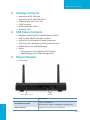
4. Physical Details
• Front Panel
Power Button and LED
USB Port
Description
5
PowerButtonandLED
Power on/off button.
LED Indicator: System Loading(Red), Ready(Yellow)
USB Port (Front)
USB port for USB mouse and keyboard
→Back
WiPG-1000 User Manual
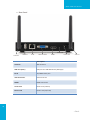
• Rear Panel
Audio Jack
Antenna
USB Port
RJ-45
VGA Connector
HDMI
Power Jack
Antenna
Description
Antenna
WiFi Antenna
USB Port (Rear)
USB port for USB IWB device (HID type)
RJ-45
10/100M RJ-45 port
VGA Connector
VGA connector
HDMI
HDMI Connector
AudioJack
Audio Jack (3.5mm)
Power Jack
Power Jack (5V/2.5A)
6
→Back
WiPG-1000 User Manual
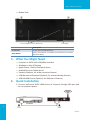
• Bottom Side
Screw hole(Optional kit for Wall Mount)
Reset Button
Description
Screw Hole
Screw Hole for Wall Mount Kit
ResetButton
Press reset button and power on the device to execute
Hardware Reset.
5. WhatYouMightNeed
•
•
•
•
•
•
•
Projector or HDTV with VGA/HDMI interface
Windows or Mac PC/Laptop
Apple iPhone, iPad or iPod-touch device
Android Phone or Tablet device
Speaker (Optional, for audio projection feature)
USB Mouse and Keyboard (Optional, for remote desktop feature)
USB HID IWB Device (Optional, for IWB over IP feature)
6. QuickInstallation
1. Connect wePresent WiPG-1000 device to Projector through VGA port and
turn on projector power.
7
→Back
WiPG-1000 User Manual
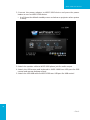
2. Connect the power adaptor to WiPG-1000 device and press the power
button to turn on WiPG-1000 device.
▪ It will show the default standby screen as below on projector when system
is ready.
3. Attach the speaker cable to WiPG-1000 phone jack for audio output
4. Attach the USB mouse and keyboard to WiPG-1000 front USB port for OSD
control and remote desktop control
5. Attach the USB IWB cable to WiPG-1000 rear USB port for IWB control
8
→Back
WiPG-1000 User Manual
7. WiPG-1000 Receiver Device
1. Connect wePresent WiPG-1000 device to Projector through VGA port and
turn on projector power.
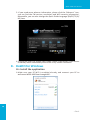
2. It will show the Quick Guide Information, WiFi Network Name, IP Address
and Code on standby screen.
3. If there is sender connected to WiPG-1000 device, it will show the PC-List on
standby screen, conference moderator can use the USB mouse/keyboard to
select the PC and control it remotely.
4. You can also click the feature Icon to browse the Quick Guide for each
feature.
9
→Back
WiPG-1000 User Manual
5. If you need more advance information, please click the “Advance” icon,
you can find the FW version, resolution and WiFi security information.
Meanwhile, you can also change the Quick Guide Language (EN/SC/TC/JP/
KO) here.
6. System will enter the Screen Saver mode if none is connected, it will restore
to standby status immediately when there is any sender connected.
8. DoWiFiforWindows
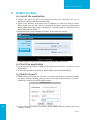
8.1Installtheapplication
1.Make sure your PC WiFi is enabled already, and connect your PC to
wePresent WiPG-1000 box through WiFi.
10
→Back
WiPG-1000 User Manual
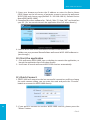
2. Open your browser and enter the IP address or enter the Device Name
(SSID) shown on the left corner of projector screen to access the wePresent
WiPG-1000 web home page.(Default IP: 192.168.100.10, Default Device
Name(SSID):WiPG-1000)
3. Download the client software for “Win 8 / Win 7 / Vista / XP” and install on
your PC. (Ps. You can also launch the application from PnS token directly.)
4. Launch WiPG-1000 client and connect to WiPG-1000 receiver.
(Make sure your personal firewall allows wePresent WiPG-1000 software to
pass through.)
8.2Starttheapplication
1. Click wePresent WiPG-1000 icon on desktop to execute the application, or
launch the application from PnS token directly.
2. It will start to search wePresent WiPG-1000 receiver automatically.
8.3QuickConnect
1. WiPG-1000 will memorize the last successful connection profile and open
the quick connect dialog, you can enter the code and press the “Connect”
button to connect this WiPG-1000 directly.
11
2. If you want to connect to another WiPG-1000 receiver, please press the
“Rescan” button.
→Back
WiPG-1000 User Manual
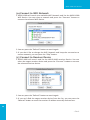
8.4ConnecttoWiFiNetwork
1. WiPG-1000 will search the available WiFi Network and list the WiPG-1000
WiFi Device. You can select a network and press the “Connect” button to
connect the selected WiFi Device.
2. You can press the “Refresh” button to search again or press the “All” button
to list all available WiFi Network name.
3. If you don’t like to change the WiFi Network and keep the connection to
current network, you can press the “Skip” button.
8.5ConnecttoReceiverDevice
1. WiPG-1000 will search and list the WiPG-1000 receiver Device. You can
select the target receiver device and press the “OK” button to connect the
selected receiver device.
2. You can press the “Refresh” button to search again.
3. If you can’t find the target receiver device from the list, you can press the
“Manual” button to enter the receiver IP address manually and connect.
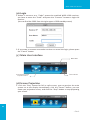
8.6Login
1. When it connects to a “Code” protection enabled WiPG-1000 receiver,
you have to enter the “Code” and press the “Connect” button to login the
receiver.
(You can find the CODE from the right-upper of OSD standby screen)
12
→Back
WiPG-1000 User Manual
2. If you want to connect to another receiver or cancel the login, please press
the “Cancel” button.
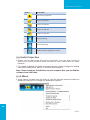
8.7MainUserInterface
Menu Area
Control Area for Screen
Projection Feature
Status Indicator
8.8ScreenProjection
1. Click the “Play” button for full or split screen, you can project the main
screen on to the display immediately, click the “Pause” button, you can
freeze you projection screen, and click the “Stop” button to stop projecting
your screen.
Button
Description
Full Screen projection
Project to Split #1
Project to Split #2
Project to Split #3
Project to Split #4
Stop projecting
Pause projecting
13
Enable the Windows
Magnifier function
→Back
WiPG-1000 User Manual
8.9AudioProjection
1. When you are doing the full screen projection, you can also choose to
project the audio to WiPG-1000 receiver for the multimedia or video
scenario.
2. To enable or disable the audio projection feature, please change the setting
from WiPG-1000 menu. (Menu -> Send audio to display)
Note: ForWindowsXPsystem,pleaseinstalltheAudiodriver(“VAC.exe”,Virtual
AudioControlDriver)onyourcomputerfirst,youcanfindthesoftwarefromUSB
Token.(WindowsVista/Win7/Win8isnotnecessarytoinstallVAC)
8.10Menu
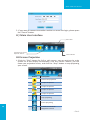
1. Press “Menu” button from the main UI, you will find the menu to enable the
additional feature or to change the application options.
14
Item
ShowReceiverInformation
WebAdmin
Search Receiver
LaunchSidePad->SidePadReceiver
EnableBrowserSlides
SelectProjectionDesktop
ProjectionQuality
ProjectionMode
ProjectionAspectRatio
EnableIWBUSBBridge
AdvancedScreenCapture
SendAudiotoDisplay
AutoPowerManagement
Auto WiFi Connect
Make Plug&Show Token
CopyApplicationtoDesktop
About
Exit
Description
Show Receiver Information on desktop
Open web admin page
Search another receiver device
Launch SidePad sender
Enable BrowserSlides feature
Select different projection desktop
Change projection quality
Change projection latency option
Change projection screen ratio
Enable IWB USB bridge
Enable advance screen capture
Enable audio projection
Enable Auto Power management feature
Enable Auto WiFi connect feature
Make Plug&Show USB token
Copy the application to desktop
About this application
Exit the application
→Back
WiPG-1000 User Manual
8.10.1ShowReceiverInformation
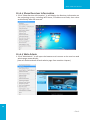
1. Click “Show Receiver Information”, it will display the Receiver Information on
the projecting screen, including WiFi Name, IP Address and Code, then close
automatically after 30 seconds.
8.10.2WebAdmin
1. Click “Web Admin”, it will open the browser and connect to the receiver web
admin page automatically.
(You can find the details of web admin page from another chapter.)
15
→Back
WiPG-1000 User Manual
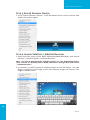
8.10.3SearchReceiverDevice
1. Click “Search Receiver Device”, it will disconnect from current receiver and
search the receiver again.
8.10.4LaunchSidePad->SidePadReceiver
1. Open the main menu of the WiPG-1000 application(Win/Mac), and choose
the item, “Launch SidePad -> SidePad Receiver”
Note: You havetodownloadthe“SidePadreceiver”onyourAndroid/iOSdevice,
then connect the Android/iOS to WiPG-1000 device through WiFi and Launch
“‘SidePadReceiver”.
2. In seconds, you shall see the PC desktop shown on the iOS Device. Use two
fingers to pinch or one finger to pan the desktop image and control it by
single or double clicks!
16
→Back
WiPG-1000 User Manual
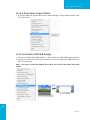
8.10.5EnableBrowserSlides
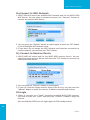
1. Click the “Enable BrowserSlides”, it will start to broadcast your slides to the
browser on connected mobile devices.
Note: AudienceneedtoconnecttoWiPG-1000WiFiNetwork,openthebrowser
andclickthe“BrowserSlides”buttontostartreceivingtheslides.
8.10.6SelectProjectionDesktop(WinXP/Vista/7/8)
1. Click the “Select Projection Source” then you can select to project the main
screen of desktop or the virtual extended screen.
Note:
ForWindowsXPsystem,youneedtoinstall“VDD.exe”driverfirst,youcanfindit
fromUSBtoken.
ForWindows7/VistaStarteredition,itcan’tsupportextendedscreen.
17
→Back
WiPG-1000 User Manual
8.10.7ProjectionQuality
1. Click the “Projection Quality”, choose “Normal” for faster projection speed
with lower screen image quality, and “Best” for clear screen image quality
but slower projection speed.
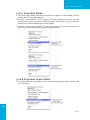
8.10.8ProjectionMode
1. The Projection Mode provides the option to support “Presentation Mode”
and “Video Mode”.
2. For the “Video mode”, it will trigger the longer latency but much smooth
performance when you are watching video, meanwhile it will change PC
resolution to 1024x768 and gray some option, and change back to shortest
latency when it detect you are moving the mouse cursor.
3. For the “Presentation Mode”, it will always keep the shortest latency to
provide the most responsive operation performance.
18
→Back
WiPG-1000 User Manual
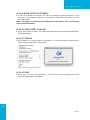
8.10.9ProjectionAspectRatio
1. It can provide the projection screen ratio setting of “Keep Aspect Ratio” and
“Fit Full Screen”.
8.10.10EnableUSBIWBBridge
1. Click the “Enable USB IWB Bridge”, it will enable the USB IWB Bridge feature.
2. When you start the full screen projection, it will bridge the IWB device to
your PC wirelessly.
Note: YouhavetoinstalltheUSBoIPdriverfirst.YoucanfindthedriverfromUSB
token.
19
→Back
WiPG-1000 User Manual
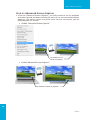
8.10.11AdvancedScreenCapture
1. Click the “Advanced Screen Capture”, you will be able to see tip windows
and other layered windows (include the main UI) on the connected display.
However, the mouse cursor may blink from time to time when you are
projecting your PC screen!
• Disable “Advanced Screen Capture”.
Tip windows is not
shown in projector
• Enable “Advanced Screen Capture”.
Tip windows is shown in projector
20
→Back
WiPG-1000 User Manual
8.10.12SendAudiotoDisplay
1. Click “Send Audio to Display” to start the audio projection feature. It will
mute your local speaker during the projection and restore it when it closes
the application.
Note: ForWindowsXPsystem,youhavetoinstalltheAudiodriver.(VAC.exe)You
canfindthedriverfromUSBtoken.
8.10.13AutoPowerManager
1. To make the highest projection performance, application will turn the PC’s
windows power scheme from current settings to “highest performance”,
however, you can click the “Auto Power Manage” to enable or disable this
function and restore you power scheme immediately.
21
→Back
WiPG-1000 User Manual
8.10.14AutoWiFiConnect
1. Click “Auto WiFi Connect” to enable the WiFi connect feature through WiPG1000 application.
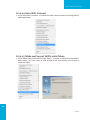
8.10.15MakewePresentWiPG-1000Token
1. Click “Make wePresent WiPG-1000 Token” to make a USB wePresent WiPG1000 Token, you can insert a USB thumb drive and follows the wizard to
make the Token.
22
→Back
WiPG-1000 User Manual
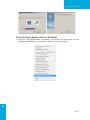
8.10.16CopyApplicationtodesktop
1. Click the “Copy Application to desktop”, it will copy the application to your
desktop immediately even you don’t have the system privilege
23
→Back
WiPG-1000 User Manual
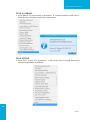
8.10.17About
1. Click “About” to show system information. It includes product model name,
Client version, IP address and other information.
8.10.18Exit
1. Click “Exit” to exit this application. It will stop current playing status and
close the application immediate.
24
→Back
WiPG-1000 User Manual
9. DoWiFi for Mac
9.1Installtheapplication
1. Make sure your PC WiFi is enabled already, and connect your PC to
wePresent WiPG-1000 box through WiFi.
2. Open your browser and enter the IP address or enter the Device Name
(SSID) shown on the left corner of projector screen to access the wePresent
WiPG-1000 web home page. (Default IP: 192.168.100.10, Default Device
Name(SSID):WiPG-1000)
3. Download the client software for “Mac” and install on your PC.
4. Launch WiPG-1000 client and connect to WiPG-1000 receiver.
9.2Starttheapplication
1. Click wePresent WiPG-1000 from Application folder to execute the
application.
2. It will start to search wePresent WiPG-1000 receiver automatically.
9.3QuickConnect
1. WiPG-1000 will memorize the last successful connection profile and open
the quick connect dialog, you can enter the code and press the “Connect”
button to connect this WiPG-1000 directly.
25
2. If you want to connect to another WiPG-1000 receiver, please press the
“Rescan” button.
→Back
WiPG-1000 User Manual
9.4ConnecttoWiFiNetwork
1. WiPG-1000 will search the available WiFi Network and list the WiPG-1000
WiFi Device. You can select a network and press the “Connect” button to
connect the selected WiFi Device.
2. You can press the “Refresh” button to search again.
3. If you don’t like to change the WiFi Network and keep the connection to
current network, you can press the “Skip” button.
9.5ConnecttoReceiverDevice
1. WiPG-1000 will search and list the WiPG-1000 receiver Device. You can
select the target receiver device and press the “Connect” button to connect
the selected receiver device.
2. You can press the “Refresh” button to search again.
3. If you can’t find the target receiver device from the list, you can press the
“Manual” button to enter the receiver IP address manually and connect.
26
→Back
WiPG-1000 User Manual
9.6Login
1. When it connects to a “Code” protection enabled WiPG-1000 receiver,
you have to enter the “Code” and press the “Connect” button to login the
receiver.
(You can find the CODE from the right-upper of OSD standby screen)
2. If you want to connect to another receiver or cancel the login, please press
the “Cancel” button.
9.7MainUserInterface
Menu Area
Control Area for Screen
Projection Feature
Status Indicator
9.8ScreenProjection
1. Click the “Play” button for full or split screen, you can project the main
screen on to the display immediately, click the “Pause” button, you can
freeze you projection screen, and click the “Stop” button to stop projecting
your screen.
27
→Back
WiPG-1000 User Manual
Button
Description
Full Screen projection
Project to Split #1
Project to Split #2
Project to Split #3
Project to Split #4
Stop projecting
Pause projecting
Enable the Mac Magnifier function
9.9AudioProjection
1. When you are doing the full screen projection, you can also choose to
project the audio to WiPG-1000 receiver for the multimedia or video
scenario.
2. To enable or disable the audio projection feature, please change the setting
from WiPG-1000 menu. (Menu -> Send audio to display)
Note: PleaseinstalltheSoundFloweronyourcomputerfirst,youcanfindthe
softwarefromUSBToken.
9.10Menu
1. Press “Menu” button from the main UI, you will find the menu to enable the
additional feature or to change the application options.
28
→Back
WiPG-1000 User Manual
Item
Description
ShowReceiverInformation
Show Receiver Information on desktop
WebAdmin
Open web admin page
Search Receiver
Search another receiver device
LaunchSidePad->SidePadReceiver
Launch SidePad sender
EnableBrowserSlides
Enable BrowserSlides feature
ProjectionQuality
Change projection quality
ProjectionMode
Change projection latency option
ProjectionAspectRatio
Change projection screen ratio
SendAudiotoDisplay
Enable audio projection
Auto WiFi Connect
Enable Auto WiFi connect feature
About
About this application
Exit
Exit the application
9.10.1ShowReceiverInformation
1. Click “Show Receiver Information”, it will display the Receiver Information on
the projecting screen, including WiFi Name, IP Address and Code, then close
automatically after 30 seconds.
9.10.2WebAdmin
1. Click “Web Admin”, it will open the browser and connect to the receiver web
admin page automatically.
(You can find the details of web admin page from another chapter.)
29
→Back
WiPG-1000 User Manual
9.10.3SearchReceiverDevice
1. Click “Search Receiver Device”, it will disconnect from current receiver and
search the receiver again.
9.10.4LaunchSidePad->SidePadReceiver
1. Open the main menu of the WiPG-1000 application(Win/Mac), and choose
the item, “Launch SidePad -> SidePad Receiver”
Note: Youhavetodownloadthe“SidePadreceiver”onyourAndroid/iOS
device,thenconnecttheAndroid/iOStoWiPG-1000devicethroughWiFiand
Launch“‘SidePadReceiver”.
2. In seconds, you shall see the PC desktop shown on the iOS Device. Use two
fingers to pinch or one finger to pan the desktop image and control it by
single or double clicks!
30
→Back
WiPG-1000 User Manual
9.10.5EnableBrowserSlides
1. Click the “Enable BrowserSlides”, it will start to broadcast your slides to the
browser on connected mobile devices.
Note: Audience need to connect to WiPG-1000 WiFi Network, open the
browserandclickthe“BrowserSlides”buttontostartreceivingtheslides.
9.10.6ProjectionQuality
1. Click the “Projection Quality”, choose “Normal” for faster projection speed
with lower screen image quality, and “Best” for clear screen image quality
but slower projection speed.
31
→Back
WiPG-1000 User Manual
9.10.7ProjectionMode
1. The Projection Mode provides the option to support “Video Mode” latency
control and “Presentation Mode”.
2. For the “Video Mode”, it will trigger the longer latency but much smooth
performance when you are watching video, meanwhile it will change PC
resolution to 1024x768 and gray some option.
3. For the “Presentation Mode”, it will always keep the shortest latency to
provide the most responsive operation performance.
9.10.8ProjectionAspectRatio
1. It can provide the projection screen ratio setting of “Keep Aspect Ratio” and
“Fit Full Screen”.
32
→Back
WiPG-1000 User Manual
9.10.9SendAudiotoDisplay
1. Click “Send Audio to Display” to start the audio projection feature. It will
mute your local speaker during the projection and restore it when it closes
the application.
Note: YouhavetoinstalltheSoundFlowerAudiodriver.Youcanfindthe
driverfromUSBtoken.
9.10.10AutoWiFiConnect
1. Click “Auto WiFi Connect” to enable the WiFi connect feature through WiPG1000 application.
9.10.11About
1. Click “About” to show system information. It includes product model name,
Client version and other information.
9.10.12Exit
1. Click “Exit” to exit this application. It will stop current playing status and
close the application immediate.
33
→Back
WiPG-1000 User Manual
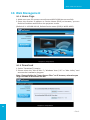
10. WebManagement
10.1HomePage
1. Make sure your PC connect to wePresent WiPG-1000 box successfully.
2. Enter the receiver IP address or Device Name (SSID) on browser; you can
find the IP address and SSID on the projector screen.
(Default IP is 192.168.100.10, Default Device name (SSID) is WiPG-1000)
10.2Download
1. Select “Download” function.
2. Please select the “Win 8/ Win 7 / Windows Vista / XP” or “Mac Utility” and
execute the installation program.
Note:Pleasedisablethe“SmartScreenFilter”onIEbrowser;otherwiseyou
mightnotabletodownloadthefile.
34
→Back
WiPG-1000 User Manual
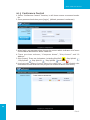
10.3ConferenceControl
1. Select “Conference Control” function, it will show current connected sender
list.
2. Enter password and then press [Login]. (default password: moderator)
3. After login, you can see a User List on the screen which indicates all of users
connected to WEPRESENT WIPG-1000 box.
4. There are three columns, “Computer Name”, “Play Control” and “IP
Address”.
5. Play Control, There are six buttons, including Play(Full)
, Play Split #1
, Play Split #2
,Play Split #3
, Play Split #4
and Stop
.
6. Uncheck the “Allow Control from this page only”, it will disable the
centralized control and user can project the screen to WiPG-1000 freely.
35
→Back
WiPG-1000 User Manual
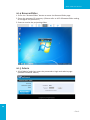
10.4BrowserSlides
1. Press the “BrowserSlides” button to enter the BrowserSlides page.
2. Enter the password if necessary. (Please refer to 10.5.8 BrowserSlides setting
to configure the password.)
3. Start to receive the projecting slides.
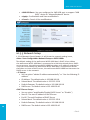
10.5Admin
1. Click [Admin] and then enter the password to login web admin page.
(Default Password: admin)
36
→Back
WiPG-1000 User Manual
10.5.1SystemStatus
1. Click [System Status], it will show current system status.
ModelName:Product model name
Versions:
•Firmwareversionno.:Product firmware version number.
Network Status:
•IPaddress:IP address of WiPG-1000 device.
•SubnetMask:subnet mask
•DefaultGateway:default gateway
•WirelessMACaddress:wireless MAC address
•WireMACaddress:wire MAC address
ConnectionStatus:
•Projectingstatus:“Waiting for projecting” or “Projecting”
•TotalUsers:It shows how many users login to wePresent WiPG-1000.
10.5.2DeviceSetup
1. Click [Device Setup] button, it will show the device setting items,
• Choose <VGA>or<HDMI>output option
• <Resolution>:
HDMI: 720p, 1080i, 1080p
• VGA: UXGA(1600*1200), WXGA+(1440*900), WXGA(1360*768,
1280x768, 1280x800) ,XGA(1024*768), and SVGA(800*600). The
default value is XGA(1024*768).
<Code>: You can select “Disable”, “Random”, or “Use the following code”
to set a specified 4-characters Number.
37
→Back
WiPG-1000 User Manual
• <IWBUSBPort>: You can configure the IWB USB port to support “IWB
(HID)” device or “Mouse/Keyboard” device
• <Apply>: Confirmation and Save modifications
• <Cancel>: Cancel all the modifications
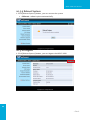
10.5.3NetworkSetup
1. Click [Network Setup] button, it will show the network setting items,
38
<Note:Auto-ConfigurationNetworkSetuponWiPG-1000>
The default setting of the wePresent WiPG-1000 box is DHCP client. When
the wePresent WiPG-1000 box is connected to a LAN that already has a DHCP
server present, the wePresent WiPG-1000 box takes an IP address assigned to
it by the server. When the wePresent WiPG-1000 box is connected to a LAN
that does not have a DHCP server, the wePresent WiPG-1000 box becomes the
DHCP server in the network.
<IPSetup>
• You can select “obtain IP address automatically” or “Use the following IP
address”
• IP Address: The default value is 192.168.100.10.
• Subnet Mask: The default value is 255.255.255.0
• Default Gateway: The default value is 192.168.100.10
• DNS Server: The default value is 192.168.100.10
<DHCPServerSetup>
• You can select “auto(Enable/Disable DHCP Server” or “Disable”)
• Start IP: The start IP address of DHCP Server.
• End IP: The end IP address of DHCP Server
• Subnet Mask: The default value is 255.255.255.0
• Default Gateway: The default value is 192.168.100.10
• DNS Server: The default value is 192.168.100.10
→Back
WiPG-1000 User Manual
<WirelessSetup>
• Wireless LAN: The default value is “Enable”
• Region: default value is “Worldwide”.
• SSID: SSID string, max. Length is 32 bytes.
• SSID Broadcast: The default value is “Enable”
• Channel: to set fixed channel or Auto. The “Auto” means after power
on wePresent WiPG-1000, it will scan all of wireless channel and select
clear one channel automatically.
• Encryption: you can select “Disable” or one of WEP/WPA/WPA2 64bit or
128bit in ASCII or HEX string.
• Key:If Encryption is enabled, you have to set key value according to the
encryption mode you selected.
• Channel Bandwidth:20MHz or Auto (20MHz/40MHz)
<SNMP>
You can select “Enable” or ”Disable” option to set up the SNMP function.
And the SNMP community password is the same as the web Admin
password.
<APClient>
• Connect to Existing AP: Input the SSID of Home WiFi AP you want to
connect.
• Encryption: you can select “Disable” or one of WEP/WPA/WPA2 64bit or
128bit in ASCII or HEX string.
• Key: If Encryption is enabled, you have to set key value according to the
encryption mode you selected.
• Press Apply button, and follow the reboot instruction to make it work.
<Gatekeeper>
Gatekeeper is designed for ensuring the enterprise network security
within wePresent WiPG-1000 box
• All Block can block Guest Users(through wireless) to access all office
network(LAN),
• All Allow can pass Guest Users(through wireless) to access all office
network
• Internet Only can block Guest Users (through wireless) from office
network (LAN) but still reserve internet connection capability.
<Apply>: press button to select this mode.
<Cancel>: press button to abort action.
<Back>: Back to Operating mode main menu.
39
→Back
WiPG-1000 User Manual
10.5.4OSDSetup
1. Click [OSD Setup] button, you can change the standby Logo image
40
ChangeLogoImage
▪ <Resettodefault>: Restore to default Logo image.
▪ <ImageFileUpload>: Upload the customized Logo Image.
2. Display Option
→Back
WiPG-1000 User Manual
DeviceInformation
Show All: Display SSID, IP address and Code information.
Hide All: Hide SSID, IP address and Code information.
Font Size
Normal: Normal SSID, IP address and Code font size.
Large: Make SSID, IP address and Code font size bigger.
ScreenSaverSettings
Enable: Enable the screen saver function.
Disable: Disable the screen saver function.
Idle Time(Minutes): Choose “5”, “10”, “15”, “30” and “60” minutes idle
time to start the Screen Saver function. (Default is 5 minutes.)
10.5.5ChangePasswords
1. Click [Change Password] button, you can change the password setting.
(Length: up to 8 characters)
• < EnterNewPassword>: enter new password you want to change for
each category.
• <ConfirmNewPassword>: Confirm the new password again.
• <Apply>: Confirm and Save modifications.
41
→Back
WiPG-1000 User Manual
10.5.6ResettoDefault
1. Click [Reset to Default] button to restore factory default settings.
<Apply>: Confirm and take action.
***ToexecutetheHardwareFactoryResettoDefault,Pleasefollowbelow
procedures.
1.Press [Reset] button and Hold.
2.Turn on wePresent WiPG-1000 box.
3.Wait for over 10 seconds and relief [Reset] button.
4.It will take effect to restore factory default settings.
42
→Back
WiPG-1000 User Manual
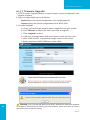
10.5.7FirmwareUpgrade
1. Click [Firmware Upgrade] button to import/export system configuration and
upgrade firmware.
2. System Configuration Import and Export
Export:Export the system configuration to a configuration file
Import:Import the system configuration file to WiPG-1000
3. Firmware Upgrade
A. Firstly, you have to get latest firmware image file from your vendor.
B. Click <Browse> to specify file name you want to upgrade.
C. Click <Upgrade> to start.
D. A warning message shown and count down counter on the screen.
E. After a few minutes, a complete message shown on the screen.
F. Restart wePresent WiPG-1000 box to take effect.
43
Warning: Don’t power off wePresent WiPG-1000 while firmware upgrade
in progress, otherwise will cause your Box doesn’t work and have to return
device to your vendor for fixing.
→Back
WiPG-1000 User Manual
10.5.8BrowserSlidesSetup
1. Click [BrowserSlides Setup] button to setup the BrowserSlides Feature.
2. Auto Refresh Interval: choose “Manual Refresh”, “10”, “20”, “30”, “45”, “60”
or “90” seconds Refresh Interval.
3. Access Password Control: choose “Disable”, “Use the same password as
Code” or “Use the following Code”
Note:
The WiPG-1000 logged-in user is not identical to BrowserSlides user, and they
both consume the wireless bandwidth for device connection. If there are
more than 10 users logged into WiPG-1000, it is recommended to connect
WiPG-1000 to company network through Ethernet or bridge WiPG-1000 to a
router due to wireless bandwidth concern. User should connect WiPG-1000
via company network or router in order to secure the projection performance.
The BrowserSlides user number should not exceed the recommended number
on the web management page to prevent the connection failure or low
projection performance.
PS. Wireless Projection function and Conference Control function can support
up to 64 users.
44
→Back
WiPG-1000 User Manual
10.5.9RebootSystem
1. Click [Reboot System] button, you can restart the system
• <Reboot>: reboot system automatically.
10.5.10Logout
1. Click [Reboot System] button, you can logout the WiPG-1000
45
→Back
WiPG-1000 User Manual
11. Appendix
11.1Wall-mountInstructions
Mounting Screw X 2
Screw Washer X 2
Mounting
Bracket
Bracket Fix Screw X 4
Wall
46
→Back