1
The gateway for Smart Linux TV
User Manual
Contents
(A) Safety Instructions .................................................................................................................................................... 4
(B) Packaging Contents ................................................................................................................................................. 6
(C) Product Descriptions ............................................................................................................................................... 7
(D) Conditional Access..................................................................................................................................................... 9
(E) Remote Control ....................................................................................................................................................... 10
(F) Main Features ........................................................................................................................................................... 13
(G) Technical Data ........................................................................................................................................................... 14
I. Installation of STB .................................................................................................................................................. 15
1.
Connecting Satellite Cables ............................................................................................................. 15
2.
Connecting the TV (and VCR).......................................................................................................... 16
3.
Connecting Power ............................................................................................................................ 17
4.
Power ON/OFF ................................................................................................................................. 18
II. First Time Installation (using Wizard) ............................................................................................................ 19
Step 1. Language Selection ....................................................................................................................... 19
Step 2. Configuring Satellite Connection ................................................................................................. 19
Step 3. Configuring Tuner A ...................................................................................................................... 20
Step 4. Configuring Tuner B...................................................................................................................... 22
Step 5. Parental Control Option ................................................................................................................. 23
III. Basic Operations ...................................................................................................................................................... 24
1.
Switching Channel ............................................................................................................................ 24
2.
Volume Control ................................................................................................................................ 24
3.
Selecting Audio Track ...................................................................................................................... 25
1
User Manual
The gateway for Smart Linux TV
4.
Subtitle .............................................................................................................................................. 25
5.
Teletext ............................................................................................................................................. 26
6.
Program Information (Infobar) ......................................................................................................... 27
7.
Channel List (Channel Selection Menu)........................................................................................... 28
8.
Electronic Program Guide (Eventview) ............................................................................................ 30
9.
Media Player ..................................................................................................................................... 32
10.
Sleep Timer....................................................................................................................................... 33
IV. System Configuration ........................................................................................................................................... 34
1.
Main Menu ........................................................................................................................................ 34
2.
System Setup.................................................................................................................................... 35
2-1. Service Searching ............................................................................................................................. 35
A.
Tuner Configuration ............................................................................................................... 35
B.
Automatic Scan of Services ................................................................................................ 36
C.
Manual Scan of Services ...................................................................................................... 37
2-2. System Configuration ..................................................................................................................... 39
A.
A/V Settings ............................................................................................................................... 39
B.
Language Selection ................................................................................................................ 41
C.
Customization ........................................................................................................................... 41
D.
Selecting Time Zone .............................................................................................................. 42
E.
Hard Disk Setup ....................................................................................................................... 43
F.
Front Display Setup ................................................................................................................ 44
G.
Network Setup .......................................................................................................................... 45
H.
Skin ................................................................................................................................................ 47
2-3. Checking CAM ................................................................................................................................... 48
2-4. Parental Control ................................................................................................................................ 48
2-5. Factory Reset ...................................................................................................................................... 52
2-6. Checking H/W & S/W Information .......................................................................................... 53
2
The gateway for Smart Linux TV
User Manual
A.
Service Information ................................................................................................................ 53
B.
System Information ................................................................................................................ 54
V. Copyright - GNU GPL .......................................................................................................................................... 55
VI. Menu Structure ....................................................................................................................................................... 59
VII. Troubleshooting ...................................................................................................................................................... 60
VIII.
Universal Remote Control ..................................................................................................................... 61
1.
Setup method.................................................................................................................................... 61
1-1. Initial Settings .................................................................................................................................... 61
A.
Device Default: STB ................................................................................................................ 61
B.
Remote Control Default Setting Code .......................................................................... 61
1-2. Settings method ............................................................................................................................... 61
A.
3-DIGIT Setup Method ......................................................................................................... 61
B.
Auto Search (CH+, CH-) Setup method ....................................................................... 61
1-3. Setup Code Read Out (Number Call) ..................................................................................... 62
1-4. Factory Reset ...................................................................................................................................... 62
2.
TV Brand/Code List .......................................................................................................................... 63
IX. Service.......................................................................................................................................................................82
X. Glossary ...................................................................................................................................................................... 82
3
User Manual
The gateway for Smart Linux TV
(A) Safety Instructions
STB has been designed and manufactured in compliance with EU consumer safety requirements (CE). Please
read the following safety precautions carefully.
1. Connecting Power
●
●
●
This product operates only in the range of AC 100V~250V and 50Hz/60Hz. Please check first your power
supply to see if it fits this range.
Please be noted that you need to disconnect from the mains before you start any maintenance or
installation procedures.
Make sure that the power cord is placed in a position where it is easy to unplug it from the mains in an
emergency.
2. Overloading
●
Do not overload a wall outlet, extension cord or adapter as this may cause electrical fire or shock.
3. Liquid
●
●
●
●
This product is not water-proof and should not be exposed to dripping, splashing, or any type of liquid.
No objects filled with liquid such as base shall be placed on the product.
Please do not clean the product with wet cloth, which may cause a short circuit.
No wet objects should be placed near the product.
4. Ventilation
●
●
●
●
Allow a sufficient space between the product and other objects to make sure air ventilation of the product.
Do not block the top or rear of the product with an object, which will close the ventilation holes and lead to
a high temperature of the system. This may cause a failure of the product.
Do not stack other electronic devices on top of the product.
Do not insert any kind of pointed objects like screw, gimlet, etc. into the ventilation holes of the product.
This will damage the product.
5. Connecting the Satellite Cable
●
Disconnect the power of the product before you connect the satellite cable to the product. Otherwise, it
may cause damage to the LNB.
6. Grounding
●
The LNB must be earthed to the system earth for the satellite dish.
7. Location
●
●
Place the product indoor.
Do not expose the product to rain, sun or lightening.
4
The gateway for Smart Linux TV
●
●
User Manual
Do not place the product near any heat appliances as a radiator.
Ensure that there is more than 10 cm distance from any electrical devices & wall.
8. Lightening, Storm or Not In Use
●
Unplug the product and disconnect the antenna cable during a thunderstorm or lightening, especially when
left unattended and unused for a long period of time. This will prevent possible damages from power
surges or lightening.
9. Replacement of Parts
●
●
Unauthorized part replacements, especially by one who is not a qualified technician may result in damage
to the product.
Ensure that when part replacements are necessary qualified technicians perform the task using the
components specified by the manufacturer.
10. Hard Disk Drive
●
●
Do not move the product or turn the power off suddenly while the Hard Disk Drive (HDD) is still running.
This may result in damage to the HDD and thus the system.
The company shall not be liable for any corruption of data on the HDD caused by careless use or misuse
of users.
11. Battery
●
●
There is danger of explosion if batteries are incorrectly replaced.
Replace batteries only with the same or equivalent type.
‘WEEE’ Symbol instructions
This product should not be disposed with other house hold wastes at the end of its working life.
Please separate this from other types of wastes and recycle it responsibly to promote the sustainable reuse of
material resources. This will help prevent harm to the environment or human health from uncontrolled waste
disposal.
Dolby Digital: Manufactured under license from Dolby Laboratories. ‘Dolby’ and the ‘double-D’ symbol are
trademarks of Dolby Laboratories.
MP3: MPEG Layer-3 audio coding technology licensed from Fraunhofer IIS and Thomson
5
User Manual
The gateway for Smart Linux TV
(B) Packaging Contents
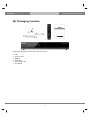
Please check all package contents before using your product.
●
●
●
●
●
●
STB
Remote Control
Batteries
HDMI cable
Loop-through cable
User Manual
6
The gateway for Smart Linux TV
User Manual
(C) Product Descriptions
Front Panel
① Display : Displays the current menu information. 12 character dot matrix VFD.
② ~③ VOL▲/ VOL▼ : Volume control
④ OK : Select
⑤ ~⑥
⑥ CH▼/ CH▲ : Switches channel
⑦ Menu : Shows main menu
⑧ Cancel : Cancel the menu
⑨ CI Module slot
⑩ Smartcard reader slot
⑪ USB: Connect a USB storage device
7
User Manual
The gateway for Smart Linux TV
Rear Panel
① TUNER 1 / TUNER 2 : Two satellite cables can be connected.
② S/PDIF : Connects to a digital audio system using S/PDIF cable.
③ Video output : Connects to TV using RCA cable.
④ Audio output : Connects to TV using RCA cable.
⑤ Component (YPbPr) : Connects to TV using a component cable.
⑥ SCART : Two SCART connectors are provided for TV and/or VCR using SCART cables.
⑦ HDMI : Connects to TV using a HDMI cable for both audio and video signals.
⑧ e-SATA : Connects the external HDD using e-SATA cable.
⑨ Ethernet : Connects the PC or another set top box of ET.
⑩ USB : Connects the USB memory stick or external HDD.
⑪ RS-232 : RS-232 data port is provided.
⑫ Power Inlet : Connects the detachable power cord.
⑬ On/Off Switch : Powers on/off.
8
The gateway for Smart Linux TV
User Manual
(D) Conditional Access
Amongst the channels that are scanned via STB, some channels can be properly tuned in only with the
corresponding Smartcard. STB provides two Smartcard Reader slots and users need to purchase those
Smartcards that are required for viewing such subscription based services.
Insertion of Smartcard
① Open the door on the right side.
② Insert Smartcard as in the following instruction.
③ Make sure that the Smartcard remain inserted while viewing.
Insertion of CAM (Conditional Access Module)
There are several Conditional Access Systems (CAS) that STB supports. To be able to watch channels that are
encrypted in such CAS as Nagravision, NDS, Irdeto, Viaccess, etc, users need to purchase a CAM that is
corresponding to each CAS, as well as Smartcard to decrypt those encrypted channels.
①
Insert a Smartcard into the CAM as in the below picture.
②
Once the Smartcard inserted into the CAM, insert the CAM into the CI slot.
③
Make sure that the CAM remain inserted while viewing.
9
User Manual
The gateway for Smart Linux TV
(E) Remote Control
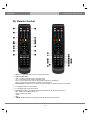
○,1
○,2
Power : To switch the receiver in and out of stand-by mode.
○,4
○,5
○,6
< : Navigates left on the menu options.
STB, TV, DVD, AUX :
• STB - To switch the remote control to receiver mode.
• TV - To switch the remote control to Television mode.
• DVD - To switch the remote control to DVD mode to operate your DVD player.
• AUX - To switch the remote control to operate your audio system.
○,3 Numeric Keys : Enters a service number for service change or to specify values for menu options.
> : Navigates right on the menu options.
Color Keys : Each key is assigned a specific function that may be different in each menu.
• Red - mainly used for REC, Cancel, etc.
• Green - mainly used for OK
• Yellow
• Blue
○,7 GUIDE : Displays the Electronic Program Guide (EPG) information if provided.
10
The gateway for Smart Linux TV
○,8
○,9
User Manual
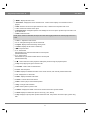
MENU : Displays the main menu.
Information : Displays the service information box. It is also used to display more information about a
program.
○,10 EXIT : Exits the current menu option into the live mode, or switches one step back of the menu.
○,11
○,12
OK : Confirms the selected menu option.
Navigation Keys : Navigates Up/Down and Left/Right on the menu options. Up/down keys are used to call
up the channel list.
○,13 Mute : Mutes the audio.
NOTE: When Teletext is activated, this key is also used when toggling between the Teletext page and the live
mode.
○,14
○,15
○,16
○,17
○,18
○,19
VOL +/- : Adjusts the audio volume.
○,22
I▶
▶ : Used to start slow motion playback. Subsequent presses change the playback speed.
○,23
Stop : Stops playing and goes to the live mode.
○,24
Timeshift : Used to start Timeshift function.
○,25
Timer : Sets sleep timer
○,26
TEXT : Displays the teletext information of the current channel, if the channel provides teletext data.
○,27
TV : Displays the TV channel list.
○,28
Radio : Displays the Radio channel list.
○,29
Search : Used to start channel search.
○,30
Mark : Used to jump to next bookmark position.
○,31
Vkey : Changes video resolution.
○,32
PIP : Used to picture-in-picture mode.
○,33
Subtitle : Displays the subtitle of the current channel if the channel provides subtitle.
○,34
Audio: Displays the audio track option to choose (e.g. AC3, Stereo)
○,35
Help : Displays major important operation methods of STB. This provides users with a quick guide of using
P +/- : Navigates through the scanned channel list
Playlist : Displays channel list during viewing mode.
Filelist : Displays the list stored on HDD if any.
▶ll : Play and Pause
<< : Fast Rewind
Fast rewinds at up to 128 times faster than the normal speed
(x2/4/8/16/32/64/128)
○,20 >> : Fast Forward
Fast forwards at up to 128 times faster than the normal speed
(x2/4/8/16/32/64/128)
STB.
11
User Manual
The gateway for Smart Linux TV
12
The gateway for Smart Linux TV
User Manual
(F) Main Features
●
●
●
●
●
●
●
●
●
●
●
●
●
●
●
●
●
●
●
●
●
●
●
●
400 MHz MIPS Processor
Linux Operating System
Media Player
Downloadable Plug-ins supported
2 x Smartcard Readers
2 x Common Interface
MPEG2 / H.264 Hardware Decoding
DVB-S2 Twin Tuners
12 character Dot Matrix VFD
128MB NAND Flash / 512MB DDR Memory
External SATA supported
10/100MB Ethernet Interface
3 x USB 2.0
RS-232
HDMI
YPbPr
Composite Video (RGB)
2 x SCART
S/PDIF for digital bit stream out (optical)
EPG supported
Automatic & Manual Service Scan supported
Multiple LNB control (DiSEqC) supported
Skin change supported
Stable SMPS integrated
13
User Manual
The gateway for Smart Linux TV
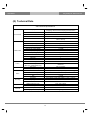
(G) Technical Data
STB Technical Specifications
12-digit Dot Matrix VFD display with status icons
displaying channel names and program information
2
2
1 x USB 2.0
8 (Power, Volume Up/Down, OK, Channel Up/Down,
Menu, Cancel)
1
2 x F-type socket
2 x Scart socket
3 x RCA (YPbPr)/1 x RCA (Composite)
1 x HDMI
2 x RCA
Standard optical (S/PDIF)
2 x USB 2.0
1
1
1
95~250/50~60 V/Hz
Display
Front Panel
Smartcard reader slot
Common Interface
USB
Buttons
Rear Panel
Power
RF
Video
Decoding
LNB
General
Power Switch
Sat-IF input/output
Connection TV/VCR
Video output(analogue)
Video/audio output (digital)
Audio output (analogue)
Audio output (digital)
USB
eSATA
Ethernet
RS-232
Mains voltage
Power consumption
(Max./typ. operation/stand-by)
RF range
Modulation, FEC, de-multiplexer
Video resolution
Video decoding
Input data rate
S/N
Decoding
Sampling rate
65/35/1 W
950~2,150 MHz
DVB-S/DVB-S2 standard
CCIR 601 (720x576 lines), 576p, 720p, 1080i, 1080p@30
MPEG-2, MPEG-4 compatible
2~45 MSymb/s
> 53 dB
AC 3, MPEG-4 (AAC-HE), MPEG-1, Layer 1, 2 and 3
32/4.1/48 kHz
S/N
> 65 dB
LNB supply(horiz./vert.)
Control signal
Dimensions (W x H x D)
Weight (without HDD)
14/18 ; Max. 400mA
22kHz ; ToneBurst ; DiSEqCTM1.0/1.1/1.2
380 x 60 x 240 mm
App. 3kg
14
The gateway for Smart Linux TV
User Manual
I. Installation of STB
This chapter will guide you through the whole installation process of STB. Please read each section carefully to
make sure that the system runs properly.
1. Connecting Satellite Cables
STB is integrated with twin satellite tuners, and one of the first steps is to connect satellite cable(s) to STB in order
to gain optimal signal quality. You can either choose one of the following connection methods depending on the
equipment you have.
A.
Two Separate Satellite Cables
In case you have two separate satellite cables providing different broadcast signals, you can configure
TUNER 1 Input and TUNER 2 Input independently.
B.
Internal Loop-through
In case you have only one satellite cable, connect the cable to TUNER 1 Input.
15
User Manual
The gateway for Smart Linux TV
2. Connecting the TV (and VCR)
STB provides a variety of audio/video connection methods.
A. Connecting TV via HDMI Cable
For the sake of the best picture quality, especially for digital TV, HDMI connection is recommended. Most
HDTVs have HDMI connectors to ensure the highest picture quality. In the rear panel of STB one HDMI
connector is available for this purpose. Connect your TV to STB using a HDMI cable as follows.
B.
Connecting TV via Component Cable
The secondly recommend TV connection for digital TV is via component cable (YPbPr). However, unlike
the HDMI connection which delivers audio and video signal at the same time, YPbPr connection requires
additional audio connection either via RCA cable (Stereo L/R) or S/PDIF as follows.
NOTE: When you have an A/V receiver with S/PDIF digital audio input, this connection is recommended to
enjoy the best audio quality, especially for the Dolby Digital sound.
16
The gateway for Smart Linux TV
C.
User Manual
Connecting TV via RCA (Video) Cable
STB provides Composite video connection as well. Composite cable has normally three connectors at
the both end; one Video (Yellow) and two Audio (White/Red). Connect your TV to STB as follows:
D. Connecting TV (and VCR) SCART Cable
In case your TV is analogue TV, SCART cable is the most common method. Connect your TV to STB
using SCART cable as follows
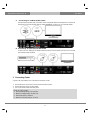
3. Connecting Power
A power code is provided as one of the basic accessories of STB.
●
●
●
Connect the power cord to the connector at the rear panel of STB.
Connect the power cord to a power outlet.
Turn on the power switch at the rear panel.
NOTE: AC input condition
● Nominal Voltage Range: 100~240 VAC
● Maximum Voltage Range: 90~264 VAC
● Nominal Frequency: 50/60 Hz
● Maximum Frequency Range: 47~63 Hz
17
User Manual
The gateway for Smart Linux TV
4. Power ON/OFF
[
: Press
or Press
‘Standby/Reset’]
There are several ways to turn your STB ON or OFF
●
Complete Power Shutdown
There is a Power Switch in the rear panel and once it is ON, you do not need to turn it on or off each time. It takes
a longer time to boot the system if you turned it off by this switch.
●
Standby Mode
POWER key is normally used to turn the power of STB on or off. If you press POWER, it instantly switches your
STB off or on. In this mode, the system is not completely shutdown and thus it takes a shorter time to turn it on and
off.
●
Deep Standby Mode
Deep Standby is used to reduce the standby power consumption. STB is designed to be energy efficient and to
guarantee the power consumption to be under 1W in the deep standby mode.
18
The gateway for Smart Linux TV
User Manual
II. First Time Installation (using Wizard)
When you turn on STB for the first time after purchase, an installation wizard will begin step by step.
NOTE: ‘OK’ key is used for confirmation and turns to the next step. Pressing ‘EXIT’ key to return to the
previous page.
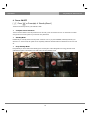
Step 1. Language Selection
STB provides various languages and here you can
choose the main language for your STB. Use
UP/DOWN key to scroll up and down to find the
language you want.
Step 2. Configuring Satellite Connection
From now on you need to configure the satellite connection. You have two options:
● Use wizard to setup basic features
● Exit wizard
You are strongly recommended to use wizard as it is designed to guide you through the configuration process.
19
User Manual
The gateway for Smart Linux TV
Step 3. Configuring Tuner A
Using LEFT/RIGHT key, you can choose one of the following Configuration Modes:
● Not configured.
● Simple
● Loop-through to: mode to make the TUNER 1 be internally connected to the TUNER 2.
● Equal to: mode to use the same configuration as that of Tuner B.
● Advanced: for an advanced user configuration.
If you choose Simple configuration mode, the following picture will appear.
20
The gateway for Smart Linux TV
User Manual
The five modes are available for the satellite cable connection between LNB and your STB
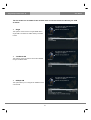
as below:
●
Single
This option is used to receive a single satellite with a
single LNB. The cable from LNB is directly connected
to STB.
●
ToneBurst A/B
This option is used if you want to receive two satellites
using a ToneBurst switch.
●
DiSEqC A/B
This option allows you to configure two satellites in Port
A and Port B.
21
User Manual
●
The gateway for Smart Linux TV
DiSEqC A/B/C/D
This option allows you to configure four satellites in
Port A, Port B, Port C and Port D.
●
Positioner
This option is used when you have a motorized
satellite antenna.
Step 4. Configuring Tuner B
This step is for the configuration of TUNER B Input and the process is same as that of Tuner A. For further
information please refer to the above “Configuring Tuner A” section.
22
The gateway for Smart Linux TV
User Manual
Step 5. Parental Control Option
Here you can choose whether to enable the parental control option. If you press OK, you will be asked to enter
PIN number.
23
User Manual
The gateway for Smart Linux TV
III. Basic Operations
1. Switching Channel
[
: Press CHANNEL
next channels]
/
or Press
/
Press
/
to move to the
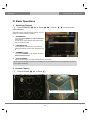
STB offers various channel zapping methods. You can
switch the current channel by pressing
●
UP/DOWN key
If you press UP or DOWN key, Channel Selection
menu appears.
You can move up and down to select the channel
that you want to tune into.
●
LEFT/RIGHT key
If you press LEFT or RIGHT key, the previous or
subsequent channel of the current channel is tuned
in.
●
CHANNEL +/- key
If you press CHANNEL +/- key, this will call up the
Channel Selection menu.
●
Channel Number
Enter a channel number, and it will instantly tune into the channel.
NOTE: If channel change is not done, it is probably because the selected channel is encrypted and you do not
have a proper smartcard.
2. Volume Control
[
: Press VOLUME
/
or Press
]
You can adjust the audio volume by pressing VOLUME +/- key. You can also mute or unmute the audio
temporarily by pressing MUTE key
Mute icon is on when the audio is muted.
24
The gateway for Smart Linux TV
User Manual
3. Selecting Audio Track
[
: Press
]
You can check what audio tracks are available to choose by pressing AUDIO key.
By using UP/DOWN key and Color key, you can select a different audio language or Stereo sound.
NOTE: Available options on this menu will differ depending on the service.
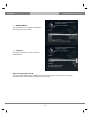
4. Subtitle
[
: Press
or Press
‘Subtitle’]
You can view the subtitle of the current program if the program provides the subtitle. Press SUBTITLE key and
Subtitle selection menu appears as below.
Available subtitles, if any, will display. By using UP/DOWN navigate the list to select a subtitle that you want to
play and press OK to activate it.
25
User Manual
The gateway for Smart Linux TV
5. Teletext
[
: Press
]
You can call up Teletext information by pressing TEXT key. It will take some time to load all the information.
You can navigate through the Teletext page by using UP/DOWN key to select a text page. Also, just simply enter
the page number that you want to read.
●
MUTE key
Once you activated Teletext, you can toggle between the live mode and the Teletext page by pressing
MUTE key instantly. In this case, loading of the Teletext page takes place instantly.
●
VOLUME + key
If you want to enlarge the page, press VOLUME + key.
26
The gateway for Smart Linux TV
●
User Manual
VOLUME - Key
If you want to reduce the page size, press VOLUME - key.
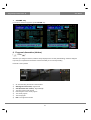
6. Program Information (Infobar)
[
: Press
]
Whenever you change the channel, infobar is always displayed for 5 seconds (default setting). Infobar is designed
to provide you comprehensive information of the channel that you are currently watching.
Press OK to call up infobar.
①
A : The tuner being used for the current channel
②
SNR (Signal to Noise Ratio) : Signal Level
③
AGC (Automatic Gain Control) : Signal Strength
④
The name of the current channel
⑤
Remaining time of the current program
⑥
⑦
The current program
The next program
⑧
REC : Not support this function
27
User Manual
The gateway for Smart Linux TV
⑨
CAS : Encrypted program
⑩
Text : Highlighted when the program provides Teletext.
⑪
16:9 : Screen ratio
⑫
RED : Not support this function
⑬
⑭
GREEN : to call up Subservices, if available
YELLOW : to activate Timeshift
⑮
Extensions : to call up a menu for Sleep Timer and Graphical Multi EPG
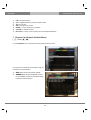
7. Channel List (Channel Selection Menu)
[
: Press
/
]
If press UP/DOWN key, this will activate Channel Selection Menu as below.
Four types of the channel lists are available to help you
manage your channel selection.
●
●
RED displays the list of all scanned channels.
GREEN displays the list of all satellites scanned.
Per each satellite, channels are arranged according
to Services, Provider, and New.
28
The gateway for Smart Linux TV
●
YELLOW displays the list of providers.
●
BLUE displays the list of your favorite channels.
User Manual
In order for you to add certain channels to this
Favourites list,
①
Call up the Channel Selection list by Pressing UP
or DOWN key.
②
Go to All list by pressing RED key.
③
Select the channel that you want to add to the
Favourites list.
④
Press MENU key on the selected channel and the
following menu appears.
⑤
Choose ‘add service to bouquet’ and press OK.
⑥
Go to the Favourites list by pressing BLUE key to
confirm that the selected channel is correctly
included in the list.
29
User Manual
The gateway for Smart Linux TV
8. Electronic Program Guide (Eventview)
[
: Press
]
The Electronic Program Guide (EPG) displays the program information of each channel, if provided, in time and
date order. You can view the detailed program information by pressing GUIDE key and the menu, Eventview
appears.
Detailed information of the current channel will be displayed on EPG. On this menu, three options are provided.
●
RED (Similar)
This option helps you find similar programs. If there are one or more programs that are similar to the current
program, EPG Selection window displays them.
●
GREEN (Add Timer)
If you press GREEN key, Timer entry menu appears. This option is used to setup a new timer for zapping.
-
Name
Displays the name of the selected program.
-
Description
Displays a short description of the selected program.
-
Timer Type
• Select Zap for channel tuning reservation.
-
Repeat Type
• Select Once for one time of zapping reservation.
• Select Repeated for repeated zapping.
• Repeats - This option is given only when you selected ‘Repeated’ in the Repeat Type.
You can reserve zapping per Daily/Weekly/Mon-Fri/User-defined.
-
Date
Displays the current date. This entry is on when you selected Once, in the Repeat Type.
-
Start Time
You can set the time to begin zapping.
-
End Time
You can set the time to end zapping.
-
Channel
This entry allows you to change the channel. Press LEFT/RIGHT key to call up Channel Selection menu. You
can select a different channel from this list using this option. To return to Timer entry menu, press EXIT.
30
The gateway for Smart Linux TV
●
User Manual
YELLOW (Single EPG)
Press YELLOW while Eventview menu is on, to call up the program event schedules of the selected channel.
In this state, you can sort the list according to A-Z order or Time by pressing YELLOW.
NOTE: To add a timer for zapping, press GREEN.
●
BLUE (Multi EPG)
Press BLUE to activate EPG Selection Multi EPG window.
-
You can move the previous or next program within the same channel by using YELLOW (Previous)/BLUE
(Next).
NOTE: Not all channels provide EPG information and thus in case of no EPG data, nothing will be displayed
except for the channel name.
-
You can switch to another channel by using UP/DOWN key.
RED key is used to instantly tune into the selected channel.
GREEN key is used to reserve zapping of the selected program.
31
User Manual
The gateway for Smart Linux TV
9. Media Player
[
: Press
‘Media Player’]
STB is truly a multimedia receiver capable of playing media contents. Using Media Player, you can enjoy Music,
Photo and Video contents stored on the internal HDD and/or a USB memory stick plugged into STB .
If you play Media Player, the following player will appear.
①
Go into any directory of the HDD or plugged USB.
②
Select a file to play and press OK.
③
Supported formats are mainly JPG, MP3, AVI, etc.
④
In the same way, you can play the files stored on the HDD.
32
The gateway for Smart Linux TV
User Manual
10. Sleep Timer
[
: Press
‘Standby/Restart’
‘Sleep Timer’]
You can set a specific time when your STB goes into Standby mode or Deep Standby mode, using this menu.
Three color keys are used to setup this sleep timer.
① RED
This option is used to enable or disable Sleep Timer.
② GREEN
This option is used to choose between Standby mode and Deep Standby mode.
③ YELLOW
This option is used to choose whether to be asked of confirmation before system shutdown.
33
User Manual
The gateway for Smart Linux TV
IV. System Configuration
STB is a very sophisticated device designed to allow users a variety of system setting options as detailed as
possible. You can fine-tune your STB to be your OWN system to fit your taste. This chapter will guide you through
the entire menu of system configuration.
Prior to System Configuration, please take a notice on the menu structure of STB first.
1. Main Menu
[
: Press
]
The main menu of STB consists of the following sub menus.
① Subtitles
Displays Subtitle selection menu of the current program.
② Media player
Activate Media player of STB. For more information, please refer to the page 38.
③ Information
Has two sub menus for Service/About. Service menu provides the detailed information of the current Channel.
About menu provides the detailed information of the H/W and S/W system of your STB. For more information,
please refer to the 61~62.
④ Plug-ins
Activates Plug-in browser of STB .Using this browser, you can log onto the designated website and you can
download a variety of new plug-ins. For more information, please refer to the page 39.
⑤ Setup
Provides all of the system settings. For more information, please refer to the page 42~62.
⑥ Standby/Restart
Provides options for power On/Off and sleep timer. For more information, please refer to the page 17.
34
The gateway for Smart Linux TV
User Manual
2. System Setup
[
: Press
‘Setup’]
The Setup menu consists of the following sub-menus.
① Service Searching
② System
③ Common Interface
④ Parental Control
⑤ Default settings
⑥ Factory reset
2-1. Service Searching
[
: Press
‘Setup’
‘Service Searching’]
Here you setup the tuners of your STB and run channel scanning automatically or manually.
A.
[
Tuner Configuration
: Press
‘Setup’
‘Service Searching’
‘Tuner Configuration’]
If you run the First Time Installation process (refer to the page 18~22), the Tuner A is already configured. You can
check the information of Tuner A and which satellites are scanned by Tuner A as follows.
35
User Manual
B.
[
The gateway for Smart Linux TV
Automatic Scan of Services
: Press
‘Setup’
‘Service Searching’
‘Automatic Scan’]
The easiest way to scan services is to use Automatic Scan. In the Automatic Scan menu, there are two options to
choose from as below.
●
Clear Before Scan
YES is used when you want to delete the existing channel list before you start the automatic scan. If you want to
keep the existing list, select NO.
Press OK to activate the automatic scan. This will take some minutes. As the scan proceeds, you will see the
progressive bar and the newly found services underneath.
36
The gateway for Smart Linux TV
C.
[
User Manual
Manual Scan of Services
: Press
‘Setup’
‘Service Searching’
‘Manual Scan’]
If you know well enough to configure each exact setting required for manual search of services, you can do
manual scan as well. There are many parameter values that you need to decide as below.
For DVB-S (Standard Definition)
For DVB-S2 (High Definition)
Amongst other things, the below parameters are what you need to decide prior to performing manual scan.
① Tuner
You need to decide which tuner you want to use for manual scan.
② System
Here you have two options between DVB-S (SD) and DVB-S2 (HD).
③ Frequency
You need to enter the exact frequency of the transponder that you want to scan.
④ Symbol Rate
You need to enter the exact symbol rate of the transponder that you want to scan
⑤ Polarity
Here, you have options for Horizontal, Vertical, Circular Left and Circular Right. You need to know the polarity of
the transponder that you want to scan.
⑥ FEC (Forward Error Correction)
You need to enter the exact FEC value of the transponder that you want to scan
⑦ Modulation
Here you have two options for QPSK (SD) and 8PSK (HD).
⑧ Network Scan
Here you have two options for YES and NO. NO is used to scan the transponder (TP) based on the data that your
STB currently has. YES is used to scan the TP not just based on the existing TP data but also using new TP data,
if there is TP data newly transported from the TP. Naturally, YES option takes longer while it may results in a
better scan result.
⑨ Clear Before Scan
YES is used when you want to delete the existing channel list before you start the automatic scan. If you want to
keep the existing list, select NO.
⑩ Only Free Scan
Here you have two options for YES and NO. You want to scan only Free to Air channels without any encryption,
select YES. Otherwise, select NO to scan all FTA and CAS channels.
37
User Manual
The gateway for Smart Linux TV
Press OK to activate the manual scan. This will take some minutes. As the scan proceeds, you will see the
progressive bar and the newly found services underneath.
38
The gateway for Smart Linux TV
User Manual
2-2. System Configuration
[
: Press
‘Setup’
‘System’]
Here you can find most of the necessary settings that you might need to optimize your STB in the way you like it.
Please read the followings carefully.
A.
[
A/V Settings
: Press
‘Setup’
‘System’
‘A/V Settings]
Here you will find options necessary to setup the audio and video configuration of your STB.
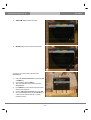
NOTE: RED is for cancel and GREEN is OK.OK key of RCU is not working in this mode.
39
User Manual
The gateway for Smart Linux TV
Amongst the parameters given in this menu, the following ones are generally what you need to decide for the
audio and video.
① Video output
Here you need to decide which video output you want to use between your TV and STB. The available options are
as below.
• CVBS
• S-Video
• RGB
② Mode
You need to decide which resolution to use according to the video output above and your TV amongst the
following options.
PAL
NTSC
Multi
Resolution
③ AC3 Default
YES is used when you want to set Dolby Digital audio as the default audio. If the program you are watching has
AC3 and Stereo, AC3 is used.
On the other hand, NO is used when you do not want to set Dolby Digital audio as the default audio. If the
program you are watching has AC3 and Stereo audio, Stereo audio is used.
④ AC3 Downmix
YES is used when you want to set the audio output to be down-mixed from AC3 to Stereo. NO is used when you
do not want to set the audio output to be down-mixed from AC3 to Stereo. If NO is on and you are using only
HDMI connection, there can be no audio sometimes, if the program that you are watching provides AC3 only. This
option is recommended when you are using S/PDIF connection.
40
The gateway for Smart Linux TV
B.
[
User Manual
Language Selection
: Press
‘Setup’
‘System’
‘Language’]
A variety of languages are available for the OSD of STB.
C.
[
Customization
: Press
‘Setup’
‘System’
‘Customize’]
In this menu you will find various customization options and this menu can be displayed in three different formats:
Simple, Intermediate, and Expert.
41
User Manual
The gateway for Smart Linux TV
NOTE: RED is for cancel and GREEN is OK. OK key of RCU is not working in this mode.
Amongst the options given in this menu, the following ones are generally what you may need to know.
D.
[
Selecting Time Zone
: Press
‘Setup’
‘System’
‘Timezone’]
You can set your time zone in this menu.
Using LEFT/RIGHT key, you can find a time zone that you want to use for your STB .After selecting a time zone,
press GREEN to confirm and save the changed setting.
42
The gateway for Smart Linux TV
E.
[
User Manual
Hard Disk Setup
: Press
‘Setup’
‘System’
‘Harddisk setup’]
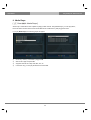
You can set the duration of time after which HDD is to be put into standby mode.
Here, you can choose from
● No standby
● 10 or 30 seconds
● 1, 2, 5,10, 20, 30 minutes
● 1, 2, 4 hours.
Once you set this option, press GREEN key to confirm the change.
43
User Manual
F.
[
The gateway for Smart Linux TV
Front Display Setup
: Press
‘Setup’
‘System’
‘Display Setup’]
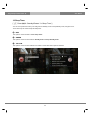
There is a 16 character dot matrix VFD display on the front panel of STB. This display shows various information
like the current menu, channel, HD icon, and so on. You can adjust the brightness of this display using this menu.
●
Brightness
You can change the brightness of the front VFD display using LEFT/RIGHT key when the set is in use.
●
Standby
You can change the brightness of the front VFD display using LEFT/RIGHT key when the set is in standby mode.
Once you completed this option, press GREEN key to confirm the change.
44
The gateway for Smart Linux TV
User Manual
G. Network Setup
[
: Press
‘Setup’
‘System’
‘Network’]
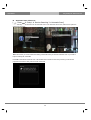
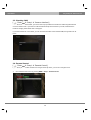
STB is integrated with standard 10/100Mbps Ethernet with RJ 45 connector standard. You are recommended to
use this network capability of STB to fully enjoy the system. You can setup the network settings through this
Network Configuration menu.
In the Network Configuration menu, you will see five sub menus as follows:
① Adapter settings
Through this menu, you can set the basic Ethernet configuration.
●
User Interface
YES is used to activate the Ethernet. If you set this option at NO, the Ethernet will not work.
●
Use DHCP
YES is used to use DHCP (Dynamic Host Configuration Protocol). If you set this option at YES, it will
automatically detect the correct IP address. NO is used when you want to use a certain fixed IP address. In this
case, you need to enter correct addresses in each field.
45
User Manual
The gateway for Smart Linux TV
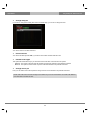
② Nameserver settings
This option is required if you selected not to use DHCP. You need to enter the address of the Nameserver.
③ Network test
When you are not sure whether the network configuration has been done correctly or not, you can run this test.
④ Restart Network
This option is used when you want to reboot the Ethernet of your STB.
46
The gateway for Smart Linux TV
H.
[
User Manual
Skin
: Press
‘Setup’
‘System’
‘Skin’]
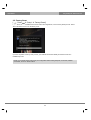
STB is a Linux based set top box and there are a lot of Skins available for Linux set top box. Using this menu,
you can use a different Skin other than the default one.
NOTE: It takes some minutes since the change of Skin requires a complete system shutdown. Please wait
patiently until the system reboots with a newly selected Skin.
47
User Manual
The gateway for Smart Linux TV
2-3. Checking CAM
[
: Press
‘Setup’
‘Common Interface’]
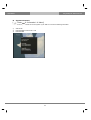
To be able to watch CAS channels, you need to have a proper CAM and a Smartcard. STB is integrated with two
Common Interface slots. If you have two CAM modules and keep them inserted in your STB, it will reduce the
trouble of changing CAM. Please refer to the page 9.
If you have inserted one or two CAMs, you can check the information of the inserted CAMs, through this menu as
below:
2-4. Parental Control
[
: Press
‘Setup’
‘Parental Control’]
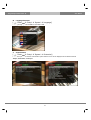
If you want to prevent certain channels from being accessed by others, you can do so using this menu.
①
Go to Parental Control menu by pressing MENU > Setup > Parental Control.
48
The gateway for Smart Linux TV
User Manual
②
Set the parental control option at YES using LEFT/RIGHT key. The menu will change as below.
●
Protect setup
If you set this option at YES, you will be asked to enter PIN code when you enter this Parental setup menu.
49
User Manual
●
The gateway for Smart Linux TV
Change setup pin
If you want to change the existing PIN code for Parental setup, you can do so using this menu.
You need to enter a new PIN code twice.
●
Protect services
You need to set this option at YES, if you want to lock certain channels with PIN code.
●
Parental control type
This option will be activated only if you set Protect services at YES. Here there are two options:
- White list : This option is used to block all channels except those channels in the parental control list.
- Black list : This option is used to block only those channels included in the parental control list.
●
Change service pin
Here you can define a PIN code required to change services to be included in the parental control list.
NOTE: PIN code here is used for Change service and thus you are recommended to use a PIN code different
from that used for Protect services.
50
The gateway for Smart Linux TV
●
User Manual
Edit service list
Here you can add services that you want to lock with PIN code. Services will be arranged in the alphabetical order
and you can select an alphabet to enter into the list where you can find the channel that you want to lock.
Once the selected channel is locked, next time when you or anyone else want to tune into this service, the menu
asking for PIN code will appear instantly as below.
NOTE: It is very important not to lose this PIN code.
51
User Manual
2-5. Factory Reset
[
: Press
‘Setup’
The gateway for Smart Linux TV
‘Factory Reset’]
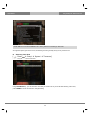
If you want to erase all installed service list as well as all configurations, run the Factory Reset process. Select
YES in the below menu to run the factory reset.
Upon the completion of factory reset process, your STB will reboot automatically and start the First Time
Installation process.
NOTE: If you do this factory reset, all of your configuration data including bouquets, service lists, satellite
parameters, and so on will be erased.
52
The gateway for Smart Linux TV
User Manual
2-6. Checking H/W & S/W Information
[
: Press
‘Information’]
If you want to check the H/W or S/W system of your STB, this is the menu that you need to use. Also, here you
can check very detailed information of a specific service.
A.
[
Service Information
: Press
‘Information’
‘Service’]
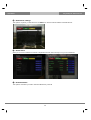
In this menu, you can see all the parameter data of the current channel. The service information is well arranged in
four sections as below:
①
Service info
② PIDs
③
Transponder
④ Tuner Status
53
User Manual
B.
[
The gateway for Smart Linux TV
System Information
: Press
‘Information’
‘About’]
This menu is for you to check the current system of your STB.You can see the following information:
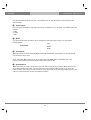
①
S/W version
②
Detected NIMs for both Tuner A & B
③
Detected HDD
54
The gateway for Smart Linux TV
User Manual
V. Copyright - GNU GPL
GNU GENERAL PUBLIC LICENSE
Version 2, June 1991
Copyright (C) 1989, 1991 Free Software Foundation, Inc.
51 Franklin Street, Fifth Floor, Boston, MA 02110-1301, USA
Everyone is permitted to copy and distribute verbatim copies of this license document, but changing it is not
allowed.
Preamble
The licenses for most software are designed to take away your freedom to share and change it. By contrast, the
GNU General Public License is intended to guarantee your freedom to share and change free software-to make
sure the software is free for all its users. This General Public License applies to most of the Free Software
Foundation's software and to any other program whose authors commit to using it. (Some other Free Software
Foundation software is covered by the GNU Lesser General Public License instead.) You can apply it to your
programs, too.
When we speak of free software, we are referring to freedom, not price. Our General Public Licenses are designed
to make sure that you have the freedom to distribute copies of free software (and charge for this service if you
wish), that you receive source code or can get it if you want it, that you can change the software or use pieces of it
in new free programs; and that you know you can do these things.
To protect your rights, we need to make restrictions that forbid anyone to deny you these rights or to ask you to
surrender the rights. These restrictions translate to certain responsibilities for you if you distribute copies of the
software, or if you modify it.
For example, if you distribute copies of such a program, whether gratis or for a fee, you must give the recipients all
the rights that you have. You must make sure that they, too, receive or can get the source code. And you must
show them these terms so they know their rights.
We protect your rights with two steps: (1) copyright the software, and (2) offer you this license which gives you
legal permission to copy, distribute and/or modify the software.
Also, for each author's protection and ours, we want to make certain that everyone understands that there is no
warranty for this free software. If the software is modified by someone else and passed on, we want its recipients
to know that what they have is not the original, so that any problems introduced by others will not reflect on the
original authors' reputations.
Finally, any free program is threatened constantly by software patents. We wish to avoid the danger that
redistributors of a free program will individually obtain patent licenses, in effect making the program proprietary. To
prevent this, we have made it clear that any patent must be licensed for everyone's free use or not licensed at all.
The precise terms and conditions for copying, distribution and modification follow.
TERMS AND CONDITIONS FOR COPYING, DISTRIBUTION AND MODIFICATION
0. This License applies to any program or other work which contains a notice placed by the copyright holder saying
it may be distributed under the terms of this General Public License. The ‘Program’, below, refers to any such
program or work, and a ‘work based on the Program’ means either the Program or any derivative work under
copyright law: that is to say, a work containing the Program or a portion of it, either verbatim or with modifications
55
User Manual
The gateway for Smart Linux TV
and/or translated into another language.(Hereinafter, translation is included without limitation in the term
‘modification’.) Each licensee is addressed as ‘you’.
Activities other than copying, distribution and modification are not covered by this License; they are outside its
scope. The act of running the Program is not restricted, and the output from the Program is covered only if its
contents constitute a work based on the Program (independent of having been made by running the
Program).Whether that is true depends on what the Program does.
1. You may copy and distribute verbatim copies of the Program's source code as you receive it, in any medium,
provided that you conspicuously and appropriately publish on each copy an appropriate copyright notice and
disclaimer of warranty; keep intact all the notices that refer to this License and to the absence of any warranty; and
give any other recipients of the Program a copy of this License along with the Program.
You may charge a fee for the physical act of transferring a copy, and you may at your option offer warranty
protection in exchange for a fee.
2. You may modify your copy or copies of the Program or any portion of it, thus forming a work based on the
Program, and copy and distribute such modifications or work under the terms of Section 1 above, provided that
you also meet all of these conditions:
a) You must cause the modified files to carry prominent notices stating that you changed the files and the date
of any change.
b) You must cause any work that you distribute or publish, that in whole or in part contains or is derived from
the Program or any part thereof, to be licensed as a whole at no charge to all third parties under the terms of
this License.
c) If the modified program normally reads commands interactively when run, you must cause it, when started
running for such interactive use in the most ordinary way, to print or display an announcement including an
appropriate copyright notice and a notice that there is no warranty (or else, saying that you provide a
warranty) and that users may redistribute the program under these conditions, and telling the user how to
view a copy of this License.(Exception: if the Program itself is interactive but does not normally print such an
announcement, your work based on the Program is not required to print an announcement.)
These requirements apply to the modified work as a whole. If identifiable sections of that work are not
derived from the Program, and can be reasonably considered independent and separate works in
themselves, then this License, and its terms, do not apply to those sections when you distribute them as
separate works. But when you distribute the same sections as part of a whole which is a work based on the
Program, the distribution of the whole must be on the terms of this License, whose permissions for other
licensees extend to the entire whole, and thus to each and every part regardless of who wrote it. Thus, it is
not the intent of this section to claim rights or contest your rights to work written entirely by you; rather, the
intent is to exercise the right to control the distribution of derivative or collective works based on the Program.
In addition, mere aggregation of another work not based on the Program with the Program (or with a work
based on the Program) on a volume of a storage or distribution medium does not bring the other work under
the scope of this License.
3. You may copy and distribute the Program (or a work based on it, under Section 2) in object code or executable
form under the terms of Sections 1 and 2 above provided that you also do one of the following:
a) Accompany it with the complete corresponding machine-readable source code, which must be distributed
under the terms of Sections 1 and 2 above on a medium customarily used for software interchange; or,
b) Accompany it with a written offer, valid for at least three years, to give any third party, for a charge no more
56
The gateway for Smart Linux TV
User Manual
than your cost of physically performing source distribution, a complete machine-readable copy of the
corresponding source code, to be distributed under the terms of Sections 1 and 2 above on a medium
customarily used for software interchange; or,
c) Accompany it with the information you received as to the offer to distribute corresponding source code.
(This alternative is allowed only for noncommercial distribution and only if you received the program in object
code or executable form with such an offer, in accord with Subsection b above.)
The source code for a work means the preferred form of the work for making modifications to it. For an
executable work, complete source code means all the source code for all modules it contains, plus any
associated interface definition files, plus the scripts used to control compilation and installation of the
executable. However, as a special exception, the source code distributed need not include anything that is
normally distributed (in either source or binary form) with the major components (compiler, kernel, and so on)
of the operating system on which the executable runs, unless that component itself accompanies the
executable.
If distribution of executable or object code is made by offering access to copy from a designated place, then
offering equivalent access to copy the source code from the same place counts as distribution of the source
code, even though third parties are not compelled to copy the source along with the object code.
4. You may not copy, modify, sublicense, or distribute the Program except as expressly provided under this
License. Any attempt otherwise to copy, modify, sublicense or distribute the Program is void, and will automatically
terminate your rights under this License. However, parties who have received copies, or rights, from you under this
License will not have their licenses terminated so long as such parties remain in full compliance.
5. You are not required to accept this License, since you have not signed it. However, nothing else grants you
permission to modify or distribute the Program or its derivative works. These actions are prohibited by law if you do
not accept this License. Therefore, by modifying or distributing the Program (or any work based on the Program),
you indicate your acceptance of this License to do so, and all its terms and conditions for copying, distributing or
modifying the Program or works based on it.
6. Each time you redistribute the Program (or any work based on the Program), the recipient automatically
receives a license from the original licensor to copy, distribute or modify the Program subject to these terms and
conditions. You may not impose any further restrictions on the recipients' exercise of the rights granted herein.
You are not responsible for enforcing compliance by third parties to this License.
7. If, as a consequence of a court judgment or allegation of patent infringement or for any other reason (not limited
to patent issues), conditions are imposed on you (whether by court order, agreement or otherwise) that contradict
the conditions of this License, they do not excuse you from the conditions of this License. If you cannot distribute
so as to satisfy simultaneously your obligations under this License and any other pertinent obligations, then as a
consequence you may not distribute the Program at all. For example, if a patent license would not permit royaltyfree redistribution of the Program by all those who receive copies directly or indirectly through you, then the only
way you could satisfy both it and this License would be to refrain entirely from distribution of the Program.
If any portion of this section is held invalid or unenforceable under any particular circumstance, the balance of the
section is intended to apply and the section as a whole is intended to apply in other circumstances. It is not the
purpose of this section to induce you to infringe any patents or other property right claims or to contest validity of
any such claims; this section has the sole purpose of protecting the integrity of the free software distribution
system, which is implemented by public license practices. Many people have made generous contributions to the
wide range of software distributed through that system in reliance on consistent application of that system; it is up
to the author/donor to decide if he or she is willing to distribute software through any other system and a licensee
57
User Manual
The gateway for Smart Linux TV
cannot impose that choice.
This section is intended to make thoroughly clear what is believed to be a consequence of the rest of this License.
8. If the distribution and/or use of the Program is restricted in certain countries either by patents or by copyrighted
interfaces, the original copyright holder who places the Program under this License may add an explicit
geographical distribution limitation excluding those countries, so that distribution is permitted only in or among
countries not thus excluded. In such case, this License incorporates the limitation as if written in the body of this
License.
9. The Free Software Foundation may publish revised and/or new versions of the General Public License from
time to time. Such new versions will be similar in spirit to the present version, but may differ in detail to address
new problems or concerns.
Each version is given a distinguishing version number. If the Program specifies a version number of this License
which applies to it and ‘any later version’, you have the option of following the terms and conditions either of that
version or of any later version published by the Free Software Foundation. If the Program does not specify a
version number of this License, you may choose any version ever published by the Free Software Foundation.
10. If you wish to incorporate parts of the Program into other free programs whose distribution conditions are
different, write to the author to ask for permission. For software which is copyrighted by the Free Software
Foundation, write to the Free Software Foundation; we sometimes make exceptions for this. Our decision will be
guided by the two goals of preserving the free status of all derivatives of our free software and of promoting the
sharing and reuse of software generally.
NO WARRANTY
11. BECAUSE THE PROGRAM IS LICENSED FREE OF CHARGE, THERE IS NO WARRANTY FOR THE
PROGRAM, TO THE EXTENT PERMITTED BY APPLICABLE LAW.EXCEPT WHEN OTHERWISE STATED IN
WRITING THE COPYRIGHT HOLDERS AND/OR OTHER PARTIES PROVIDE THE PROGRAM ‘AS IS’
WITHOUT WARRANTY OF ANY KIND, EITHER EXPRESSED OR IMPLIED, INCLUDING, BUT NOT LIMITED
TO, THE IMPLIED WARRANTIES OF MERCHANTABILITY AND FITNESS FOR A PARTICULAR PURPOSE.
THE ENTIRE RISK AS TO THE QUALITY AND PERFORMANCE OF THE PROGRAM IS WITH YOU.SHOULD
THE PROGRAM PROVE DEFECTIVE, YOU ASSUME THE COST OF ALL NECESSARY SERVICING, REPAIR
OR CORRECTION.
12.IN NO EVENT UNLESS REQUIRED BY APPLICABLE LAW OR AGREED TO IN WRITING WILL ANY
COPYRIGHT HOLDER, OR ANY OTHER PARTY WHO MAY MODIFY AND/OR REDISTRIBUTE THE
PROGRAM AS PERMITTED ABOVE, BE LIABLE TO YOU FOR DAMAGES, INCLUDING ANY GENERAL,
SPECIAL, INCIDENTAL OR CONSEQUENTIAL DAMAGES ARISING OUT OF THE USE OR INABILITY TO USE
THE PROGRAM (INCLUDING BUT NOT LIMITED TO LOSS OF DATA OR DATA BEING RENDERED
INACCURATE OR LOSSES SUSTAINED BY YOU OR THIRD PARTIES OR A FAILURE OF THE PROGRAM
TO OPERATE WITH ANY OTHER PROGRAMS), EVEN IF SUCH HOLDER OR OTHER PARTY HAS BEEN
ADVISED OF THE POSSIBILITY OF SUCH DAMAGES.
END OF TERMS AND CONDITIONS
58
The gateway for Smart Linux TV
User Manual
VI. Menu Structure
Main Menu
st
1 level
Subtitles
Media player
Timer
VCR Scart
Information
Plug-ins
nd
2 level
Subtitle selection
Window
Media Player
Timer List
Switch to VCR Scart
Service
About
Plug-in browser
3rd level
Default Service list
Automatic Scan
Manual Scan
Language
Customize
Timezone
Harddisk
Setup
A/V Settings
Display Setup
Network
Keyboard
Skin
Standby / Restart
Common Interface
Parental control
Default settings
Factory reset
Sleep Timer
Standby
Restart
Deep Standby
5th level
Service info
About
Tuner Configuration
Service Searching
4th level
Parental control setup
59
Tuner A
Tuner B
Service scan Window
Service scan Window
Language Selection
Window
Customize Window
Timezone Window
Harddisk setup
Harddisk setup
Initialization
Filesystem Check
A/V Settings Window
Display Setup Window
Initialization
Filesystem Check
Network Configuration
Window
Keyboard Setup Window
User Manual
The gateway for Smart Linux TV
VII. Troubleshooting
Before you contact your local service center, please read the following tips carefully.
NOTE: if the antenna is covered with snow or the RF signal is weakened by heavy rain, the quality of audio
and video may become temporarily poor. If you experience poor audio and video quality due to bad weather
conditions, please check if your satellite antenna is oriented in the original direction. And see if it is covered by
snow. Also, check if your LNB is not damaged.
1. No Video on TV
●
●
●
●
●
Check first if the product is powered on and in operation mode.
Check if the video cable is properly connected between TV and STB.
Check if the satellite cable is properly connected to STB.
Check if the selected channel is currently on air.
Check if the selected channel is encrypted and if you have a corresponding access smartcard.
2. Problem with audio quality
●
●
●
●
Check if your audio cable is connected correctly.
Check the volume level of your TV and the product.
Check if the product or TV is on mute.
Check the audio option if it is correctly selected for the program that you are currently watching.
3. Remote control problem
●
●
●
●
Check if the batteries are correctly mounted.
If your remote control has been used for long, change the batteries.
Point the remote control directly toward the product.
Make sure that nothing blocks the front panel display.
4. Channel search problem
●
●
• Make sure if tuner configurations are all correctly made.
• Check if the antenna cable(s) are properly connected.
5. Encrypted channel viewing problem
●
●
●
Check if you have the appropriate Smartcard and/or CAM.
Take the Smartcard and CAM out and re-insert them to re-initialize.
Check if your system correctly detects the smartcard and CAM.
60
The gateway for Smart Linux TV
User Manual
VIII. Universal Remote Control
The universal remote control allows you to operate the most important functions such as power on/off and volume
control on your television, audio-video receiver, or DVD player. To be able to control the device, you must adapt
the remote control to the device first.
1. Setup method
1-1. Initial Settings
A.
B.
Device Default: STB
Remote Control Default Setting Code
1)
2)
3)
4)
STB: 001
TV: 001
DVD: 001
AUX: 001
1-2. Settings method
A.
3-DIGIT Setup Method
1) Turn on the device that you want to setup (for example turn on TV)
2) Press and hold [DEVICE] + [OK] button more than 2 seconds until the device LED blinks.
If there is no key input for 20secnds, the Remote Control will exit the setting mode and return to normal
mode.
3) Enter the 3-Digit setup code from the Brand list. (The LED will blink by Key input)
When the 3-Digit setup code is input, the designated Power Code will be output. (LED blinks)
Verify whether it operated properly by pressing the [Power] button. (If the device does not operate
properly, press next 3-Digit setup code)
In case the 3-Digit setup code is not valid, the LED will off for 1.5seconds and revert to on status for input
mode.
It does not answer against key input other than [OK], [0~9], [CH+], [CH-], [Power] key.
4) Press [OK] button to save and exit the setup model. (LED will blink 2 times and off)
B.
Auto Search (CH+, CH-) Setup method
1) Turn on the device that you want to setup (for example turn on TV)
2) Press and hold [DEVICE] + [OK] button more than 2 seconds until the device LED blinks.
If there is no key input for 20secnds, the Remote Control will exit the setting mode and return to normal
mode.
3) Press [CH+] or [CH-] button. By pressing the button, the power code of next setting number will be output.
(LED blinks)
It does not answer against key input other than [OK], [0~9], [CH+], [CH-], [Power] key.
4) Press [OK] button to save and exit the setup model. (LED will blink 2 times and off)
61
User Manual
The gateway for Smart Linux TV
1-3. Setup Code Read Out (Number Call)
1) Press and hold [DEVICE] + [OK] button more than 2 seconds until the device LED blinks.
If there is no key input for 20secnds, the Remote Control will exit the setting mode and return to normal
mode.
2) Press [INFO] button. LED will blink the number of times as setup code.
0: LED blinks quickly 10 times.
1~9: LED blinks the number of digit.
1-4. Factory Reset
1)
2)
Press and hold [TV] + [0] button simultaneously for more than 5 seconds.
LED will blink in the following order of STB -> TV->DVD->AUX 3 times and turn off.
62
The gateway for Smart Linux TV
User Manual
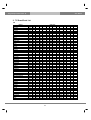
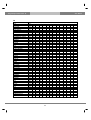
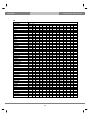
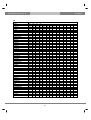
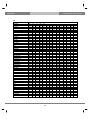
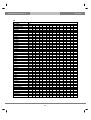
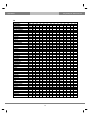
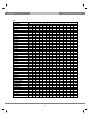
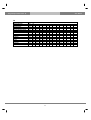
2. TV Brand/Code List
TV
Brand
A.R.SYSTEM
ACCENT
ACEC
ACURA
ADMIRAL
ADYSON
AGASHI
AGEF
AIKO
AIM
AIRSTONA
AIWA
AKAI
AKAI
AKIBA
AKITO
AKURA
ALARON
ALBA
ALBA
ALBIRAL
ALCYON
ALLORGAN
ALLSTAR
AMPLIVISION
AMSTRAD
ANAM
ANGLO
ANITECH
ANSONIC
APOLLO
ARC EN CIEL
ARCAM
ARDEM
ARTHUR MARTIN
ASA
ASA
ASBERG
ASORA
ASTRA
ASUKA
ATLANTIC
ATORI
AUCHAN
AUCHAN
AUDIOTON
AUSIND
AUTOVOX
AUTOVOX
AWA
Code List
049
049
112
195
065
379
076
324
049
049
049
376
019
174
006
049
006
042
018
239
121
407
050
049
113
004
049
076
049
045
165
029
029
392
075
003
341
049
195
195
006
049
195
107
031
050
075
050
324
018
063
063
076
163
171
190
307
324
369
076
102
141
172
195
225
379
063
065
079
112
158
160
188
050
195
063
106
076
055
209
123
063
225
380
076
326
102
333
107
379
123
428
133
432
139
433
141
437
150
172
096
123
195
419
426
049
413
372
050
421
107
431
123
134
163
179
184
195
225
228
232
094
063
379
011
063
195
063
049
236
334
421
049
195
425
063
076
123
131
172
195
225
426
076
063
195
107
407
112
195
210
242
391
413
421
034
379
074
424
182
186
415
424
107
020
375
063
127
065
406
407
133
078
408
136
080
139
091
148
117
153
146
307
171
425
197
235
307
319
324
050
050
076
063
123
113
379
236
242
379
425
049
076
090
071
379
049
063
379
407
078
407
063
074
392
076
421
195
213
379
392
421
079
413
131
080
416
195
083
090
147
156
236
254
305
319
323
206
320
379
426
433
379
063
063
050
377
049
182
049
063
049
334
044
379
326
63
User Manual
The gateway for Smart Linux TV
TV
Brand
AYOMI
BAIRD
BANG & OLUFSEN
BARCO
BASIC LINE
BASTIDE
BAUR
BAUR
BAZIN
BEKO
BEON
BEST
BESTAR
BINATONE
BLACK STAR
BLACKTRON
BLACKWAY
BLAUPUNKT
BLUE SKY
BLUE STAR
BONDSTEC
BOOTS
BPL
BRANDT
BRANDT ELECTRONIQUE
BRINKMANN
BRION VEGA
BRITANNIA
BROTHER
BRUNS
BSR
BTC
BUSH
BUSH
BUSH(UK)
CAPSONIC
CARAD
CARENA
CARREFOUR
CARVER
CASCADE
CASIO
CATHAY
CCE
CENTURION
CENTURY
CGE
CGE
CIHAN
CIMLINE
Code List
411
074
324
107
006
379
012
416
379
063
049
213
049
379
413
006
006
019
006
006
413
050
006
074
029
049
049
379
076
056
094
123
006
195
107
076
049
049
018
177
049
049
049
049
049
044
002
369
111
031
102
182
209
321
329
379
409
355
031
371
049
372
107
422
123
159
195
207
226
049
053
063
107
150
172
244
245
246
247
301
357
184
063
421
063
240
163
241
392
421
433
053
049
057
063
060
123
113
195
118
232
244
245
246
247
248
249
308
106
049
182
034
063
063
379
063
218
074
163
065
415
182
424
186
436
083
167
172
173
181
196
324
356
065
107
324
110
139
168
314
018
209
147
049
223
168
076
225
094
226
106
232
107
239
123
307
134
379
139
416
142
143
172
063
063
406
380
189
093
324
094
411
096
413
107
139
142
163
168
189
414
421
063
063
063
063
063
054
044
407
064
195
065
054
413
163
090
421
123
134
195
379
64
179
The gateway for Smart Linux TV
User Manual
TV
Brand
CITY
CLARIVOX
CLATONIC
CLATRONIC
CMS HIGHTEC
COMTEL
CONCORD
CONDOR
CONTEC
CONTINENTAL EDISON
COSMEL
CROSELY
CROSELY
CROWN
CS ELECTRONICS
CTC
CTC CLATRONIC
CURTIS MATHES
CYBERTRON
DAENYK
DAEWOO
DAINICHI
DANSAI
DANSETTE
DANTAX
DATSURA
DAWA
DAYTRON
DE GRAAF
DECCA
DECCA(UK)
DEITRON
DENKO
DENON
DER
DERWENT
DESMET
DIAMANT
DIGILINE
DIXI
DOMLAND
DORIC
DREAN
DTS
DUAL
DUAL
DUAL-TEC
DUMONT
DUMONT-FINLUX
DUX
Code List
195
056
076
031
379
111
195
006
018
029
195
044
054
049
031
413
045
126
123
042
063
123
063
426
392
209
049
049
023
049
046
049
076
126
321
105
049
049
049
063
423
104
049
195
049
423
195
045
020
049
121
123
045
125
163
406
049
063
076
113
123
195
225
379
407
413
045
131
034
213
049
195
074
050
206
182
063
302
186
113
320
232
163
379
415
195
210
379
413
421
065
063
123
090
154
379
093
163
413
094
170
104
195
107
209
139
232
324
372
407
407
413
419
421
431
190
212
123
379
076
140
145
161
193
195
379
141
195
379
195
122
102
102
226
139
106
106
209
111
131
307
120
200
331
379
421
431
125
424
421
063
063
107
063
050
063
212
063
063
063
195
113
379
413
063
095
107
139
156
168
182
242
243
379
414
416
050
080
061
112
040
102
075
139
078
146
091
319
104
324
117
339
147
341
375
379
406
408
105
063
050
424
168
065
045
063
65
User Manual
The gateway for Smart Linux TV
TV
Brand
DYNATRON
ELBE
ELBE
ELBIT
ELCIT
ELECTA
ELECTRO TECH
ELEKTA
ELEKTRONSKA
ELG
ELIN
ELITE
ELMAN
ELTA
EMERSON
EMPEROR
ERRES
ESC
ETRON
EURO-FEEL
EUROMANN
EUROPA
EUROPHON
EUROPHON
EXPERT
EXQUISIT
FAMILLY LIFE
FENNER
FERGUSON
FERGUSON
FERGUSON
FIDELITY
FIDELITY(UK)
FILSAI
FINHER
FINLANDIA
FINLUX
FINLUX
FINLUX
FIRST LINE
FIRST LINE
FISHER
FISHER
FLINT
FNR
FORGESTONE
FORMENTI
FORMENTI-PHOENIX
FORTRESS
FRABA
Code List
049
049
421
111
045
006
195
006
318
049
003
031
045
076
004
006
063
049
049
076
049
049
044
413
107
049
049
063
001
218
411
049
133
050
359
033
003
107
375
049
413
019
189
031
045
158
090
050
190
049
063
063
435
107
121
123
172
194
210
242
337
368
047
062
065
104
107
150
168
324
413
049
063
063
123
107
139
172
195
379
408
416
379
042
044
049
063
065
113
225
324
107
139
195
063
063
045
076
379
421
046
049
050
063
068
107
120
236
063
063
195
032
244
436
050
242
413
425
050
245
073
246
074
251
076
306
080
319
082
321
063
076
107
158
225
122
020
117
379
063
416
041
206
049
139
042
139
406
094
172
045
146
407
102
197
049
147
408
107
209
061
163
428
134
050
209
063
056
320
102
065
324
123
107
075
324
063
113
104
139
113
307
148
046
076
369
391
411
327
406
413
168
318
336
379
102
322
103
328
121
329
158
344
182
409
204
307
364
379
223
063
197
429
139
307
075
210
437
191
375
078
235
419
080
319
090
324
091
339
102
341
104
195
209
210
379
411
102
379
379
104
408
380
107
414
117
416
139
421
143
156
172
324
307
379
407
076
063
020
049
168
195
006
112
063
063
379
421
66
The gateway for Smart Linux TV
User Manual
TV
Brand
FRIAC
FRONTECH
FUJITSU
FUJITSU GENERAL
FUNAI
GALAXI
GALAXIS
GBC
GE
GEANT CASINI
GEC
GEC(UK)
GELOSO
GENERAL
GENERAL TECHNIC
GENEXXA
GOLDHAND
GOLDLINE
GOODMANS
GOODMANS
GORENJE
GPM
GRADIENTE
GRAETZ
GRANADA
GRANADA
GRANADA(UK)
GRANDIN
GRONIC
GRUNDIG
GRUNDIG
HALIFAX
HAMPTON
HANIMEX
HANSEATIC
HANSEATIC
HANTAREX
HANTOR
HARLET DAVIDSON
HARWOOD
HAUPPAUGE
HCM
HEMA
HEMMERMANN
HIFIVOX
HIGASHI
HIGHLINE
HIKONA
HINARI
HINARI
Code List
045
076
042
195
042
045
045
031
006
107
049
046
031
064
195
049
379
213
018
232
124
123
049
049
013
209
046
006
045
005
246
076
379
094
006
391
045
049
042
049
049
006
195
150
029
050
049
123
004
195
049
139
045
379
076
049
049
104
074
425
063
050
047
074
063
195
102
195
307
107
379
195
094
063
063
107
182
314
327
163
139
218
102
102
062
182
063
413
236
416
327
421
143
168
195
104
107
104
107
150
107
120
162
139
171
192
168
172
192
307
379
171
195
307
413
123
307
426
042
379
189
063
428
421
076
102
134
139
141
143
155
182
195
218
225
063
063
018
218
050
031
170
090
033
237
090
049
177
104
041
238
107
063
136
063
240
139
107
139
102
241
143
113
153
104
252
162
123
159
105
307
307
195
162
112
325
171
120
363
172
148
379
198
164
407
225
165
418
307
171
419
379
380
425
431
435
019
247
379
049
248
053
249
063
308
080
340
090
341
101
406
115
407
118
166
232
244
245
018
416
046
063
049
421
049
050
423
063
063
094
104
107
113
143
172
195
324
379
063
063
031
379
416
034
195
426
049
063
076
123
163
195
379
426
074
182
186
304
424
063
076
018
209
042
232
049
307
066
327
094
107
119
123
133
134
139
143
179
379
416
195
67
User Manual
The gateway for Smart Linux TV
TV
Brand
HISAWA
HIT
HITACHI
HITACHI
HITACHI
HITASHI FUJIAN
HITSU
HORNYPHON
HOSHAI
HUANYU
HYGASHI
HYPER
HYPERSONIC
HYPSON
IBERRIA
ICE
ICES
IMPERIAL
IMPERIAL
INDIANA
INGELEN
INGERSOL
INNAVATION
INNO HIT
INTERACTIVE
INTERBUY
INTERFUNK
INTERFUNK
INTERVISION
INTERVISION
IRRADIO
ISUKAI
ITC
ITS
ITT
ITT
ITT-NOKIA
ITT-NOKIA
ITT-NOKIA
ITV
JEAN
JEC
JET POINT
JVC
KAISUI
KAMOSONIC
KAMP
KAPSCH
KARCHER
KARCHER
Code List
006
342
007
110
212
013
123
049
123
379
379
050
172
006
049
049
123
002
307
049
090
195
049
044
210
076
049
182
006
382
031
006
379
006
042
197
042
171
433
049
018
141
365
018
006
050
379
107
003
421
031
123
380
425
009
126
218
164
195
063
379
018
127
231
252
379
112
020
139
304
023
143
307
033
150
309
049
162
315
168
195
254
361
379
416
049
063
063
379
044
369
063
104
063
076
379
380
411
076
123
195
225
379
049
407
054
413
063
416
090
421
093
136
139
153
159
063
046
049
050
063
195
063
301
045
384
049
049
413
065
302
049
385
063
063
067
324
055
386
066
123
031
090
198
090
172
435
063
049
107
209
097
185
437
076
063
117
301
104
193
103
031
123
049
172
006
435
236
020
050
168
333
063
171
334
074
176
344
086
182
361
102
185
379
104
186
416
107
192
418
094
107
142
163
168
189
301
162
171
198
232
435
066
102
123
155
195
217
379
407
413
074
363
063
387
075
090
421
076
388
090
104
107
112
139
150
153
159
172
107
389
123
123
413
155
225
421
195
232
423
254
378
379
380
381
407
413
076
134
307
107
197
123
139
343
117
198
225
150
350
134
209
379
157
375
136
301
159
416
139
307
162
428
150
343
165
171
172
193
153
350
159
375
162
416
165
428
129
050
143
063
158
123
170
195
174
207
182
379
225
380
364
409
433
242
031
408
045
049
050
063
068
076
107
195
207
425
413
68
217
The gateway for Smart Linux TV
User Manual
TV
Brand
KATHREIN
KAWASHO
KB ARISTOCRAFT
KENDO
KENNEDY
KINGSLEY
KLARMAX
KNEISSEL
KOLSTER
KONKA
KORPEL
KORTING
KOSMOS
KOTRON
KRANKING
KRIESLER
KTV
KYOSHU
KYOTO
KYUSHU
LECSON
LEMAIR
LENCO
LENOIR
LESA
LEYCO
LEYEO
LG(GOLDSTAR)
LG(GOLDSTAR)
LIESENKOTTER
LIFETEC
LLOYD'S
LOEWE
LOEWE OPTA
LOGIC
LOGIK
LOGIX
LUMA
LUMATRON
LUX MAY
LUXOR
LUXOR
LYCO
M ELECTRONIC
MAAZ
MACROMAXX
MADISON
MAGNADYNE
MAGNAFON
MAGNAVOX
Code List
124
379
107
044
071
379
371
049
045
031
049
027
049
076
411
050
050
076
107
426
049
210
049
050
413
049
076
023
219
049
049
195
049
035
331
032
195
063
049
049
042
197
076
003
371
049
049
045
045
018
045
079
049
104
055
107
063
139
134
236
172
305
210
323
413
369
210
063
063
242
416
123
369
391
411
421
435
225
232
094
113
324
421
065
079
112
158
160
188
063
195
107
195
408
063
076
094
102
431
049
254
063
063
050
379
112
076
055
413
063
421
107
139
152
123
195
063
046
089
049
324
052
391
063
421
065
120
131
158
225
364
107
063
063
050
209
110
076
195
090
307
133
107
171
172
172
236
107
312
122
330
235
372
063
063
046
046
042
375
062
068
063
065
075
372
063
049
049
063
065
063
426
063
379
163
421
435
155
168
172
144
213
324
195
242
210
329
236
379
242
307
127
416
133
418
139
428
150
429
155
104
090
107
120
120
235
139
336
150
379
063
195
202
203
159
165
172
185
168
407
318
324
413
195
047
050
049
69
User Manual
The gateway for Smart Linux TV
TV
Brand
MANDOR
MANESTH
MANHATTAN
MARANTZ
MARELLI
MARK
MASUDA
MATSUI
MATSUI
MATSUI
MAXIMAL
MAXWELL
MCMICHAEL
MEDIATOR
MEDION
MEGAS
MEGATRON
MELECTRONIC
MELVOX
MEMOREX
MEMPHIS
MERCURY
METZ
MINERVA
MINERVA
MINOKA
MISTRAL
MITSUBISHI
MITSUBISHI
MIVAR
MIVAR
MONACO
MORGAN'S
MOTION
MOTOROLA
MTC
MTEC
MULTISTANDARD
MULTITEC
MULTITECH
MURPHY
MURPHY(UK)
MUSIKLAND
NAD
NAIKO
NAKIMURA
NAONIS
NAT
NATIONAL
NEC
Code List
076
063
049
063
324
063
123
001
141
246
119
371
192
049
049
435
125
003
425
099
102
049
019
019
406
049
158
013
183
043
421
195
049
407
190
049
106
045
049
031
102
162
123
172
049
049
036
085
033
018
076
063
094
195
113
134
141
379
195
195
004
143
307
139
372
379
225
018
150
314
041
171
331
049
179
379
050
180
380
063
195
416
094
209
431
100
218
102
225
106
229
107
232
131
244
134
245
063
063
112
195
212
049
063
074
182
195
210
375
379
408
413
416
428
429
213
195
051
080
053
090
065
118
067
232
070
244
092
245
118
246
244
247
245
248
246
249
247
340
324
341
419
426
019
244
050
021
245
058
049
246
072
063
252
081
065
326
090
105
330
120
124
331
155
131
132
143
157
164
318
337
379
391
407
063
379
416
421
063
045
104
195
046
105
049
107
050
117
063
171
120
254
189
307
195
379
379
408
392
413
416
421
209
063
063
040
149
085
049
071
151
104
063
079
110
171
113
131
143
177
195
379
380
195
195
063
049
053
407
063
018
190
046
434
063
70
The gateway for Smart Linux TV
User Manual
TV
Brand
NECKERMANN
NECKERMANN
NEI
NESCO
NETIATOR
NETSAT
NETWORK
NEUFUNK
NEW WORLD
NEWTECH
NICAMAGIC
NIKKAI
NIKKIA
NOBLEX
NOBLIKO
NOGAMATIC
NOKIA
NOKIA
NOKIA
NORDMENDE
NORDMENDE
NOVATRONIC
OCEANIC
OCEANIC(F)
ODEON
OKANO
OMEGA
ONCEAS
ONWA
OPERA
OPTIMUS
OPTONICA
ORBIT
ORION
ORION
ORLINE
ORMENTI-PHOENIX
ORMOND
OSAKA
OSAKI
OSIO
OSO
OSUME
OTTO VERSAND
OTTO VERSAND
P.T ACTRON
PAEL
PALLADIUM
PALSONIC
PANAMA
Code List
002
250
063
042
063
049
213
049
123
049
379
018
066
049
044
029
090
172
433
017
218
003
086
150
076
049
076
050
031
049
099
190
049
004
191
049
104
195
066
049
049
123
018
012
172
111
050
012
049
049
012
307
125
413
049
312
225
050
324
063
357
107
379
133
413
139
416
163
421
180
189
063
195
435
050
063
049
210
247
182
195
379
063
076
102
123
139
141
195
213
379
063
045
034
104
193
437
029
244
020
094
076
050
074
107
197
359
075
182
117
198
360
080
186
134
209
090
424
136
301
235
379
406
407
139
307
150
330
153
343
157
350
159
416
162
419
165
428
171
429
034
245
049
104
038
246
063
107
049
304
063
307
074
333
083
334
130
424
150
165
174
182
186
108
109
116
139
159
172
209
425
063
076
102
421
123
063
315
225
432
063
042
195
063
045
199
123
049
216
051
314
063
331
076
366
094
367
113
426
131
134
139
150
179
063
063
066
155
076
102
106
123
379
426
102
018
190
123
049
244
302
050
245
053
246
063
247
074
250
094
312
104
357
107
362
113
379
134
413
139
414
143
416
075
049
055
063
379
063
063
076
107
076
195
163
379
379
210
426
413
247
324
357
379
413
416
421
063
71
User Manual
The gateway for Smart Linux TV
TV
Brand
PANASONIC
PANASONIC
PANAVISION
PATHE CINEMA
PATHE CINEMA(F)
PATHE MARCONI
PAUSA
PAUZA
PERDIO
PERFEKT
PERSHIN
PHILCO
PHILCO
PHILHARMONIC
PHILIPS
PHILIPS
PHILIPS
PHOENIX
PHONOLA
PILOT
PIONEER
PIONIER
PLANTRON
PLASONIC
POLICOM
POPPY
POWERPOINT
PRANDONI-PRINCE
PRECISION
PREMIER
PRIMA
PRINCE
PRINZ
PROFEX
PROFI-TRONIC
PROLINE
PROSONIC
PROTECH
PROVISION
PYE
PYMI
QUADRA VISION
QUASAR
QUELLE
QUELLE
QUELLE
QUELLE
QUESTA
RADIALVA
RADIO SHACK
Code List
049
405
049
107
050
029
195
195
049
049
425
002
163
379
015
182
363
049
022
049
049
392
049
379
074
195
232
044
379
142
076
044
102
107
045
030
049
045
049
050
049
425
045
003
091
195
406
018
049
049
063
099
104
107
137
139
149
151
172
397
398
400
401
063
113
168
034
210
121
379
391
411
416
425
074
182
186
415
424
063
063
102
107
113
016
168
044
189
049
212
054
324
063
369
065
407
090
413
093
421
094
104
107
126
142
022
188
374
050
050
063
063
421
063
049
192
427
063
063
050
215
063
217
065
220
079
221
089
247
111
250
112
313
157
324
158
337
160
342
175
350
075
065
102
079
104
112
107
158
113
160
148
188
324
250
379
324
392
379
421
074
172
182
209
218
227
307
421
427
076
195
046
075
090
120
171
172
307
407
413
195
046
185
139
049
049
063
063
063
063
063
307
075
416
195
063
102
085
076
112
149
139
191
151
163
366
195
195
436
225
379
379
416
421
416
431
065
112
079
195
112
324
157
158
160
188
250
046
018
094
206
408
068
019
113
235
413
075
020
115
244
416
099
049
117
245
155
050
118
246
413
053
131
247
063
139
254
074
146
301
075
147
319
078
153
340
080
155
341
063
063
074
107
123
171
72
076
150
320
090
172
379
The gateway for Smart Linux TV
User Manual
TV
Brand
RADIOLA
RADIOMARELLI
RADIONETTE
RADIOTONE
RAMK
RANDT
RANK
RBM
RBM(UK)
RCA
RECOR
RECTILIGNE
REDIFFUSION
REDIFFUSION(UK)
REDIFUSION
REDSTAR
REFLEX
REVOX
REX
REX
RFT
RHAPSODY
R-LINE
ROADSTAR
ROBOTRON
RODEX
ROTEL
ROWSONIC
ROYAL LUX
RTF
SABA
SABA
SACCS
SAGEM
SAISHO
SAISHO
SALORA
SALORA
SAMBERS
SAMSUNG
SANDRA
SANELA
SANSUI
SANTON
SANYO
SANYO
SANYO
SAVE
SBR
SCHAUB LORENZ
Code List
050
045
003
049
341
029
147
341
147
190
049
049
018
150
104
049
049
049
036
307
076
049
031
056
049
302
050
421
056
014
182
121
006
004
379
033
209
045
050
379
411
049
195
003
189
421
049
063
090
063
046
020
063
065
047
117
076
079
062
150
163
112
063
158
065
160
104
188
105
250
168
342
324
413
195
421
426
431
105
139
171
172
307
343
421
063
338
390
071
413
391
079
095
107
110
171
210
236
242
243
305
392
393
394
395
421
063
324
076
163
195
426
065
017
186
029
218
034
304
038
307
046
324
065
333
074
334
077
424
107
436
120
133
139
172
380
050
435
076
084
107
131
132
134
179
195
233
307
330
331
075
301
046
063
107
307
068
066
127
312
075
076
133
416
090
102
136
418
120
155
139
419
155
189
148
150
153
171
172
185
198
336
195
407
217
359
360
365
379
421
063
225
018
195
020
198
041
201
049
206
050
209
056
302
063
320
065
325
102
331
107
351
117
379
131
391
143
408
063
112
104
157
136
185
139
192
153
313
159
162
171
198
307
416
433
406
218
063
063
059
162
105
063
063
063
040
323
102
063
049
065
063
436
73
User Manual
The gateway for Smart Linux TV
TV
Brand
SCHNEIDER
SCHNEIDER
SCHNEIDER
SCOTT
SEARS
SEG
SEI
SEI
SEL SINUDYNE
SELECO
SELECO
SENCORA
SENTRA
SERINO
SHARP
SHORAI
SIAM
SIAREM
SICATEL
SIEMENS
SIEMENS
SIERA
SIERRA
SIESTA
SILVA
SILVER
SINGER
SINUDYNE
SINUDYNE
SKANTIC
SKGERA
SKY
SOLAVOX
SONITRON
SONNECLAIR
SONOKO
SONOLOR
SONTEC
SONY
SOUND & VISION
SOUND WAVE
SOUNDESIGN
SPECTRA
SSANGYONG
STANDARD
STENWAY
STERN
STERN
STRAIGHT
STRATO
Code List
031
156
328
042
042
018
004
416
250
036
305
195
123
380
018
042
049
045
121
003
247
050
049
421
049
018
045
004
216
307
113
049
066
209
049
006
012
049
012
031
049
042
195
195
049
006
036
323
049
049
040
158
342
327
050
160
379
063
168
413
065
172
414
069
182
416
079
188
423
095
195
104
225
107
242
112
243
114
250
139
307
045
045
049
049
050
051
056
063
063
094
076
107
107
139
172
236
195
314
232
324
379
357
413
040
307
063
323
071
338
095
339
107
369
110
171
172
210
236
242
243
139
435
094
094
063
046
141
195
143
170
190
206
214
302
362
364
065
104
107
120
139
324
018
248
063
063
019
249
065
112
023
302
079
049
307
112
053
063
066
113
118
206
244
245
246
158
160
188
063
042
047
031
266
418
379
049
049
045
314
063
063
051
324
076
065
063
357
172
104
065
366
195
094
367
324
104
416
369
107
413
134
425
139
150
172
210
107
421
123
139
172
307
063
139
094
028
123
163
076
159
421
045
195
172
379
209
357
425
131
143
204
208
211
331
357
358
370
063
123
063
113
123
195
379
071
079
095
107
110
171
266
242
243
305
076
076
107
195
195
063
102
379
063
050
107
063
018
045
113
050
031
040
338
063
063
74
148
307
The gateway for Smart Linux TV
User Manual
TV
Brand
SUNKAI
SUNSTAR
SUNWOOD
SUPERLA
SUPERTECH
SUPRA
SUSMU
SUTRON
SWISSLINE
SYDNEY
SYTONG
TACTUS
TANDBERG
TANDY
TASHIKO
TATUNG
TEAC
TEC
TECH LINE
TECHICA
TECHINEMA
TECHNICS
TEDELEX
TEIRON
TEKNIKA
TELEAVIA
TELECOR
TELEFUNKEN
TELEFUSION
TELEGAZI
TELEMEISTER
TELESONIC
TELESTAR
TELETECH
TELETON
TELEVIDEON
TELEVISO
TEMCO
TEMPEST
TENNESSEE
TENSAI
TETUNG
TEVION
TEXET
THOMSON
THOMSON
THORN
THORN
THORN-FERGUSON
THORN-FERGUSON
Code List
049
049
049
379
049
195
218
195
413
379
425
106
065
050
018
049
049
040
049
123
113
099
379
195
042
029
049
032
049
049
049
049
049
049
018
050
425
094
049
049
003
046
049
050
008
186
049
419
032
329
063
063
063
094
195
195
123
225
134
431
179
191
232
314
367
063
123
195
379
074
096
050
050
063
050
063
078
102
107
063
076
064
195
172
123
143
102
195
168
182
190
177
106
380
195
210
307
192
111
416
213
213
379
201
120
426
218
304
413
379
131
419
200
253
331
242
243
379
413
074
107
063
182
123
064
186
242
074
415
379
082
424
423
182
186
187
218
392
424
436
076
113
107
123
242
195
107
104
213
236
107
413
242
113
379
148
416
379
379
315
327
034
063
049
063
063
063
063
063
063
067
075
063
063
020
195
050
055
063
094
113
117
123
195
225
379
408
413
063
195
010
218
053
195
379
017
230
063
024
234
106
029
304
141
034
309
185
049
333
218
063
334
222
064
415
321
074
424
329
134
436
408
147
174
182
409
411
073
357
074
358
076
364
080
375
082
103
121
158
306
319
321
322
75
328
User Manual
The gateway for Smart Linux TV
TV
Brand
THRON
TMK
TOKAI
TOKYO
TOMASHI
TOSHIBA
TOWADA
TOYODA
TRAKTON
TRANS CONTINENS
TRANSONIC
TRANSTEC
TRIDENT
TRISTAR
TRIUMPH
UHER
UHER
ULTRAVOX
UMA
UNIC LINE
UNITED
UNIVERSUM
UNIVERSUM
UNIVERSUM
UNIVOX
UTAX
VEGAVOX
VESTEL
VEXA
VICTOR
VIDEO SYSTEM
VIDEOLOGIQUE
VIDEOTECHNIC
VIDEOTON
VIDIKRON
VIDTECH
VIPER
VISIOLA
VISION
VISTAR
VOLTEC
VORTEC
VOXSON
WAGAVOX
WALTHAM
WATSON
WATT RADIO
WEGA
WEGA COLOR
WELTBLICK
Code List
117
143
049
141
006
001
045
195
076
044
049
379
379
123
044
049
414
044
305
049
049
003
165
379
049
050
163
049
063
174
049
031
113
107
045
018
213
379
049
172
074
063
049
195
049
049
045
018
065
063
063
379
031
018
379
102
107
195
213
379
123
045
416
128
141
143
147
205
046
063
049
380
063
075
171
307
379
049
069
063
080
128
090
147
113
197
147
047
049
050
063
012
195
407
107
018
202
408
121
020
206
413
213
049
210
416
324
107
125
364
379
364
046
063
421
045
063
063
004
172
406
063
063
195
063
123
379
418
341
369
379
406
235
148
339
163
375
236
242
307
392
407
065
104
107
133
139
324
379
413
063
213
421
409
074
235
428
411
076
244
429
094
245
437
107
246
131
320
155
357
163
375
423
379
431
416
165
379
063
236
113
063
065
090
163
171
307
324
407
063
063
050
049
088
113
163
107
068
063
182
113
104
139
307
123
107
143
379
195
121
324
418
244
139
245
150
246
336
76
The gateway for Smart Linux TV
User Manual
TV
Brand
WESTINGHOUSE
WESTON
WHARFEDALE
WHITE
WHITE WESTINGHOUSE
WINCO
WINDSTAR
WINTERNITZ
XRYPTON
YAMISHI
YOKAN
YOKO
YORX
ZANUSSI
ZOPPAS
Code List
063
168
049
045
049
426
006
361
049
006
049
049
123
036
036
094
063
050
063
049
063
050
040
040
063
113
213
379
063
123
379
380
063
076
123
195
379
413
421
063
071
071
079
079
110
095
171
110
307
171
236
77
305
307
323
338
379
User Manual
The gateway for Smart Linux TV
DVD
Brand
3 DLAB
ADCOM
AIWA
AKI
ALBA
AMSTRAD
ANTHEM
ARCAM
ATLANTIC_TECHNOLOG
A-TREND
AUDIO_FILE
B&K
BLUE SKY
BOSE
BOSTON_ACOUSTICS
BUSH
CARVER
CINE ULTRA
CLARION
CYBER HOME
DAEWOO
DELPHI
DENON
DENVER
DENZEL
DIGITOR
DIVIDO
DUAL
ELAN
ELTA
ENZER
ESCIENT
FISHER
FLEXTRONICS
FOSGATE_AUDIONICS
GE
GOLDSTAR
GRUNDIG
HARMAN KARDON
HITACHI
INTEGRA
JMB
JVC
KENWOOD
KISS
KLH
KRELL
LAWSON
LECSON
LENCO
Code List
072
082
075
189
087
085
127
141
134
086
071
096
080
070
246
078
006
082
026
086
083
251
002
082
077
079
083
076
057
079
077
229
047
207
231
003
008
072
001
077
029
080
006
005
077
123
150
083
081
082
092
170
225
018
161
104
023
202
148
203
149
213
211
188
170
224
147
227
199
079
028
082
061
085
071
201
214
226
185
022
077
050
019
022
034
051
109
215
230
234
002
121
133
069
145
182
192
128
255
097
077
090
214
182
134
004
080
066
020
231
233
153
154
118
119
163
007
191
026
114
034
034
037
091
043
050
066
072
197
222
78
196
252
The gateway for Smart Linux TV
User Manual
DVD
Brand
LEXICON
LG(GOLDSTAR)
LIFETEC
LINN
LOGIX
LUXMAN
MAGNAVOX
MAGNAVOX
MANHATTAN
MARANTZ
MARANTZ
MATSUI
MCINTOSH
MEDION
MERIDIAN
MICROMEDIA
MICROMEGA
MINOWA
MITSUBISHI
MONDIAL
MONYKA
MYRYAD
NAD
NAD
NAKAMICHI
NEUFUNK
NILES
NIRO
ONKYO
OPTIMUS
ORION
ORITRON
OUTLAW
PANASONIC
PARASOUND
PEALISTIC
PHILIPS
PHONOTREND
PIONEER
PIONEER
POLKAUDIO
PROCEED
PROLINE
PROSCAN
PROVISION
RAITE
RCA
REC
REVOY
ROADSTAR
Code List
120
005
076
124
083
137
009
086
083
033
006
076
238
076
100
009
072
083
023
157
077
030
010
186
111
077
241
135
009
050
080
076
134
024
129
019
009
082
010
116
251
144
076
003
082
077
003
034
082
078
235
055
236
064
237
070
159
160
139
033
164
052
056
152
165
115
004
009
059
028
080
053
083
012
072
031
040
063
185
186
015
056
036
158
242
042
243
043
204
081
112
099
062
113
244
038
245
216
172
210
183
054
015
026
048
041
029
017
046
108
080
209
025
130
073
033
030
132
075
056
034
003
035
103
044
105
052
125
032
126
195
219
177
098
221
072
249
250
063
012
035
020
078
038
041
046
065
072
074
014
039
044
069
037
010
048
117
156
067
055
206
208
013
021
004
037
004
078
018
079
082
79
168
User Manual
The gateway for Smart Linux TV
DVD
Brand
ROTEL
RUSSOUND
SAMSUNG
SANSUI
SANYO
SCAN
SCHNEIDER
SCOTT
SEG
SHARP
SHERWOOD
SHINCO
SM ELECTRONIC
SONY
SONY
SOUDESIGN
STANDARD
SUNFIRE
TEAC
TECHINICS
TENSAI
TEVION
THETA_DIGITAL
THOMSON
TOKAI
TOKIWA
TOSHIBA
TV PROJECT
UNIVERSUM
WALKVISION
WESDER
WHARFEDALE
YAMAHA
YAMAHA
YAMAKAWA
ZENITH
Code List
074
223
016
080
047
083
076
019
077
021
024
087
079
015
180
036
076
142
087
122
076
076
136
003
077
083
009
008
085
087
082
081
016
027
077
005
083
239
085
040
059
048
110
065
228
063
050
106
026
246
094
131
175
029
220
043
045
067
018
247
248
166
143
005
193
079
146
019
219
049
178
111
177
212
200
217
254
007
034
004
073
010
033
057
058
060
087
033
017
051
084
009
030
181
034
063
026
253
169
033
055
064
083
085
028
102
80
067
101
184
218
025
179
173
205
011
232
089
The gateway for Smart Linux TV
User Manual
Media PC Controls
Brand
DELL
GATEWAY
HP
SONY
TOSHIBA
WINBOOK
Code List
194
194
194
194
194
194
190
190
190
190
190
190
XM Radios
Brand
DELPHI
KENWOOD
POLKAUDIO
SOLY
Code List
251
252
251
220
81
User Manual
The gateway for Smart Linux TV
IX. Service
Service address of this receiver:
COMAG Handels AG
Zillenhardtstr. 41
73037 Göppingen
Germany
Service-Hotline:
Email:
+49 (0) 7161 5030666
[email protected]
Dear customer,
as experience has shown, a lot of complaints can be solved easily
by calling the service-hotline. If you have problems with this device,
please contact our service-hotline. By this way, you can save a lot of
time and trouble. Our service-hotline will inform you about the
procedure of further steps if there is a defect.
82
The gateway for Smart Linux TV
User Manual
X. Glossary
8PSK
CAM
Composite Video
Conditional Access System
DiSEqC
Dolby Digital
8-PSK is usually the highest order PSK constellation deployed. With more than 8
phases, the error-rate becomes too high and there are better, though more
complex, modulations available such as quadrature amplitude modulation (QAM).
Although any number of phases may be used, the fact that the constellation must
usually deal with binary data means that the number of symbols is usually a
power of 2 — this allows an equal number of bits-per-symbol.
Conditional Access Module is an electronic device, usually incorporating a slot for
a smart card, which equips an Integrated Digital Television or set-top box with the
appropriate hardware facility to view conditional access content that has been
encrypted using a conditional access system. They are normally used with direct
broadcast satellite (DBS) services.
Composite video is the format of an analog television (picture only) signal before
it is combined with a sound signal and modulated onto an RF carrier. Composite
video is often designated by the CVBS acronym, meaning ‘Color, Video, Blank
and Sync’. In German (with PAL being a German invention by Telefunken's
Walter Bruch) the abbreviation FBAS (Farbe-Bild-Austastung-Synchron) means
the same.
It is usually in standard formats such as NTSC, PAL, and SECAM. It is a
composite of three source signals called Y, U and V (together referred to as YUV)
with sync pulses. Y represents the brightness or luminance of the picture and
includes synchronizing pulses, so that by itself it could be displayed as a
monochrome picture. U and V represent hue and saturation or chrominance;
between them they carry the color information. They are first modulated on two
orthogonal phases of a color carrier signal to form a signal called the
chrominance. Y and UV are then combined. Since Y is a baseband signal and UV
has been mixed with a carrier, this addition is equivalent to frequency-division
multiplexing.
Several companies provide competing Conditional Access Systems; Irdeto
Access, Nagravision, Conax, Viaccess, Verimatrix and NDS are among the most
commonly used CAS systems.
Stands for Digital Satellite Equipment Control. It is a special communication
protocol for use between a satellite receiver and a device such as a multi-dish
switch or a small dish antenna rotor. DiSEqC was developed by European
satellite provider Eutelsat, which now acts as the standards agency for the
protocol.
Dolby Digital is the common version containing up to six discrete channels of
sound. The most elaborate mode in common usage involves five channels for
normal-range speakers (20 Hz - 20,000 Hz) (right front, center, left front, right rear
and left rear) and one channel (20 Hz - 120 Hz allotted audio) for the subwoofer
driven low-frequency effects. Mono and stereo modes are also supported.AC-3
supports audio sample-rates up to 48 kHz.
* Dolby Digital
83
User Manual
The gateway for Smart Linux TV
EPG
eSATA
FEC
HDMI
LNB
PID
Polarization
* DD (an abbreviation for Dolby Digital, often combined with channel count; for
instance, DD 2.0, DD 5.1)
* AC-3 (Audio Codec 3, Advanced Codec 3, Acoustic Coder 3.
Electronic Program Guide is a digital guide to scheduled broadcast television or
radio programs, typically displayed on-screen with functions allowing a viewer to
navigate, select, and discover content by time, title, channel, genre, etc. by use of
their remote control, a keyboard, or other input devices such as a phone keypad.
Content can also be scheduled.The on-screen information may be delivered by a
dedicated channel or assembled by the receiving equipment from information
sent by each program channel.
A variant of SATA meant for external connectivity with the following
characteristics: * Minimum transmit potential: Range is 500-600 mV. * Minimum
receive potential: Range is 240-600 mV. * Identical protocol and logical signaling
(link/transport-layer and above), allowing native SATA devices to be deployed in
external enclosures with minimal modification.
Stands for Forward Error Correction. This is a system of error control for data
transmission, whereby the sender adds redundant data to its messages, also
known as an error-correction code. This allows the receiver to detect and correct
errors (within some bound) without the need to ask the sender for additional data.
The advantages of forward error correction are that a back-channel is not
required and retransmission of data can often be avoided (at the cost of higher
bandwidth requirements, on average).
Stands for High-Definition Multimedia Interface. It is a compact audio/video
interface for transmitting uncompressed digital data. HDMI connects digital audio/
video sources—such as set-top boxes, Blu-ray Disc players, personal computers
(PCs), video game consoles (such as the PlayStation 3 and some models of
Xbox 360), and AV receivers—to compatible digital audio devices, computer
monitors, and digital televisions. As an uncompressed connection, HDMI is
independent of the various digital television standards used by individual devices,
such as ATSC and DVB, as these are encapsulations of compressed MPEG
video streams (which can be decoded and output as an uncompressed video
stream on HDMI).
Stands for Low-Noise Block converter. This is the (receiving, or downlink)
antenna of what is commonly called the parabolic satellite dish commonly used
for satellite TV reception. The LNB is usually fixed on or in the satellite dish. The
purpose of the LNB is to take a wide block (or band) of relatively high frequencies,
amplify and convert them to similar signals carried at a much lower frequency
(called intermediate frequency or IF).These lower frequencies travel through
cables with much less attenuation of the signal, so there is much more signal left
on the satellite receiver end of the cable. It is also much easier and cheaper to
design electronic circuits to operate at these lower frequencies, rather than the
very high frequencies of satellite transmission.
Stands for Packet Identifier. This is a set of numbers identifying stream packets
contained within a single data stream
The orientation of the electrical and magnetic fields of a signal. Satellites use
84
The gateway for Smart Linux TV
S/PDIF
Smartcard
Teletext
YPbPr
User Manual
mainly vertical and horizontal polarization.
Stands for Sony/Philips Digital Interconnect Format. A common use for the
S/PDIF interface is to carry compressed digital audio as defined by the standard
IEC 61937.This mode is used to connect the output of a DVD player to a home
theater receiver that supports Dolby Digital or DTS surround sound. Another
common use is to carry uncompressed digital audio from a CD player to a
receiver. This specification also allows for the coupling of personal computer
digital sound (if equipped) via optical or coax to Dolby or DTS capable receivers.
A pocket-sized card with embedded Integrated Circuits which can process data. It
can receive input which is processed and delivered as an output. The card may
embed a hologram to avoid counterfeiting. It is used for accessing encrypted TV
channels or services.
A television information retrieval service developed in the United Kingdom in the
early 1970s.It offers a range of text-based information, typically including national,
international and sporting news, weather and TV schedules. Subtitle (or closed
captioning) information is also transmitted in the teletext signal, typically on page
888 or 777.
A color space used in video electronics, in particular in reference to component
video cables. YPbPr is the analog version of the YCBCR color space; the two are
numerically equivalent, but YPBPR is designed for use in analog systems
whereas YCBCR is intended for digital video. YPbPr is commonly called
‘component video’, but this is a misnomer, as there are many other types of
component video (mostly RGB with sync either on green or one or two separate
signals).
YPbPr is converted from the RGB video signal, which is split into three
components, Y, PB, and PR.
* Y carries luma (brightness) and sync information.
* PB carries the difference between blue and luma (B-Y).
* PR carries the difference between red and luma (R-Y).
Sending a green signal would be redundant, as it can be derived using the blue,
red and luma information.
85