1
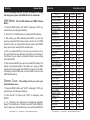
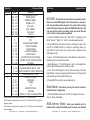
Dotz Par
Channel
5
6
7
8
9
Value
200 - 207
208 - 215
216 - 223
224 - 231
232 - 239
240 - 247
248 - 255
0
1 - 20
21 - 40
41 - 60
61 - 80
81 - 100
101 - 120
121 - 140
141 - 255
0 - 255
0 - 255
0 - 255
0 - 41
42 - 84
85 - 127
128 - 170
171 - 213
214 - 255
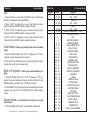
9 Channel Mode
Function
COLOR MACROS CONT.
MOSS GREEN
PRIMARY GREEN
DOUBLE CTB
FULL RED
FULL GREEN
FULL BLUE
WHITE
PROGRAMS
OFF
COLOR FADE/CHANGE
7 COLOR CHANGE
7 COLOR FADE
3 COLOR CHANGE
3 COLOR FADE
SOUND ACTIVE COLOR FADE
SOUND ACTIVE COLOR CHANGE
NOTHING
PROGRAM SPEED/SOUND SENSITIVE
PROGRAM SPEED SLOW - FAST
LEAST SENSITIVE - MOST SENSITIVE
STROBING SLOW - FAST
DIMMER CURVES
STANDARD
STAGE
TV
ARCHITECTURAL
THEATRE
DEFAULT TO UNIT CURVE SETTING
When Channel 5 is being used Channels 1 - 3 will not function.
When Channel 6 is between the values of 1-100, Channel 7 will control the
program speed.
When Channel 6 is between the values of 101-140, Channel 7 will control the
sound sensitive.
ADJ Products, LLC - www.adj.com - Dotz Par User Manual Page 15
Dotz Par
System Menu
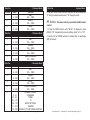
confirm.
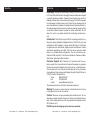
NO DMX - This mode can be used as a precaution mode,
that in case the DMX signal is lost, interrupted, or power is
lost, the operating mode chosen in the setup is the running
mode the fixture will go into when the DMX signal is lost. You
can also set this as the operating mode you would like the
unit to return to when power is applied.
1. Press the MENU button until “NO DMX” is displayed, and
either “Sound”, “Black”, or “Hold” will be displayed beneath.
2. Press ENTER and the bottom choice will begin to flash. Use
the UP or DOWN buttons to choose an operating mode you
would like the unit to start up in when power is applied or the
DMX signal is lost.
• Sound - If the DMX signal is lost, interrupted, the unit will automatically go into sound active mode.
• Black (Blackout) - If the DMX signal is lost or interrupted, the
unit will automatically go into stand by mode.
• Hold - If the DMX signal is lost the fixture will stay in the last
DMX setting. If power is applied and this mode is set, the unit will
automatically go into the last DMX set up.
3. Press ENTER to confirm your desired set up.
Slave Mode - This will let you set your unit as a slave in
a master/slave configuration.
1. Press the MODE button until “SLAU” is displayed. Your unit
will now follow the Master.
RGB Dimmer Mode - Select your desired color to
remain static or adjust the RGB colors to create your desired
ADJ Products, LLC - www.adj.com - Dotz Par User Manual Page 8