1
Building a Linux-only Access Grid Node
Christoph Willing
University of Sydney
[email protected]
Building a Linux-only Access Grid Node
by Christoph Willing
Copyright © 2001-2003 by Christoph Willing
Please freely copy and distribute (give away) this document in any format. It’s requested that corrections and/or
comments be forwarded to the document maintainer. You may create a derivative work and distribute it provided
that you:
1. Send your derivative work (in the most suitable format, such as DocBook) to the
AGDP (Access Grid Documentation Project) or the like for posting on the Internet. If
not the AGDP, then let the AGDP know where it is available.
2. License the derivative work with this same license or use GPL. Include a copyright
notice and at least a pointer to the license used.
3. Give due credit to previous authors and major contributors. If you’re considering
making a derived work other than a translation, it’s requested that you discuss your
plans with the current maintainer.
It is requested that corrections and/or comments be forwarded to the document maintainer, Chris Willing,
[email protected]
Revision History
Revision 1.0 10 June, 2003
Initial publication on AGDP
Table of Contents
1. INTRODUCTION .....................................................................................................1
..................................................................................................................................1
2. INSTALLATION ........................................................................................................3
Overview ................................................................................................................3
Instructions for the Impatient..............................................................................4
Hardware Considerations....................................................................................4
Software Installation .............................................................................................5
3. APPENDIX A............................................................................................................15
Format of the vvd.config configuration file.....................................................15
Examples of vvd.config files..............................................................................15
4. APPENDIX B ............................................................................................................17
XF86Config file examples for Xinerama ..........................................................17
5. APPENDIX C ............................................................................................................25
Accelerated nVidia drivers with gcc3 ..............................................................25
6. APPENDIX D............................................................................................................27
Configuring vic ....................................................................................................27
7. APPENDIX E.............................................................................................................29
Resources ..............................................................................................................29
iii
iv
Chapter 1. INTRODUCTION
This document describes how to construct an Access Grid node using only the
Linux operating system. This construction method has been used for two separate nodes at the University of Sydney and have now been in operation for nearly
two years. The first of these, a three machine node, was used for our participation
in the SCGlobal 2001 event. A single machine version was built soon after. This
method of construction has since been successfully implemented by another six
sites throughout Australia.
The method of construction described here relates to Access Grid nodes prior to
the AG2 release of May, 2003. It is similar to the AG2 version in that the primary
services (video, audio, MUD) may be configured to run on any of the machines
in the node. However the AG2 version is far more advanced especially in terms
of dynamic configurability, authentication and deployment of new services.
The typical Access Grid node, built to the recipe provided by the Access Grid
team at Argonne National Laboratory1, uses a mixture of Windows and Linux
machines. An excellent AGDP Guide Building an Access Grid Node 2 provides
the information required to build such a system. Probably all of the information in
that Guide that doesn’t relate to actual node machines also applies to the system
decribed here. For instance, room construction will not depend on the operating
system(s) being used.
A particular benefit of using this method is its scalability. Exactly the same
method of construction may be used to implement nodes comprising any
number of machines. The normal distinction between display, video and audio
machines is largely unimportant, since each machine participating in a node is
merely a provider of arbitrary services, in particular the video, audio and MUD
functions used in an AG node. All these functions can be performed on a single
machine or shared between a number of machines built in the same way.
An issue arising from this method of construction is that of applications designed
particularly for a non-Linux environment, in particular Distributed PowerPoint
and Gentner (Clear One) control software. In the short term our solution has been
to have a separate Windows machine available to run these applications. In practice this works very well. For large events in particular, the functions of presentation and node operation are best separated anyway. The Genter control software
is rarely used, the settings rarely being changed after optimal settings have been
made. In the longer term, it is expected that versions these applications will run
in a Linux environment.
Notes
1. http://www.accessgrid.org
2. http://www.accessgrid.org/agdp/documentation-index.html
1
Chapter 1. INTRODUCTION
2
Chapter 2. INSTALLATION
This chapter begins with an overview of the installation process and some behind
the scenes explanation of how the Linux-only AG node works. This is followed
by some "instructions for the impatient", a very brief pointwise list of the steps
necessary for a Linux-only installation. After a section containing some general
observations about hardware selection, a detailed section on the software installation process is presented.
Overview
This overview explains some of the differences between a Linux-only AG node
installation and the standard AG node software provided by ANL. It includes
some of the behind the scenes details of how a Linux-only AG node works. Despite these differences, the actual operation of a Linux-only AG node is the same.
All the main tools used in an all-Linux Access Grid node (vic, rat, tkMOO-lite)
are the same as in a conventional node, except that Windows versions of any of
these applications are not required. In fact, none of the ANL installation system
is used; standalone versions of all software will be installed. The major difference between a conventional node and the all-Linux node is the Virtual Venues
Daemon, vvd. It is the only "new" software application in the installation and is
used to synchronise operation of all the other tools when navigating about a virtual meeting venue. It replaces a conventional node’s CORBA based mechanism
to perform the synchronisation function. It is assumed that Tcl/Tk is already installed; this is required by both vvd and tkMOO-lite.
The vvd daemon works as follows. When a virtual venue room is selected with a
browser (usually running on the display machine), information about that room
is returned by the virtual venue server to the browser in the form of a session
description and a MUD room change command. This information is tagged
by the server with particular mime types, namely application/x-ag-sdp and
application/x-ag-mud. The browser passes this information to vvd using special
mimetype handlers. The vvd daemon uses this information to start and stop the
various tools in accordance with a predefined configuration. The configuration
is specified in a configuration file, /etc/vvd/vvd.conf. This configuration file
lists (amongst other things) how many instances of any application should be
run, using the downloaded venue information as startup parameters. Typically,
a "display" machine will run a single instance of vic and a single instance of
tkMOO-lite. The configuration file also lists any other machines in the node to
which the venue information should be sent. On these other machines, vvd
receives the information and starts up any applications listed in their own
configuration file. Typically the "video" machine would run three instances of
vic, while the "audio" machine would run a single instance of rat.
Note that the "classical" distribution of work between three machines as
described above (display, video, audio machines) is easily changed merely
by changing the vvd.conf configuration file. For instance, a single machine
configuration would (hardware constraints permitting) start 1 instance of
tkMOO-lite, 3 of vic and 1 of rat. In this case, there is no need to pass room
information to any other machines. In a 2 machine system where the audio
is performed on the display machine, the vvd.conf for the display machine
would start 1 instance of tkMOO-lite, 1 of vic and 1 of rat, then pass the room
information to the second machine listed in vvd.conf. The second machine
would start 3 instances of vic. The format of the vvd.conf file is detailed in.
Appendix A.
The fact that an all-Linux system can be used for nodes comprising any number
of machines means that no rigid delineation between "display", "video" and "audio" machines exists. However, for ease of explanation, the instructions presented
here will implement a classical three machine system in which one machine will
perform the display function, another the video capture function, the third the
audio functions.
3
Chapter 2. INSTALLATION
Instructions for the Impatient
For experienced Linux enthusiasts, these Instructions for the Impatient may provide sufficient information in themselves to construct a complete Linux-only AG
node. However, they are really intended to provide an overview of the steps that
will need to be performed. These steps are explained in detail in the Software
Installation section.
The points below enumerate the steps of an Installation for the Impatient. Some
Linux users may find these to be sufficient to proceed with an installation immediately. However, each point has an accompanying link which should also be
consulted for greater detail about that point.
1. Install operating system. This means just building a basic working Linux
system with networking (including multicast). More details.
2. On the display machine, configure X Windows with Xinerama for the VGA
cards being used. More details.
3. On the audio machine, install sound driver. This involves installation of
either the ALSA project drivers1 (0.5 series), or the OSS commercial drivers
from 4Front Technologies2. More sound driver details.
4. Create a user named ag on all machines. Optionally, first create a distinct ag
group as well. More details.
5. Install and configure vic, rat, tkMOO-lite and vvd. More details.
At this point, the installation is complete. Log into the display machine and use
the browser to enter meetings at a virtual venue.
Hardware Considerations
Some hardware considerations are dealt with in this section, namely choice of
motherboard, vga cards, audio cards.
The following issues are worth considering when purchasing equipment.
1. MOTHERBOARDS:
The more available PCI slots the better, especially for single machine nodes.
If using a newer high performance VGA card, the motherboard should have
appropriate AGP performance to make use of it.
Dual processor motherboards are preferred but not essential. P4 processors
are only available for dual operation in the Xeon configuration. Newer dual
Xeon motherboards often have a mixture of 32bit and 64bit PCI slots. While
some 64bit slots can accomodate 32 bit cards, the results may not be predictable and a motherboard with all 32bit PCI slots is recommended. The
only dual Xeon motherboard with a reasonable number of 32bit PCI slots
(five) currently known to be available is the Tyan Tiger i7505 (S2668)3.
A number of single P4 processor motherboards exist with six available 32bit
PCI slots.
2. VGA CARDS:
4
Chapter 2. INSTALLATION
Four VGA outputs are required to achieve the single control monitor and
three projected outputs of a standard Access Grid node. While this can be
achieved with a single Matrox G200 PCI card, its performance is limited by
the bandwidth of the PCI bus itself. The table below gives the bandwidth of
various bus types showing why it is preferable to use the AGP slot as much
as possible. A dual output Matrox G450 or G550 AGP card combined with
a dual output G400 PCI card is a common configuration.
Our interest in running hardware accelerated visualisation and graphics
applications in an Access Grid context has led us to use nVidia based
cards. Any of the Quadro4 series give excellent accelerated performance.
The newest of these cards require an 8x AGP slot. They are generally dual
output and are used together with two additional single output PCI cards.
When using AGP and PCI cards together like this, it is preferable to
use cards based on chips from the same manufacturer. This simplifies
installation of drivers for the cards.
Table 2-1. Bandwidth of various bus types
BUS type
Bandwidth
PCI
133MB/s
AGP 1x
266MB/s
AGP 2x
532MB/s
AGP 4x
1.05GB/s
AGP 8x
2.1GB/s
A new, yet to be released, bus standard "PCI Express" will have a bandwidth
of 8GB/s.
3. AUDIO CARDS:
An audio chip capable of full-duplex operation is required. Many motherboards already have audio chips available on board. If a suitable driver is
available for an on board chip then no additional sound card is required,
making an extra PCI slot available for other purposes. If an on board chip
is not supported and an additional card is required, ensure that the motherboard BIOS is capable of disabling the on board chip.
The Soundblaster PCI-128 is a cheap but adequate audio card commonly
used in Access Grid installations. Both ALSA and commercial OSS drivers
are available for this card.
Software Installation
This section gives detailed instructions for installing the required software in a
Linux-only Access Grid node.
This section expands on all the steps listed in the Overview section. However, detailed instructions for tasks like installing an operating system are really beyond
this HOWTO. Therefore this section is mainly concerned with the steps which
make an otherwise normal Linux machine(s) into an Access Grid node.
5
Chapter 2. INSTALLATION
1. Install operating system.
For all machines participating in the Access Grid node, an operating system
must first be installed. Any Linux distribution may be used. The all-Linux
Access Grid system was developed using the Slackware4 distribution (version 8.1), but it is known to have been implemented using Red Hat and
Mandrake distributions too. It is a good idea (but not essential) to specify a
journalling file system during the installation. We prefer the XFS file system
but ext3, reiserfs or jfs should work well too.
After the base distribution has been installed, it may be a good idea to recompile the kernel. Although the stock kernels included with many Linux
distributions will work quite well, recompilation will ensure the availability of video, audio and networking features. Recompilation also offers the
opportunity to optimize the kernel for the CPU type being used, as well as
creating and setting certain system files necessary for the later compilation
of the ALSA audio drivers. To perform the recompilation, it is necessary to
have installed development tools and the kernel source code as part of the
initial installation procedure. First login as root. Then
• change directory to where the kernel source is located, usually in
/usr/src/linux.
• configure the kernel, using any of the commands make configure, make
menuconfigure or make xconfigure. The following descriptions of where
particular kernel or module options are set assumes that the make menuconfigure command is being used. Apart from CPU options (CPU type
and SMP operation which don’t necessarily need to be changed), the options which need to be set are:
a. CONFIG_VIDEO_DEV=m to enable video as a module. This is done
by setting the "Video For Linux" option in the "Multimedia devices"
menu to M.
b. CONFIG_VIDEO_BT848=m to enable BT848 video capture devices
(Hauppauge and many other video cards). Do this by entering the
"Video For Linux" subdirectory of the "Multimedia devices" menu.
Now set the "BT848 Video For Linux" option to M. If you know that
your capture card requires some other driver which appears there,
set it to M instead.
c. CONFIG_SOUND=m to enable sound as a module. In the "Sound"
menu, set "Sound card support" to M. If installing the ALSA project
sound drivers, as described later in this HOWTO, it is important to
disable all other sound options.
d. CONFIG_IP_MULTICAST=y to enable multicast in the kernel. This
requires that TCP/IP networking is enabled (CONFIG_INET=y). To
do this, enter the "Networking options" menu and set the "TCP/IP
networking" option to [*]. Immediately below is the "IP: multicasting" option which should also be set to [*].
• after saving the new kernel configuration, compile the kernel using
all of the steps: make dep; make bzImage; make modules; make
modules_install.
Copy the new kernel image (at /usr/src/linux/arch/i386/boot/bzImage)
to the /boot directory. Its a good idea to rename it using some convention
that allows different kernel versions to be kept in the same directory e.g.
bzim2420a, bzim2420b etc. In order to use the new kernel, either grub or
lilo (depending on the distribution being used) must be configured. If using
lilo, edit the /etc/lilo.conf file to add the new kernel to the choices offered at
boot up time. The contents of this file will not be enabled, i.e. the new kernel
will not appear in the boot menu, until the lilo command is run. Reboot the
system and select the new kernel.
6
Chapter 2. INSTALLATION
2. On the display machine, configure X Windows with Xinerama for the VGA
cards being used.
The X Windows implementation used in most Linux distributions is named
XFree86. The latest possible version should be used, at least version 4.0,
although a problem with such earlier versions is that recent VGA cards may
not be recognised. The version can be checked by running the command
XFree86 -version.
The aim in this section is to produce a configuration file which will start
XFree86 in a way such that three projected VGA outputs and a single VGA
output for the operators monitor all share the same desktop. Within the
XFree86 system, a facility named Xinerama is used to enable an arbitrary
number (in our case, four) of VGA outputs to share a common desktop. The
configuration file to be created is /etc/X11/XF86Config and if such a file
already exists it should be renamed to something else, e.g. XF86Config.old.
Warning! If the file /etc/X11/XF86Config-4 exists, it should also be renamed or deleted. It is an alternate configuration file which will not be used
in this setup, but will confuse the setup if it remains.
If there is access to an existing XF86Config file suitable for your system, i.e.
from another node which uses the same vga cards, monitor and projectors,
just copy that XF86Config file into /etc/X11 and the following steps will
be unnecessary. Some XF86Config files for various hardware are given in
Appendix B. Otherwise, the following procedure explains how to create a
suitable XF86Config file.
The procedure described here assumes the use of an nVidia based dual output capable AGP card and two single output PCI cards. The setup will arrange the two outputs from the AGP card to fill the left and middle tiles of
the projected output. One of the PCI card outputs will fill the right tile of
the projected output, while the second PCI card will provide the output for
the operator monitor.
An advantage of using the nVidia based VGA cards is their excellent hardware accelerated performance for graphics applications. The accelerated
performance is not available with the default driver provided with XFree86,
so an accelerated driver must be downloaded and installed before creating
the XF86Config file for XFree86. This is not essential if accelerated graphics
performance is not required, but is quite simple to do:
Note: all the commands in this section should be run as the root user.
a. Download
the
most
recent
Linux
drivers
(currently
1.0-4349) from nVidia5. The files to download are the
NVIDIA-Linux-x86-1.0-4349.run installation file and a README.txt
file.
b. Change directory to the location into which the files were
downloaded. The README file there has detailed installation
instructions. More briefly, exit out of X if it is running (using
the telinit 3 command) and then, as root, run the command sh
NVIDIA-Linux-x86-1.0-4349.run -n which will unpack, build and
install the driver.
Caution! Very new Linux distributions using the gcc 3.x compiler may
produce a faulty binary at this step. See Appendix C for alternative
methods.
A basic XF86Config configuration file is now made using the XFree86 configure command. Remember that this should be run as the root user
and that X should not be running. Running this command creates a file,
/root/XF86Config.new, which will be edited to produce a working configuration file for the display machine. Change directory to /etc/X11 and copy
7
Chapter 2. INSTALLATION
/root/XF86Config.new to /etc/X11/XF86Config (note that the .new suffix
is dropped).
A general description of the XF86Config file format is available from the
its man page, by running man XF86Config, from which we see that "Monitor" definitions are combined with "Device" (vga card) definitions to produce "Screen" (output) definitions. These "Screen" definitions are used in a
"ServerLayout" section, in which the positions of the output screens relative
to each other are specified. All definitions are declared between Section and
EndSection statements, i.e. a monitor definition appears between the lines
Section "Monitor" and EndSection. Any number of definitions may appear,
distinguished by an Identifier statement within each definition.
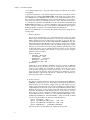
The various definitions are created in the XF86Config file by using the following steps:
a. Section "Monitor".
If projectors and monitors are connected directly to the vga cards,
there is a good chance that the Monitor sections are already complete.
Many modern projectors and monitors are able to provide the necessary information to the system when XFree86 -configure is run. The
important entries in the Monitor section are those of HorizSync, VertRefresh and Identifier. The Identifier. entry should be unique across all the
Monitor sections which are in the configuration file. The HorizSync and
VertRefresh entries can be obtained from the monitor’s user manual,
or they may be marked on the monitor (or projector) itself. A typical
Monitor section would be:
Section "Monitor"
Identifier "Monitor0"
VendorName "API"
ModelName "acer FP751"
HorizSync 31.0 - 81.0
VertRefresh 56.0 - 75.0
EndSection
Although a single Monitor definition may be reused in different
Screen sections, e.g. the three projectors could use the same "Monitor"
section, it is probably less confusing to define a separate section for
each monitor and projector being used. Thus, in a system with 3
projectors and one monitor, there should be four "Monitor" sections,
with identifiers "Monitor0", "Monitor1", "Monitor2" and "Monitor3".
Just cut/paste/edit to create them.
b. Section "Device".
The Device sections will have already generated when the XFree86 configure command was run. Three Device definitions should have
been created, one for the dual output AGP vga card and two for the
single output PCI cards. The only change required is to enable the dual
output function in the AGP card, as it is not enabled by default. First,
identify the "Device" section for the AGP card. This can be ascertained
from the "BoardName" and "BusID" entries of the Device sections.
Each "Device" section contains a number of entries beginning with a
"#". Find the entries for "TwinView", "SecondMonitorHorizSync", "SecondMonitorVertRefresh" and "MetaModes". They should be enabled
by removing the leading "#" character and edited to be:
Option
Option
Option
Option
"TwinView" "True"
"SecondMonitorHorizSync" "31.0 - 81.0"
"SecondMonitorVertRefresh" "56.0 - 75.0"
"MetaModes" "1280x1024, 1280x1024;"
The actual values should reflect the hardware being used.
8
Chapter 2. INSTALLATION
c. Section "Screen".
In this section, previously defined "Device" and "Monitor" sections
are combined and display resolutions are set. There should be three
Screen definitions, identified as "Screen0", "Screen1" and "Screen2".
Each should include a Device and Monitor entry, as well as a number
of "Display" subsections. Delete all "Display" subsections, leaving
only those for Depths of 8 and 24. In the remaining subsections with
Depth 8 and 24, add the following line:
Modes "1280x1024" "1024x768" "800x600" "640x480"
The "1280x1024" mode should not be included here if the monitor or
projectors being used don’t support that resolution.
Before the first "Display" Subsection, add the line:
DefaultDepth 24
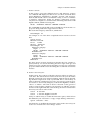
An example of one of the three completed Screen sections is shown
here:
Section "Screen"
Identifier "Screen0"
Device "Card0"
Monitor "Monitor0"
DefaultDepth 24
SubSection "Display"
Depth 8
Modes "1280x1024" "1024x768" "800x600" "640x480"
EndSubSection
SubSection "Display"
Depth 24
Modes "1280x1024" "1024x768" "800x600" "640x480"
EndSubSection
EndSection
The three Screen sections should now describe the four outputs required, namely one Screen describing the dual ouput AGP vga card
and its projectors, another Screen describing one PCI vga card and its
projector and the third Screen describing the second PCI card and its
monitor.
d. Section "ServerLayout".
In this section, the positions of the three Screens will be set relative to
each other. The current Screen entries in the ServerLayout should be
deleted, replaced by new entries beginning with the Screen describing the dual output AGP card, say Screen0. This is followed by an
entry for the PCI card driving a projector, say Screen1, giving its position relative to Screen 0 by using any of the terms "RightOf", "LeftOf",
"Above" or "Below". The same is done for Screen2 so that, given we
want to position all the outputs in a horizontal row with the operator
monitor on the right hand side of the desktop, the Screen entries in the
ServerLayout section will look like:
Screen
Screen
Screen
0 "Screen0"
1 "Screen1" RightOf "Screen0"
2 "Screen2" RightOf "Screen1"
Lastly we add an entry to enable the Xinerama option, which allows
the defined layout of Screens to occupy a single desktop. That line is:
Option "Xinerama" "True"
An alternative to enabling the Xinerama option in the "ServerLayout"
section is to include it in a "ServerFlags" section.
9
Chapter 2. INSTALLATION
At this stage, XFree86 should be configured correctly. To test the configuration, run the command startx. It is possible that some of the projected (or
monitor) tiles are not in the correct order. In this case, edit the XF86Config
file until it is correct (perhaps first saving a copy). The startx command will
have to be run again after each change to the configuration file.
Now that the XF86Config file is correct, we can set XFree86 to be run
automatically when the system boots up, so that startx doesn’t have to be
run each time. To do this, edit the /etc/inittab file. Look for an entry which
includes the term "initdefault". For Slackware systems change it to be
"id:4:initdefault:", while for RedHat systems, change it to "id:5:initdefault:".
Now whenever the system boots, it will start with the AG display running
correctly.
For all machines in the node other than the display machine i.e. video and
audio machines, the tiled display is not required. Just install XFree86 as per
the instructions supplied with the Linux distribution being used. Typically,
their vga outputs are input to a KVM switcher, as is done in a standard AG
node.
3. On the audio machine, install sound driver.
This involves installation of either the OSS commercial drivers from 4Front
Technologies6, or the ALSA project drivers7 which is described below. (Instructions to use the OSS commercial drivers are available from the AG Documentation Project8). The reason that installation of either of these drivers is
necessary is that the free OSS drivers distributed with the Linux kernel are
not capable of full duplex operation, which is a requirement to run the audio
tool, rat, correctly. It is true that some recent audio chips are supported for
full duplex operation by the kernel drivers but this support is inconsistent,
hence the need for separate installation.
At the ALSA organisation’s download page are two sets of downloads, the
most recent 0.9 series and the older 0.5 series. Don’t use the 0.9 series!
Download three files: the most recent revision of the 0.5 series driver, lib and
utils files. As root user, unpack them somewhere convenient, e.g. /tmp, then
cd into the driver directory. The README file in the driver directory gives
all the details for the driver installation. Assuming that a PCI-128 sound
card is being used, the brief version of those instructions is to run the commands: ./configure --with-card=ens1371 then make then make install. Now
run the script ./snddevices which creates some sound devices. Finally, edit
the /etc/modules.conf file to enable automatic loading of the driver moules
whenever they’re needed, namely add the lines:
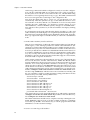
alias char-major-116 snd
alias snd-card-0 snd-card-ens1371
alias char-major-14 soundcore
alias sound-slot-0 snd-card-0
alias sound-service-0-0 snd-mixer-oss
alias sound-service-0-1 snd-seq-oss
alias sound-service-0-3 snd-pcm-oss
alias sound-service-0-8 snd-seq-oss
alias sound-service-0-12 snd-pcm-oss
post-install snd-card-ens1371 alsactl restore
Now cd into the previously unpacked libs directory and run the commands:
./configure then make then make install. Repeat this for the utils directory:
run ./configure then make then make install.
The ALSA installation should now be complete. Test it by running the command alsamixer, and set levels of all the available channels to something
reasonable, say 60-100%. Press the Esc key to exit the program and run alsactl store to save the alsamixer settings.
4. Create a user named ag on all machines.
10
Chapter 2. INSTALLATION
Before creating the user ag, first create a distinct ag group as well, using
the command (as root) groupadd -g 59999 ag where 59999 is the numerical
identifier of the group and ag is its name. The group id number should not
be already assigned. This is unlikely but can be checked in /etc/groups.
The actual value of the group number is not important, only that it doesn’t
duplicate an existing group number.
To create the user ag, run the command adduser which will prompt for a
login name (answer: ag), user id (answer: accept the default), initial group
(answer: ag), additional groups (answer: users), home directory (answer:
default), shell (answer: default) and expiry date (answer: default). After
confirmation to proceed with creating the new account, a password will
be requested. Assuming the ag account will be a generic account for operation of the node by a range of users, an easy to remember low security
password is probably OK, although local institutional policies may need to
be observed.
When the account for ag has been created, test it by logging out and logging
in again as the user ag. Don’t forget to log out and log in again as root before
going on to the next step.
5. Install and configure vic, rat, tkMOO-lite and vvd.
The core programs which make the system an Access Grid node are now
ready to be installed and configured. They may be downloaded from the
Asia Pacific Access Grid9 or from their originating sites.
a. Install vvd.
The Virtual Venues Daemon (vvd) package is really a small collection
of Tcl/Tk scripts which coordinates the actions of all the other the software when navigating through an Access Grid virtual venue with a
web browser. Install the vvd package on all machines which constitute the AG node being built. If installing by hand, these script should
be put in /usr/local/ag/bin; package based installations (Slackware
tgz package, RedHat rpm, etc.) should put them there automatically.
Whatever the installation method, some post-installation configuration is required. This involves editing the /etc/vvd/vvd.config file
(which is created when vvd is installed) on each machine.
The format of the vvd.conf file is the same for all machines in the node.
There are two attributes defined in a vvd.config file, namely the "master/slave" and "applications" attributes.
The "master/slave" attribute denotes whether the machine is a master
or slave machine. The master machine is the one from which the node
is navigated, via browser, to virtual meeting rooms. This is almost always the display machine. Other machines in the node are slave machines. If the machine is a master, it lists any slaves with their DNS
names and the port number for communication. Any slave machine
similarly lists master machines from which they will take instruction.
The "applications" attribute merely lists the names of any applications
to be started when a new virtual venue room is entered. It also gives
the number of instances of each application to run.
Lets consider some example vvd.config files for a three machine AG
node in which the display machine is used to navigate a virtual venue
site and control the other two machines in the node.
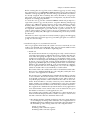
• The display machine (named ag-display) will run a single instance
of vic to display incoming video. It will also run a single instance of
the MUD application, tkMOO-lite. It will send venue information to
the machines ag-video and ag-audio. Its vvd.config file will be:
# start of vvd.config
SLAVE:ag-video.somesite.org:2929
SLAVE:ag-audio.somesite.org:2929
11
Chapter 2. INSTALLATION
VID_vic=1
AUD_rat=0
MUD_tkmoo=1
# end of vvd.config
Lines beginning with a "#" symbol are ignored. SLAVE machines
ag-video and ag-audio are communicated with at port 2929. On this
machine, one instance of each of vic and tkMOO-lite will be started.
• The video machine (named ag-video) will run three instances of
vic to capture and transmit video from three cameras. It will accept and act on venue information from the machine ag-display. Its
vvd.config file will be:
# start of vvd.config
MASTER:ag-display.somesite.org:2929
VID_vic=3
AUD_rat=0
MUD_tkmoo=0
# end of vvd.config
• The audio machine (named ag-audio) will run a single instance of
rat to capture and transmit audio. It will accept and act on venue
information from the machine ag-display. Its vvd.config file will be:
# start of vvd.config
MASTER:ag-display.somesite.org:2929
VID_vic=0
AUD_rat=1
MUD_tkmoo=0
# end of vvd.config
From the above it should be clear that it is trivial to create a single
machine AG node (hardware issues permitting) by appropriate configuration via the vvd.config file.
• In the case of a single machine node, there are no slaves to control.
We just run some instances of vic (depending on how many capture
cards could be installed), and single instances of rat and tkMOO-lite.
The vvd.config file will be:
# start of vvd.config for single machine node
VID_vic=3
AUD_rat=1
MUD_tkmoo=1
# end of vvd.config
Starting vvd.
For vvd to do its work, it needs to be running whenever the user ag is
logged in. Most desktop managers have some mechanism to achieve
this automatically without explicit user intervention at login. With the
Gnome desktop manager (version 1.4), log in as user ag and run the
Gnome Control Center, gnomecc, program. In its "Session Properties &
Startup" section, select the "Startup Programs" tab and press the "Add"
button, which will bring up an "Add Startup Program" widget. Use the
widget’s "Browse" facility to find /usr/local/ag/bin/vvd and click its
OK button, then the Control Center’s OK button. This should be done
for all machines which may constitute the node (display, video, audio,
others).
b. Install vic.
12
Chapter 2. INSTALLATION
The vic program may be compiled and installed from source code but
it is most easily installed using a prebuilt package. If your package
does not install the vic binary in /usr/local/ag/bin, then a symbolic
link to it will be required since that is where vvd will expect it to be,
e.g. if it had been installed in /usr/bin, create the link with: ln -s
/usr/bin/vic /usr/local/ag/bin/vic.
On the video capture machine at least, video device nodes must exist
for each capture device. If there are three capture devices, then there
must exist /dev/video0, /dev/video1 and /dev/video2 device files. If
they don’t already exist, they must be created with the mknod command, using major number 64 and minor numbers 0, 1, 2 and 3. Consult the mknod manpage for details. This step is performed automatically if installing the Slackware vic package from APAG. An additional
feature of the vic installed by this package is that it has been modified
to include support for USB cameras (Logitech Pro4000).
Automatic transmission (including frame rate and PAL/NTSC setting) is controlled by the .vic.tcl startup file in ag’s home directory.
An example startup file is given in Appendix D.
c. Install rat.
The audio tool rat may be installed by compiling source code or by
using a prebuilt package. As for vic, if the rat executable is not installed
into /usr/local/ag/bin, then a symbolic link to that location must be
created.
d. Install tkMOO-lite.
To make tkMOO-lite operate in an Access Grid environment, it requires the moo_control.tcl plugin, which enables tkMOO-lite to respond
(change rooms) to another program (in this case, vvd). If downloading from the tkMOO-lite web site, be sure to find the plugin there
as well. If using the version from the APAG web site, it is already
included. In either case, unpack the tarball and read the README
file which gives instructions about modifying the Makefile to suit the
local environment. Edit the Makefile to reflect the version of the Tk
shell, wish, being used as well as the location for the executable i.e.
/usr/local/ag/bin. Then, as root, execute the Makefile with make
install. If you’ve downloaded tkMOO-lite from the APAG site, now
run the command make installuser. This will create a .tkMOO-lite directory in ag’s home directory and install a "plugins" directory there,
which includes the moo_control.tcl file. Otherwise this must be done
by hand: mkdir /home/ag/.tkMOO-lite, then copy the "plugins" directory from the source code directory into the /home/ag/.tkMOO-lite
directory. Make sure that /home/ag/.tkMOO-lite/plugins contains
the moo_control.tcl plugin file.
Installation is now complete. Log into the display machine and use the browser
to enter meetings at a virtual venue.
Notes
1. http://www.alsa-project.org
2. http://www.opensound.com
3. http://www.tyan.com/
4. http://www.slackware.com
5. http://www.nvidia.com/view.asp?IO=linux_display_ia32_1.0-4349
13
Chapter 2. INSTALLATION
6. http://www.opensound.com
7. http://www.alsa-project.org
8. http://www.accessgrid.org/agdp/guide/building-an-access-gridnode/2.4.5/html/audio-config.html
9. http://www.ap-accessgrid.org/software
14
Chapter 3. APPENDIX A
Format of the vvd.config configuration file
The configuration file, /etc/vvd/vvd.config, is read when vvd starts running. It
consists of a number of single line statements. Blank lines or lines beginning with
a "#" are ignored. The configuration file has two sections, a "machines" section and
an "applications" section. The "machines" section defines the names of other machines with which vvd will interact. The "applications" section defines the names
and number of instances of any applications to be run.
A line in the "machines" section begins with either of the keywords MASTER or
SLAVE. It is followed by an "=" symbol, then by the name of a machine. In the case
of a SLAVE line, the machine name is followed by a ":" symbol and a port number
when communicating with the slave machine. The port number normally used
is 2929. There should be no spaces within an entry. Examples of suitable SLAVE
and MASTER lines are:
SLAVE=video.somewhere.com:2929
MASTER=display.somewhere.com
Note that it is quite acceptable (though probably unusual) for a machine to be
configured as both a SLAVE and a MASTER. It is also acceptable to have neither SLAVE nor MASTER entry: in fact, that is how a single machine AG node is
configured.
A line in the "applications" sections begins with one of the keywords: "VID_vic",
"AUD_rat" or "MUD_tkmoo". It is followed by an "=" symbol and then by the
number of instances of the application to run. There should be no spaces within
an entry. An example applications entry is:
VID_vic=1
The above line instructs that 1 instance of vic be run as the video application.
Examples of vvd.config files
Below are example vvd.conf files in each machine of AG nodes with varying
numbers of machines, namely a 3 machine node, a 2 machine node and a single
machine node. Note that any number of machines may be part of a node.
1. Three machine node with the display machine running vic and tkMOO-lite.
The display machine will act as the MASTER machine for the video and
audio SLAVE machines. The video machine has 3 camera inputs while the
audio machine has 1 audio card.
•
Display machine
# vvd.conf for display machine
SLAVE=video.someplace.com:2929
SLAVE=audio.someplace.com:2929
VID_vic=1
MUD_tkmoo=1
# End of vvd.conf
•
Video machine
# vvd.conf for video machine
MASTER=display.someplace.com
VID_vic=3
15
Chapter 3. APPENDIX A
# End of vvd.conf
•
Audio machine
# vvd.conf for audio machine
MASTER=display.someplace.com
AUD_rat=1
# End of vvd.conf
2. Two machine node with the display machine running vic, rat and tkMOOlite. The display machine will act as the MASTER machine for the video
machine, which has 4 camera inputs.
•
Display machine
# vvd.conf for display machine
SLAVE=video.someplace.com:2929
VID_vic=1
AUD_rat=1
MUD_tkmoo=1
# End of vvd.conf
•
Video machine
# vvd.conf for video machine
MASTER=display.someplace.com
VID_vic=4
# End of vvd.conf
3. Single machine node with the display machine running three cameras, rat
and tkMOO-lite.
•
Display machine
# vvd.conf for display machine
VID_vic=3
AUD_rat=1
MUD_tkmoo=1
# End of vvd.conf
16
Chapter 4. APPENDIX B
XF86Config file examples for Xinerama
Below are three examples of XF86Config files for different vga drivers. The first
of these uses the accelerated OpenGL drivers from nVidia. The second example
is for a Matrox G200, a single PCI card with four vga outputs. Notice that within
each example, a single projector definition (Section "Monitor", actually) can be
used in multiple Screen definitions whenever the same type of projector is being
used. The third example shows how a Matrox Parhelia with 3 vga outputs can be
combined with a single output nVidia based PCI card. More general information
on Xinerama is available in the Linux Xinerama HOWTO1.
All these examples will provide layouts in which the three leftmost vga outputs
are to be projected, while the rightmost output is intended for the operator’s monitor. They could reversed by replacing the "RightOf" keyword in the "ServerLayout" Sections with the keyword "LeftOf". All the screen sizes are based on single
1280x1024 rasters, giving a 3840x1024 projected area and a 1280x1024 monitor
area. If your projectors only support 1024x768, then the "Modes" lines in each
"Screen" will need to be changed.
If basing a real system on these examples, remember to replace the Monitor Horizontal and Vertical sync entries with those matching the projectors and monitor
actually being used.
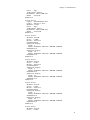
1. XF86Config file for Leadtek Quadro4 380XGL (dual output AGP) card and
two generic RIVA TNT2 (single output PCI) cards. This configuration uses
nVidia’s accelerated OpenGL driver (Driver "nvidia" in the Device sections).
Section "ServerLayout"
Identifier "XFree86 Configured"
Screen
0 "Screen0" 0 0
Screen
1 "Screen1" RightOf "Screen0"
Screen
2 "Screen2" RightOf "Screen1"
InputDevice "Mouse0" "CorePointer"
InputDevice "Keyboard0" "CoreKeyboard"
Option "Xinerama" "True"
EndSection
Section "Files"
RgbPath
"/usr/X11R6/lib/X11/rgb"
ModulePath "/usr/X11R6/lib/modules"
FontPath "/usr/X11R6/lib/X11/fonts/misc/"
FontPath "/usr/X11R6/lib/X11/fonts/Speedo/"
FontPath "/usr/X11R6/lib/X11/fonts/Type1/"
FontPath "/usr/X11R6/lib/X11/fonts/CID/"
FontPath "/usr/X11R6/lib/X11/fonts/75dpi/"
FontPath "/usr/X11R6/lib/X11/fonts/100dpi/"
EndSection
Section "Module"
Load "record"
Load "extmod"
Load "dbe"
Load "dri"
Load "xtrap"
Load "glx"
Load "type1"
Load "speedo"
EndSection
Section "InputDevice"
Identifier "Keyboard0"
Driver
"keyboard"
17
Chapter 4. APPENDIX B
EndSection
Section "InputDevice"
Identifier "Mouse0"
Driver
"mouse"
Option "Protocol" "auto"
Option "Device" "/dev/mouse"
EndSection
Section "Monitor"
Identifier "Monitor0"
# This is the monitor
VendorName "Mitsubishi"
ModelName "Diamond View DV172"
HorizSync
31.0 - 81.0
VertRefresh 56.0 - 75.0
EndSection
Section "Monitor"
Identifier "Monitor1"
# This is the projector
VendorName "Hitachi"
ModelName "SX-5500"
HorizSync 15 - 92
VertRefresh 50 - 120
EndSection
Section "Device"
Option "TwinView"
Option "SecondMonitorHorizSync" "31.0 - 81.0"
Option "SecondMonitorVertRefresh" "56.0 - 75.0"
Option "MetaModes" "1280x1024, 1280x1024;"
Identifier "Card0"
Driver
"nvidia"
VendorName "nVidia Corporation"
BoardName "NV18GL [Quadro4 380 XGL]"
BusID
"PCI:1:0:0"
EndSection
Section "Device"
Identifier "Card1"
Driver
"nvidia"
VendorName "nVidia Corporation"
BoardName "NV5M64 [RIVA TNT2 Model 64/Model 64 Pro]"
BusID
"PCI:2:4:0"
EndSection
Section "Device"
Identifier "Card2"
Driver
"nvidia"
VendorName "nVidia Corporation"
BoardName "NV5M64 [RIVA TNT2 Model 64/Model 64 Pro]"
BusID
"PCI:2:6:0"
EndSection
Section "Screen"
Identifier "Screen0"
Device "Card0"
Monitor "Monitor1"
DefaultDepth 24
SubSection "Display"
Depth 8
Modes "1280x1024" "1024x768" "800x600" "640x480"
18
Chapter 4. APPENDIX B
EndSubSection
SubSection "Display"
Depth 24
Modes "1280x1024" "1024x768" "800x600" "640x480"
EndSubSection
EndSection
Section "Screen"
Identifier "Screen1"
Device "Card1"
Monitor "Monitor1"
DefaultDepth 24
SubSection "Display"
Depth 8
Modes "1280x1024" "1024x768" "800x600" "640x480"
EndSubSection
SubSection "Display"
Depth 24
Modes "1280x1024" "1024x768" "800x600" "640x480"
EndSubSection
EndSection
Section "Screen"
Identifier "Screen2"
Device "Card2"
Monitor "Monitor0"
DefaultDepth 24
SubSection "Display"
Depth 8
Modes "1280x1024" "1024x768" "800x600" "640x480"
EndSubSection
SubSection "Display"
Depth 24
Modes "1280x1024" "1024x768" "800x600" "640x480"
EndSubSection
EndSection
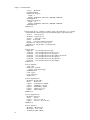
2. XF86Config file for a single Matrox G200 multimonitor card. This card has
four vga outputs. To enable the Xinerama facility, the Matrox driver for
Linux2 should be installed first.
Section "ServerLayout"
Identifier "XFree86 Configured"
Option
"Xinerama" "True"
Screen
0 "Screen0" 0 0
Screen
1 "Screen1" RightOf "Screen0"
Screen
2 "Screen2" RightOf "Screen1"
Screen
3 "Screen3" RightOf "Screen2"
InputDevice "Mouse0" "CorePointer"
InputDevice "Keyboard0" "CoreKeyboard"
EndSection
Section "Files"
RgbPath
"/usr/X11R6/lib/X11/rgb"
ModulePath "/usr/X11R6/lib/modules"
FontPath "/usr/X11R6/lib/X11/fonts/misc/"
FontPath "/usr/X11R6/lib/X11/fonts/Speedo/"
FontPath "/usr/X11R6/lib/X11/fonts/Type1/"
FontPath "/usr/X11R6/lib/X11/fonts/CID/"
FontPath "/usr/X11R6/lib/X11/fonts/75dpi/"
FontPath "/usr/X11R6/lib/X11/fonts/100dpi/"
EndSection
Section "Module"
19
Chapter 4. APPENDIX B
Load "dbe"
Load "dri"
Load "extmod"
Load "glx"
Load "record"
Load "xtrap"
Load "speedo"
Load "type1"
EndSection
Section "InputDevice"
Identifier "Keyboard0"
Driver
"keyboard"
EndSection
Section "InputDevice"
Identifier "Mouse0"
Driver
"mouse"
Option "Protocol" "PS/2"
Option "Device" "/dev/mouse"
EndSection
Section "Monitor"
Identifier "Monitor0"
# This is the monitor
VendorName "Hansol"
ModelName "710P"
HorizSync 39 - 96
VertRefresh 47 - 160
EndSection
Section "Monitor"
Identifier "Monitor1"
# This is the projector
VendorName "Hitachi"
ModelName "SX-5500"
HorizSync 15 - 92
VertRefresh 50 - 120
EndSection
Section "Device"
Option "MGASDRAM" "True"
Option "SWcursor" "True"
Identifier "Card0"
Driver
"mga"
VendorName "Matrox"
BoardName "MGA G200 AGP"
BusID
"PCI:3:0:0"
EndSection
Section "Device"
Option "MGASDRAM" "True"
Option "SWcursor" "True"
Identifier "Card1"
Driver
"mga"
VendorName "Matrox"
BoardName "MGA G200 AGP"
BusID
"PCI:3:4:0"
EndSection
Section "Device"
Option "MGASDRAM" "True"
Option "SWcursor" "True"
Identifier "Card2"
20
Chapter 4. APPENDIX B
Driver
"mga"
VendorName "Matrox"
BoardName "MGA G200 AGP"
BusID
"PCI:3:8:0"
EndSection
Section "Device"
Option "MGASDRAM" "True"
Option "SWcursor" "True"
Identifier "Card3"
Driver
"mga"
VendorName "Matrox"
BoardName "MGA G200 AGP"
BusID
"PCI:3:12:0"
EndSection
Section "Screen"
Identifier "Screen0"
Device "Card0"
Monitor "Monitor1"
DefaultDepth 24
SubSection "Display"
Depth 8
Modes "1280x1024" "1024x768" "800x600" "640x480"
EndSubSection
SubSection "Display"
Depth 24
Modes "1280x1024" "1024x768" "800x600" "640x480"
EndSubSection
EndSection
Section "Screen"
Identifier "Screen1"
Device "Card1"
Monitor "Monitor1"
DefaultDepth 24
SubSection "Display"
Depth 8
Modes "1280x1024" "1024x768" "800x600" "640x480"
EndSubSection
SubSection "Display"
Depth 24
Modes "1280x1024" "1024x768" "800x600" "640x480"
EndSubSection
EndSection
Section "Screen"
Identifier "Screen2"
Device "Card2"
Monitor "Monitor1"
DefaultDepth 24
SubSection "Display"
Depth 8
Modes "1280x1024" "1024x768" "800x600" "640x480"
EndSubSection
SubSection "Display"
Depth 24
Modes "1280x1024" "1024x768" "800x600" "640x480"
EndSubSection
EndSection
Section "Screen"
Identifier "Screen3"
Device "Card3"
21
Chapter 4. APPENDIX B
aonitor "Monitor0"
DefaultDepth 24
SubSection "Display"
Depth 8
Modes "1280x1024" "1024x768" "800x600" "640x480"
EndSubSection
SubSection "Display"
Depth 24
Modes "1280x1024" "1024x768" "800x600" "640x480"
EndSubSection
EndSection
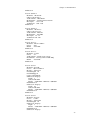
3. XF86Config file for a Matrox Parhelia AGP card with three vga outputs,
combined with a PNY brand GeForce4 MX 420 single output PCI card.
Section
"ServerLayout"
Identifier "Quad Layout"
Option
"Xinerama" "True"
Screen 0 "Screen0"
Screen 1 "Screen1" RightOf "Screen0"
InputDevice "Mouse1" "CorePointer"
InputDevice "Keyboard1" "CoreKeyboard"
EndSection
Section "Files"
RgbPath
"/usr/X11R6/lib/X11/rgb"
FontPath "/usr/X11R6/lib/X11/fonts/local/"
FontPath "/usr/X11R6/lib/X11/fonts/misc/"
FontPath "/usr/X11R6/lib/X11/fonts/75dpi/:unscaled"
FontPath "/usr/X11R6/lib/X11/fonts/Type1/"
FontPath "/usr/X11R6/lib/X11/fonts/Speedo/"
FontPath "/usr/X11R6/lib/X11/fonts/75dpi/"
EndSection
Section "Module"
Load "dbe"
SubSection "extmod"
Option "omit xfree86-dga"
EndSubSection
Load "type1"
Load "freetype"
EndSection
Section "InputDevice"
Identifier "Keyboard1"
Driver
"Keyboard"
Option
"AutoRepeat" "500 30"
Option
"XkbRules" "xfree86"
Option
"XkbModel" "pc101"
Option
"XkbLayout" "us"
Option
"XkbCompat" ""
EndSection
Section "InputDevice"
Identifier "Mouse1"
Driver
"mouse"
Option
"Protocol" "PS/2"
Option
"Device" "/dev/mouse"
EndSection
Section "Monitor"
Identifier "My Monitor"
HorizSync 31.5 - 95.0
VertRefresh 50.0 - 100.0
22
Chapter 4. APPENDIX B
EndSection
Section "Monitor"
Identifier "Monitor0"
# This is the monitor
VendorName "Mitsubishi"
ModelName "Diamond View DV172"
HorizSync
31.0 - 81.0
VertRefresh 56.0 - 75.0
EndSection
Section "Monitor"
Identifier "Monitor1"
# This is the projector
VendorName "Hitachi"
ModelName "SX-5500"
HorizSync 15 - 92
VertRefresh 50 - 120
EndSection
Section "Device"
Identifier "MGA CARD 1"
Driver
"mtx"
BusID
"PCI:1:0:0"
EndSection
Section "Device"
Identifier "Card1"
Driver
"nv"
VendorName "nVidia Corporation"
BoardName "NV17 [GeForce4 MX 420]"
BusID
"PCI:2:4:0"
EndSection
Section "Screen"
Identifier "Screen0"
Device "MGA CARD 1"
Monitor "Monitor1"
DefaultDepth 24
DefaultFbbpp 32
Option "TripleHead"
SubSection "Display"
Depth 8
Virtual 3840 1024
Modes "1280x1024" "1024x768" "800x600"
EndSubSection
SubSection "Display"
Depth 24
Virtual 3840 1024
Modes "1280x1024" "1024x768" "800x600"
EndSubSection
EndSection
Section "Screen"
Identifier "Screen1"
Device "Card1"
Monitor "Monitor0"
DefaultDepth 24
SubSection "Display"
Depth 8
Modes "1280x1024" "1024x768" "800x600"
EndSubSection
SubSection "Display"
23
Chapter 4. APPENDIX B
Depth 24
Modes "1280x1024" "1024x768" "800x600"
EndSubSection
EndSection
Section "DRI"
EndSection
Notes
1. http://www.ibiblio.org/pub/Linux/docs/HOWTO/Xinerama-HOWTO
2. http://www.matrox.com/mga/support/drivers/latest/home.cfm
24
Chapter 5. APPENDIX C
Accelerated nVidia drivers with gcc3
Some recent accelerated nVidia graphics drivers may compile with inconsistent
results. At least version 1.0-4349 is known to have problems and should be
avoided. At the time of writing, version 1.0-4363 is the newest and works well
with gcc 3.2.2. If a personally compiled driver does not run as expected, possible
workarounds include:
•
Use a precompiled version of the driver. If you install without the "-n" option
i.e. sh NVIDIA-Linux-x86-1.0-4349.run, then the installation program will attempt to download and install a precompiled driver from the nVidia download
site.
•
Use an earlier version of gcc (one of the 2.x series). This will require installation
of the older version of gcc.
•
Use an earlier version of the nVidia driver. A previous release of nVidia’s accelerated driver is 1.0-4149 which appears to compile correctly with version 3
releases of gcc (version 2 releases too).
The nVidia drivers up to and including 1.0-4149 use a different installation
method when compiling from source code. Two gzipped tar files,
NVIDIA_kernel-1.0-4149.tar.gz and NVIDIA_GLX-1.0-4149.tar.gz should be
downloaded and unpacked somewhere convenient e.g. /tmp. Change to
console mode (telinit 3) and, as root, cd into the NVIDIA_kernel-1.0-4149
directory and run the command make install. Now cd into the
NVIDIA_GLX-1.0-4149 directory and run the command make install.
•
Use a driver version known to compile with gcc 3 and which works correctly.
Driver version 1.0-4363 works correctlt when compiled with gcc 3.2.2.
•
Use a non-accelerated driver. In this case no special compilation is necessary
because the driver supplied with XFree86 is used. Of course the accelerated
OpenGL performance is not then available.
Note that any of these options only install the accelerated drivers. It is still necessary to configure XFree86 itself.
25
Chapter 5. APPENDIX C
26
Chapter 6. APPENDIX D
Configuring vic
When vic starts up, we want it be running with a number of options preset, rather
than having to manually set them everytime. These options include such things
as the frame rate and the quality settings. They can be set when vic is invoked but
it is easier to set them through a resource file in the user’s home directory. The file
is named ".vic.tcl", and an example is provided below. Note that it contains a Tcl
procedure "user_hook", which allows the user to insert Tcl code to be executed
whenever vic starts up. This mechanism is used to begin transmission of video
on the capture machine. If there are no capture devices on the display machine,
then no .vic.tcl file is required.
option add Vic.maxbw 3072 50
option add Vic.bandwidth 2048 50
option add Vic.framerate 16 50
option add Vic.quality 85 50
option add Vic.rtpName "University of Halmergurky"
option add Vic.defaultTTL 66
proc user_hook {} {
global inputPort inputType fps videoDevice videoDeviceList
set video_xmit 0
after 200 {
toggle_window .menu
set inputPort Composite1
.menu.cb.frame.right.fps.scale set 24
set inputType pal
set brightness 100
set contrast 100
set note [option get . note Vic]
if { $note != "" } {
update_note "" $note
} else {
switch $videoDevice {
"_o3" {
update_note "" "Physics PRESENTER"
set video_xmit 0
}
"_o2" {
update_note "" "Physics AUDIENCE"
set video_xmit 1
}
"_o1" {
update_note "" "Physics MAIN"
set video_xmit 1
}
"_o0" {
update_note "" "Physics X11"
set video_xmit 0
}
}
}
if { $video_xmit > 0 } {
$transmitButton invoke
}
toggle_window .menu
27
Chapter 6. APPENDIX D
}
}
28
Chapter 7. APPENDIX E
Resources
1. Software for construction of a Linux-only Access Grid node is available at
the Asia Pacific Access Grid (APAG) web site 1. In addition, Table 1 lists the
originating sites of all the software.
Table 7-1. Software downloads
Name
APAG download
Original site
vvd
vvd2
vvd2 (from APAG)
vic
vic2
vic2. (from UCL)
rat
rat2
rat2. (from UCL)
tkMOO-lite
tkMOO-lite2
tkMOO-lite2. (from
AWNS)
2. Xinerama is the XFree86 facility which allows multiple vga card outputs to
be contained within a single desktop. The Linux Xinerama HOWTO2 has
general instructions on Xinerama configuration.
3. Instructions for all other aspects of Access Grid node construction are available from the Access Grid Documentation Project3.
Notes
1. http://www.ap-accessgrid.org
2. http://www.ibiblio.org/pub/Linux/docs/HOWTO/Xinerama-HOWTO
3. http://http://www.accessgrid.org/agdp/
29
Chapter 7. APPENDIX E
30