1
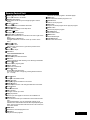
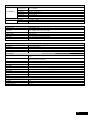
Remote Control Unit
Power ( ) button for TV & STB
Turns your receiver & TV On/Off.
Numeric (0~9) buttons
Controls the number entry and changes program channel
directly.
Mode (
) button
Switches between TV and Radio channel list.
Sleep ( ) button
Shows the time setting for the sleep-timer.
Shows the recorded program in the media player.
FWD button
Fast forward the recorded program to x16.
Record button
Starts to record programs.
Stop button
Stops to record the program and to play the program.
MoSAic ( ) button
Displays multi picture section.
Arrow (◄/►) or OK buttons
Adjusts the volume level or moves the cursor left or right on the
menu.
Arrow (▲/▼) or OK buttons
Changes channels or moves the cursor up or down on the
menu.
Menu ( ) button
Displays the menu
Exits from the current menu or goes to the previous menu.
Mute ( ) button
Mutes audio output.
V.Format button
Set the Video format.
Pause button
Pauses and play the program.
Media button
Shows Media Player.
Time Shift button
Starts Time shift function.
Last button
Shows Viewed Channel List.
Audio ( ) button
Shows the Input Audio information.
OK button
Shows Channel list while watching TV or listening to the Radio.
Guide ( ) button
Shows the TV program guide.
VOL +/- buttons
Adjusts the volume level.
Zoom ( ) button
Zooms in the selected screen.
The Zooming location changes by pressing direction buttons.
(x2 → normal)
Text ( ) button
Changes to the teletext mode.
INFO ( ) button
Displays program information in the screen.
Back ( ) button
Goes to previous menu. The changed values are to be saved.
List ( ) button
Shows channel list.
PR +/- buttons
Changes channel up or down.
Page (+/-) buttons
Moves up or down pages on the menu and TV/Radio List.
FAV (♥) button
Go to the last channel you’ve watched in the Favorite Channel
List 1.
And if pressed angina, you can see the last channel you’ve
watched in the next Favorite Channel List2. Repeat pressing the
button until no more Favorite Channel is found. Then it returns to
the current channel.
REW button
Rewinds the recorded programs to x8.
Play button
Play the recorder programs
4