1
Descriptions of Parts
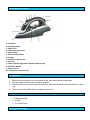
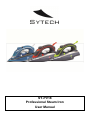
A. Soleplate B. Spraying nozzle C. Water tank D. Water tank inlet cover E. Spray button F. Shot of steam button G. Handle H. Flexible cord protector I. Heel rest J. Power indicator light/Auto shut‐off indicator light K. Self‐clean button L. Steam control M. Temperature control knob Filling water
1. Make sure the switch is not connected to the wall outlet before filling water.
2. Set the steam control to the minimum position.
3. Pull down the cover of the water filling mouth, and then fill water until the reservoir is filled
up.
4. Never exceed the MAX level as marked on the unit.
Setting the temperature
-
* Æ Synthetics/Silk
** Æ Wool
*** Æ Cotton/Linen
Ironing with Steam