1
user's manual
version 0.888
Tom Erbe
School of Music
CalArts
INTRODUCTION
SoundHack is a soundfile processing program for the Macintosh. It performs
many utility and esoteric sound processing functions available nowhere else.
These functions make SoundHack invaluable to computer musicians, sound
effects designers, multimedia artists, webmasters and anyone else who enjoys
working with sound.
Sound Processing
• Time stretching or pitch shifting with the phase vocoder or varispeed.
• Spatialize with the binaural filter.
• Cross-synthesis between two soundfiles with soundfile convolution, ring
modulation or spectral mutation.
• Noise reduction, spectral expansion or compression with the spectral
dynamics processor.
• Separate transient and steady-state components with the spectral
extractor.
• Use your own spectral algorithm with spectral analysis/resynthesis and the
spectral assistant example code.
• Save sonograms of your soundfile in QuickTime™ movies or convert
QuickTime™ movies into sound by sonographic analysis.
Utility Functions
•
•
•
•
Play almost any type of soundfile (including AU, AIFF and WAVE).
Record any size soundfile from the Macintosh sound input.
Import soundfiles from audio CDs.
Convert between different types of soundfiles with optional gain scaling
and sample rate conversion.
• Change values in the soundfile header (sample rate, number of channels,
loop points and marker info).
• Read and write Sound Designer II, Audio IFC, Audio IFF, BICSF (IRCAM),
DSP Designer, QuickTime/AIFF, Microsoft WAVE (RIFF), NeXT .snd, Sun .au,
ULaw, IMA4, TEXT and headerless (raw) soundfiles.
The rest of this document is a small tutorial (in progress) then a menu by menu
description of SoundHack. Please write me if you have any problems or
suggestions!
Tom Erbe
CONTENTS
Introduction .
.
.
Contents
.
.
.
System Requirements
.
Shareware Info
On the Internet
.
.
New Features and Bug Fixes
Tutorial
.
.
.
File Menu
.
.
.
Record New...
Open...
Open Any... .
.
Close
Close & Edit .
.
Save a Copy...
Split Into Mono Files...
Play File
Import SND Resource...
Export SND Resource...
Import CD Track...
.
Quit
Edit Menu
Hack Menu
Header Change...
.
Loops & Markers...
Binaural Filter...
Convolution...
.
Gain Change...
.
Mutation...
Phase Vocoder...
.
Spectral Dynamics... .
Varispeed... .
.
Spectral Extractor... .
Spectral Analysis...
QT Coder
.
.
Normalize
.
.
Draw Function...
SoundFile Menu
.
.
Control Menu
Show Signal
Show Spectrum
.
Show Sonogram
Pause Process
Continue Process
Stop Process
Load Settings...
.
Save Settings...
Default Settings
Preferences...
Future Plans
History of Bug Fixes And Revisions
Bibliography .
.
.
Acknowledgments .
.
.
.
.
.
.
.
.
.
.
.
.
.
.
.
.
2
3
.
.
.
.
.
5
.
.
.
.
.
.
.
.
.
.
6
14
.
.
.
.
.
15
.
.
.
.
.
16
.
.
.
.
.
17
.
.
.
.
.
18
.
.
.
.
.
19
.
.
.
.
.
.
.
.
.
.
20
22
.
.
.
.
.
.
.
.
.
.
.
.
.
.
.
.
.
.
.
.
26
27
28
29
.
.
.
.
.
.
.
.
.
.
31
32
.
.
.
.
.
33
.
.
.
.
.
34
.
.
.
.
.
35
.
.
.
.
.
.
.
.
.
..
.
.
.
.
.
36
37
38
.
4
SYSTEM REQUIREMENTS
SoundHack requires System 7.0 to operate, Sound Manager 3.0 to playback
soundfiles and Quicktime 2.0 to import CD audio tracks and read and write
sonograms. It comes in 3 flavors to accommodate different hardware
platforms.
SoundHack NF runs on all Macintoshes, albeit very slowly. This is the only version
that will work on 68LC040 based Macintoshes.
SoundHack FPU runs on 680x0 Macintoshes with hardware floating point. The
following 3 CPU/FPU configurations will work: 68020+68881, 68030+68882 and
68040. It will also run on FPUless Macintoshes (except 68LC040 machines) with
John Neil's excellent SoftwareFPU floating point emulator. SoftwareFPU is
available on most Macintosh software archives or from John Neil & Associates
([email protected]).
SoundHack PPC runs on Power Macintoshes. It is from 10 to 40 times faster than
SoundHackNF.
SHAREWARE INFO
SoundHack was once shareware/musicware, but no more. You may freely
do whatever you want with it. If you still want to send me some of your art,
music or favorite postcard my address is:
Tom Erbe
608 Carla Way
La Jolla, CA 92093
If you do not have internet access, you can buy it for $65 from my distributor.
Frog Peak Music
PO Box 1052
Lebanon, NH 03766
603-448-8837
Email: [email protected]
URL: http://www.sover.net/~frogpeak
ON THE INTERNET
The current shareware version of SoundHack (SoundHack, SoundHackNF
and documentation) is available at www.soundhack.com
There is a SoundHack mailing list. To join, send email to
[email protected] and include the text "subscribe freesound Your
Full Name" in the message body.
There is also a MP3 station for SoundHack users. Go to
http://shoko.calarts.edu/~tre/freesound.pl for information on listening or
submitting work.
RELEASE 0.880: New Features
* The QT Coder, a sound to QuickTime Movie to sound converter. Put your
sounds through After Effects, synthesize a graphic score. Turn your
home movie into a rhythm track.
* The varispeed function now maps correctly to the output file time.
* Playback enhancements: looping playback with control-space and a
playback after processing option is added to the "Preferences" dialog.
* Loop & Marker features: WAVE loop and markers are now read and written,
the
loop and marker dialog now uses sample numbers instead of time.
* The fast motorola PPC math library is built into this version.
* New read and write types:
SDII
24 & 32 bit linear
Sun/Next
aLaw
AIFF-C
aLaw, uLaw, 32-bit floating point, MACE3, MACE6 and IMA4
* New playback types:
aLaw and 32-bit floating point
* DrawFunction panel enhancements: a random function, a mean value can
be
set and the function can be normalized.
* Increased sample rate conversion quality
* An even stranger auto naming function.
* A new splash screen with flashy messages.
Bug Fixes
+ AIFF uses the common chunk order
+ AIFF uses correct blocking and chunk boundaries
+ AIFF, AIFF-C and WAVE no longer overrun the end of the sound chunk (no
end
of file click)
+ Large Kaiser windows don't crash program.
+ Playback returns to beginning after reaching end.
+ Very short soundfiles playback OK.
+ Lack of QuickTime doesn't crash PPC version.
+ Better memory conservation.
+ QuickTime files now contain proper Moov resource.
TUTORIAL: 7 points of departure
In this section I will take you step by step through some common sound
processing operations. For all of these you will need a source soundfile to
process and enough disk space to hold the result.
1. Spatialization
SoundHack provides spatialization of monaural soundfiles with its binaural
filter. This filter, known as the head-related transfer function (HRTF) emulates
the filtering action of your head and outer ear for any position around your
head. The following example will spin a sound twice around your head.
Type command - O to open the soundfile to be processed. This should be a
monaural file with a sample rate of 44100 as the filters are tuned for this
sample rate. The open dialog box will show both the sample rate and number
of channels for the selected file.
Note that some sounds spatialize better than others. One of the main cues for
spatialization is the inter-aural time difference or ITD. This is the delay from the
moment the sound is heard at the near ear to the time the sound is heard at
the far ear. Because the ITD is so important, sounds with little temporal
variation will not spatialize well. For example, a snare drum is much easier to
locate than a constant flute tone. In addition to the ITD, keep in mind that
most of the spectral differences between the near and far ear are above
1500 Hz, as frequencies below this point will diffract around your head. Sounds
with little high frequency energy will therefore spatialize poorly.
Once the soundfile is open, type command - B to bring up the binaural filter
dialog. Here you can set the various parameters for a binaural spatialization.
For instance, you could set a specific azimuth angle by typing in the Angle:
box or by
clicking on one of the radio buttons. You can set the height to be above,
below or at ear level (though the detection of height is usually dependent on
head movement, so it is not well simulated with a static filter).
To spin the sound around your head, click the box called Moving Angle.
When you do this, the Angle Function button will appear. Click on this button
to bring up the Draw Function Window.
This window allows you to draw a curve to control the angle of the sound as
it moves around your head. You will see two legends on the bottom of this
window: Time:, which indicates the current time in the input soundfile, and
Degrees:, which is the azimuth (0 degrees is straight ahead). You will now use
one of the presets to smoothly spin a sound twice around your head. First,
type "2.0" in the Cycles box,
then click on the ramp function icon (see the mouse arrow in the picture to
the left). This creates two cycles of a ramp function, which will control the
azimuth angle during processing. Now click the Done button in this dialog (the
Draw Function Window will disappear), and then click the Process button in
the binaural function dialog. The "Save Soundfile as: " dialog will now appear,
which has options to set the soundfile type and format. You will probably just
want to set the soundfile type to Audio IFF and 16 Bit Linear, as this is the
format most commonly used by sound editors. After you click Save,
SoundHack will start processing. All you need to do now is wait. On a 33MHz
68040, the compute time to real time ratio is 55 to 1 (that is, it takes 55 seconds
to compute 1 second of
sound). While processing, the status/playback window (shown below) will
show the current positions in the input and output soundfiles as well as a
progress bar. At any time, you can pause the processing by typing command
- , and listen to the output soundfile by pressing the spacebar. After it is
finished playing, another command - , will start the processing again.
2. Time distortion nr. 1
One of the main features of SoundHack is the ability to distort the timebase
and/or pitch of the soundfile. In this example, we will use a simple varispeed
(variable sample rate conversion) to modulate both the pitch and timebase.
Open a soundfile as before (command - O).
Bring up the Varispeed dialog by typing command - V. To enable varispeed
(rather than simple sample rate conversion), click on the Varispeed box. Now,
bring up the Draw Function Window by clicking on the Varispeed Function...
button (see mouse arrow in picture above). When the Draw Function Window
appears, draw a varispeed function by click/dragging the mouse in the
function drawing area (see mouse arrow at left). This varispeed, unlike a tape
varispeed, is capable of a 12 octave range. That is equivalent to a tape
machine that has speeds from 0.5 to 1,920 inches per second, so take
advantage of this broad range. Click Done in the Draw Function Window and
Process in the Varispeed dialog to start processing. On a 33MHz 68040, with
the varispeed quality set to Medium, the average process time to real time
ratio is 43 to 1. Slowing the soundfile takes more processing time, as more
sound is created.
3. Pitch shifting
SoundHack provides pitch shifting without time scaling with a technique
known as the phase vocoder. In this technique, the sound to be shifted is sent
into a bank of band-pass filters which are evenly spaced from 0 Hz to half the
sample rate. SoundHack measures the amplitude and phase for each
frequency at the output of this filter bank,. These amplitudes, phases and
frequencies are used to control a bank of oscillators. Pitch shifting simply
involves multiplying each frequency by a factor.
In this example, you will shift a soundfile up one octave. You should open a
soundfile as you did in the previous example (command - O). Pitch shifting is
not limited by sample rate or number of channels; any type of soundfile will
work. However, this effect sounds best with sounds that are not harmonically
dense. If more than one partial appears in any band of the filter bank, inter
modulation distortion will result in that band.
Once you have opened the soundfile to be processed, type command - P
and the Phase Vocoder dialog will appear (see box at left). Here there are
many options; most are related to particulars of the analysis filter bank, and
most can remain at their default setting. The phase vocoder can be set for a
one octave pitch shift with just a few steps. First, click on the Pitch Scale
button. Second, click on the Scaling:/Semitone Shift: popup menu and select
Semitone Shift:. Third, enter "12.0" in the box to the right of the Semitone Shift:
popup menu. At this point you could click on Process and start processing,
but there is another parameter you might want to adjust first. Bands: sets the
number of bands in the filter bank as well as the number of oscillators for
resynthesis. This will allow you to work with sounds of varying degrees of
harmonic density. You might think that a large number of bands is always
preferable, but more bands require tighter filters which in turn causes more
phase distortion. So it is a trade-off. I have found 512, 1024 and 2048 to be the
most useful settings. You should also try the Scaling Function option. This will
bring up the Draw Function Window and allow you to have variable pitch
shifting with a 12 octave range.
Pitch shifting is one of the slowest processes in SoundHack. With a 33MHz
68040, default settings, and a 44100 sample rate, monaural file as the source,
the process time to real time ratio is 290 to 1.
4. Time distortion nr. 2
Just as the phase vocoder technique allows pitch shifting without time scaling,
it also allows time scaling without pitch shifting. In this example, you will stretch
a soundfile to twice its length.
Open a soundfile (command - O). As in the previous example (Pitch shifting),
the results will be better for sounds which are not harmonically dense. Type
command - P to bring up the Phase Vocoder dialog. This time, click the Time
Scale button, and select the Scaling: popup menu. Type "2.0" in the box to
the right of the Scaling: popup menu, and click Process to start processing.
For an interesting special effect, set Threshold Under Max. (dB): to "-6" before
processing. This will allow only a few loud partials to be resynthesized. Phase
vocoder time scaling is relatively fast. With a 33MHz 68040, the process time to
real time ratio is 69 to 1.
5. Cross-synthesis nr. 1
Cross-synthesis is the combining of two sounds to create a new sound. This is
done by analyzing and extracting significant characteristics from the two
source soundfiles, then combining these characteristics in the synthesis of the
new soundfile. SoundHack has two functions which perform cross-synthesis,
convolution and mutation. In this example you will try convolution.
Convolution takes two sounds, analyses them for spectral content, then
multiplies the two spectra to create a new sound. This emphasizes frequencies
which are held in common and greatly reduces frequencies which are not.
For an interesting convolution it is good to start with sounds that have spectra
which are neither too similar nor dissimilar.
Open one of the two source soundfiles by typing command - O. Type
command - C to bring up the Convolve dialog. Open the second of the
source soundfiles by clicking on the Pick Impulse button. Click Moving to have
convolution move through the second soundfile, otherwise this process will
convolve against a fixed segment of the second soundfile. Click Brighten to
avoid over-attenuation of high frequencies. Select Triangle in the Window:
popup menu to smooth the convolution. If you prefer an unsmoothed
convolution, select Rectangle.
Now set the Length Used: number. This is used to designate how much sound
gets processed in each block. You can treat this number like the decay time
of a reverb, because convolution has a sound which is like a very complex,
tuned reverb. A length of 0.1 seconds (100 milliseconds) is a good place to
start. For higher settings of Length Used:, the memory requirement increases
exponentially.
Now that everything is set, click Process. Because the gain in convolution is
unpredictable, save the new soundfile in a format with a large dynamic
range. When the Save Soundfile as: dialog appears, select a File Type: of
NeXT (.snd) and a File Format: of 32 Bit Floating Point. Click Save and wait.
Once your convolution is done, you will need to convert the new soundfile
from a floating point format to something usable (usually 16 bit linear). You will
also need to adjust the optimum gain for this conversion. To do this, select the
new soundfile, then type command - G. The Gain Change dialog will appear.
Click Analyze to find the peak amplitude, then click Change Gain to create a
new, normalized soundfile. In the Save Soundfile as: dialog, set the File Format:
to 16 Bit Linear.
Convolution is the fastest of SoundHack's functions. For a moving convolution,
with a 33MHz 68040, and 44100, monaural soundfiles, the process time to real
time ratio is 14 to 1.
6. Noise reduction
As you have seen in the previous examples, much of SoundHack's processing
involves the spectral analysis of an input soundfile and subsequent
resynthesis of an output soundfile. One very practical use of spectral
analysis/resynthesis is noise reduction, where noise components are identified
and reduced before resynthesis. A very simple scheme for identifying noise
components is to assume that any spectral component with an amplitude
below a certain threshold is noise. This works well when the noise is fairly
constant, and not too loud (tape hiss, for instance).
Open the soundfile as usual (command - O). Type command - D to bring up
the Spectral Dynamics dialog. This is similar to a typical analog multiband
dynamics processor except that here there are up to 4096 separate bands.
For noise reduction, set Bands: to 2048. Set Type: to Expand. You could also use
Gate for noise reduction, but expansion gives a gentler amplitude reduction
and sounds more natural. The Lowest Band: and Highest Band: should be set
to 0 and 2048 unless you want to limit the noise reduction to a particular
frequency area (as you would in 60 Hz hum removal). Set the Expand Ratio
anywhere from 1.5 to 3.0. A higher ratio will be more effective in reducing
noise, but may cause artifacts. Set the Threshold Level anywhere from -50 to 90 dB, slightly above the hiss level. If you are too close to the hiss level, the
dynamics processor will turn on and off too much and this will cause weird
modulation noises. It is best to set the Threshold Level about 9 dB above the
hiss level. Click the Use Smoothed Amplitude box. This feature is essential for
good hiss removal as it will anticipate abrupt sounds by using an averaged
amplitude for threshold detection.
Now click Process and let it go. After SoundHack creates a few seconds of
sound, it is probably a good idea to pause processing and play the output
soundfile. The parameters for noise reduction usually take a lot of
experimentation.
With a 33MHz 68040, and 44100, monaural soundfiles, the process time to real
time ratio for spectral dynamics is 70 to 1.
7. Cross-synthesis nr. 2
In this final example, you will use the second form of cross-synthesis in
SoundHack, spectral mutation. Mutation measures the spectral change over
time in two soundfiles (called the source and target) and resynthesizes a new
soundfile (the mutant) through various strategies of combination.
For mutation, you should choose soundfiles that have similar spectral
characteristics. When the soundfiles are too different, the mutant seems to
just fluctuate between the source and target sounds, without producing
many interesting merged sounds. Open one of the soundfiles (the source)
with command-O. Type command - M to bring up the Spectral Mutation
Function dialog and open the second soundfile (the target) by clicking on the
Pick Target button. Set the mutation Type: to LCM/IUIM. The differences
between various mutation types are discussed later in this manual (page 21).
Click the Function box so that you can vary the mutation index. For the
LCM/IUIM type, an index of 0.0 produces a mutant of all source and an index
of 1.0 produces a mutant of all target. Now click Edit Function... to bring up the
Draw Function Window.
To keep the mutation index near the center of its range, set the function limits
to 0.7 and 0.3. Set the number of cycles to 4.0 and click the sine wave preset
icon (see mouse arrow in picture). This will produce a mutant which oscillates
slowly from almost the source to almost the target. Click Done in this window
and Process in the Spectral Mutation Function dialog. Mutations are very hard
to predict, so a lot of experimentation is required before you will get satisfying
results. The main factor in the success or failure of a mutation is the choice of
source and target soundfiles.
SOUNDHACK REFERENCE
FILE MENU
(Command - N) Record New...
If you have an input device, this will allow you to record an AIFF soundfile. You
should first set your desired sample rate, sample size and number of channels,
and then click Create File... to create the soundfile. Once you have initialized
the soundfile the popup menus will no longer be accessible. Options... allows
you to change settings peculiar to your input device. You will then be able to
start recording by clicking Record. Stop will stop the recording, open the
soundfile and add it to the SoundFile menu. Some slower hard disks may
cause glitches while recording at the highest rate.
(Command - O) Open...
Clicking Open All will open all of the soundfiles in the current folder. Clicking
Play will play the soundfile.
Soundfiles with the following file types will appear in this dialog box:
AIFF
AIFC
DSPs
IRCM
MSND
NxTs
PICT
SCRN
CSCR
MooV
RIFF
.WAV
Sd2f
Audio Interchange File Format
Audio Interchange File Format - Compressed
DSP Designer
BICSF/IRCAM
MacMix
NeXT .snd/Sun .au
PICT
PICT Resource
QuickTime Movie
Microsoft WAVE
Sound Designer II
Audiomedia
If the file doesn't have a Macintosh 4 character file type, it will still appear in
the open file dialog box provided it has one of the following name extensions:
.aifc .aiff .au .irc .sf .snd .wav .WAV
Once the soundfile is open, it is added to the SoundFile menu and the
soundfile information dialog box appears. This dialog box gives the name,
sample rate, length in seconds, number of channels, type and numeric
format of the soundfile. You are no longer restricted (as you were in earlier
versions of SoundHack) to having only one soundfile open at a time. The file
with the front-most dialog box (which I will refer to as the "selected soundfile") is
used as the input soundfile to the processes under the Hack menu.
Files can be opened with the open document Apple Event ('ODOC') in
SoundHack version 0.860 and later.
(Command - A) Open Any...
This does the same as above, but makes no attempt to read the soundfile
header. This is useful when opening headerless, damaged and text
soundfiles. Text soundfiles should be formatted so that each line is a fixed
point sample. Here is an example of how the text should look:
-0.054688
-0.015625
-0.007812
0.015625
0.000000
-0.117188
Soundfiles opened with Open Any... must be saved to another format before
being processed. You should set the proper sample rate and data format
with the Header Change... dialog before making this conversion.
(Command - W) Close
Closes the selected soundfile.
Close & Edit
This is available if you have selected a soundfile editor in Preferences.... It
closes the selected soundfile, sets its file type to be the same as the selected
editor and sends an AppleEvent to the Finder to open the document.
Occasionally this does not work (the file just reopens in SoundHack), because
the Finder does not always catch that you have changed the file type.
(Command - S) Save A Copy...
Saves a copy of the selected soundfile in any supported soundfile format. This
is the main command for those of you who are just copying from one
soundfile format to another.
Split Into Mono Files...
This will divide a stereo or quad soundfile into multiple monaural soundfiles. This
will be useful for those users who create quad soundfiles with Csound or Cmix
and need to get the files into a more portable format. This may also be useful
to those who are using Pro-Tools, Deck or Sonic Solutions (which currently
imports only monaural AIFF files). Soundfile splitting does not work with 24-bit
soundfiles.
(Space) Play File
This will play the selected soundfile if it is 16-bit linear, 8-bit linear, unsigned,
µlaw encoded, aLaw encoded, 32-bit floating point or ADPCM. You cannot
play soundfiles while processing sound. However, playback will be enabled if
you pause the process (Command - ,). You can start playback from any
point in the file by using the slider in the process window (shown below).
Pressing the spacebar alternately starts and stops playback. Pressing the
return key stops playback and returns the slider to the beginning of the
soundfile. Control - Space engages looping playback. SoundManager 3.0 or
an AV machine is required for sound playback to work properly.
File playback can be triggered through the print document Apple
Event ('PDOC') in SoundHack version 0.863 and later.
(Command - I) Import SND resource...
This will allow you to convert an Apple sound resource ('snd ') to a soundfile.
This does not yet work with compressed 'snd ' resources or 16-bit resources.
(Command - E) Export SND resource...
This will allow you to write part of the selected soundfile into an Apple sound
resource (also known as a double-click able soundfile). The length of the
sound resource exported is limited to the amount of memory allocated to
SoundHack. This will only make 8-bit
' snd' resources.
(Command - =) Import CD Track...
This allows you to import a CD audio track and save it to an AIFF soundfile.
After selecting the track (make sure you know the one you want before
hand!), the Quicktime Audio CD Import Options dialog box will appear. From
this box you can set the sample rate, sample size, number of channels and
the portion of sound to import for the AIFF soundfile. You can also preview the
sound (though with only 8-bit quality). Importing sounds takes a long time, so
be prepared to wait. Quicktime 2.0 and a CD-ROM drive is required for this
feature. Importing may only work reliably on an Apple CDROM drive, though
some have reported success with the HDT CDROM Tool kit and third party
drives.
(Command - Q) Quit
This command allows you to do something else.
EDIT MENU
The required Macintosh functions. They are not too useful in this program
though (as SoundHack is not an editor).
HACK MENU
This is where all the soundfile processing is. Most of the things in this menu
involve a lot of calculations, and take time! SoundHack takes over your Mac
to do these, so if it appears that your Mac has frozen up, it probably hasn't.
Spectral Mutation is the slowest of these functions, so have patience.
In most of these functions, sound is processed in blocks (a group of samples).
After each block is processed you will see the soundfile time window update.
You will be able to pause or stop a process between blocks, but not while a
block is being processed. In the functions which process sound spectrally,
each block is analyzed for amplitude and phase at a number of frequency
bands. The bands are spaced evenly between 0Hz (DC) and the Nyquist
frequency (half the sample rate). For example, if you choose 1024 bands
and your sample rate is 44100, you will have a new frequency band every
21.53 Hz (44100 / (1024 x 2)).
(Command - H) Header Change...
Allows you to change the sample rate, number or channels, and data format
of the selected soundfile. If you open a headerless file, you should use this
dialog to set things properly before saving a copy.
(Command - L) Loops & Markers...
This menu allows you to change loop pointers and marker locations for
soundfiles in AIFF, AIFC, WAVE and Sound Designer II formats. It also allows you
to change AIFF/AIFC specific information.
(Command - B) Binaural Filter...
This process allows you process a monaural soundfile (creating a stereo file).
The result is a signal at a simulated position around the head. This is done by
using a
HRTF (head related transfer function) as a filter, with a separate function for
each position around the head.
To use the binaural filter, enter the desired position in the Angle text box (in
degrees) or click the appropriate radio button. This processing module has
filter data for 12 positions. If you enter an angle between 2 positions you will
get a filter which is the mix of the 2 filters around it. The Moving Angle box will
allow you to do moving spatialization.
These HRTFs were obtained by Durand R. Begault, using methods described in
"3-D Sound for Virtual Reality and Multimedia" (Academic Press: ISBN 0-12084735-3).
(Command - C) Convolution...
This process takes 2 soundfiles: an input (the selected soundfile) and an
impulse response file. It multiplies the spectra of the 2 files together, producing
a new soundfile. The effect is a type of cross-synthesis, in which common
frequencies are reinforced. In this implementation of convolution the sound is
processed block by block, with each block as large as the impulse response.
The Length Used window allows you to designate how much of the impulse
response file to use. The kilobytes Needed number is an estimate of the
application memory size that needs to be set for processing. If you want to
use large impulse responses, that is, convolutions which cause this number to
go over 1200 (the default size), you will have to quit SoundHack and reset the
application memory size.
SoundHack attempts to automatically scale the amplitude of filter gain, but
this value is impossible to predict. The Gain buttons gives you additional
control over this. Set it to 42 dB for most cases, but if the input and impulse
response have similar spectra, extreme resonance will occur and the button
should be set to 24 dB or 0 dB. However, the best way to deal with the
uncertain gain problem in convolution is to avoid it altogether. Save the
output in NeXT/Sun or BICSF floating point format, which has enormous
dynamic range, then use the Gain... module to normalize it back to an integer
format.
Checking the Ring Modulate box allows for ring modulation (or convolution in
frequency) between 2 soundfiles. The Brighten box applies a simple +6dB per
octave high-pass filter to the impulse. This is useful as most natural sounds
have a roll-off from 6-12 dB per octave. Convolve two of these sounds and
your result will have a roll-off from 12-24 dB per octave, much too dull. Brighten
is a simple (probably too simple) fix for this.
Checking the Window popup will cause SoundHack to apply the selected
envelope onto the impulse before convolution, resulting in a smoother
convolution. A smoothing window is desirable when performing a moving
impulse response convolution (described below), since the impulse response
will be changing for each block of samples processed. This is also true for
moving ring modulation. The triangular window is probably the best for
smoothing, a rectangular window is the same as no window at all. Check the
Normalize box if you want the output to be normalized after
computation.
The Moving box allows you to perform a moving impulse response
convolution. In this process a window moves through the impulse response file,
selecting a new impulse response after every block of processing. The window
size is set in the Length Used field. This window moves through the impulse
response file at a rate which insures that the ends of the impulse response file
and the input file are reached at the same time. For example, if your input file
is 10 seconds long and your impulse response file is 5 seconds long and you
have set Length Used to 1.0 for 1 second impulse response windows, the
process would look something like this:
The first 1.0 second frame of the input file (A) will be convolved with the first 1.0
second frame of the impulse response file (ab). Then the window on the input
file is moved 1.0 second forward to B, but the window on the impulse response
file is moved only 0.5 seconds to bc. This is so both files will finish at the same
time. (Actually, the impulse response file reaches the end first and the last
impulse response is zero-padded). In the other case, when the impulse
response file is longer than the soundfile, sections of the impulse response file
will be skipped over. It is a good idea to save the output in a floating point
format if using the moving impulse. Since the impulse is continually changing,
the scaling is unpredictable.
(Command - G) Gain Change...
The equivalent functions in Sound Designer II and Alchemy are faster, so in
most cases you will want to use those. However, SoundHack will give you an
RMS value for the file, and will allow a different gain factor for each channel. It
will also work on floating point, ADPCM, and µLaw files. Finally, it will allow you to
correct for DC offset in your file.
Click on Analyze and the peak amplitude, peak position (in samples), RMS
values
and DC offset will be calculated. The gain factors will be set to normalize both
channels independently and the additional offsets (a number between 1.0
and -1.0) will be set to correct the file. Change Gain will create a new file
adjusted by the gain factors set. If you are dealing with a monaural file, only
the channel 1 information is applicable. Analyze will tie up your machine
when it is doing its stuff, so please be patient. I will fix this in a future version.
(Command - M) Mutation...
(This section of the manual is written by Larry Polansky.)
The seven different spectral mutation functions (USIM, ISIM, IUIM, UUIM, LCM,
LCM/IUIM, LCM/UUIM ) produce different types of timbral "cross-fades." Each
mutation takes 2 soundfiles: a source and a target , and returns a third
soundfile, called the mutant . The mutation functions operate on the
phase/amplitude pair of each frequency band of the source and target
spectra. The output of the functions is a phase/amplitude pair for each
frequency band in the mutant soundfile. Each phase/amplitude pair in the
mutant is some "combination" of the phase/amplitude pairs of the source
and target, for the corresponding frequency band. The mutations work on
the sign (Contour) or the magnitude of an interval, or both. They change
completely a selected number of bands from the source to the target
(Irregular) or partially change all frames (Uniform).
Type
The Type box allows you to select between seven quite different mutation
functions: USIM (Uniform Signed Interval Mutation), ISIM(Irregular Signed), IUIM
(Irregular Unsigned), UUIM (Uniform Unsigned), LCM (Linear Contour
Mutation), and the concatenations LCM/IUIM and LCM/UUIM. (For specific
definitions of the functions, see below. For more information see the two
articles cited in the bibliography).
Try starting with the simplest ones, the USIM (a simple spectral crossfade) and
the ISIM (a spectral replacement). These two mutations, unlike the UUIM and
LCM, actually arrive at the source or target, depending on which direction
you mutate (that is, you will actually hear the source or target with Ω = 0.0 or Ω
= 1.0, respectively). The IUIM, UUIM and the LCM will, with Ω = 1.0, give an
image of the target. These "incomplete mutations" mutate either the sign or
the magnitude, but not both of the intervals between the amplitudes of
successive spectral bands.
The concatenations (LCM/IUIM, LCM/UUIM) are "pipes": they apply the
second mutation to the output of the first. The concatenations are
complementary: for each frame the LCM mutates sign while the IUIM and
UUIM mutate magnitude. Different frequency bins are used for each "stage"
of the concatenation, so the mutation trajectory can be rather
unpredictable.
Mutation Index ( )
Each of the mutation functions uses an index, called Ω (omega), or an Ωfunction. This determines the amount of spectral mix, from 0 to 1, between the
source and target resulting in the mutant. Ω = 0 results in all source file, Ω = 1 all
target. Ω may vary over the course of the mutation. A constant index will result
in a sound which is a spectral mix of the source and target. More dynamic
sounds are produced with an index function, which changes Ω over time.
Absolute Interval
There are two methods used by the mutation functions to compute intervals
between frequency bands: Absolute (the default) and Relative. You may
check or uncheck the Absolute Interval box to get these two methods. If
Absolute intervals are used, you may specify an absolute amplitude value
between 0.0 and 1.0 for the source and target (Source Abs. Value, Target
Abs. Value), from which all intervals will be taken. The choice of values can
produce interesting effects, often "centering" the frequencies in which the
mutation happens, making the mutations themselves less extreme. If two
different values are used, amplitudes will be "transposed" from the source to
the target. The use of Absolute intervals rather than Relative will be most
noticeable for the LCM, IUIM and UUIM , as well as the concatenated
mutations. Low values (around .1 - .2) are a good place to start (note that .1
means 1/10th of the total amplitude of the soundfile's spectra).
If Absolute is unchecked (Relative intervals), each mutation function uses
amplitude intervals between successive frames of the spectra, multiplied by
Ω, to create the corresponding frame of the mutant sound. Relative interval
mutations will tend to "drift," often in extreme ways, and the ISIM and
concatenated mutations may never "arrive." However, some very interesting
sonic results may be produced in this way.
Delta Emphasis
If the mutation uses Relative Intervals (Absolute Interval box unchecked), you
can set a value for Delta Emphasis (DE). DE allows control over the degree to
which successive mutation intervals are emphasized in the resulting mutant.
DE values range from -1.0 to 1.0, with the default at 0.0 (no emphasis or deemphasis). For positive DE values, the current frame's intervalic characteristics
will be emphasized more than the previous mutant frames. For negative
values, the current frame will be "damped," emphasizing the previous
information. One way to think about this is as a way of "slowing down" the
mutation: a negative DE value will keep the more chaotic mutations from
getting "out of control." A negative DE value will function as a low-pass filter,
averaging the previous spectral frames into the current output. Positive DE
values will accentuate the often high-frequency activity of the mutations.
Delta Emphasis can be useful in tailoring the relative interval mutations,
especially the "incomplete" ones.
Band Persist (Irregular Mutations Only)
Band Persist pertains only to irregular mutations, the LCM , ISIM , IUIM and the
concatenations (and not to uniform mutations, the USIM and UUIM ). It will only
appear on the screen when irregular mutation is selected. High values for
Band Persist (towards 1.0) will produce more "stable" mutations. Low values
(towards 0.0) will introduce a kind of frequency pumping at the frame rate.
Try changing the number of bands for unusual results.
In irregular mutations, not every frequency band is mutated for each FFT
frame. Ω determines the percentage of bands that are mutated for a given
frame. If a band is mutated, it completely assumes the particular
characteristic (interval sign or magnitude) of the target interval, and retains
either the sign or the magnitude of the source interval. For example, the LCM
takes the sign of the target interval, and "pastes" it onto the magnitude of the
source. However, it only does that for (Ω * #-of-bands). The selection of which
bands to mutate in irregular mutations is done stochastically, but setting Band
Persist high will ensure that once a band is mutated, it will keep being mutated
as long as possible. That is why a high value for Band Persist will stabilize these
highly unusual mutations, making them a bit more "well-behaved." A good
experiment is to try an irregular mutation (LCM , IUIM , ISIM , the
concatenations) with a fixed Ω, and two different values of Band Persist, one
high and one low.
Time Scale Target
The form of the mutation functions used in SoundHack require that each
soundfile (source, target, mutant) be of equal length. The default technique is
to truncate the longer of the two files, producing a mutant which is the length
of the shorter file. If Time Scale Target is checked, the target soundfile will be
time-stretched or -compressed to be of the same length as the source. Other
techniques are of course possible (including windowing and zero-padding),
and we encourage other software developers to investigate these.
Theoretical Descriptions of the Mutation Functions
The mutation functions can be classified as follows:
USIM
ISIM
UUIM
IUIM
LCM
Uniform
yes
no
yes
no
no
Sign
yes
yes
no
no
yes
Magnitude
yes
yes
yes
yes
no
Note that the opposite of "irregular" is "uniform." Uniform mutations do
something to every frequency band. How much they do depends on Ω.
Irregular mutations change a given frequency band completely from source
to target (sign, magnitude or both), but the number of frequency bands they
operate on depends on Ω. Note that there is no UCM given here (it wouldn't
make sense).
The USIM and the ISIM are the simplest mutations, a spectral cross-fade and
spectral band-replacement, respectively The UUIM and the IUIM are two
different ways of "pasting" the magnitude differences of the target spectra
onto the sign of the source, resulting in a mutant which, when completely
mutated, is still some combination of the source and target. The LCM, perhaps
the most unusual sounding and difficult mutation to control, does the
opposite, pasting the signs of the target onto the magnitudes of the
source.
The functions are defined below. S and T are the source and target soundfiles.
Si , Ti are the amplitudes for a given frequency band of the FFT for the ith
frame of the sound. Sj , Tj are either the amplitudes of the same band in the
previous frame (Relative Interval) or some absolute amplitude (Absolute
Interval). Mi is the new amplitude of the given frequency band of the current
frame of the output sound, Mj is the amplitude for that band in the previous
frame of the output sound (Relative Interval), or some absolute amplitude
value between 0.0 and 1.0 (Absolute Interval). Tint , Sint and Mint are the
signed magnitude intervals between the amplitude of the current frame for a
given band, and the amplitude of that band in the previous frame (Relative)
or to some fixed amplitude (Absolute). Each of the equations below applies
to one frequency band of the source, target and mutant soundfile spectra.
In other words, for all of these functions, Si , Ti , and Mi run from 0 to the
number of bands in the FFT.
|Si - Sj| = Smag - and - (|Si - Sj|)/(Si - Sj) = Ssgn
• Uniform Signed Interval Magnitude (USIM)
Mi = Mj + (Sint) +
* (Tint - Sint)
- where Sint and Tint are (Ssgn * Smag)
and
(Tsgn * Tmag) respectively
• Uniform Unsigned Interval Magnitude (UUIM)
Mi = Mj + Ssgn * (Smag +
* |Tmag - Smag|)
• Linear Contour Mutation (LCM)
Mi = Mj + Tsgn * Smag
(for mutated intervals)
Mi = Mj + Ssgn * Smag
(general form for non-mutated intervals)
• Irregular Unsigned Interval Magnitude (IUIM)
Mi = Mj + Ssgn * Tmag
(for mutated intervals; non-mutated intervals same as LCM
above)
• Irregular Signed Interval Magnitude (ISIM)
Mi = Mj + Tsgn * Tmag
(for mutated intervals; non-mutated intervals same as LCM
above)
Notes:
1) In Absolute Interval mutations, Mj, the absolute amplitude to which the new
interval is added, is interpolated between the absolute values for source and
target, according to the value for Ω.
2) The Irregular mutations are in two forms: one for the case when that
particular frequency band is chosen for mutation, one for when it is not.
More Information and Acknowledgments
For more on morphological mutations, including their use in other contexts,
please contact Larry Polansky at Dartmouth College, Bregman ElectroAcoustic Music Studio, Music Dept., Hanover, NH 03755, email:
[email protected]. Various students at Dartmouth, including
Chris Langmead, Eric Smith, Steve Berkley and Martin McKinney have
provided invaluable assistance over the past few years in helping me to
formulate both the spectral mutation ideas and accompanying software
techniques. Ken Overton, Sergei Kossenko, and Chris Langmead all
contributed valuable suggestions to this documentation.
(Command - P) Phase Vocoder
This process allows one to change pitch without changing the length of the
soundfile or to change length without changing pitch. It does this by
extracting amplitude and phase information for from 8 to 4096 frequency
bands with a bank of filters. If time stretching is desired these phase and
amplitude envelopes are lengthened (or shortened, for time compression),
and then given to a bank of oscillators with corresponding frequencies to the
filters. For pitch shifting, the envelopes are untouched, and given to a bank of
oscillators with frequencies related by the pitch ratio.
To use the phase vocoder, set the number of Bands to the number of filteroscillator pairs one would like to use. A large number of bands will give one
better frequency resolution, a small number of bands will give one better time
resolution. The Window menu allows one to chose different pre-FFT windows for
different filtering characteristics. Only the Hamming, von Hann and Kaiser will
give good results (the others are there only because I wanted to use a single
menu throughout the program for all window selection). The Overlap setting
adjusts the size of the filter window (relative to the number of filter bands) for
analysis and synthesis and thus, the sharpness of the filter. A large setting (4x)
will give the sharpest filter. A sharper filter will differentiate better between
frequencies which are between bands, but responds to amplitude changes
slower. Click the Time Scale button for time scaling, Pitch Scale for pitch
scaling. Type the scale factor in the Scale box. Click on the word Scale (a
popup menu) to specify time scaling by the length desired, or pitch scaling
by equal tempered semitones. If one wants the time expansion factor or the
pitch transposition factor to change during processing, click the Scaling
Function box, and the Draw Function... button. This will bring up the Draw
Function Window, which is described later in this document.
Resynthesis Gating performs a simple spectral gate which lets only some of
the spectral data through. If a band is below the Minimum Amplitude it is not
let through. Threshold Under Max. cuts off all bands which are lower than the
threshold below the peak band in a given block of samples. So if the peak
band has an amplitude of -7 dB and Threshold Under Max. is set to -40 dB, all
bands below -47dB will be cut off.
(Command - D) Spectral Dynamics...
This process performs standard dynamics processing (gating, ducking,
expansion, compression) on each spectral band individually. It has individual
threshold detection for each band, so that one band could have the
dynamics process active, while another is inactive. The process can be limited
to affect only a specific frequency range. One can select whether to affect
sounds which are above the threshold or sounds which are below the
threshold. The threshold level can be set to one value for all bands, or it can
be set to a different value for each band by reading in and analyzing a
soundfile. This soundfile's amplitude spectrum is used for the thresholds for
each band. This is especially useful if there is a sound that one wants to
emphasize or de-emphasize (hiss or hum).
Most controls are self-explanatory. The first popup menu allows you to select
the type of process to use; gating/ducking, expansion or compression. The
second popup sets the number of filter bands to separate the sound into. 512
is a good compromise for the number of bands at a 44100 sample rate as
each band is about 43 Hz apart and the filters used have a (512*2)/44100 or
.023 second delay. In other words, a pretty good frequency resolution
(provided no partials are closer than 43 Hz) and not too much time smearing.
The Highest Band and Lowest Band boxes allow one to limit the frequency
range affected. 3rd Octave Band Grouping causes the bands to be grouped
with a 3rd octave spacing with a threshold trigger for each group (instead of
each band). This octave grouping may give a more natural sounding
dynamics process. The next box is either labelled Gain/Reduction, Expand
Ratio or Compress Ratio. It allows you to set the amount of gain or reduction
for the bands which are past the threshold when gating. For compression
and expansion it allows you to set the gain ratio. When affecting sounds
below the threshold, the compressor and expander hold the highest level
steady and affect lower levels (also known as "downward" expansion or
compression) . When the process is set to affect sounds above the threshold,
the compressor and expander hold the threshold level steady and
compress/expand up from there.
Use Smoothed Amplitude to avoid abrupt gating. Instead of comparing the
input soundfile directly to the threshold, a windowed average of the input is
compared to the threshold. This setting allows one to reduce the "martian
voices" effect (a common problem in spectral dynamics processing) and is
particularly nice for hiss and hum removal. Attack/Decay Time allows one to
set the speed that each triggered band opens or closes. The default is the
minimum time for the number of bands used. If this value is set too slow, one
loses transients, too fast and you start modulating the soundfile (whistling
sounds). Threshold Level is where you set the threshold level! If you check
Threshold Relative to Peak Amp., the threshold is now set relative to the peak
amplitude for each block of sound processed. For example, if you are using
the spectral gate, and the loudest frequency band for the current block of
sound has an amplitude of -12 dB and the threshold is set at -40 dB, the gate
will be active for sounds below -52 dB.
(Command - V) Varispeed...
This function is a high quality sample rate convertor as well as a variable
sample rate conversion utility (varispeed). The Varispeed box enables this
feature. The Varispeed Function... button will bring up the Draw Function
Window, giving one control over a 10 octave varispeed. The Quality buttons
give one control over the size of smoothing filter used, and the resultant quality
of interpolation/decimation. The Vary by Scale and Vary by Pitch buttons
allow one to draw a curve for either pitch or scaling factor.
(Command - X) Spectral Extraction...
This function attempts to separate the stable (pitched) and transient
(unpitched) parts of a sound. It does this by measuring the speed of
frequency deviation. If the deviation is too quick, it is marked unpitched
information and output to the transient soundfile. If it is too stable, it is marked
pitched information and output to the stable soundfile.
You can control the separation with this dialog box. Set the Bands to a high
number if the sound being processed is harmonically dense, otherwise keep it
around 512. Setting the number of Frames allows you to set the size of the
analysis frame (in multiples of FFT frames). Set this higher if you are having
difficulty separating the pitched material, lower if you are having difficulty
separating the transient material. The two frequency values specify the
amount of change allowed during each analysis frame. In this example, if the
harmonic deviates by more than 5 hertz in 0.035 seconds it is put into the
transient soundfile, if the harmonic deviates by less than 2 hertz in 0.035
seconds, it is put in the stable soundfile.
This function draws heavily from the work of Zack Settel and Cort Lippe on the
ISPW workstation using Max-DSP. Thank you Zack and Cort for sharing a great
idea.
(Command - -) Spectral Analysis/Resynthesis...
This function will create a Csound or SoundHack format spectral data file from
a soundfile (analysis) or create a soundfile from either format spectral data
file (resynthesis). With this, you can create files to be used with Csound's pvoc
unit generator or for you to use with your own programs to process the
spectral data directly. The format of the spectral data file (a limited version of
the Csound pvanal format) is a header, followed by multiple frames of
spectral data.
Here is a C structure describing the header:
typedef struct
{
long magic;
long
headBsize;
long
dataBsize;
long
dataFormat;
float samplingRate;
long channels;
long frameSize;
long
frameIncr;
long
frameBsize;
long
frameFormat;
float minFreq;
float maxFreq;
long freqFormat;
char info[4];
} SpectHeader;
//
//
//
//
//
//
//
//
517730 for Csound files,
'Erbe' for SoundHack files
byte offset from start to data
(usually sizeof(SpectHeader))
number of bytes of data not including
the header
(short) format specifier
always 36 for floating point
//
//
//
//
//
//
//
//
//
//
//
//
//
//
//
number of points in FFT
(number of bands * 2)
number of new samples each frame
(frames overlap)
bytes in each file frame
frameBsize = sizeof(float)
* (frameSize >> 1 + 1) << 1;
this is either 3 for SoundHack
files (amplitude & phase) or 7 for
Csound files (amplitude & frequency)
0.0
maxFreq = samplingRate/2.0;
flag for log/lin frequency
(always 1 for linear)
extendible byte area
The subsequent frames of spectral data are organized as follows:
// frameFormat == 3, amplitude and phase pairs, SoundHack file
typedef struct
{
float
amplitude;
// from 0.0 to 1.0
float
phase;
// from 0.0 to (2.0 * pi)
}
band;
band
spectralFrame[(frameSize >> 1) + 1];
// frameFormat == 7, amplitude and frequency pairs, Csound file
typedef struct
{
float
amplitude;
// from 0.0 to 1.0
float
frequency;
// from 0.0 to samplingRate/2.0
}
band;
band
spectralFrame[(frameSize >> 1) + 1];
If the spectral file is stereo, the frames are interleaved, first left then right.
Included with SoundHack is the source code for a simple spectral data
processor (Spectral Assistant) which should illustrate how to read and write this
format.
(Command - U) QT Coder
This function will convert your soundfile into a QuickTime™ movie and will
convert the QuickTime™ movie back into the same sound. You can also turn
any QuickTime™ movie into a soundfile.
The QuickTime™ movie will contain a series of sonograms representing your
sound. The sonograms have linear frequency on the vertical axis and time on
the horizontal axis. Color saturation is used to represent ampiltude and hue is
used to represent delta phase.
There are very few settings in this function. The number of bands one chooses
will affect the size of the movie frame. 256 bands will require a 343x257 frame
(a 4:3 aspect ratio). Since the QT Coder uses 32-bit uncompressed images, it
consumes a lot of memory, and the memory need increases exponentially as
the number of bands increase. For example: a 512 band, monaural QT
Coding will require about 3 megabytes allocated to SoundHack.
Window: selects the FFT windowing function. Kaiser is best for band separation,
Hamming is best for smooth band transition. The choice of window is probably
not critical to most uses of this function. Phase Center Color:selects which
color will represent a ∆ phase change of zero degrees. This color usually
becomes the predominant color in the sonogram. Amplitude Range (dB):
determines which sounds are encoded in the QuickTime™ movie. For a high
fidelty encoding, 120 dB seems sufficient. Color Inversion inverts the RGB color
values.
After the QT Coder creates the QuickTime™ movie, you will be able to open it
in any QuickTime™ application and view, edit or modify the sonogram. After
doing this, you will be able to open the modified movie in SoundHack and
convert it back into sound using the QT Coder again.
One could also use the QT Coder to convert any QuickTime™ movie into a
soundfile. The resultant sound will tend to be repetitive, it will also tend to be
biased toward the high frequencies since the frequency in the frame is
interpreted in a linear fashion.
This function is rather experimental and I am not quite sure what it will be good
for yet.
For future versions I am working on an exponential frequency encoding
scheme as well as color schemes which follow visual perception models.
(name that tune?)
(Command - ;) Normalize
This does a simple, no-questions asked, normalization of the selected
soundfile.
Draw Function Window
This window allows for the creation of control functions. It actually creates a
function of 400 entries (one per pixel) which is then interpolated on during
processing. The function controls either binaural position, mutation index,
degree of time stretching, amount of pitch shifting, or degree of varispeed
depending on which process you are using.
To create a control function, you can simply draw in the function window
(your mouse position is continually tracked and translated into relevant units)
or click on one of the preset waveform buttons. The waveform buttons will fill
the function with as many cycles as are set in the Cycles: box. If you click a
waveform after there is something already in the function window, the
waveform will modulate the function, rather than replace it. The Set button will
allow you to set all of the points to the same value. The Reverse button will
time-reverse the function. The Invert button will flip it. It Shift button will rotate
the function by up to 399 positions. The Smooth button will average adjacent
entries in the function. This smoothing wraps around the beginning and end of
the function, so watch out. The Normalize function will increase/decrease the
magnitude of the function to fit the range of the window. The Set Mean button
will scale the function so that the value you enter becomes the mean, or
average value.
The boxes in the upper right and lower right corners allow a very primitive type
of zooming. There is no facility for selecting, copy, paste or cut. One can read
or write control functions as soundfiles by clicking the Read and Write buttons.
The Time: legend refers to the time in the input soundfile and the other legend
(Scaling:) is updated depending on how the control function is applied.
SOUNDFILE MENU
This simply allows you to select between the open soundfiles. The first ten
soundfiles open are given command key equivalents (Command - 1 to
Command - 0).
CONTROL MENU
Show Signal
This will bring up a window to show the sound whenever SoundHack reads or
writes sound (except during file copying and normalization). There are
separate windows available for all active soundfiles.
Show Spectrum
This will bring up a window to show the spectral data in all spectral operations
(most everything but varispeed, which I do in the time domain). There are
separate windows available for all active soundfiles.
Show Sonogram
This will also show spectral information but over time. Intensity is represented
by different colors where purple-red is the lowest intensity, green is mid
intensity and bright red is the highest intensity. This display will slow down any
Macintosh dramatically.
Pause Process
This allows you to pause during a long process. This is especially useful if you
would like to here the sound you have processed so far. If you are running a
convolution, it sometimes takes a while to pause (up to 3 minutes on a slow
Mac II).
Continue Process
This will resume processing where you left off.
Stop Process
This will kill your process and close the output soundfile.
Load Settings...
This loads a previously created settings file. This is also done automatically on
startup to the "SoundHack Preferences" file in the ":System Folder:Preferences"
folder.
Save Settings...
This will create a settings file which contains the current settings from the
binaural, convolution, spectral analysis, spectral dynamics, mutation, phase
vocoder, varispeed, gain and preferences dialog panels. This is done
automatically when you quit SoundHack to the "SoundHack Preferences" file
in the ":System Folder:Preferences" folder.
Default Settings
This will reset all internal settings to a default set. Recommended if you suspect
your "SoundHack Pref" file is corrupt.
Preferences...
This allows you to set a few things. You can set SoundHack to automatically
play a soundfile when it is opened. This is a very nice way to set things if you
are using SoundHack as your web browser helper application. If you set an
editor, then you can use the Close & Edit command (described earlier). The
Default File Type, when set, will give you the selected file type and format
whenever you create a new soundfile. Play On Open will play the file as soon
as it is opened, Play After Processing will play the output file as soon as the
current Hack process is done with it.
FUTURE PLANS
1.0
.90
SoundHack is finished. Tom and Betsy take a holiday.
Last major release, only bug-fixes and minor updates from
now on. Make a suggestion for final features. Time is running out!
Port to IRIX, Linux? Solaris, Rhapsody, Wintel. AppleEvents and
scriptablity. MPEG. Spectral plugins?
.89
Mark Dolson phase vocoder enhancements. Simple graphic filtering.
SDS, SDI, TX16W, OMF, Sonic, ProTools, AIFF resource soundfile formats.
QT coder: log frequency sonograms, new color encodings. Buffered read
and write routines.
BUG FIXES AND REVISIONS
.88
QT coder - changes soundfiles into QuickTime™ movies into soundfiles.
24&32 bit SDII files, IMA4, MACE3, MACE6, aLaw and µLaw AIFC files, aLaw
Sun files. 32-bit float AIFC files compatible with Mills'
Csound. Peak sample saved in all 32-bit float files. 32-bit float
playback. QuickTime/AIFF files fixed. Increased sample rate conversion
quality. Motorola's libmoto library integrated into app. Looping
playback. WAVE loops and markers. Enhanced Draw Function dialog.
Functions work much more predictably with varispeed (no more fast high
pitch - slow low pitch). Tiny soundfile playback fixed. 3rd octave band
grouping added to spectral dynamics and irregular mutation.
.87
Spectral files are now treated as soundfiles. Simple spectral
analysis/resynthesis added. Quick normalization added. Many
cosmetic/GUI changes. New binaural filters added. Spectral
dynamics will trigger on an averaged amplitude value (good for hiss
removal). Draw function debugged for the umpteenth time.
Preferences are now savable.
.86
The shareware version now is just the 68k version. Multiple
soundfiles supported. Another sample rate conversion bug (errant
pointer deallocation) squashed. CD Audio import added. Channel
splitting added.
.85
Soundfile playback now works for all soundfiles which are 8-bit
(twos, raw or µLaw) or 16-bit linear (twos). The apple events for
open and quit application added. Spectral dynamics fixed again.
.84
Separate display windows for most signals added. Sonogram window
added. Off screen drawing keeps windows updated. Most all dialogs
now modeless.
.83
Popup bugs fixed, convolution brightening added.
.82
Soundfile recording has been added.
.815 24 and 32 bit AIFF and AIFC supported.
.81
Spectral extraction added. Spectral dynamics now allows threshold
to be set relative to the peak amplitude in a block of sound.
.803-6
Various bug fixes. A full disk now stops any process. Samples
which are too loud now clip instead of going out of range. Greater
post convolution gain is now possible. Normalization no longer
clips. The packmode no longer changes when a new soundfile type
is selected. Mixed stereo/mono mutation no longer crashes!
.80
Split into shareware (0.74) and commercial (0.80) versions.
Added Mutation functions. Ported to the Power Macintosh.
.74
Fixed early ending sample rate conversion problem. Fixed the
spectral display. Added attack/decay time to spectral dynamics. A
moving binaural effect is added. Allow raw data files to have text
packmode and text files to have raw packmodes. Fixed various GUI
complaints (0.743) Double-clicked soundfiles now open correctly
in all versions.
.73
.72
.71
.70
.68
.67
.66
.65
.64
.63
.62
.61
.60
.59
.58
.57
.56
.55
.54
.5
Fixed varispeed clicking for the third time. Fixed the output
soundfile dialog. Ported the code from Think C to Codewarrior.
Spectral display is now broken and needs to be redone (disabled
for the present).
Fixed 16 bit Microsoft RIFF/WAVE file bug.
Fixed a minor bug which caused spectral dynamics crashing.
Also fixed a typo (thank you Phil Burk).
Added spectral dynamics process. Added AIFC and Microsoft WAVE
file support. Added 4-bit ADPCM. Opens double-clicked documents.
More types show up in "Open" menu item. Fixed stupid error about
number of bands in the phase vocoder and the spectral dynamics
processor. It used to refer to the number of FFT points used, it
now correctly refers to the number of filter bands used.
Added import and export of SND resources. Limited soundfile
playback to AIFF and AIFC until Apple comes up with a stable
sound manager. Sound Manager 3.0 is required for playback of
16-bit files. Added a limited spectral gate to the phase vocoder.
Fixed old bug in pitch shifting.
Added soundfile playback.
Added windowing selection for both convolution and the phase
vocoder. Added "Vary by Pitch" /"Vary by Scale" selection in
varispeed.
Fixed crashing at the end of long varispeed calculations,
cleaned up memory allocation (especially for convolution), added
ring modulation (spectral convolution), cleaned up dialog
annoyances. Made output window resizable, and made it white on
black (like a scope). Added bibliography
screen.
Added varispeed processing, added many things to the function
dialog.
Added TEXT soundfile format. Added interpolation, sinc and number
of cycles to function dialog. Added ramp enveloping of impulse to
convolution. Added popup menus.
Added function window for multirate phase vocoder.
Sped up pitch transposition significantly, allowed pitch
transposition by semitone and time warping by desired length.
Added the phase vocoder, phase vocoder Csound analysis and show
output. Fixed problem with normalization after moving convolution.
Added moving convolution.
Fixed problems with 8-bit AIFF files.
AIFF files used to read everything from SSND chunk to EOF, now
only SSND chunk is read. The Binaural processor often destroyed
AIFF headers, I think I have this fixed. DSP Designer files are
now written as well as read (though I have no way of checking,
please DSP Designer users, give me feedback).
Filter files are now closed properly after convolution.
Normalization feature disabled Binaural filtering, now fixed.
Filter sensitivity added to Convolve.
Normalize after processing feature added. Dialogs adjusted for
small monitors.
Gain change added, 8-bit linear, 8-bit mulaw and 32-bit float
added. (Jan 1992)
.4
.3
.2
.1
Binaural filtering and process control added.
Convolution and NeXT/Sun file formats added.
Sound Designer II files and Header change added.
First release of SoundHack, converts AIFF files to IRCAM and back.
(Fall 1991?)
BIBLIOGRAPHY
Apple Computer, Inc., Inside Macintosh, Volume 1-6, Addison Wesley,
Reading, Mass., 1985-91.
Begault, Durand R., Control of Auditory Distance, Ph.D.. dissertation,
University of California, San Diego, 1987.
Begault, Durand R., 3-D sound for virtual reality and multimedia, Academic
Press Professional, Cambridge, MA, 1994.
Blauert, J., Spatial Hearing, MIT Press, Cambridge, Mass., 1983.
Dolson, Mark, "The Phase Vocoder: A Tutorial", Computer Music Journal
10:4, 1986.
Ellis, Dan, "pvanal.c", part of the Csound distribution, MIT, 1991.
Gordon, J. W. and Strawn, J., "An Introduction to the Phase Vocoder",
Digital Audio Signal Processing: An Anthology, editor J. Strawn,
Kaufmann, Los Altos, Calif., 1985.
Mark, David and Reed, Cartwright, Macintosh C Programming PRIMER,
Volume I, Addison Wesley, Reading, Mass., 1989.
Moore, F. Richard Elements of Computer Music, Prentice Hall, Englewood
Cliffs, NJ, 1990.
Polansky, L. "More on Morphological Mutations: Recent Techniques and
Developments, "Proceedings of the ICMC., San Jose, 1992.
Polansky, L. and McKinney, M. "Morphological Mutation Functions:
Applications to Motivic Transformations and to a New Class of CrossSynthesis Techniques." Proceedings of the ICMC. Montreal, 1991.
Reed, C. E. and Passin, T. B., Signal Processing in C, John Wiley, New York,
NY, 1992.
Settel, Z. and Lippe, C. "Real-time Musical Applications using FFT-based
Resynthesis", Proceedings of the 1994 International Computer Music
Conference. Diem Aarhus, Denmark 1994.
Vaseghi, S. and Frayling-Cork, R., "Restoration of Old Gramophone
Recordings", Journal of the AES, 40:10, 1992.
ACKNOWLEDGMENTS
Betsy Edwards for unending support, for teaching me how to write and for
editing this long winded and technical document.
Larry Polansky for his mutation functions, for helping me edit this document.
and for his unending encouragement, criticism and support.
Dr. Durand Begault of NASA-Ames for letting me use his binaural filter
coefficients.
F. Richard Moore, D. Gareth Loy and Mark Dolson for my initial exposure to the
wonders of computer music.
Dan Ellis of MIT's Media Lab for helping me with the Csound analysis feature.
Zack Settel for relating his work on spectral extraction to me.
Scott Morgan and Geoff Hufford for all their Macintosh toolbox help.
Tim Walters, Jeanne Parson, Kent Clelland, Vincent Carte, George Taylor, Zach
Belica, Phil Burk, Curtis Roads, Richard Boulanger, douglas repetto and many
others for their many comments, bug reports and encouragement.
The Bregman Electro-Acoustic Music Studio at Dartmouth College for
sponsoring my initial Power Macintosh development.
The Center for Contemporary Music at Mills College and the CalArts School of
Music for sponsoring all of the rest of my activities.
All the wonderful people who sent me their music including:
=cw4t7abs
Murray Anderson
Michael Angell
Marc Battier
Eve Beglarian
Eric Belgum
Dan Bertolet
Philippe Blanchard
Greg Boddy
Gregory G Booth
Chris Brown
Richard Brown
Ray Brunelle
Kim Cascone
Damian Castaldi
Rudolfo Caesar
Jim Croson
Matthew Davidson
Xopher Davidson
Bruno Degazio
Rohan De Livera
Paul DeMarinus
Denis Dion
Paul Doornbusch
John Duesenberry
David Eagle
Ambrose Field
Devin Fleenor
Ryan Francesconi
Howard Fredrics
Sérgio Freire
Joshua Fried
Christopher Frye
Alex Garvin
Raviv Gazit
Mark Geller
Marco Giommoni
Robert Gibson
Chris Grigg
Ray Guillette
Bernard Günter
Jose Halac
Geln Hall
Jeff Hass
Patrick Heilman
Peter Heijens
Robert Henke
Brian Hill
Steev Hise
Naut Humon
John Hudak
Joseph Hyde
Øivind Idso
Katchy
Utah Kawasaki
Leif Keane
Jim Keiser
Mendel Kleiner
Michael Lande
Richard Lerman
Gregory Lenczycki
Daniel Lenz
Polar Levine
Eirik Lie
Eric Lyon
Alistair MacDonald
A. M. McKenzie
Chris Meyer
Steve Miller
Toshikazu Minami
Diego Minciacchi
Eric Moe
Gary Lee Nelson
Loren Nerell
Yuko Nexus6
NORSCQ
João Oliveira
Jim O'Rourke
Bob Ostertag
John Oswald
Bernard Parmegiani
Nye Parry
Michel Pascal
Maggi Payne
Heather Perkins
Richard Pinhas
John Pospisil
Richard Power
Christopher Preissing
Trent Reznor
Robert Rich
Jeremy Roberts
Jøran Rudi
Dirk Specht
Bruno Spoerri
Carl Stone
Hans Timmermans
Mark Tinley
Felix Tod
Barry Truax
Hans Vallden
Chris Vrenna
Tim Walters
Jeremy Wells
Micheal White
Beth Wiemann
Bob Willey
Michael Winnerholt
Justin Winokur
Stephan Wittwer
Erling Wold
James Wood



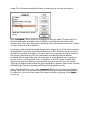
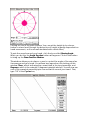
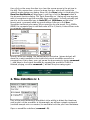
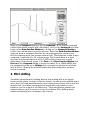

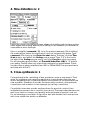
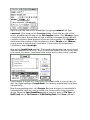

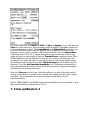
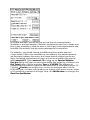

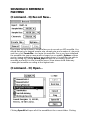
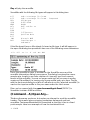

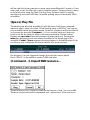
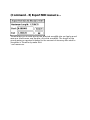

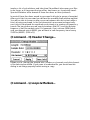
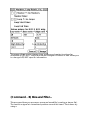
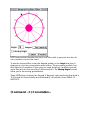
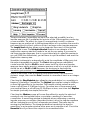

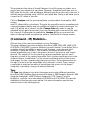
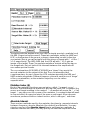
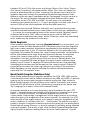
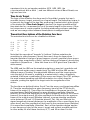

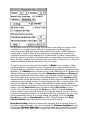

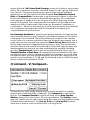
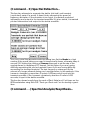


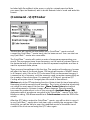

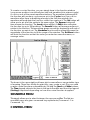
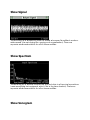
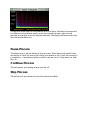
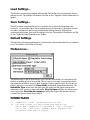

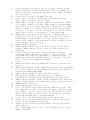






![PathoDx Herpes Typing Kit [FR]](http://vs1.manualzilla.com/store/data/006441679_1-9ffcc47a7f13fe52f3c55f72a743d5da-150x150.png)