1
4. Product overview
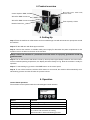
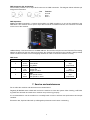
Blue LCD screen, Timer mode,
Volume mode
Control Options: DMX, W-DMX
XLR 3-Pin DMX Connector
XLR 5-Pin DMX Connector
Tank Capacity: 5 liters
Neutrik PowerCon
5. Setting Up
Step 1: Place the machine on a flat surface and in a suitable large area with at least 50 cm open space around
the machine.
Step 2: Fill the fluid tank with Robe approved fluid.
Step 3: Connect the machine to suitable rated power supply.To determine the power requirement for the
machine refer to the label on the back of the machine.
Always connect the machine to a protected circuit and ensure it is properly grounded to avoid risk
of electrocution!
Step 4: Turn on the machine and allow it to heat up. Heat up takes approximatly 6 mintues. Once the machine has reached operating temperature, the display will show Ready to Fog. Now the machine is ready for
operation.
Step 5: To start making fog, press the VOLUME button on the control panel.
Step 6: To turn off the machine, hold the STOP button for 3 seconds; the machine will automatically run a
self-cleaning process and shut off after the process is done.
6. Operation
Control Panel Operation
The machine can be operated with the onboard digital control interface.
Robe X1 FT PRO
Ready to Faze
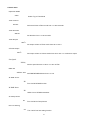
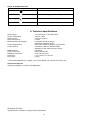
Button
Function
[MENU]
Scroll through setting menu
[UP]/[TIMER]
Up/Activate Timer function
[DOWN]/[VOLUME]
Down/Activate Volume function
[STOP]
Deactivate Timer/Volume function
Or to select and memorize the setting.
Hold 3 seconds to start self-cleaning process