1
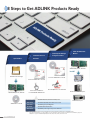
8 Steps to Get ADLINK Products Ready
Install the DAQ Card /
Install System Manager
Install the Driver for
Module
Configure and Test
Windows
Open the Box
ADLINK DAQ Cards / Modules
Install
ADLINK Product Package
Insert the ADLINK All-in-one CD
Insert the ADLINK All-in-one CD
PXI Platform
Click ”Driver Installation”
ADLINK DAQ Cards / Modules
ADLINK All-in-one CD
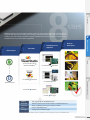
Click ”DAQMaster*” for installation
to install ADLINK DASK Drivers
PCIS-DASK
ADLINK PCI/PCIe/cPCI Series DAQ Cards
D2K-DASK
ADLINK DAQ/DAQe/PXI-2000 Series Cards
WD-DASK
ADLINK High-Speed Digitizers
UD-DASK
ADLINK USB DAQ Modules
DSA-DASK
ADLINK Dynamic Signal Acquisition Modules
Fanless Embedded Computer
Industrial Computer
NOTES: *Please download Windows drivers and API Library from the corresponding product page at the ADLINK website.
*Linux drivers and API Library are also available. For more information, please visit http://www.adlinktech.com/MAPS/linux_daq.html
*DAQMaster support for ADLINK DAQ/DAQe/PXI-2000, 6000, 8000, 91XX, 92XX Series Cards.
2-3
www.adlinktech.com