1
User’s Manual BDF-xx-T1, T2, T3, T5 and T6
Programming the instrument
Programming codes
The BDF Counter instruments are configured by programming codes that activate internal «scale factors», decimal
points, and other elements which scale the signal counted
on display.
The programming codes are made of 2 digits identifying the
code, and a third digit identifying the value assigned to the
code.
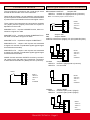
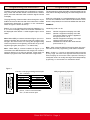
The programming of these codes is done through the 15 pin
SUB-D connector at the rear side of the instrument. A «KBD
Programming Keyboard» is needed, or the connections
shown in Figure 1 need to be set-up.
Buttons «1» to «6» introduce the numerical characters 1, 2,
3, 4, 5 and 6 on display, button «#» executes «ENTER» on
the displayed code. Button «*» adds negative sign in some
codes.
Note - When KBD (or contacts indicated in Figure 1) are connected to the BDF, the point placed under the negative sign
will light. This led must be «on» during the reprogramming
of the unit (if the led is not lightning, but the led on top of the
negative sign lights, then press «*» to switch leds).
Note - When KBD (or contacts indicated in Figure 1) are
connected to the BDF Ratemeter with 4 digits, the 2 small 7
segment displays on top left part will light. These digits are
needed to program some codes which are 6 digit codes.
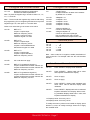
Code «41» with value «1» is represented as «41 1#». Button
«#» acts as a validation of the code and value entered. If this
button is not pressed, the unit will not validate the new value.
EXAMPLE
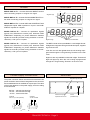
Introducing code «41 1#»
Press 4 Press 1 Press 2 Press # Number 4 appears on display, to the left
Number 1 appears on display, to the left
The current value for code 41 appears to
the right (it can be 1 or 2)
Number 2 appears on display, to the right
replacing the previous value
Validates the code and the value entered
(in this case 41 1)
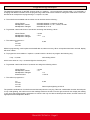
Note .- After 6 seconds without introducing data, the instrument will cancel the programming code without validation.
Note .- Codes «1», «2» and «3» are special codes composed
by only 1 digit. The value is a 6 digit numerical value and will
load on display as soon as the code is pressed. The way to
modify this value is to modify each digit value independently
by pressing 1 to 6 and then # to validate the whole.
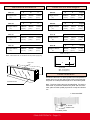
Figure 1
Function of the programming terminal pins
9
10
11
12
13
14
15
1
2
3
4
5
6
7
8
Pin 1 common
Pin 9
Pin 2
Pin 10
Pin 3
Pin 11
Pin 4
Pin 12
Pin 5
KBD programming keyboard
button «*»
button «6»
button «5»
button «4»
button «3»
button «2»
button «1»
button «# (ENTER)»
Pins 6, 13 and 14 shortcircuited
Pin 7, 8 and 15 leave open
FEMA ELECTRÓNICA - Page 6